
1. Producte acabatview
The Aigo DarkFlash RC2-PWM is a compact and functional controller designed to manage both Addressable RGB (ARGB) lighting and Pulse Width Modulation (PWM) fan speeds within a personal computer system. It provides centralized control for multiple ARGB devices and PWM fans, allowing for synchronized lighting effects and optimized cooling performance.
This controller features 6 ARGB ports and 6 PWM ports, powered directly via a SATA connection, simplifying cable management and installation. It supports synchronization with compatible motherboards for integrated system control or offers standalone lighting modes via a connected reset button.

Imatge 1.1: Anglesa view of the Aigo DarkFlash RC2-PWM controller, showing its compact design and port labels.
2. Característiques clau
- Entrada d'alimentació: Powered via SATA, eliminating the need for additional power cables.
- ARGB Ports: Six 5V 3-pin outputs for comprehensive RGB lighting control.
- PWM Ports: Six PWM channels (1 master + 5 slave) for precise fan speed control.
- Compatibilitat: Synchronizable with most motherboards that support ARGB.
- Modes d'il·luminació: Up to 14 lighting modes, controllable via a connected RESET button.
- Dimensions compactes: Measures 11 x 4.7 x 1.3 cm, designed for minimal space occupation within the PC case.
- Instal·lació: Plug & Play setup with PWM/ARGB interface via motherboard.
- Material: Constructed from robust ABS for durability.
3. Contingut del paquet
- Aigo DarkFlash RC2-PWM Controller Unit
- SATA Power Cable (pre-attached or included)
- Motherboard Sync Cable (ARGB 3-pin and PWM 4-pin)
- Manual d'usuari (aquest document)
4. Informació de seguretat
- Ensure your computer is powered off and unplugged from the wall outlet before installation.
- Handle the controller and cables with care to avoid damage to components.
- No exposeu el dispositiu a la humitat ni a temperatures extremes.
- Connect only 5V 3-pin ARGB devices to the ARGB ports. Connecting 12V RGB devices will cause damage.
- Assegureu-vos que totes les connexions estiguin segures abans d'encendre el sistema.
5. Configuració i instal·lació
5.1 Identificació de components
Familiarize yourself with the controller's ports:
- ARGB Ports: 6 ports for 5V 3-pin ARGB devices.
- PWM Ports: 6 ports for 4-pin PWM fans. The first PWM port is typically the master, controlling the speed of the other 5 slave ports.
- SATA Power Input: For connecting to your power supply unit (PSU).
- MB PWM Sync Port: Connects to a 4-pin PWM header on your motherboard for fan speed synchronization.
- MB ARGB Sync Port: Connects to a 5V 3-pin ARGB header on your motherboard for lighting synchronization.
- RESET Button Port: Connects to your PC case's reset button cable for manual lighting mode control.

Imatge 5.1: Frontal view of the controller, highlighting the ARGB and PWM output ports.
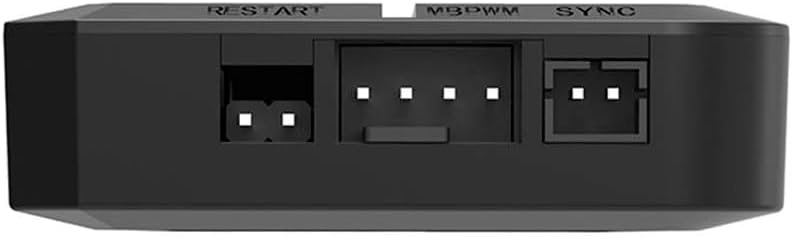
Imatge 5.2: Lateral view of the controller, showing the RESET, MB PWM Sync, and MB ARGB Sync input ports.
5.2 Passos d'instal·lació
- Muntar el controlador: Choose a suitable location within your PC case, typically behind the motherboard tray or in an accessible drive bay. The controller is compact and can be secured using double-sided adhesive tape (not included) or screws if mounting points are available.
- Connecteu l'alimentació SATA: Connect the SATA power cable from the controller to an available SATA power connector from your power supply unit (PSU). This provides power to both the ARGB lighting and PWM fans.
- Connecteu els dispositius ARGB: Connect your 5V 3-pin ARGB fans, LED strips, or other compatible ARGB devices to the ARGB ports on the controller. Ensure the arrow on the ARGB connector aligns with the +5V pin on the controller port to prevent damage.
- Connecteu els ventiladors PWM: Connect your 4-pin PWM fans to the PWM ports on the controller. The fan connected to the first PWM port (often labeled 'PWM1' or similar) will act as the master, dictating the speed for all other connected fans.
- Connect Motherboard Sync (Optional):
- For ARGB synchronization: Connect the MB ARGB Sync cable from the controller to an available 5V 3-pin ARGB header on your motherboard.
- For PWM fan speed synchronization: Connect the MB PWM Sync cable from the controller to an available 4-pin PWM fan header on your motherboard (e.g., CPU_FAN, SYS_FAN).
Note: If connecting to the motherboard for sync, ensure your motherboard software is installed and configured to control ARGB and PWM devices.
- Connect Reset Button (Optional): If you wish to manually control lighting modes without motherboard software, connect your PC case's reset button cable to the RESET port on the controller. This will allow you to cycle through lighting effects by pressing the reset button.
- Gestió de cables: Col·loca tots els cables amb cura per garantir un flux d'aire adequat i una construcció neta.

Image 5.3: The controller with various cables connected, illustrating a typical setup.
6. Instruccions de funcionament
6.1 Control d'il·luminació ARGB
- Sincronització de la placa base: If the MB ARGB Sync cable is connected to your motherboard, the lighting effects of all connected ARGB devices will be controlled by your motherboard's RGB software (e.g., ASUS Aura Sync, MSI Mystic Light Sync, Gigabyte RGB Fusion, ASRock Polychrome Sync). Open the respective software to customize colors, patterns, and brightness.
- Control manual: If the RESET button cable is connected to the controller and the MB ARGB Sync cable is no connected (or motherboard sync is disabled in software), you can cycle through the 14 built-in lighting modes by pressing the PC case's reset button.
6.2 PWM Fan Speed Control
- Sincronització de la placa base: If the MB PWM Sync cable is connected to your motherboard, the speed of all connected PWM fans will be controlled by your motherboard's fan control settings (accessible via BIOS/UEFI or motherboard software). The fan connected to the master PWM port on the controller will report its RPM to the motherboard, and the motherboard will send a PWM signal to control all connected fans.
- Operació per defecte: If the MB PWM Sync cable is not connected, the fans will typically operate at a default speed, often full speed, or a fixed lower speed depending on the controller's internal programming.
7. Manteniment
- Neteja: Periodically clean the controller and surrounding area with a soft, dry cloth to prevent dust buildup. Ensure the system is powered off and unplugged before cleaning. Do not use liquid cleaners.
- Inspecció del cable: Regularly check all connected cables for secure connections and signs of wear or damage.
- Actualitzacions de firmware: The controller does not typically require firmware updates. Any updates would be managed through motherboard software if synchronization is used.
8. Solució De Problemes
- ARGB Lights Not Working:
- Check SATA power connection to the controller.
- Verify ARGB device connections are secure and correctly oriented (5V 3-pin).
- If using motherboard sync, ensure the MB ARGB Sync cable is connected to a 5V 3-pin header and motherboard software is configured correctly.
- If using manual control, ensure the RESET button cable is connected and try pressing the reset button to cycle modes.
- Confirm ARGB devices are functional by testing them individually if possible.
- Fans Not Spinning or Not Controlling Speed:
- Check SATA power connection to the controller.
- Verify PWM fan connections are secure (4-pin).
- If using motherboard sync, ensure the MB PWM Sync cable is connected to a 4-pin PWM header and motherboard BIOS/software is configured for fan control.
- Ensure the fan connected to the master PWM port is functional and reporting RPM.
- Controller Not Detected by Motherboard Software:
- Ensure both MB ARGB Sync and MB PWM Sync cables are correctly connected to the motherboard headers.
- Verify that your motherboard supports the specific ARGB and PWM headers being used.
- Update motherboard BIOS and RGB/fan control software to the latest versions.
9. Especificacions
| Característica | Especificació |
|---|---|
| Marca | aigo |
| Número de model | RC2-PWM |
| Número de part | DF-RC2-BLACK |
| Dimensions del producte (L x A x A) | 11 x 4.7 x 1.3 cm |
| Dispositius compatibles | Ordinador personal |
| Number of ARGB Ports | 6 (5V 3-pin) |
| Number of PWM Ports | 6 (4-pin, 1 master + 5 slave) |
| Entrada de potència | SATA |
| Modes de control | Motherboard Sync (ARGB & PWM), Manual (ARGB via Reset button) |
10. Garantia i Suport
For warranty information and technical support, please refer to the official Aigo DarkFlash weblloc web o poseu-vos en contacte amb el vostre distribuïdor local. Conserveu el comprovant de compra per a reclamacions de garantia.
For further assistance, you may also consult online resources and community forums dedicated to PC hardware and cooling solutions.