
1. Introducció
Thank you for choosing the LDNIO A4405 4-Port USB Wall Charger. This device is designed to provide efficient and safe charging for multiple electronic devices simultaneously. It features four USB ports with intelligent AUTO-ID technology and an integrated LED touch lamp for added convenience. Please read this manual carefully before use to ensure optimal performance and safety.
2. Informació de seguretat
- No exposeu el carregador a líquids, humitat ni temperatures extremes.
- Eviteu deixar caure el carregador ni sotmetre'l a impactes forts.
- Do not disassemble, modify, or attempt to repair the charger. This will void the warranty and may cause electric shock or fire.
- Assegureu-vos que la presa de corrent voltage is compatible with the charger's input specifications (AC100-240V).
- Mantenir fora de l'abast dels nens.
- Desendolleu el carregador de la presa de corrent quan no l'utilitzeu o durant tempestes elèctriques.
- No l'utilitzeu si el carregador o el cable estan danyats.
3. Contingut del paquet
- LDNIO A4405 4-Port USB Wall Charger
- Cable USB a Lightning
4. Producte acabatview
The LDNIO A4405 is a compact and versatile wall charger featuring four USB output ports and an integrated LED touch lamp. Its AUTO-ID technology automatically detects and delivers the optimal charging current for connected devices.
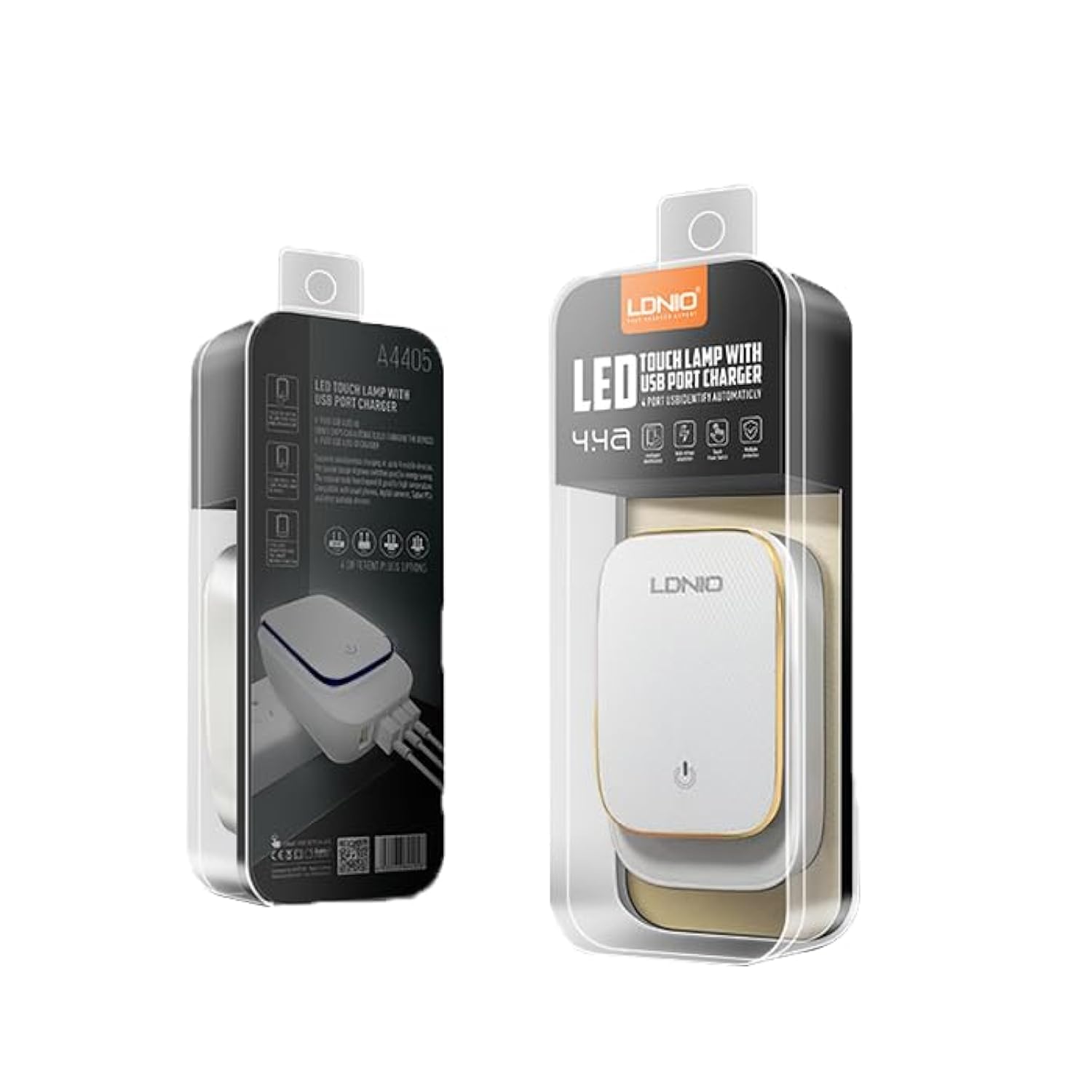
Figure 4.1: LDNIO A4405 4-Port USB Wall Charger in its retail packaging, showcasinel producte i les seves característiques.

Figura 4.2: Frontal view of the LDNIO A4405 charger, featuring four green USB ports labeled 'AUTO-ID' and an integrated UK-style power plug.

Figura 4.3: Frontal view of the LDNIO A4405 charger, featuring four green USB ports labeled 'AUTO-ID' and an integrated EU-style power plug.

Figura 4.4: superior view of the LDNIO A4405 charger, showing the LDNIO logo and the touch-sensitive area for the LED lamp.
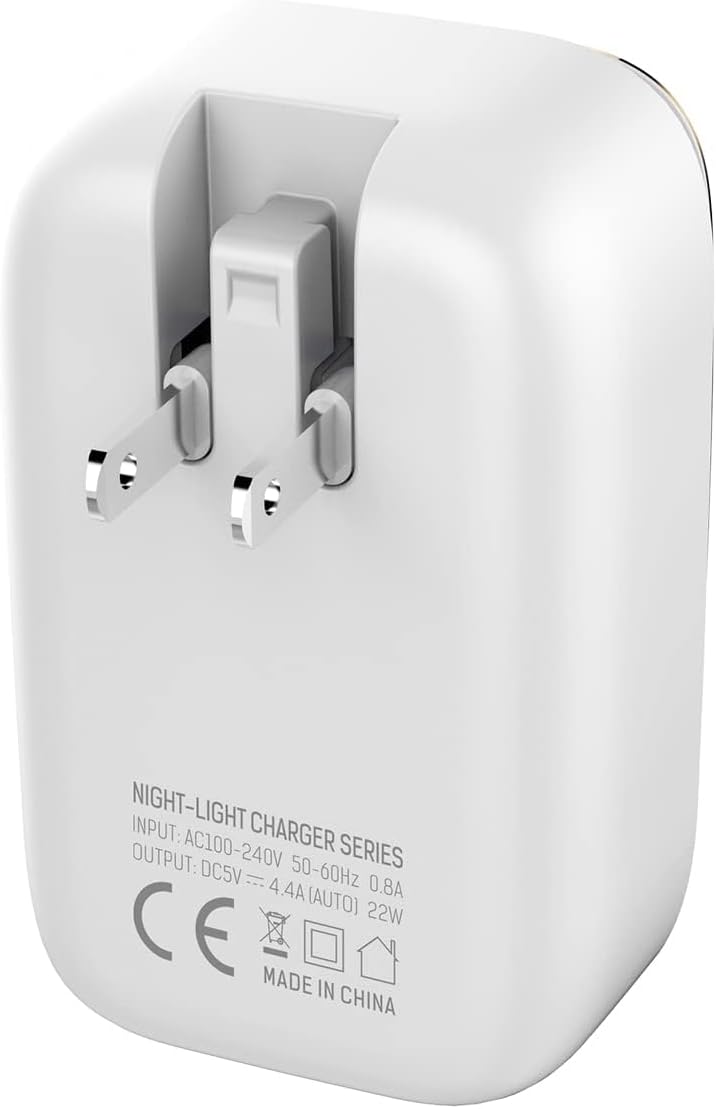
Figura 4.5: Esquena view of the LDNIO A4405 charger, displaying detailed input (AC100-240V, 50-60Hz, 0.8A) and output (DC5V, 4.4A AUTO, 22W) specifications, along with CE certification.
5. Instruccions de configuració
- Desembalar: Carefully remove the LDNIO A4405 charger and included cable from its packaging.
- Inspeccionar: Comproveu si el carregador i el cable presenten danys visibles. No l'utilitzeu si està danyat.
- Connectar: Insert the charger's integrated power plug into a standard wall electrical outlet. Ensure it is securely seated.
- Connexió de dispositius: Use the provided USB to Lightning cable or your own compatible USB charging cables to connect your devices to any of the four USB ports on the charger.
6. Instruccions de funcionament
6.1 Dispositius de càrrega
- Once plugged into a power outlet, the charger is ready for use.
- Connect your device's charging cable to one of the four USB ports. The charger's AUTO-ID technology will automatically detect your device and deliver the optimal charging current up to 2.4A per port, with a total output of 4.4A (22W) across all ports.
- El dispositiu hauria d'indicar que s'està carregant.
- Desconnecteu el dispositiu un cop estigui completament carregat.
6.2 LED Touch Lamp Funcionament
- The top surface of the charger features an integrated LED touch lamp.
- Per activar/desactivar: Lightly touch the power icon on the top surface of the charger.
- Per ajustar la brillantor: Press and hold the power icon to cycle through different brightness levels. Release when the desired brightness is reached.
7. Manteniment
- Neteja: Desconnecteu el carregador de la presa de corrent abans de netejar-lo. Feu servir un drap suau i sec per netejar la superfície. No utilitzeu netejadors líquids ni aerosols.
- Emmagatzematge: Guardeu el carregador en un lloc fresc i sec, allunyat de la llum solar directa i de temperatures extremes quan no l'utilitzeu.
- Cura del cable: Eviteu doblegar o torçar excessivament els cables de càrrega, ja que això els pot danyar.
8. Solució De Problemes
| Problema | Causa possible | Solució |
|---|---|---|
| El dispositiu no es carrega | Charger not plugged in correctly Cable danyat Problema amb el dispositiu | Ensure charger is firmly plugged into the wall outlet. Prova amb un cable USB diferent. Test the device with another charger to confirm it's not a device problem. |
| Càrrega lenta | Qualitat del cable Device drawing too much power Múltiples dispositius connectats | Use a high-quality USB cable. Ensure the device is compatible with the charger's output. Disconnect other devices to see if charging speed improves. |
| LED lamp no funciona | Sense poder Problema amb el sensor tàctil | Assegureu-vos que el carregador estigui connectat a una presa de corrent activa. Try touching the sensor firmly or for a longer duration. |
9. Especificacions
| Característica | Especificació |
|---|---|
| Nom de marca | LDNIO |
| Número de model | A4405 (Internal ID: ELC ldnio-045) |
| Tipus de producte | Carregador de paret |
| Color | Blanc |
| Ports USB totals | 4 |
| Entrada Voltage | CA 100-240 V, 50-60 Hz, 0.8 A |
| Sortida | DC 5V / 4.4A (AUTO-ID, 22W Total) |
| Corrent de sortida (per port) | Fins a 2.4A |
| Tecnologia de connectivitat | USB |
| Tipus de muntatge | Muntatge de paret |
| Font d'alimentació | Corded Electric (Integrated Plug) |
| Dispositius compatibles | Multiple (Smartphones, Tablets, etc.) |
| Components inclosos | Charger, USB to Lightning Cable |
| Pes de l'article | 50 grams |
| Compliment | CE |
10. Garantia i Suport
LDNIO products are manufactured to high-quality standards. For warranty information, technical support, or customer service inquiries, please refer to the contact details provided on the product packaging or visit the official LDNIO weblloc web. Si us plau, conserveu el comprovant de compra per a reclamacions de garantia.