
Thunderobot ML903
Thunderobot ML903 4K Wireless Gaming Mouse User Manual
Model: ML903
1. Introducció
This manual provides detailed instructions for the setup, operation, and maintenance of your Thunderobot ML903 4K Wireless Gaming Mouse. Please read this manual thoroughly before using the product to ensure optimal performance and longevity.

Figure 1: Thunderobot ML903 4K Wireless Gaming Mouse with its RGB Charging Dock.
2. Contingut del paquet
Verifiqueu que tots els elements siguin presents al paquet:
- Thunderobot ML903 Wireless Gaming Mouse
- Base de càrrega magnètica RGB
- USB-C to USB-A Cable (for charging and wired mode)
- Receptor sense fil de 2.4 GHz (adaptador USB)
- Extensor de receptor
- Manual d'usuari (aquest document)
3. Producte acabatview
The Thunderobot ML903 mouse features an ergonomic design and advanced components for high-performance gaming.

Figura 2: Mésview of the ML903's core technologies and features.
3.1 Ergonomics and Design
The ML903 is designed for comfort and agility, weighing approximately 65 grams. It features a frontal trapezoidal elevation, a midsection waistline design, and palm arch support to reduce fatigue during extended use.

Figure 3: Ergonomic design elements of the ML903 mouse.
3.2 Components interns
The mouse incorporates a Pixart PAW3395 optical sensor, Kailh GM8.0 microswitches, and Nordic nRF528 series MCUs for precise tracking and reliable clicks.

Figura 4: Explotat view of ML903 internal components.
4. Configuració
4.1 Càrrega del ratolí
The ML903 mouse can be charged using the included magnetic RGB charging dock or directly via the USB-C cable.
- Ús de la base de càrrega: Place the mouse onto the magnetic charging dock. The mouse will align automatically and begin charging. The RGB lighting on the dock indicates charging status and can be adjusted.
- Càrrega directa per USB-C: Connect the USB-C cable to the front port of the mouse and the other end to a USB power source.

Figure 5: ML903 mouse on its magnetic charging dock.
4.2 Modes de connectivitat
The ML903 supports three connectivity modes: Wired USB, 2.4GHz Wireless, and Bluetooth.

Figure 6: Tri-mode connectivity setup.
- Mode sense fil de 2.4 GHz:
- Locate the 2.4GHz USB receiver. It may be stored in a compartment on the underside of the mouse.
- Plug the receiver into an available USB port on your computer. For optimal signal, use the included receiver extender to position the receiver closer to the mouse.
- Turn on the mouse. The mouse should automatically connect.
- Mode Bluetooth:
- Assegureu-vos que el Bluetooth del vostre dispositiu estigui activat.
- Switch the mouse to Bluetooth mode (refer to the mouse's underside switch for mode selection).
- On your device, search for new Bluetooth devices and select "Thunderobot ML903" to pair.
- Mode USB per cable:
- Connecteu el cable USB-C al ratolí i l'extrem USB-A a l'ordinador.
- El ratolí funcionarà com un ratolí amb cable i es carregarà simultàniament.
4.3 Dual-Dongle Switching Capability
The ML903 supports switching between two 2.4GHz dongles, allowing seamless use with two different PCs.
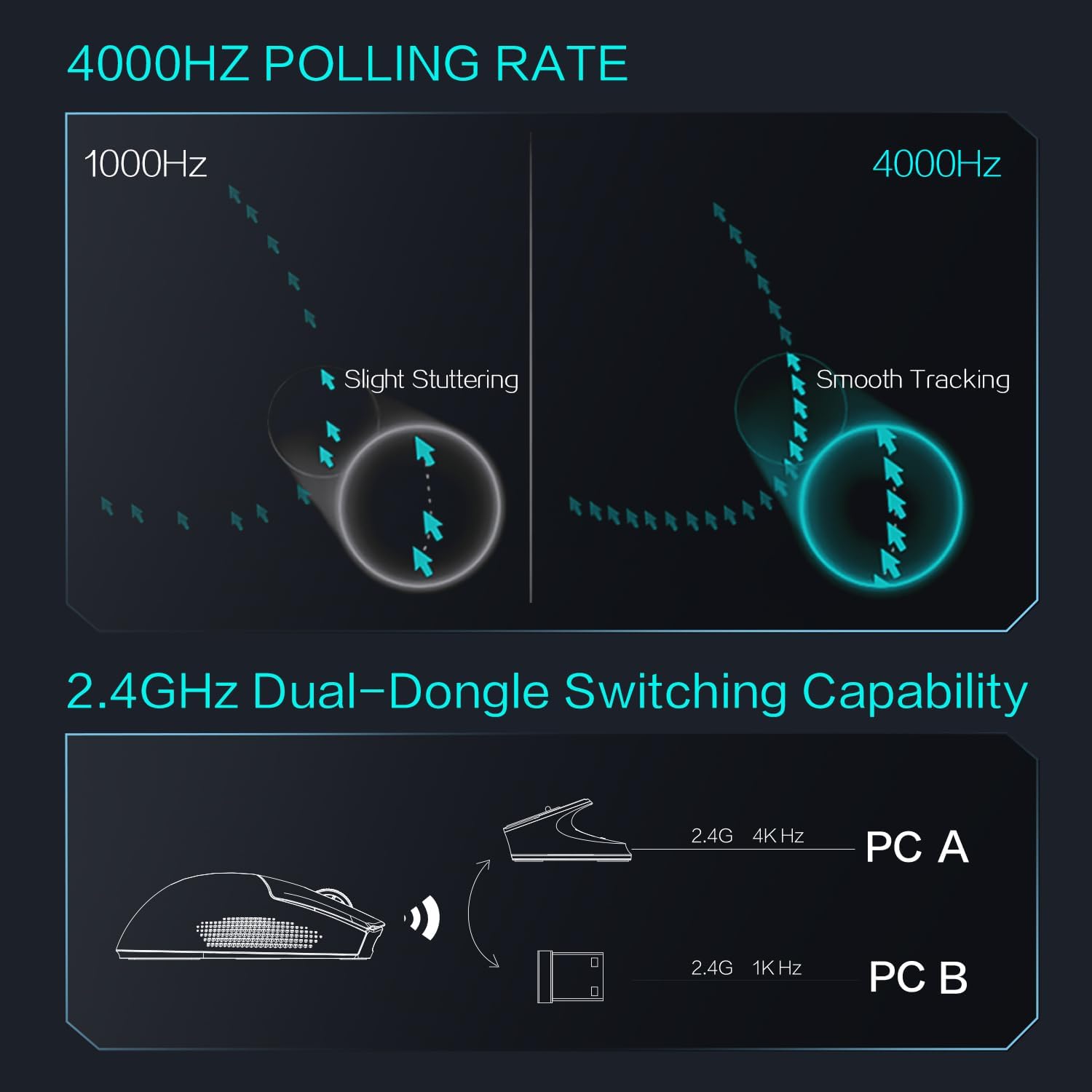
Figure 7: Dual-dongle switching for multiple PCs.
5. Instruccions de funcionament
5.1 Ajust de DPI
The ML903 features a Pixart PAW3395 optical sensor with a resolution up to 26,000 DPI. DPI settings can typically be adjusted via dedicated buttons on the mouse or through the Thunderobot software (if available).

Figure 8: PAW3395 Sensor Specifications.
5.2 Ajust de la taxa de sondeig
The mouse supports an adjustable polling rate up to 4000Hz, providing smoother tracking and lower latency compared to standard 1000Hz mice. Polling rate settings are usually managed through the mouse's software.

Figure 9: Polling rate comparison (1000Hz vs. 4000Hz).
5.3 Indicador de bateria
The mouse features an intuitive battery indicator. When the battery level drops below 10%, the last indicator light will start blinking (1s/1 time) to remind you to charge.

Figure 10: Battery indicator details.
6. Manteniment
6.1 Neteja
Per mantenir un rendiment i un aspecte òptims:
- Use a soft, dry cloth to wipe the mouse surface.
- Per a la brutícia persistent, lleugerament dampNetegeu el drap amb aigua o una solució de neteja suau. Eviteu productes químics agressius.
- Netegeu la zona del sensor òptic periòdicament amb un bastonet de cotó per garantir un seguiment precís.
6.2 Cura de la bateria
The ML903 is equipped with a Lithium Polymer battery. To prolong battery life:
- Eviteu descarregar completament la bateria amb freqüència.
- Guardeu el ratolí en un lloc fresc i sec quan no l'utilitzeu durant períodes prolongats.
- Charge the mouse regularly, especially if it has been unused for a long time.
7. Solució De Problemes
If you encounter issues with your Thunderobot ML903 mouse, refer to the following common solutions:
| Problema | Possible solució |
|---|---|
| Mouse not responding in 2.4GHz mode |
|
| El ratolí no es connecta per Bluetooth |
|
| Inaccurate tracking or stuttering |
|
| La bateria s'esgota ràpidament |
|
8. Especificacions
| Característica | Detall |
|---|---|
| Marca | Thunderobot |
| Número de model | ML903 |
| Tecnologia de connectivitat | Bluetooth, 2.4GHz Wireless, Wired USB-C |
| Tecnologia de detecció de moviment | Òptic (Pixart PAW3395) |
| DPI màxim | 26,000 DPI |
| Max Polling Rate | 4000 Hz |
| Velocitat màxima | 650 IPS |
| Acceleració màxima | 50G |
| Microinterruptors | Kailh GM8.0 (80 million click lifecycle) |
| Tipus de bateria | Polímer de liti (inclòs) |
| Battery Life (Wireless Mode) | Més de 70 hores |
| Pes de l'article | 2.29 unces (aproximadament 65 grams) |
| Característica especial | Soundless clicks, Magnetic RGB Charging Dock |
| Color | Blanc |
9. Garantia i Suport
For warranty information and technical support, please refer to the official Thunderobot weblloc web o poseu-vos en contacte amb el vostre distribuïdor. Conserveu el comprovant de compra per a reclamacions de garantia.
Ask a question about this manual
Ask about setup, troubleshooting, compatibility, parts, safety, or missing instructions. Manuals+ will review the question and use this page’s manual context to help answer it.