
Introducció
This manual provides detailed instructions for the installation, operation, and maintenance of your DELLA 6000 BTU Window Air Conditioner. Please read this manual thoroughly before using the appliance and retain it for future reference.
Informació de seguretat
Seguiu sempre les precaucions de seguretat bàsiques quan utilitzeu aparells elèctrics per reduir el risc d'incendi, descàrrega elèctrica i lesions a les persones.
- Assegureu-vos que la unitat estigui correctament connectada a terra.
- No feu servir la unitat amb un cable o un endoll danyats.
- No introduïu els dits ni objectes estranys a l'entrada/sortida d'aire.
- Desendolleu la unitat abans de netejar-la o realitzar qualsevol manteniment.
- Mantingueu els materials inflamables allunyats de la unitat.
Producte acabatview
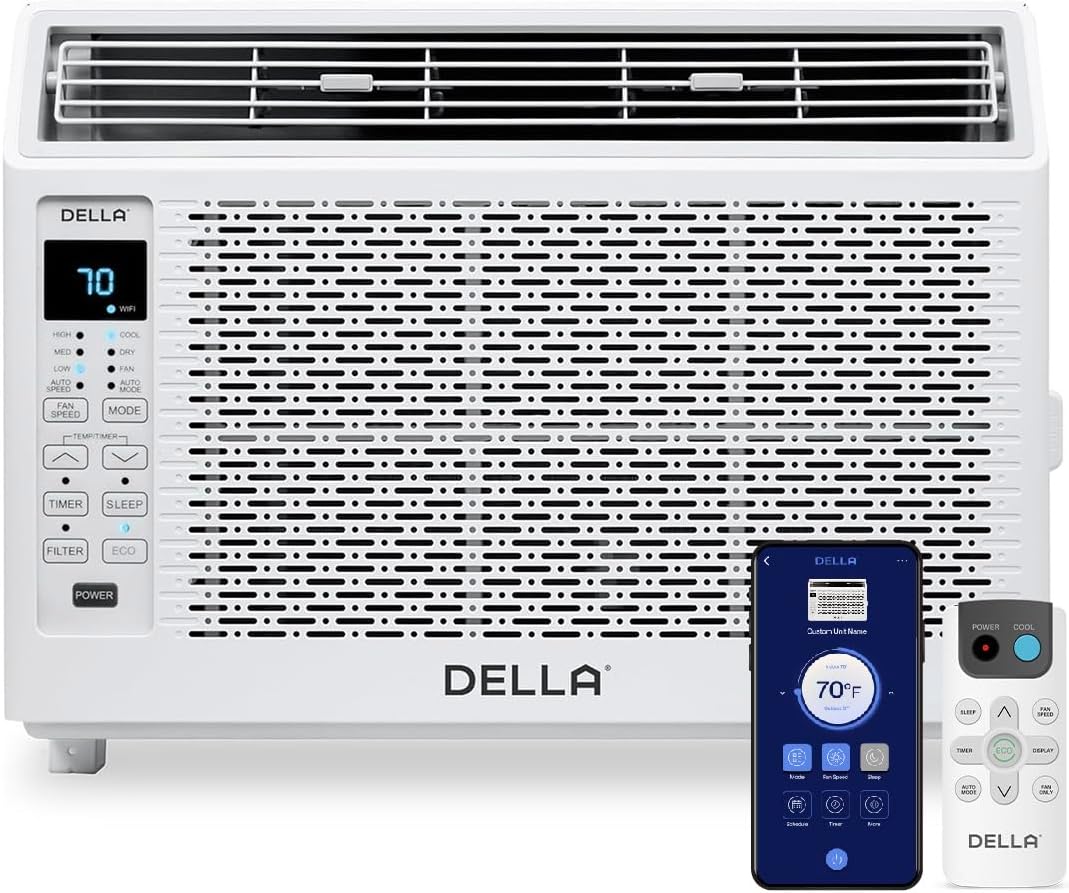
Figure 1: DELLA 6000 BTU Window Air Conditioner Unit, Remote Control, and Smartphone App Interface.
Tauler de control
The unit features an intuitive control panel with various buttons and indicator lights for easy operation.
- Botó d'encesa: Encén o apaga la unitat.
- Botó de mode: Cycles through Cool, Dry (Dehumidifier), Fan, Auto Mode, and ECO Mode.
- Botó de velocitat del ventilador: Adjusts fan speed (High, Med, Low, Auto Speed).
- Temp/Timer Buttons: Adjusts temperature settings or sets timer.
- Botó de dormir: Activates sleep mode for quiet, energy-efficient operation overnight.
- Botó de filtre: Indicates when the filter needs cleaning.
- Indicador WiFi: Shows Wi-Fi connectivity status.
Control remot

Figure 2: Remote Control for the DELLA Air Conditioner.
The remote control allows for convenient operation of all unit functions from a distance. Ensure batteries are correctly installed.
Instal·lació
The DELLA 6000 BTU Window Air Conditioner features a T-design for simplified installation.
Passos d'instal·lació

Figure 3: T-design installation allows for flexible window opening.

Figure 4: Simplified 3-step installation process.
- Step 1: Secure into window frame. Place the unit into the window opening, ensuring it is securely seated.
- Step 2: Mount with four screws. Fasten the unit to the window frame using the provided screws for stability.
- Step 3: Extend side panels into wall. Extend the accordion side panels to fill the gap between the unit and the window frame, providing insulation and reducing air leaks.
Components del kit d'instal·lació

Figure 5: Included installation kit components.
The installation kit includes filler panels, insulation strips, lock frame & sash lock, screws, window sash seal, and a top mounting rail to ensure a secure and efficient installation.
Dimensions del producte

Figure 6: Unit dimensions and recommended window opening.
The unit dimensions are approximately 15.94"D x 16.02"W x 12.05"H. It is designed for window widths between 23"-34" and requires at least 14.5" vertical clearance.
Instruccions de funcionament
Modes and Fan Speeds

Figure 7: Available operating modes and fan speeds.
The unit offers 5 operating modes (Cool, Auto, Dehumidify, Fan Only, ECO Mode) and 4 fan speeds (Auto, Low, Mid, High) to suit various comfort needs. Use the 'Mode' and 'Fan Speed' buttons on the control panel or remote to select your desired settings.
Control de temperatura
Use the up and down arrow buttons on the control panel or remote to set your desired temperature. The digital display will show the current setting.
Smart Features (Wi-Fi Control)

Figure 8: Control your unit wirelessly with the Della+ APP.

Figure 9: Della+ app supports Google Assistant and Alexa for voice control.
Download the free Della+ app to control your unit from anywhere. The app allows for remote control, scheduling, and integration with smart home systems like Google Assistant and Alexa.
Geo Location Function

Figure 10: Smart Geo Location feature for automatic operation.
The Geo Location feature allows the unit to automatically turn on or off based on your proximity to your home. This feature can be configured via the Della+ app.
Video 1: Demonstration of the Geo Location Function setup and customization within the Della+ app.
Mode de repòs

Figure 11: Intelligent sleep mode adjusts temperature for optimal comfort.
Intelligent sleep mode automatically adjusts the temperature overnight to maintain comfort and save energy. Activate it using the 'Sleep' button.
Funció de temporitzador
The 24-hour auto on/off timer allows you to program the unit to turn on or off at specific times, enhancing convenience and energy efficiency.
Manteniment
Neteja de filtres reutilitzables

Figure 12: The unit features a washable and reusable filter.
The unit is equipped with a washable and reusable filter. A clean filter helps maintain optimal cooling performance and air quality. When the 'Filter' indicator light illuminates, it's time to clean the filter.
- Apagueu i desconnecteu l'aire condicionat.
- Remove the front panel and slide out the air filter.
- Renteu el filtre amb aigua tèbia i sabó. Esbandiu-lo bé.
- Deixeu que el filtre s'assequi completament abans de tornar-lo a inserir.
- Substituïu el panell frontal.
Atenció General
- Netegeu l'exterior de la unitat amb un damp tela.
- No utilitzeu productes químics ni productes de neteja abrasius.
- Ensure the drainage area is clear of obstructions.
Resolució de problemes
If you experience issues with your air conditioner, refer to the following common problems and solutions:
| Problema | Causa possible | Solució |
|---|---|---|
| La unitat no s'encén | No power; circuit breaker tripped; unit unplugged. | Check power supply; reset circuit breaker; ensure plug is fully inserted. |
| La unitat no refreda eficaçment | Dirty air filter; blocked air intake/outlet; room too large; windows/doors open. | Clean air filter; clear obstructions; ensure unit is sized correctly for room; close windows/doors. |
| Funcionament sorollós | Peces soltes; unitat no anivellada; obstrucció del ventilador. | Check for loose components; ensure unit is level; remove any fan obstructions. |
| Aigua que degota fora | Funcionament normal (condensació). | This is normal during cooling. Ensure proper drainage. |
Especificacions
| Característica | Detall |
|---|---|
| Nom de marca | Della |
| Informació del model | 048-TL-W6KWD |
| Dimensions del producte | 15.94 x 16.02 x 12.05 polzades |
| Número de model de l'article | 048-TL-W6KWD |
| Eficiència | Energèticament eficient |
| Capacitat | 0.5 tones |
| Soroll | 51 dB |
| Tipus d'instal·lació | Finestra |
| Número de part | 048-TL-W6KW_2 |
| Factor de forma | Aire condicionat per finestres |
| Característiques especials | Comandament a distància |
| Voltage | 115 volts (CA) |
| Wattage | 517.5 watts |
| Piles incloses? | No |
| Zona Pis | 250 peus quadrats |
| Potència de refrigeració | 6000 unitats tèrmiques britàniques |
| Classificació per estrelles de BEE | Sí |
| Ràtio d'eficiència energètica estacional (SEER) | 11 |
| Font d'alimentació | Elèctric amb cable |
Garantia i Suport
Your DELLA 6000 BTU Window Air Conditioner comes with a 1 anys de garantia. For any inquiries or technical assistance, Della provides Atenció al client 24/7.
Si us plau, visiteu el Della Store on Amazon per a més informació o per contactar amb el suport.