
1. Introducció
Thank you for choosing the Peski K-51 Portable Bluetooth Karaoke Machine. This compact and versatile device is designed to provide an enjoyable karaoke experience with its high-quality sound, dynamic lighting, and dual wireless microphones. This manual will guide you through the setup, operation, and maintenance of your new karaoke machine to ensure you get the most out of its features.
2. Què hi ha a la caixa
- Mini Karaoke Machine (1 unit)
- Wireless Microphone (2 units)
- Cable USB (2 unitats)
- Manual d'usuari (1 unitat)
3. Producte acabatview
The Peski K-51 features a compact speaker unit with integrated controls and two wireless microphones for duet performances. The speaker includes a leather handle for portability and dynamic LED lighting for an enhanced experience.
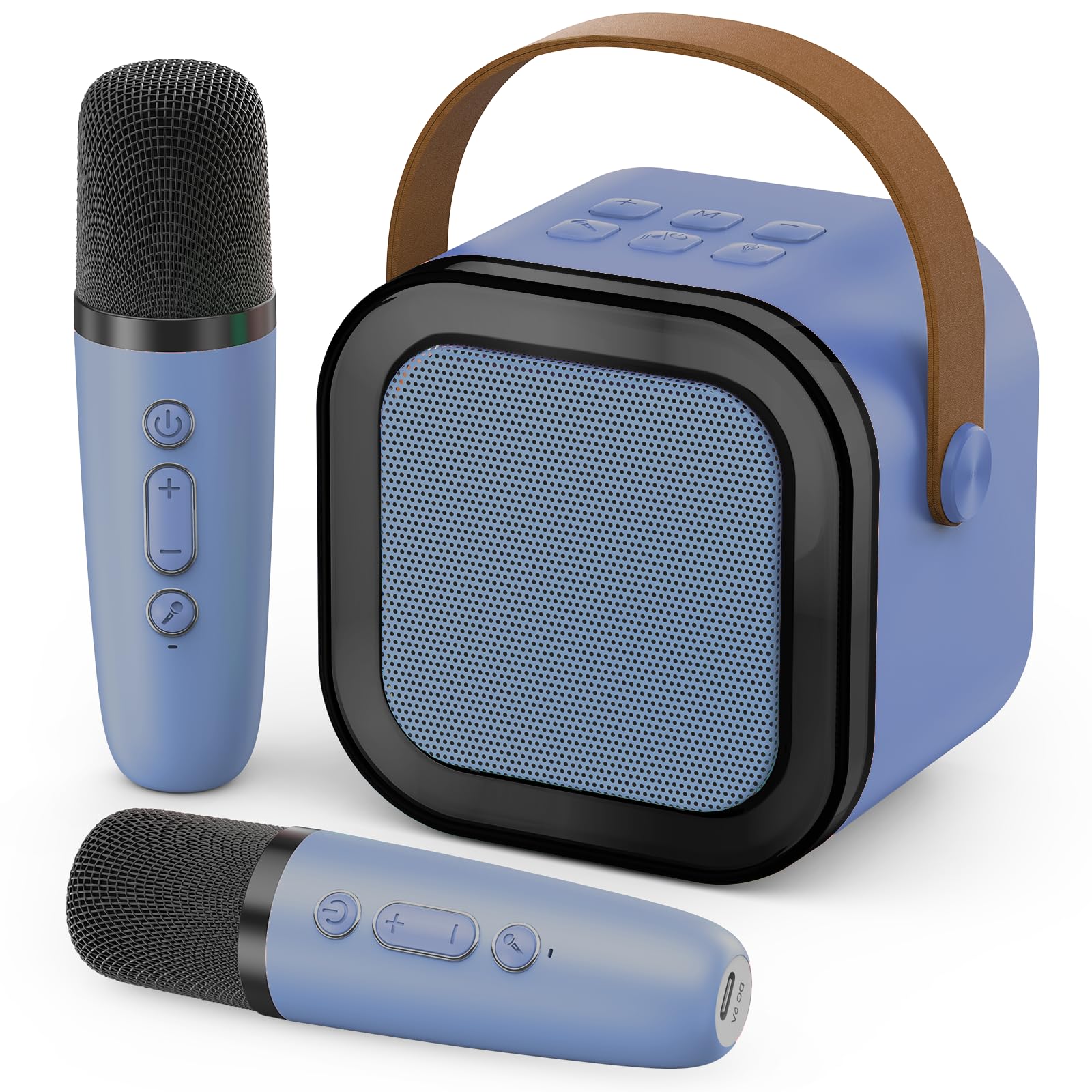
Image: The Peski K-51 Portable Bluetooth Karaoke Machine, showing the main speaker unit with colorful LED lights and two matching wireless microphones.
Speaker Controls and Ports:
- Botó d'encesa: Encén/apaga l'altaveu.
- Botons de volum (+/-): Ajusta el volum de l'altaveu.
- Botó de mode (M): Switches between input modes (e.g., Bluetooth, TF card, USB).
- Botó de llum: Controls the LED lighting effects.
- Botó Reproduir/Pausa: Controla la reproducció de música.
- Botó del micròfon: Activates/deactivates microphone input.
- Port USB: For USB drive playback and power bank functionality.
- Ranura per a targetes TF: Per a la reproducció de targetes TF.
- Port de càrrega USB-C: Per carregar l'altaveu.
- Conector d'àudio de 3.5 mm: For headphone output.
Microphone Controls and Ports:
- Botó d'encesa: Activa/desactiva el micròfon.
- Volume/Echo Control: Adjusts microphone volume and echo effect.
- Port de càrrega USB-C: Per carregar el micròfon.
4. Configuració
4.1 Càrrega dels dispositius
Before first use, fully charge the karaoke machine speaker and both wireless microphones. Use the provided USB cables to connect them to a compatible USB power adapter (not included).
- Connect the USB-C end of the cable to the charging port on the speaker.
- Connect the USB-C end of the other cable to the charging port on each microphone.
- El llum indicador de càrrega s'il·luminarà durant la càrrega i s'apagarà o canviarà de color quan estigui completament carregat.
4.2 Engegada/apagada
- Ponent: Press and hold the Power button on the speaker until the indicator light turns on.
- Micròfons: Press and hold the Power button on each microphone until the indicator light turns on.
- To power off, repeat the process by pressing and holding the Power button on each device.
4.3 Connexió Bluetooth
To play music from your smartphone or other Bluetooth-enabled device:
- Ensure the karaoke machine speaker is powered on and in Bluetooth mode (indicated by a flashing blue light or voice prompt). If not, press the 'M' (Mode) button to switch to Bluetooth mode.
- On your smartphone or device, go to Bluetooth settings and search for available devices.
- Select "K-51" (or similar name) from the list to pair. A confirmation sound will indicate successful pairing.
- Once connected, you can play music from your device through the karaoke machine speaker.
4.4 Emparellament de micròfons
The microphones should automatically pair with the speaker when both are powered on. If they do not connect:
- Ensure both the speaker and microphones are powered on and fully charged.
- If a microphone is not connecting, try powering it off and on again.
- If issues persist, consult the troubleshooting section.
5. Instruccions de funcionament
5.1 Ajust del volum
- Volum dels altaveus: Use the '+' and '-' buttons on the speaker to adjust the overall music volume.
- Volum del micròfon: Use the dedicated volume control on each microphone to adjust your singing volume.
5.2 Efectes de veu
The microphones feature built-in voice effects to enhance your performance. Press the dedicated button on the microphone to cycle through available voice effects (e.g., echo, robot voice, etc.).
5.3 Dynamic Colorful Lights
The speaker is equipped with dynamic LED lights that create a vibrant atmosphere. Press the light bulb button on the speaker to turn the lights on/off or to cycle through different lighting modes.
Video: Demonstrates the dynamic colorful light show feature of the Peski K-51 karaoke machine, showing various color changes and patterns.
5.4 Playing Music from USB/TF Card
Insert a USB drive or TF card (with music files in MP3 format) into the corresponding port on the speaker. The speaker will automatically switch to USB/TF card mode and begin playing music. Use the Play/Pause button and volume controls as needed.
6. Característiques
- Astonishing Sound: Built-in professional tuning grade speaker delivers clear, loud, and distortion-free stereo sound.
- Micròfons sense fil duals: Two microphones allow for duets and interactive singing.
- Dynamic Colorful Lights: Integrated LED lights provide a vibrant visual experience, enhancing the party atmosphere.
- Disseny portàtil: Compact size with a convenient leather handle for easy transport.
- Efectes de veu: Microphones offer various voice modulation effects for added fun.
- Reproducció multifont: Supports Bluetooth, USB drive, and TF card for versatile music options.
- Bateria recarregable: Long-lasting internal battery for extended use.
- Funcionalitat del banc d'energia: The speaker's USB port can be used to charge other devices.
7. Manteniment
- Neteja: Wipe the surfaces of the speaker and microphones with a soft, dry cloth. Do not use harsh chemicals or abrasive cleaners.
- Emmagatzematge: Guardeu el dispositiu en un lloc fresc i sec, allunyat de la llum solar directa i de temperatures extremes.
- Cura de la bateria: Per allargar la durada de la bateria, eviteu descarregar-la completament amb freqüència. Carregueu el dispositiu regularment, fins i tot si no l'utilitzeu durant períodes prolongats.
- Resistència a l'aigua: Aquest dispositiu no és impermeable. Eviteu l'exposició a l'aigua o a una humitat excessiva.
8. Solució De Problemes
| Problema | Causa possible | Solució |
|---|---|---|
| No hi ha so de l'altaveu | Speaker is off or low battery. Volume is too low. Incorrect input mode. | Ensure speaker is charged and powered on. Increase speaker volume. Press 'M' button to select correct input mode (Bluetooth, USB, TF). |
| Microphone not working/pairing | Microphone is off or low battery. Not paired correctly. | Ensure microphone is charged and powered on. Power off and on the microphone to re-establish connection. Ensure it's within range of the speaker. |
| Connexió Bluetooth inestable | Device too far from speaker. Interference. | Move your device closer to the speaker. Avoid obstacles between devices. Disconnect and reconnect Bluetooth. |
| Els llums no funcionen | Els llums estan apagats. | Press the light bulb button on the speaker to activate or change light modes. |
9. Especificacions
| Característica | Detall |
|---|---|
| Número de model | K-51 |
| Marca | Peski |
| Pes de l'article | 360 grams (12.7 unces) |
| Dimensions del producte (L x A x A) | 2.7 x 3.5 x 3.5 polzades |
| Nombre de canals | 1 |
| Font d'alimentació | Funciona amb bateria |
| Connectivitat | Bluetooth, USB, targeta TF |
10. Garantia i Suport
For warranty information and customer support, please refer to the contact details provided on the product packaging or visit the official Peski weblloc web. Conserveu el rebut de compra com a comprovant de compra per a qualsevol reclamació de garantia.