
Introducció
The Ravemen AOM03 is a lightweight, rigid carbon fiber out front mount designed for integrated handlebars. It provides a secure and extended platform for cycling GPS computers and action cameras, enhancing visibility and accessibility during rides. This manual provides instructions for proper installation, operation, and maintenance of your AOM03 mount.
Informació de seguretat
- Comprovació de compatibilitat: Abans de la compraasing and installing, verify that the mount's specifications are compatible with your bicycle's integrated handlebars. This mount is NO compatible with Canyon Aeroad bikes featuring CP0039, CP0047, and CP0048 cockpits.
- Secure Your Device: Always use a tether (not included, typically supplied with your bike computer) to secure your cycling GPS computer to prevent loss or damage in case of accidental detachment.
- Estancament: Ensure all screws are tightened securely according to the installation instructions. Regularly check the tightness of the screws before each ride to prevent loosening due to vibrations.
- Límit de pes: Do not exceed the maximum weight capacity of 28 grams for mounted devices.
- Inspecció: Periodically inspect the mount for any signs of wear, damage, or cracks, especially after impacts or falls. Replace the mount if any damage is observed.
Contingut del paquet
Verifiqueu que tots els elements siguin presents al vostre paquet:
- 1 x Bike computer mount with action camera mount
- 1 x clau hexagonal
- 4 x rentadores
Especificacions
| Característica | Detall |
|---|---|
| Marca | Homes dels Rave |
| Nom del model | AOM03 |
| Color | Negre |
| Material | Fibra de carboni |
| Tipus de muntatge | Handlebar (Integrated) |
| Dispositius compatibles | Garmin Edge/Explore/Plus/Touring, COOSPO, Hammerhead, XOSS, CYCPLUS, iGPSPORT cycling GPS computers, Action Cameras |
| Longitud del braç | 166 mm / 6.54 polzades |
| Pes de l'article | 28 grams / 0.06 lliures |
| Nivell de resistència a l'aigua | Impermeable |
Nota: The mount is designed for aero-integrated handlebars. Please refer to the dimensions image for detailed measurements to ensure compatibility with your specific handlebar model.
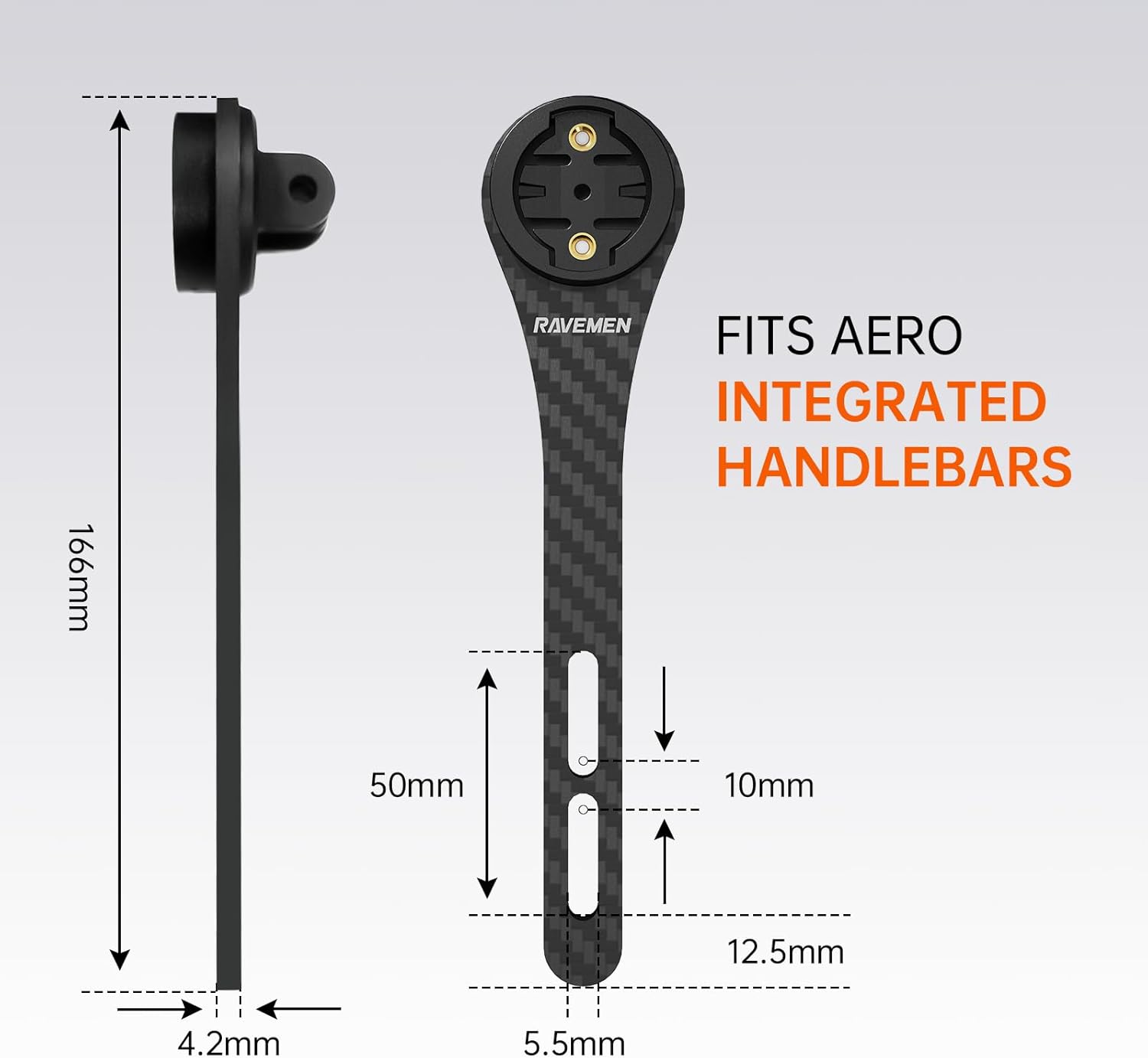
Image: Ravemen AOM03 mount with detailed dimensions for integrated handlebars.
Configuració i instal·lació
Follow these steps to install the Ravemen AOM03 mount on your integrated handlebars:
- Prepare Handlebar: Identify the mounting points on the underside of your integrated handlebar. Place the provided washers onto the handlebar's screw holes.
- Posició de muntatge: Align the Ravemen AOM03 mount with the screw holes on your handlebar. Ensure the mount is oriented correctly, with the computer interface facing upwards and the action camera mount (if used) facing downwards. Adjust the mount to the proper position for optimal viewing and clearance.
- Inseriu els cargols: Insert the screws (typically from your handlebar, not included with the mount) through the mount and into the mounting points on the handlebar.
- Apretar els cargols: Using the provided hex wrench, carefully tighten the screws. Tighten them evenly to ensure the mount is secure and stable. Do not overtighten.

Image: Step-by-step visual guide for installing the Ravemen AOM03 mount.
Funcionament
The Ravemen AOM03 mount allows for the attachment of various cycling accessories.
Mounting a Cycling GPS Computer
The top interface of the AOM03 mount is compatible with Garmin-style cycling GPS computers, including models from Garmin Edge/Explore/Plus/Touring, COOSPO, Hammerhead, XOSS, CYCPLUS, and iGPSPORT. To attach your computer, align the tabs on the back of your device with the slots on the mount and twist until it locks securely into place. Ensure the computer is firmly seated before riding.

Imatge: Examples of compatible cycling GPS computers with the Ravemen AOM03 mount.

Image: Cycling computer mounted on the AOM03, demonstrating optimal viewangle de ing.
Muntatge d'una càmera d'acció
The underside of the AOM03 mount features an integrated interface for action cameras. Attach your action camera using its standard mounting hardware to capture your rides from a unique perspective.

Image: Action camera mounted below the AOM03 for recording.
Mounting a Front Light
A front light can be mounted underneath the AOM03 using an optional upside-down mount adapter (e.g., Ravemen AUB01, sold separately). This allows for a clean setup and provides an adjustable bolt for better vision. Ensure the light is securely attached and does not interfere with steering or other components.

Image: Front light mounted below the AOM03, demonstrating adjustability.

Image: Ravemen AUB01 upside-down mount adapter (sold separately).
Manteniment
- Neteja: Netegeu la muntura amb un drap suauamp cloth. Avoid using harsh chemicals or abrasive materials that could damage the carbon fiber finish.
- Comprovació de fixació: Periodically check all mounting screws for tightness, especially after long rides or riding on rough terrain. Vibrations can cause screws to loosen over time.
- Integritat estructural: Inspect the carbon fiber body and plastic interfaces for any signs of cracks, stress marks, or deformation. If any damage is found, discontinue use and replace the mount.
Resolució de problemes
- Mount Vibrates Excessively:
- Assegureu-vos que tots els cargols de muntatge estiguin ben ajustats.
- Verify that the mount is correctly installed on your specific integrated handlebar model and that there is no play.
- Consider applying a small amount of thread locker to the screws if they repeatedly loosen due to vibration (consult a professional if unsure).
- Bike Computer Detaches or Mount Breaks:
- Always use a tether to secure your bike computer to the handlebars as a backup.
- Ensure the computer is twisted and locked firmly into the mount.
- If the plastic interface of the mount breaks, it indicates material fatigue or excessive force. The mount should be replaced immediately.
- Mount Does Not Fit Handlebar:
- Re-check the compatibility information and dimensions provided in the specifications section against your handlebar model.
- This mount is specifically designed for certain aero-integrated handlebars and may not be universally compatible.
Garantia
The Ravemen AOM03 Integrated Handlebars Out Front Mount comes with a 1 any de garantia from the date of purchase. This warranty covers manufacturing defects under normal use. It does not cover damage resulting from improper installation, misuse, accidents, modifications, or normal wear and tear. Please retain your proof of purchase for warranty claims.
Suport
For further assistance, technical support, or warranty inquiries, please contact Ravemen customer service through their official website or the retailer where the product was purchased. Provide your product model (AOM03) and a detailed description of the issue for efficient support.