
1. Introducció
The GODIAG CAS1/CAS2 Test Platform, Model SK420, is a specialized tool designed for automotive diagnostic and key programming tasks, specifically for BMW CAS1 and CAS2 systems. This platform facilitates various operations including key synchronization detection, solder-free mechanical key matching, CAS data reading, writing, and programming, as well as handling all keys lost scenarios and key data backup. It also assists in judging CAS module functionality.
Les funcionalitats clau inclouen:
- Detect CAS and key synchronization
- Solder-free matching CAS1/CAS2 mechanical key
- CAS data reading, writing, and programming
- All keys lost / adding keys matching
- CAS key data backup
- CAS module function judgment
2. Contingut del paquet
The GODIAG CAS1/CAS2 Test Platform package includes the following items:
- GODIAG CAS1/CAS2 Test Platform Main Unit
- OBD2 to DB25 Cable
- CAS1 Module Connector
- CAS2 Module Connector
- Cable d'alimentació
- Cable USB

Figure 2.1: The complete GODIAG CAS1/CAS2 Test Platform kit, featuring the central processing unit, various connection cables, and specialized module boards for CAS1 and CAS2 systems, alongside the product packaging.
3. Especificacions tècniques
| Característica | Especificació |
|---|---|
| Fabricant | GODIAG |
| Model | SK420 |
| Pes de l'article | 13.1 unces |
| Dimensions del paquet | 8.07 x 6.1 x 2.09 polzades |
| Font d'alimentació | Elèctric amb cable |
| Operating System (for associated software) | Android (for some related tools, PC software for VVDI2) |
| UPC | 889327073702 |
4. Configuració i connexions
Before operating the GODIAG CAS1/CAS2 Test Platform, ensure all connections are made correctly. This section outlines the typical setup process.
- Connect the VVDI2 Device: Connect the OBD2-DB25 cable to your VVDI2 device.
- Connexió a l'ordinador: Use the USB cable to connect the VVDI2 device to your computer.
- Connect OBD2 to Test Platform: Connect the OBD2 end of the OBD2-DB25 cable to the GODIAG CAS1/CAS2 Test Platform.
- Connect CAS Module: Connect the appropriate CAS module (CAS1 or CAS2) to the corresponding port on the GODIAG Test Platform. Ensure a secure fit.
- Aplicar potència: Connect the 12V power supply to the GODIAG Test Platform.
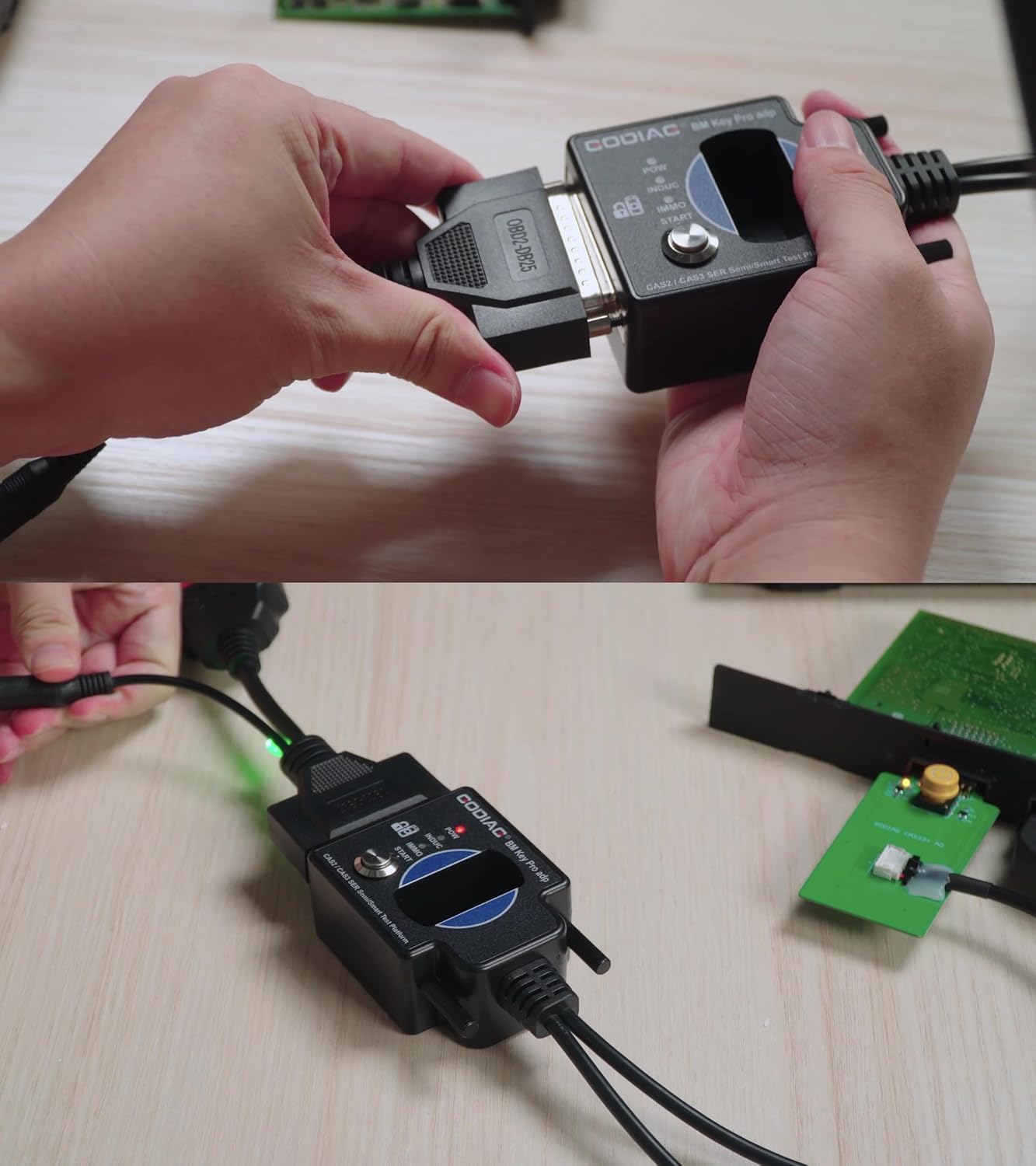
Figura 4.1: Un primer pla view of hands connecting the OBD2-DB25 cable to the main GODIAG test platform unit, illustrating the secure attachment of the primary data cable.

Figure 4.2: This image shows the connection of the power supply cable and the OBD2 diagnostic cable to the GODIAG test platform, indicating readiness for operation.

Figure 4.3: A user is shown connecting the specific CAS1 module connector to the GODIAG test platform, a crucial step for interacting with the CAS1 system.

Figure 4.4: An annotated diagram highlighting the various parts of the GODIAG CAS1/CAS2 Test Platform, including indicator lights (Power, IMMO, INDUC), key identification port, start switch, and connectors for CAS1 (54PIN) and CAS2 (41PIN, 14PIN) modules, along with the start/stop button.
5. Operation: Adding a CAS1 Key with VVDI2
This section provides a detailed guide on how to add a new CAS1 key using the GODIAG CAS1/CAS2 Test Platform in conjunction with VVDI2 software. Ensure all setup steps from Section 4 are completed.
Video 5.1: This video provides a step-by-step demonstration of how to add a new CAS1 key using the GODIAG CAS1/CAS2 Mech-Key Test Platform in conjunction with VVDI2 software. It covers connecting the devices, reading CAS data, preparing a dealer key, and testing the newly generated key.
5.1. Initial Key Check
- Insert a blank key into the ECU key port on the GODIAG Test Platform.
- If the key pops out, it indicates that this key is not yet paired with the CAS module.
5.2. Software Preparation and Data Reading
- Open the VVDI2 software on your computer.
- Select the "BMW" option within the VVDI2 software interface.
- Click "Connect" to establish communication with the CAS system.
- Click "Read KM" to read the current mileage data from the CAS module.
- Click "Read Code" to read the code data from the CAS module.
- Click "Read EEPROM" to read the EEPROM data.
- Click "Save to file" to save the EEPROM data to your desktop for backup purposes.

Figure 5.2: A screenshot of the VVDI2 software interface, specifically displaying the 'Key Learn' section with options for CAS/EWS Information, CAS Key Learn, FEM/BDC Key Learn, and other key programming functions.
5.3. Key Learning Process
- Navigate to the "Key Learn" tab in the VVDI2 software and select "CAS Key Learn".
- Click "Connect" again to refresh the key information.
- Click "Get Key Info" to retrieve the current key status.
- Select an unused or blank key position from the displayed list.
- Click "Prepare dealer key with programmer". Follow the prompts to place the blank key into the VVDI2 device's key slot.
- Once the software confirms the key is successfully generated, click "OK".
- Click "Add Key" to finalize the key addition process.

Figure 5.3: A comprehensive diagram illustrating all necessary connections for programming a CAS1 module using the GODIAG Test Platform in conjunction with a VVDI2 device and a laptop.

Figure 5.4: A comprehensive diagram illustrating all necessary connections for programming a CAS2 module using the GODIAG Test Platform in conjunction with a VVDI2 device and a laptop.
5.4. Testing the New Key
- Insert the newly generated key into the ECU key port on the GODIAG Test Platform.
- If the key remains securely in the port and does not pop out, it indicates that the key has been successfully programmed and synchronized with the CAS module.
6. Manteniment
To ensure the longevity and optimal performance of your GODIAG CAS1/CAS2 Test Platform, follow these maintenance guidelines:
- Neteja: Regularly clean the device and its connectors with a soft, dry cloth. Avoid using abrasive cleaners or solvents.
- Emmagatzematge: Guardeu el dispositiu en un lloc fresc i sec, allunyat de la llum solar directa i de temperatures extremes. Guardeu-lo en el seu embalatge original o en una funda protectora quan no l'utilitzeu.
- Cura del cable: Inspect cables for any signs of wear, fraying, or damage before each use. Replace damaged cables immediately to prevent electrical issues or data loss.
- Actualitzacions de programari: Periodically check the GODIAG official website or VVDI2 software for available updates to ensure compatibility and access to the latest features and bug fixes.
7. Solució De Problemes
If you encounter issues while using the GODIAG CAS1/CAS2 Test Platform, refer to the following common problems and solutions:
- El dispositiu no s'encén:
- Ensure the 12V power supply is securely connected and functioning.
- Check the power indicator light on the device. If it's off, verify the power source.
- Connection Issues with VVDI2 Software:
- Verify that the USB cable connecting VVDI2 to the computer is secure.
- Ensure the OBD2-DB25 cable is correctly connected between VVDI2 and the GODIAG Test Platform.
- Restart the VVDI2 software and try connecting again.
- Check for any driver issues for the VVDI2 device on your computer.
- Key Not Programming Successfully:
- Ensure you are using a compatible blank key.
- Verify that the CAS module is correctly connected to the GODIAG Test Platform.
- Confirm that the EEPROM data was read and saved correctly.
- Follow all software prompts carefully, especially when placing the key in the VVDI2 device.
- If the issue persists, try a different blank key or consult the VVDI2 software's specific troubleshooting guides.
- CAS Module Function Judgment Failure:
- Ensure all connections to the CAS module are firm.
- The module itself might be faulty.
8. Informació de la garantia
GODIAG products typically come with a standard manufacturer's warranty. For specific details regarding the warranty period, coverage, and claims process for your CAS1/CAS2 Test Platform (Model SK420), please refer to the warranty card included with your product or visit the official GODIAG weblloc web. Conserveu el comprovant de compra per validar la garantia.
9. Atenció al client
For technical assistance, product inquiries, or support related to the GODIAG CAS1/CAS2 Test Platform, please contact GODIAG customer service through their official channels. You can typically find contact information on the GODIAG weblloc web o dins de l'embalatge del producte.
Recursos en línia:
- Visita el GODIAG Store on Amazon per a informació i actualitzacions del producte.