Producte acabatview
This kit provides a comprehensive solution for repairing or replacing the control system of compatible ice makers. It includes essential components designed to restore full functionality to your ice machine's control and display systems.
The kit is compatible with most Chinese brands of split-type ice machines. It is crucial to verify that your original motherboard and display boards match those shown in this manual for proper compatibility.
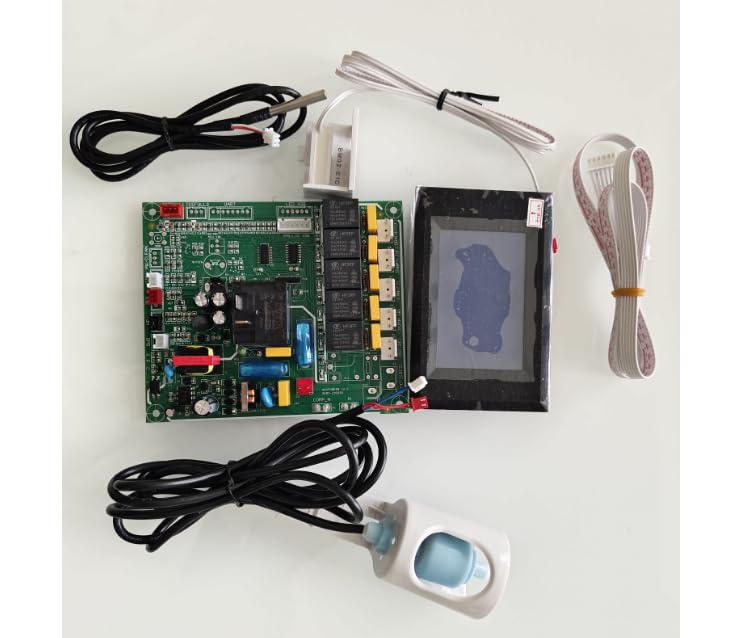
Figure 1: Complete Ice Maker Control Board Kit, including main board, touch screen display, and various sensors.
Què hi ha a la caixa
The Ice Maker Control Board Kit includes the following components:
- Tauler de control principal
- Touch Screen Display Board
- Sensor de temperatura de l'aigua
- Interruptor de flotador d'aigua
- Sensor del condensador
- Display Board Connecting Wire
- Ice Bin Sensor
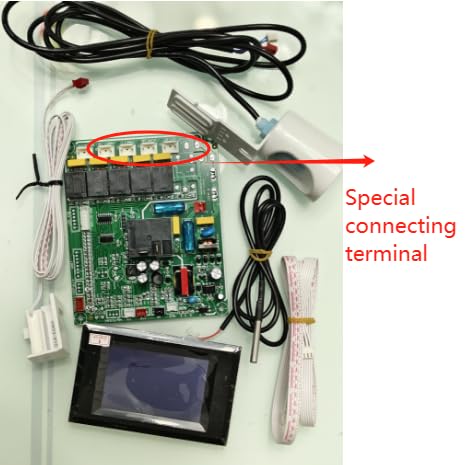
Figure 2: All components of the control kit, highlighting the special connecting terminal on the main board.
Configuració i instal·lació
Before beginning installation, ensure the ice maker is completely disconnected from power. Safety is paramount during any electrical component replacement.
- Comprovació de compatibilitat: There are two types of main boards that use the same blue touch screen. They have different wire connecting terminals. Carefully compare the connecting terminals on your original board with those on the new board to ensure compatibility.
- Document Original Connections: Before disconnecting any wires from your original board, take clear photographs of all connections. This will serve as a crucial reference during the installation of the new board.
- Treure els components originals: Carefully disconnect all wires and remove the old main board, display board, and sensors from the ice maker.
- Instal·leu nous components:
- Mount the new main control board in the designated location.
- Connect the display board connecting wire between the main board and the touch screen display board.
- Install the touch screen display board in its panel.
- Connect the water temperature sensor, water float switch, condenser sensor, and ice bin sensor to their respective ports on the main board, referring to your photographs for correct placement.
- Connexions segures: Ensure all connections are firm and secure to prevent loose contacts.
- Encès: Once all components are installed and secured, reconnect the ice maker to power.

Figura 3: Detallada view of the main control board, showing various connection points and relays.

Figure 4: The condenser sensor, typically used to monitor the temperature of the condenser coil.

Figure 5: The water float switch, which detects the water level in the ice maker's reservoir.

Figure 6: The ice bin sensor, responsible for detecting when the ice storage bin is full.
Instruccions de funcionament
The touch screen display board provides an intuitive interface for controlling your ice maker. Upon successful installation and power-up, the display will illuminate.

Figure 7: The blue touch screen display, showing various indicators and control buttons.
Key functions and indicators on the display typically include:
- Botó d'encesa: To turn the ice maker on or off.
- Ice Making Indicator: Shows when the machine is actively producing ice.
- Water Shortage Indicador: Alerts when the water reservoir needs refilling.
- Indicador de gel ple: S'il·lumina quan el dipòsit de gel és ple.
- Cicle de neteja: Initiates an automatic cleaning process.
- Codis/indicadors d'error: Displays specific codes or symbols to indicate operational issues (e.g., sensor errors, high temperature). Refer to your ice maker's specific manual for detailed error code interpretations.
- Visualització de la temperatura: Shows the current temperature readings from relevant sensors.
Interact with the display by gently touching the corresponding icons or numerical fields. For specific operational modes or advanced settings, consult the original ice maker's user manual, as this control board integrates with its existing functionalities.
Manteniment
Proper maintenance of the control board and associated sensors ensures longevity and reliable operation of your ice maker. While the control board itself requires minimal maintenance, consider the following:
- Mantenir sec: Ensure the control board and all electrical connections remain dry. Moisture can cause short circuits and damage.
- Netegeu suaument: If dust accumulates on the board, gently remove it using a soft brush or compressed air. Do not use liquids or abrasive cleaners.
- Inspeccionar connexions: Periodically check that all wire connections to the board and sensors are secure and free from corrosion.
- Neteja del sensor: Clean the water temperature sensor and water float switch as part of your regular ice maker cleaning routine to ensure accurate readings.
Resolució de problemes
This control board is designed to resolve common issues related to the ice maker's control system. If you encounter problems after installation, consider the following:
- Sense alimentació/Pantalla apagada:
- Verify the ice maker is plugged into a working power outlet.
- Check the main power switch of the ice maker.
- Ensure the display board connecting wire is securely attached at both ends.
- Incorrect Readings/Malfunctions:
- Confirm all sensors (water-temp, water float, condenser, ice bin) are correctly connected to the main board.
- Inspect sensors for any physical damage or blockages (e.g., debris on the water float switch).
- Ensure the correct type of main board was installed, especially regarding wire connecting terminals.
- La màquina de gel no produeix gel:
- While this kit addresses control issues, ensure other parts of your ice maker (e.g., compressor, water pump, evaporator) are functioning correctly. This kit resolves control problems, assuming other mechanical components are sound.
- Check for water supply to the ice maker.
- Codis d'error que es mostren:
- Refer to your ice maker's original manual for specific error code definitions and troubleshooting steps. The control board displays these codes as received from the ice maker's system.
If issues persist after following these steps, it is recommended to consult a qualified technician or contact customer support.
Especificacions
| Característica | Detall |
|---|---|
| Dimensions del producte | 12.3 "P x 7.6" W x 2.4" H |
| Pes | 1.34 lliures |
| Marca | Genèric |
| Nom del model | touch screen ice maker controller |
| Voltage | 115 V |
| Fabricant | xinrui |
| ASIN | B0CYY1C636 |
Informació de la garantia
Specific warranty details for this product are provided by the seller or manufacturer at the time of purchase. Please retain your proof of purchase for any warranty claims. For detailed warranty terms and conditions, refer to the documentation included with your product or contact the seller directly.
Atenció al client
For technical assistance, installation queries, or troubleshooting beyond the scope of this manual, please contact the seller or manufacturer. When contacting support, please have your product model name ("touch screen ice maker controller") and ASIN ("B0CYY1C636") ready for quicker service.
Seller: Goodquality-appliance parts
Manufacturer: xinrui


