
1. Configuració
This section guides you through the initial setup of your DOOGEE U10 tablet.
1.1 Contingut del paquet
Assegureu-vos que tots els elements siguin presents a la caixa:
- Tauleta DOOGEE U10
- Cable USB-Type C
- Adaptador d'alimentació
- Eina d'expulsió de la SIM (si escau)
- Guia d'inici ràpid
- Targeta de garantia
1.2 Disseny del dispositiu
Familiaritzeu-vos amb les característiques físiques de la vostra tauleta.
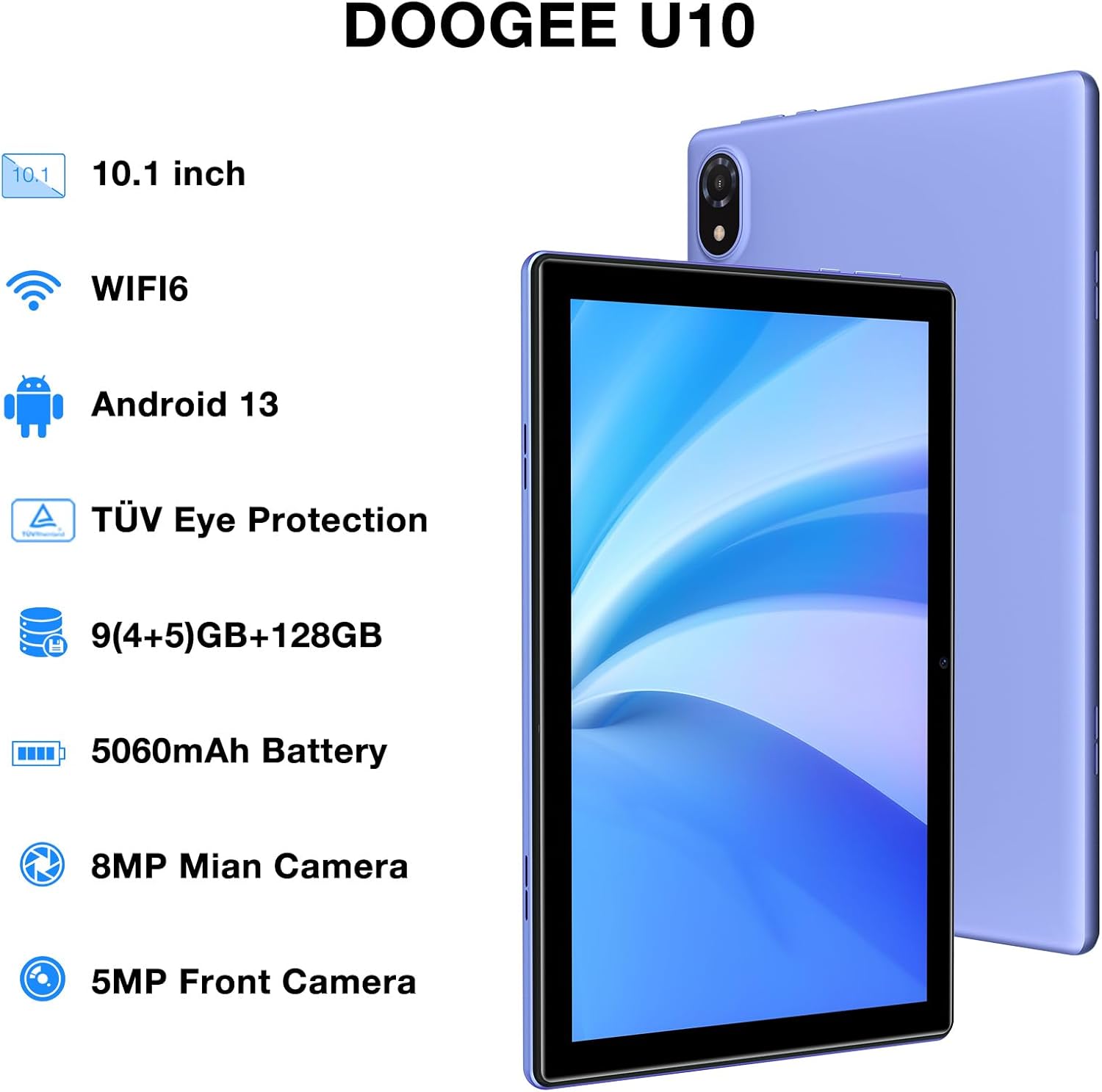
Figure 1: DOOGEE U10 Tablet Overview. This image highlights the tablet's 10.1-inch display, WiFi 6 capability, Android 13 operating system, TÜV Eye Protection, 9GB RAM, 128GB ROM, 5060mAh battery, 8MP main camera, and 5MP front camera.
- Botó d'encesa: Located on the side, press and hold to power on/off or restart.
- Botons de volum: Adjust media volume and notification sounds.
- Port USB tipus C: Per a càrrega i transferència de dades.
- Presa d'auriculars de 3.5 mm: Connecteu els auriculars amb cable.
- Càmera frontal: Per a videotrucades i selfies.
- Càmera posterior: Per fer fotos i vídeos.
- Ponents: Dual stereo speakers for audio output.
1.3 Engegada i càrrega inicials
Before first use, fully charge your tablet. Connect the USB Type-C cable to the tablet and the power adapter to a wall outlet. The battery indicator will show charging status.
- Press and hold the Power Button until the DOOGEE logo appears.
- Segueix les instruccions que apareixen a la pantalla per seleccionar l'idioma, connectar-te a la Wi-Fi i configurar el teu compte de Google.
2. Com utilitzar la tauleta
Learn how to navigate and use the core features of your DOOGEE U10 tablet.
2.1 Pantalla i navegació
The DOOGEE U10 features a 10.1-inch IPS HD display with a resolution of 1280x800 pixels, providing clear visuals for various tasks.

Figure 2: Vivid IPS HD Display. This image illustrates the tablet's 10.1-inch screen with 800x1280 HD+ resolution, ideal for media consumption.
- Gestos tàctils: Toca per seleccionar, llisca per desplaçar-te, pessiga per ampliar.
- Pantalla d'inici: Personalitza amb widgets i dreceres d'aplicacions.
- Notificacions: Swipe down from the top to access notifications and quick settings.
- Reconeixement facial: Unlock your tablet using facial recognition for convenience.
2.2 Rendiment i emmagatzematge
The tablet is powered by a Quad-Core RK3562 processor clocked at up to 2.0GHz, ensuring smooth performance. It comes with 9GB RAM (5GB physical + 4GB expansion) and 128GB internal storage, expandable up to 1TB via a microSD card.

Figure 3: Powerful Processor and Memory. This image details the tablet's Rockchip RK3562 Quad-Core processor, 9GB RAM, 128GB ROM, and support for 1TB TF card expansion.
2.3 Connectivitat
- Wi-Fi 6: Connect to high-speed Wi-Fi networks for faster browsing and streaming. Go to Settings > Network & internet > Wi-Fi.
- Bluetooth 5.0: Pair with wireless headphones, speakers, or other Bluetooth devices. Go to Settings > Connected devices > Bluetooth.
- OTG (On-The-Go): Connect USB peripherals like flash drives or keyboards using an OTG adapter (sold separately).
2.4 Funcions de la càmera
The tablet is equipped with an 8MP main camera and a 5MP front camera for photos and video calls.

Figure 4: Dual Camera System. This image showcases the tablet's 8MP main camera and 5MP front camera, suitable for capturing moments and video conferencing.
- Obre l'aplicació Càmera des de la pantalla d'inici o des del calaix d'aplicacions.
- Toqueu el botó de l'obturador per fer una foto.
- Canvieu entre la càmera frontal i la posterior mitjançant la icona de la càmera.
2.5 Gestió de la bateria
The 5060mAh battery provides extended usage. To optimize battery life, adjust screen brightness, close unused apps, and enable power-saving modes.

Figure 5: Large Capacity Battery. This image highlights the 5060mAh battery, Type-C charging, 5V2A fast charging, and 3.5mm headphone jack, along with estimated usage times for gaming, movies, and music.
2.6 Experiència multimèdia
Enjoy an immersive audio experience with dual stereo speakers. The tablet supports Widevine L1, allowing for high-quality streaming from various video platforms.

Figure 6: Immersive Audio and DRM L1. This image illustrates the tablet's support for WiFi 6, Bluetooth 5.0, dual speakers, and DRM L1 for enhanced multimedia playback.
2.7 Mode de protecció ocular
The DOOGEE U10 is TÜV SÜD blue light certified, reducing harmful blue light emissions to protect your eyes during prolonged use.

Figure 7: TÜV Certified Eye Protection. This image shows the TÜV Rheinland certification, indicating the tablet's low blue light feature for eye comfort.
2.8 Vídeos oficials de productes
DOOGEE U10 Tablet Showcase
Aquest vídeo ofereix una visió generalview and showcase of the DOOGEE U10 tablet's features and design.
DOOGEE U10 Fantastic Experience for Kids
This video demonstrates how the DOOGEE U10 tablet can be used by children, highlighting its suitability for educational and entertainment purposes for younger users.
3. Manteniment
Una cura adequada garanteix la longevitat i el rendiment òptim de la tauleta.
3.1 Neteja de la tauleta
- Feu servir un drap suau i sense borrissol per netejar la pantalla i la carcassa.
- Eviteu utilitzar productes químics agressius, netejadors abrasius o aerosols.
- Per a taques persistents, lleugerament dampNetegeu el drap amb aigua o un netejador de pantalles dissenyat per a electrònica.
3.2 Actualitzacions de programari
Comproveu i instal·leu regularment si hi ha actualitzacions de programari per millorar el rendiment, la seguretat i afegir noves funcions.
- Aneu a Configuració > Sistema > Actualització del sistema.
- Connecta't a una xarxa Wi-Fi estable abans de descarregar actualitzacions.
4. Solució De Problemes
This section addresses common issues you might encounter with your DOOGEE U10 tablet.
4.1 El dispositiu no s'encén
- Assegureu-vos que la bateria estigui carregada. Connecteu la tauleta al carregador durant almenys 30 minuts.
- Press and hold the Power Button for 10-15 seconds to force a restart.
4.2 Problemes de connectivitat (Wi-Fi/Bluetooth)
- Toggle Wi-Fi or Bluetooth off and on in Quick Settings or Settings menu.
- Restart your tablet and the router/Bluetooth device.
- Oblida't de la xarxa/dispositiu i torna a connectar-te.
4.3 Les aplicacions es bloquegen o es bloquegen
- Tanca l'aplicació problemàtica i torna-la a obrir.
- Clear the app's cache: Settings > Apps > [App Name] > Storage & cache > Clear cache.
- Assegureu-vos que l'aplicació estigui actualitzada a la seva darrera versió.
- Si el problema persisteix, considereu la possibilitat de desinstal·lar i reinstal·lar l'aplicació.
5. Especificacions tècniques
Key technical details of the DOOGEE U10 tablet.
| Característica | Especificació |
|---|---|
| Nom del model | U10 |
| Sistema operatiu | Android 13 |
| Mida de la pantalla | 10.1 polzades |
| Resolució de pantalla | 1280 x 800 píxels (HD+) |
| Processador | Quad-Core (Rockchip RK3562, up to 2.0GHz) |
| RAM | 9GB (5GB physical + 4GB expansion) |
| Emmagatzematge intern | 128 GB |
| Emmagatzematge ampliable | Up to 1TB (microSD/TF card) |
| Càmera principal | 8MP |
| Càmera frontal | 5MP |
| Capacitat de la bateria | 5060 mAh |
| Connectivitat | Wi-Fi 6, Bluetooth 5.0, OTG |
| Dimensions (LxWxH) | 9.6 x 6.4 x 0.4 polzades |
| Pes | Aproximadament 1.13 lliures (427 g) |
| Protecció ocular | TÜV SÜD Low Bluelight Certified |
| Suport DRM | Widevine L1 |
6. Garantia i Suport
Information regarding your product's warranty and how to obtain support.
6.1 Garantia limitada
The DOOGEE U10 tablet typically comes with a 2-year limited warranty. This warranty covers manufacturing defects and workmanship under normal use. Please refer to the warranty card included in your package for specific terms and conditions, including coverage details and exclusions.
Conserveu el vostre comprovant de compra per a reclamacions de garantia.
6.2 Atenció al client
If you encounter any issues not covered in the troubleshooting section or require further assistance, please contact DOOGEE customer support.
- Assistència en línia: Visit the official DOOGEE weblloc web per a preguntes freqüents, recursos d'assistència i opcions de contacte.
- Suport per correu electrònic: Refer to your warranty card or quick start guide for specific email addresses.
- Centres de servei: Information on authorized service centers may be available on the DOOGEE weblloc.
When contacting support, please have your tablet's model number (U10) and purchase information ready.