
1. Introducció
The Retevis MB62 VOX CB Radio is a compact and portable communication device designed for reliable long-distance communication. It supports both AM (Amplitude Modulation) and FM (Frequency Modulation) modes, providing clear audio quality for various applications, especially for truckers and mobile users. This manual provides detailed instructions for setting up, operating, and maintaining your MB62 CB radio.
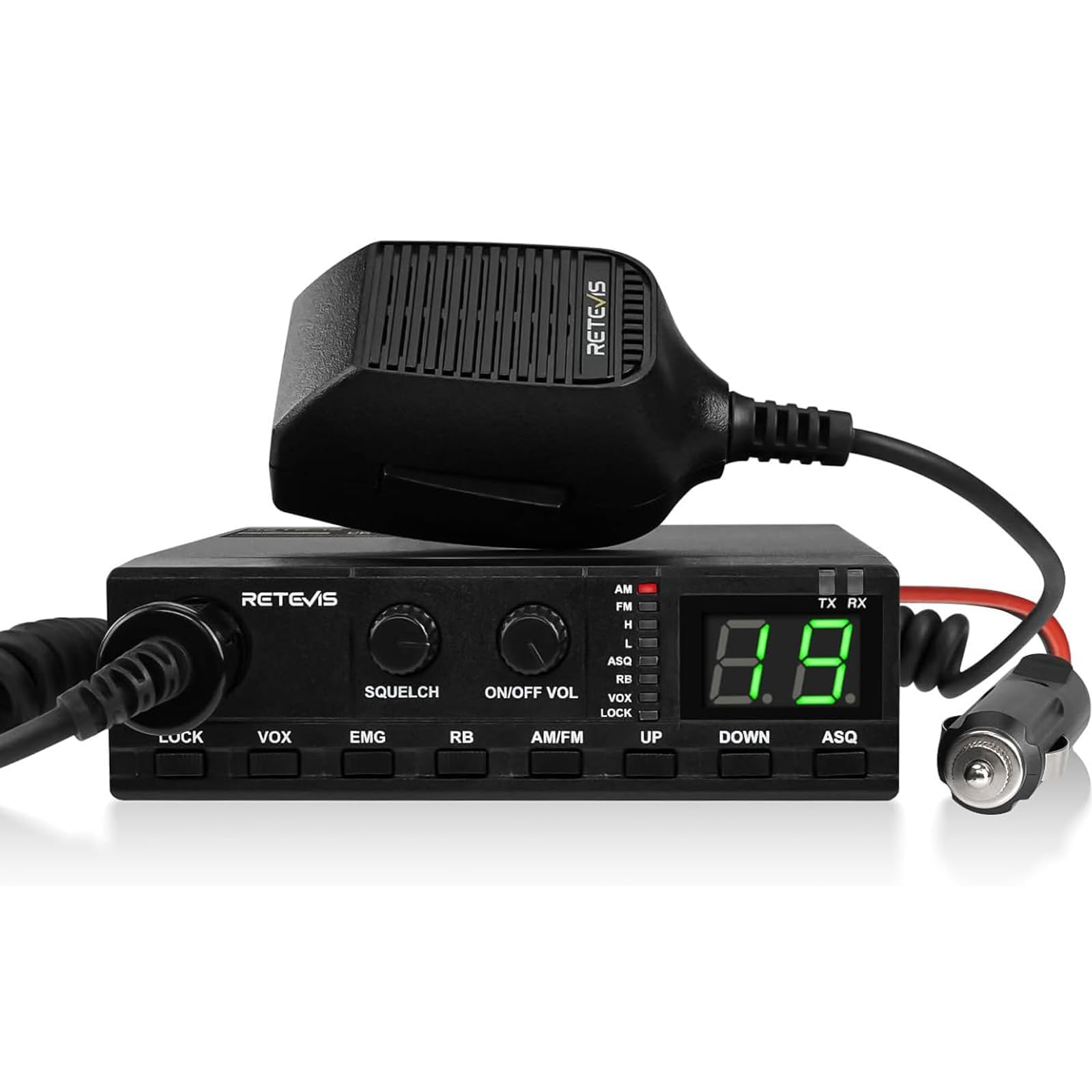
Image 1.1: The Retevis MB62 VOX CB Radio.
2. Què hi ha a la caixa
Si us plau, comproveu el contingut del paquet per assegurar-vos que hi hagi tots els elements:
- MB62 CB Radio Unit x1
- Micròfon d'altaveu x1
- Cigarette Lighter Power Cable x1
- Main Mounting Bracket x1
- Mounting Knobs x2
- Cargols x4
- Anti-Slip Mats x4
- Stop Pads x2
- Microphone Hanger x1
- Fusible de recanvi x1
- Manual d'usuari x1

Image 2.1: All included components of the Retevis MB62 CB Radio package.
3. Configuració
3.1 Connexió de l'antena
Important: The CB radio must be operated with an antenna. Failure to connect an antenna can damage the device.
- Connect a suitable CB antenna to the antenna connector on the rear of the MB62 unit. Ensure the connection is secure.
3.2 Connexió d'alimentació
- Connect the cigarette lighter power cable to the power input on the rear of the MB62 unit.
- Insert the cigarette lighter plug into your vehicle's 12V power socket.
3.3 Muntatge de la unitat
The MB62 is compact and portable, allowing for flexible placement in your vehicle.
- Attach the main mounting bracket to a desired location in your vehicle using the provided screws.
- Secure the MB62 unit to the mounting bracket using the mounting knobs.
- Attach the microphone hanger in a convenient location for easy access to the speaker microphone.

Image 3.1: The compact size of the MB62 allows for easy placement.
4. Instruccions de funcionament
4.1 Engegada/Apagada i control de volum
Gireu el VOLUM ON/OFF knob clockwise to power on the unit and adjust the volume. Turn it counter-clockwise until it clicks to power off.
4.2 AM/FM Dual Mode Selection
The MB62 supports both AM and FM modes. FM offers clear audio quality, while AM supports longer-distance communication.
- Premeu el botó AM/FM botó per canviar entre Amplitude Modulation (AM) and Frequency Modulation (FM) modes. The selected mode will be indicated on the LED display.

Image 4.1: Selecting AM or FM mode on the MB62 CB Radio.
4.3 Selecció de canals
The radio features 40 legal channels. Use the UP i ABAIX buttons to navigate through the channels.
- Emergency Channel (CH9): Premeu el botó EMG button once to quickly switch to Channel 9 for emergency assistance.
- Traffic Information Channel (CH19): Premeu el botó EMG button again to switch to Channel 19 for road traffic information.

Image 4.2: Using the EMG button to access emergency and traffic channels.
4.4 Funció VOX (mans lliures)
The VOX function allows you to transmit by speaking into the microphone without needing to press the PTT (Push-To-Talk) button.
- Premeu el botó VOX button to activate or deactivate the VOX function. When active, the VOX indicator will light up.
- Adjust the VOX sensitivity as needed to prevent accidental transmissions or missed voice activations.

Image 4.3: Hands-free communication with the VOX function.
4.5 Squelch Function (ASQ and SQ)
The squelch function reduces background noise, ensuring clear transmission and reception.
- Silenciador automàtic (ASQ): Premeu el botó ASQ button to activate the automatic squelch. This function automatically adjusts the squelch level.
- Manual Squelch (SQ): Gira el SQUELCH knob to manually adjust the squelch level. Turn it clockwise to increase the squelch level (reduce sensitivity to weak signals and noise) and counter-clockwise to decrease it.

Image 4.4: The Squelch function for clear communication.
4.6 Funció de bloqueig de tecles
The key lock function prevents accidental operation or changes to settings, which is useful when driving.
- Premeu el botó BLOC button to activate or deactivate the key lock. When active, a lock icon may appear on the display or an indicator light will show.

Image 4.5: Activating the Key Lock function.
4.7 Connexió d'altaveus externs
For louder and clearer audio, an external speaker can be connected.
- Connect a 3.5mm external speaker to the EXT.SP jack on the rear of the unit.

Image 4.6: Connecting an external speaker to the 3.5mm jack.
4.8 Roger Beep
The MB62 features a Roger Beep tone, which is an audible signal transmitted at the end of your transmission to indicate that you have finished speaking.
- The Roger Beep function is typically enabled or disabled via a menu setting or a dedicated button (refer to the specific unit's controls if not explicitly labeled).
5. Manteniment
Per garantir la longevitat i el rendiment òptim de la vostra ràdio CB Retevis MB62, seguiu aquestes pautes de manteniment:
- Neteja: Use a soft, dry cloth to clean the radio's exterior. Avoid using harsh chemicals or abrasive cleaners.
- Connexions: Periodically check all cable connections (antenna, power, microphone) to ensure they are secure and free from corrosion.
- Medi ambient: Store and operate the radio within the specified temperature range (-20 to 60 degrees Celsius). Avoid exposing the unit to extreme temperatures, direct sunlight for prolonged periods, or excessive moisture. The unit is not waterproof.
- Antena: Ensure your antenna is properly maintained and tuned for optimal performance.
6. Solució De Problemes
If you encounter issues with your Retevis MB62 CB Radio, refer to the following common problems and solutions:
- Sense energia:
- Check the power cable connection to the radio and the vehicle's cigarette lighter socket.
- Verify the vehicle's 12V power socket is functioning.
- Check the fuse in the cigarette lighter plug and the spare fuse provided. Replace if blown.
- Sense recepció/transmissió:
- Ensure the antenna is properly connected and not damaged.
- Verify the correct channel and mode (AM/FM) are selected.
- Adjust the Squelch (SQ) knob counter-clockwise to increase sensitivity.
- Check that the microphone is securely connected.
- Poor Audio Quality (Static/Noise):
- Adjust the Squelch (SQ) knob clockwise to reduce background noise.
- Ensure the antenna is properly installed and tuned.
- Check for sources of electrical interference in the vehicle.
- VOX Not Activating:
- Ensure the VOX function is enabled (VOX indicator light on).
- Adjust the VOX sensitivity to a higher level.
- Botons que no responen:
- Check if the Key Lock function is active. Press the BLOC botó per desactivar-lo.
If the problem persists after trying these steps, please contact Retevis customer support for further assistance.
7. Especificacions
| Característica | Especificació |
|---|---|
| Marca | Retevis |
| Número de model | MB62 |
| Color | Negre |
| Nombre de canals | 40 |
| Tipus de sintonitzador | AM/FM |
| Interval de freqüència | 26.965 MHz - 27.405 MHz (AM), 27.085 MHz - 27.255 MHz (FM) |
| Max. Talk Range | 2 quilòmetres |
| Voltage | 12 volts (CC) |
| Classificació de resistència a l'aigua | No impermeable |
| Dimensions del producte (P x A x A) | 12.4T x 18.5B x 3.8H cm (4.88 x 7.28 x 1.49 inches) |
| Nivell de soroll | 40 decibels |
| Dispositius compatibles | CB radios on 26.965 MHz - 27.405 MHz (AM) and 27.085 MHz - 27.255 MHz (FM), compatible accessories |
| Interval de temperatura | -20 a 60 graus centígrads |
| Protocol de connexió | CB |
| Característica especial | Roger Tone |
| Grau de protecció IP | IP67 |
8. Garantia i Suport
Garantia: We offer a 2-year warranty and a 30-day return policy. The radio housing is covered by a 2-year warranty, and accessories have a 1-year warranty. Beyond the warranty period, we continue to provide maintenance services, with buyers responsible for associated costs.
Suport: For any questions, issues, or warranty claims, please contact us directly on Amazon. We commit to responding within 12 hours to ensure the most straightforward resolution process.
Seller: RetevisDirect
Thank you for choosing Retevis. We are dedicated to redefining communication technology and making communication easier.