
1. Introducció
This manual provides detailed instructions for the safe and effective use of your Glazata R80-N Wireless Audio Receiver. Please read this manual thoroughly before using the product and retain it for future reference.
2. Producte acabatview

Imatge 2.1: Davant i lateral view of the Glazata R80-N Wireless Audio Receiver, showing its compact design and control buttons.

Imatge 2.2: Detailed diagram of the Glazata R80-N receiver, labeling its buttons and ports such as volume controls, power switch, charging connector, 3.5mm jack, and multi-button.
2.1. Components
- Glazata R80-N Wireless Audio Receiver
- Cable de càrrega USB tipus C
- Manual d'usuari
2.2. Característiques clau
- Qualcomm Smart Chip: Equipped with a high-performance Qualcomm earphone amplifier chip for optimized audio performance.
- aptX & aptX-LL Support: Compatible with AAC and aptX codecs, including aptX Low Latency for reduced audio delay.
- MEMS High-Sensitivity Microphone: Integrated omnidirectional microphone for clear hands-free calls and reduced ambient noise.
- Wireless Conversion: Transforms non-Bluetooth audio devices (e.g., car audio, home stereos, wired headphones) into Bluetooth-enabled systems.
- Compacte i portàtil: Lightweight design with a clip for easy attachment.
- Llarga vida útil de la bateria: Extended standby, talk, and music playback times.
3. Configuració
3.1. Càrrega del dispositiu
Before first use, fully charge the receiver. Connect the supplied USB Type-C cable to the charging port on the receiver and the other end to a USB power source (e.g., computer, wall adapter). The LED indicator will show charging status.

Imatge 3.1: Illustration of the Glazata R80-N receiver's battery life and Type-C charging port.
3.2. Vinculació amb un dispositiu Bluetooth
- Assegureu-vos que el receptor estigui carregat i apagat.
- Premeu i manteniu premut el botó d'engegada fins que l'indicador LED parpellegi, cosa que indica el mode d'emparellament.
- On your smartphone, tablet, or other Bluetooth-enabled device, go to Bluetooth settings and search for new devices.
- Select "Glazata R80-N" from the list of available devices.
- Once connected, the LED indicator will change to a steady light or flash slowly.
3.3. Connecting to Wired Audio Devices
Plug your wired headphones, car AUX input, or home stereo's AUX input into the 3.5mm audio jack on the Glazata R80-N receiver.

Imatge 3.2: The Glazata R80-N receiver connected to a smartphone and wired earphones.
4. Instruccions de funcionament
4.1. Encendre/apagar
- Encès: Manteniu premut el botó d'engegada fins que s'il·lumini l'indicador LED.
- Apagar: Manteniu premut el botó d'engegada fins que l'indicador LED s'apagui.
4.2. Reproducció de música
- Reproduir/pausa: Premeu el botó multifunció una vegada.
- Pista següent: Press the 'Next' button.
- Pista anterior: Press the 'Previous' button.
- Pujar el volum: Premeu el botó '+'.
- Baixar el volum: Premeu el botó '-'.
4.3. Gestió de trucades
- Respon a la trucada: Premeu el botó multifunció una vegada.
- Finalitzar la trucada: Premeu el botó multifunció una vegada durant una trucada.
- Rebutja la trucada: Premeu i manteniu premut el botó multifunció.
- Torna a marcar l'últim número: Premeu dues vegades el botó multifunció.

Imatge 4.1: Using the receiver for telework or online learning.

Imatge 4.2: Using the receiver for hands-free calls or car navigation.
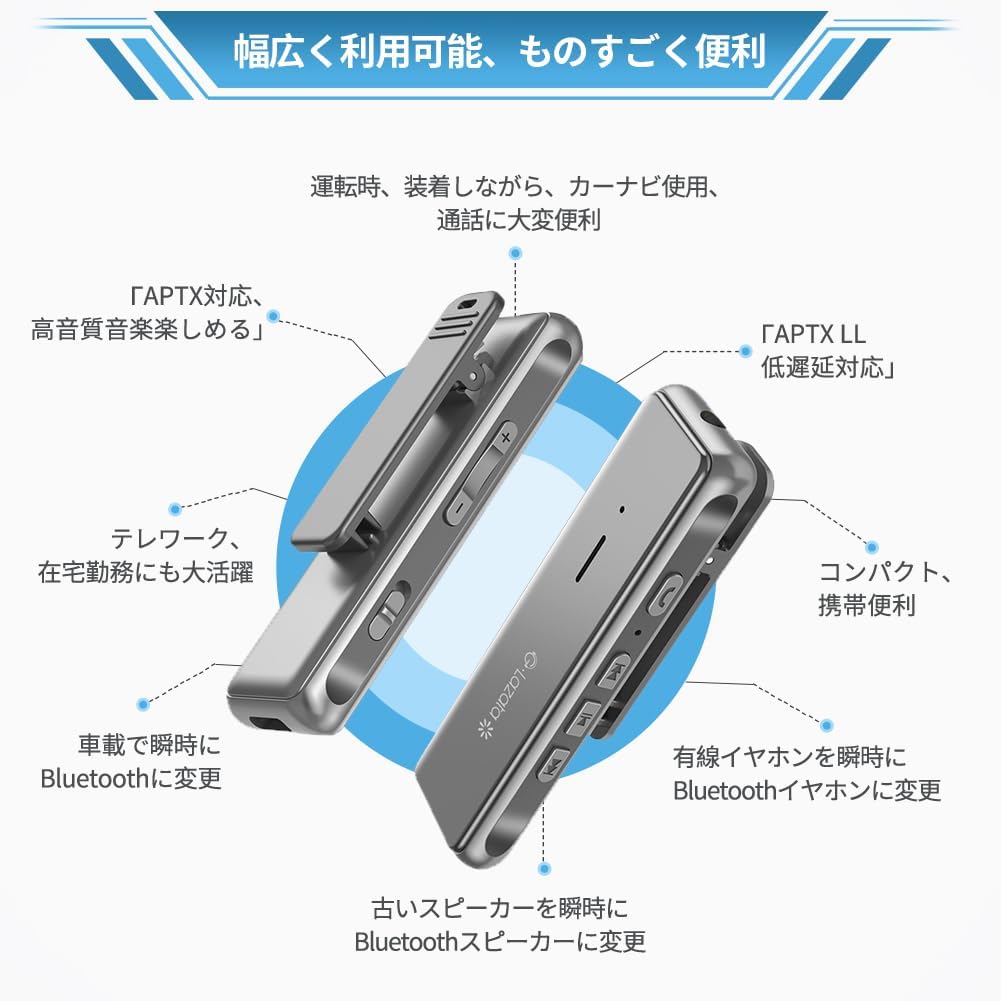
Imatge 4.3: Receiver use during mobile gaming for enhanced audio and communication.
5. Manteniment
- Mantingueu el dispositiu sec. La humitat pot danyar els circuits interns.
- No exposeu el dispositiu a temperatures extremes.
- Netegeu el dispositiu amb un drap suau i sec. Eviteu utilitzar productes químics agressius o netejadors abrasius.
- Guardeu el dispositiu en un entorn net i sense pols quan no l'utilitzeu.
6. Solució De Problemes
6.1. No Sound After Connecting
- Ensure the receiver is properly paired with your device.
- Check the volume levels on both the receiver and your connected device.
- Verify that your smartphone or PC's operating system is up to date.
- In your Bluetooth settings, ensure that "Phone audio" and "Media audio" are enabled for the Glazata R80-N.

Imatge 6.1: Bluetooth settings for enabling audio output.
6.2. Call Functionality with Apps (e.g., LINE)
When making calls through certain communication applications (e.g., LINE), incoming call notifications may be heard through the earphones. However, functions such as microphone control, volume adjustment, answering calls, or hanging up may need to be managed directly from your smartphone, not the headset buttons. This is due to the software design of the application itself, not a defect in the earphone or receiver. This behavior is common across many wireless headsets.

Imatge 6.2: Information regarding call functionality with specific applications.
6.3. Altres qüestions
- Connection Instability: Ensure there are no obstructions between the receiver and the paired device. Reduce the distance between devices.
- Mala qualitat d'àudio: Confirm that your source device supports aptX for optimal sound. Ensure the wired earphones are fully plugged into the receiver.
- El dispositiu no respon: Try resetting the device by powering it off and on. If issues persist, ensure the battery is charged.
7. Especificacions
| Característica | Detall |
|---|---|
| Marca | Glaçada |
| Número de model | R80-N |
| Tecnologia de connectivitat | Bluetooth |
| Dispositius compatibles | Speakers, Smartphones, Tablets |
| Tipus de sortida d'àudio | Altaveu |
| Característiques especials | Built-in Bluetooth, MEMS High-Sensitivity Microphone, aptX/aptX-LL Support |
| Mètode de control | Remot |
| Piles incloses | Sí |
| Piles necessàries | Sí |
| Color | Gris |
| Dimensions del producte | 11.6 x 9.1 x 2.7 cm; 100 g |
8. Informació de seguretat
- No desmunteu, repareu o modifiqueu el dispositiu.
- Mantingueu el dispositiu allunyat de l'aigua, el foc i les altes temperatures.
- Desfeu-vos de les piles i del dispositiu d'acord amb la normativa local.
- Eviteu escoltar música durant molt de temps a volums alts per evitar danys auditius.
9. Garantia i Suport
For warranty information and customer support, please refer to the contact details provided with your purchase or visit the official Glazata weblloc web. Si us plau, conserveu el comprovant de compra per a reclamacions de garantia.