
1. Introducció
Thank you for choosing the Loddery 9.7-inch Android 13 Vertical Car Stereo. This manual provides detailed instructions for the installation, operation, and maintenance of your new car stereo system. Please read this manual thoroughly before use to ensure proper functionality and to maximize your user experience. Keep this manual for future reference.
2. Producte acabatview
2.1 Característiques clau
- Sistema operatiu: Android 13 for broad application compatibility.
- Visualització: 9.7-inch vertical touchscreen with 1024x600 resolution.
- Connectivitat: Built-in Wi-Fi, Bluetooth 4.0, dual USB interfaces.
- Navegació: Integrated GPS with support for offline maps and real-time updates via Wi-Fi.
- Integració del telèfon intel·ligent: Mirror Link (iOS/Android), wired/wireless Carplay, and Android Auto support.
- Àudio: Hi-Fi audio with EQ sound effects, FM radio, support for APE/FLAC/WAV/MP3/WMA formats.
- Vídeo: Supports MKV/RMVB/AVI/MP4/MDV video formats.
- Suport de càmera: AHD signal input for high-definition backup camera (optional 12LED HD backup camera included in some packages).
- Control: Steering wheel control function support.
- Multilingüe: Supports switching between up to 40 national languages.
2.2 Contingut del paquet
Verifiqueu que tots els elements siguin presents al paquet:
- 1 x Loddery 9.7-inch Car MP5 Player
- 1 x cable d'alimentació
- 1 x Antena GPS
- 1 x Cable d'entrada de càmera
- 1 x RCA Input and Output Cable Set
- 2 x cables USB
- 2 x Metal Mounting Frames
- 4 x cargols de muntatge
- 1 x Manual d'instruccions (aquest document)
- 1 x 12LED HD Backup Camera (if included in your specific package)

Imatge: Frontal view of the Loddery 9.7-inch vertical car stereo, showing the main unit, a backup camera, and icons for CarPlay and Android Auto.
3. Configuració i instal·lació
Es recomana una instal·lació professional per a un rendiment i una seguretat òptims. Assegureu-vos que la bateria del vehicle estigui desconnectada abans de començar la instal·lació.
3.1 Comprovació prèvia a la instal·lació
- Confirm compatibility with your vehicle's double DIN slot.
- Gather necessary tools (screwdrivers, wire strippers, electrical tape, etc.).
3.2 Connexions de cablejat
Consulteu el diagrama de cablejat que s'inclou amb la unitat per a les connexions específiques. Les connexions generals inclouen:
- Cable de corrent: Connecteu-lo als cables d'alimentació, terra i accessoris del vehicle.
- Antena GPS: Muntar en un lloc amb claredat view del cel.
- Entrada de la càmera: Connect the backup camera cable to the designated input.
- Entrada/Sortida RCA: Per a exteriors ampamplificadors, subwoofers o sortida de vídeo.
- Cables USB: Route to an accessible location for USB devices.
- Cables de control del volant: Connecteu-vos a la interfície de control del volant del vostre vehicle (si escau).

Imatge: Part posterior view of the car stereo unit, displaying the multiple wiring harnesses for power, audio, video, USB, and GPS antenna connections.
3.3 Muntatge de la unitat
The unit is designed for a double DIN vertical mount. Use the provided metal frames and screws to secure the unit into your vehicle's dashboard.

Image: An illustration demonstrating the installation process, highlighting how the outer frame is used for both 10-inch and 9-inch car machine installations to ensure compatibility.

Image: A side-by-side comparison showing a vehicle's dashboard before and after the installation of the Loddery 9.7-inch vertical car stereo, demonstrating its integrated appearance.
4. Instruccions de funcionament
4.1 Funcionament bàsic
- Encès/apagat: Press and hold the power button (usually marked with a power symbol) to turn the unit on or off. A short press may mute or put the unit into standby.
- Control de volum: Use the physical volume knob or on-screen controls to adjust audio levels.
- Pantalla d'inici: Toqueu la icona d'inici per tornar a la interfície principal de l'aplicació.
4.2 System Navigation (Android 13)
The unit runs on Android 13, providing a familiar smartphone-like interface.
- Calaix d'aplicacions: Swipe up or tap the apps icon to access all installed applications.
- Configuració: Access system settings (Wi-Fi, Bluetooth, display, sound, etc.) through the 'Settings' app.
- Multitasca: Use the recent apps button to switch between open applications.

Image: The main user interface of the Loddery car stereo, displaying a grid of application icons including navigation, radio, Bluetooth, music, settings, and other apps, along with system status indicators.
4.3 Connectivitat
- Wi-Fi: Go to Settings > Network & Internet > Wi-Fi to connect to available networks for internet access, map updates, and app downloads.
- Bluetooth: Go to Settings > Connected devices > Bluetooth to pair your smartphone for hands-free calling, contact synchronization, and audio streaming.
- Enllaç mirall: Supports both iOS (unidirectional) and Android (two-way) mirror link. Follow on-screen instructions in the 'Mirror Link' app to connect your phone.
- Carplay/Android Auto: Connect your smartphone via USB for wired Carplay/Android Auto, or follow the instructions in the respective app for wireless connection. This allows access to phone contacts, navigation, and music directly from the stereo interface.

Image: The car stereo screen showing the Wi-Fi connection interface, with an on-screen keyboard for entering network passwords, indicating strong signal and faster transmission speed.
4.4 Navegació GPS
The unit comes with built-in offline maps. For real-time traffic and map updates, ensure the unit is connected to Wi-Fi.
- Open the 'Maps' application to access navigation features.
- Download additional offline map data for areas you frequently travel without internet access.
4.5 Audio Functions
- Ràdio FM: Access the 'Radio' app to scan for and save FM stations.
- Reproductor de música: Use the 'Music' app to play audio files from USB drives or internal storage. Supports APE, FLAC, WAV, MP3, WMA formats.
- Hi-Fi Audio: The unit features Hi-Fi audio with EQ sound effects. Adjust equalizer settings in the audio settings menu for a personalized listening experience.
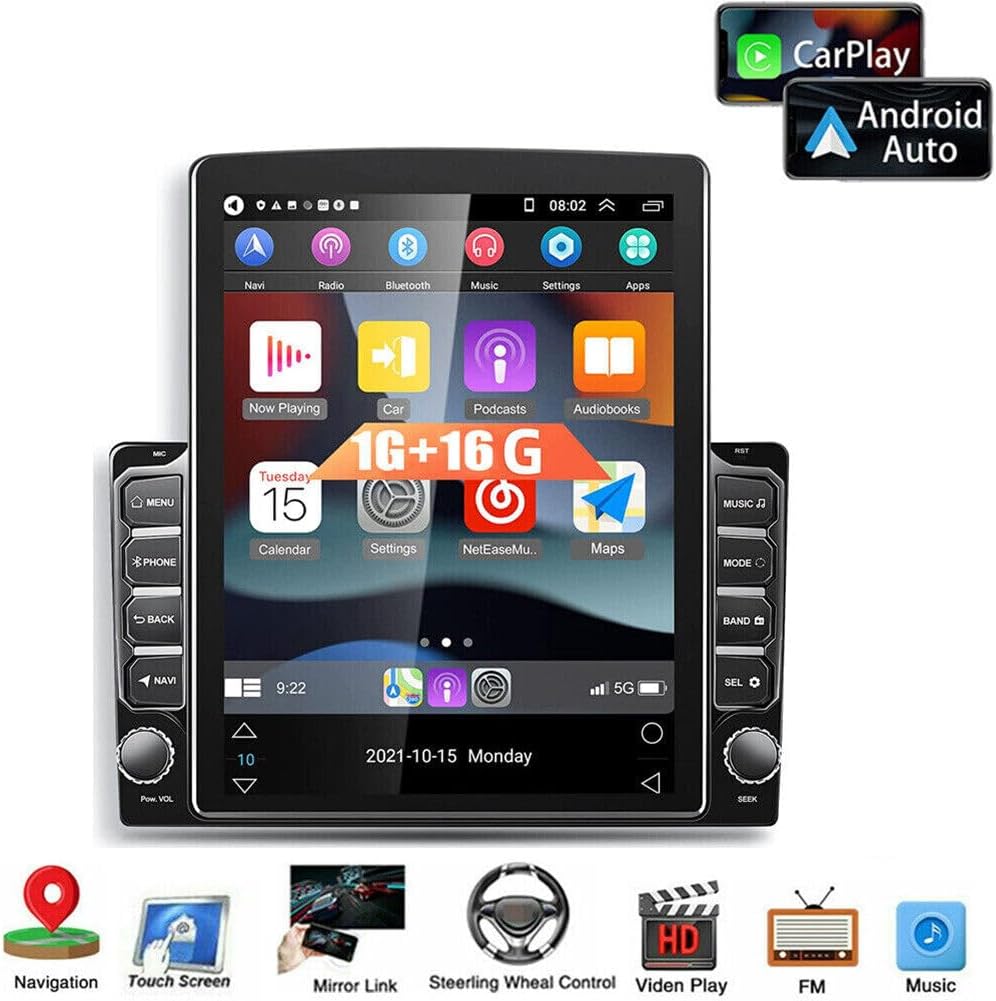
Image: The car stereo screen showing a graphic equalizer display, illustrating the Hi-Fi audio and EQ sound effect capabilities, designed to create a live concert-like sound experience.
4.6 Comandaments al volant
If your vehicle supports steering wheel controls, you can configure them to operate the stereo.
- Go to 'Car Settings' > 'Steering Learn' to program your steering wheel buttons.
- Seguiu les instruccions que apareixen a la pantalla per assignar funcions a cada botó.

Image: The car stereo screen displaying the 'Steering Learn' interface within the car settings, with an arrow pointing to a steering wheel, indicating the functionality to configure steering wheel controls.
4.7 Càmera de marxa enrere
The unit supports AHD signal input for a high-definition rear view camera. When properly connected, the display will automatically switch to the camera view quan el vehicle està en marxa enrere.
- Ensure the backup camera is correctly wired to the 'Camera Input' and the reverse trigger wire.
- Adjust camera settings (if available) in the system settings for optimal view.

Image: The car stereo screen showing a clear, high-definition rear view from a backup camera, complete with parking guidelines, emphasizing the AHD signal input for enhanced safety.
5. Manteniment
Regular maintenance helps ensure the longevity and optimal performance of your car stereo.
- Neteja: Feu servir un drap suau i sec per netejar la pantalla i l'exterior. Per a taques difícils, fregueu lleugeramentamp Es pot utilitzar un drap amb un netejador suau i no abrasiu i, a continuació, eixugar immediatament. Eviteu productes químics agressius.
- Actualitzacions de programari: Periodically check for system updates via Wi-Fi in the 'Settings' menu to ensure you have the latest features and security patches.
- Temperatura: Avoid exposing the unit to extreme temperatures for extended periods. The operating temperature range is -40℃ to 80℃.
6. Solució De Problemes
Si teniu problemes, consulteu els següents problemes i solucions habituals:
- Sense energia:
- Check all power connections (ACC, B+, Ground) and ensure they are secure.
- Verify the vehicle's fuse for the stereo is not blown.
- Assegureu-vos que la bateria del vehicle tingui prou càrrega.
- Sense so:
- Comproveu les connexions del cablejat dels altaveus.
- Ensure the volume is not muted or set to zero.
- Verifiqueu la configuració de la sortida d'àudio al menú del sistema.
- Si s'utilitza extern amplifiers, check their power and connections.
- El GPS no funciona/és inexacte:
- Assegureu-vos que l'antena GPS estigui connectada correctament i muntada en un lloc amb llum clara view del cel.
- Reviseu la configuració del GPS al menú del sistema.
- Verify that map data is installed and up to date.
- Problemes de connectivitat Bluetooth:
- Assegureu-vos que el Bluetooth estigui activat tant a l'estèreo com al telèfon intel·ligent.
- Suprimeix els emparellaments anteriors i intenta tornar a emparellar els dispositius.
- Move the phone closer to the stereo to rule out interference.
- Pantalla tàctil que no respon:
- Perform a soft reset of the unit (refer to the power button instructions or a small reset button if available).
- Assegureu-vos que la pantalla estigui neta i lliure de residus.
Si els problemes persisteixen després d'intentar aquestes solucions, poseu-vos en contacte amb l'atenció al client.
7. Especificacions tècniques
| Nom del producte | Loddery Car Navigation Player |
| Número de model | QA1181X-5974-1602189781 |
| Sistema operatiu | Android 13 |
| Mida de la pantalla | 9.7 polzades |
| Resolució de pantalla | 1024 x 600 |
| Memòria (RAM+ROM) | 2GB RAM + 32GB ROM (as per title, description states 1GB+16GB, refer to product listing for exact configuration) |
| Versió Bluetooth | 4.0 |
| Suport Wi-Fi | Sí |
| Navegació GPS | Mapes fora de línia integrats |
| Enllaç mirall | Android/IOS (Two-way for Android, Unidirectional for iOS) |
| Interfície USB | Doble USB |
| Formats d'àudio | APE/FLAC/WAV/MP3/WMA |
| Formats de vídeo | MKV/RMVB/AVI/MP4/MDV |
| Format d'imatge | PNG/JPEG/JPG/GIF/WBMP/BNP |
| Temperatura de funcionament | -40 ℃ a 80 ℃ |
| Pes de l'article | 3.53 lliures |
| Dimensions del producte | 12.99 x 11.42 x 3.94 polzades |
8. Garantia i Suport
This product is covered by a standard manufacturer's warranty. For specific details regarding warranty duration and terms, please refer to the purchase documentation or contact the seller directly.
For technical support, troubleshooting assistance beyond what is provided in this manual, or warranty claims, please contact the Loddery customer service team or the retailer from whom you purchased the product. Please have your model number (QA1181X-5974-1602189781) and proof of purchase available when contacting support.