
1. Producte acabatview
This Loddery 9-inch Android 13.0 Car Stereo is designed to upgrade the infotainment system in Ford Transit Tourneo Custom vehicles manufactured between 2013 and 2019. It features a high-definition touchscreen, integrated GPS navigation, wireless Carplay and Android Auto, Wi-Fi connectivity, Bluetooth, and support for an AHD backup camera.
The system provides a modern and intuitive interface for enhanced driving experience, offering access to various applications, media playback, and communication features directly from your dashboard.
2. Contingut del paquet
Abans de la instal·lació, comproveu que tots els components que s'enumeren a continuació siguin presents al paquet:
- 1 x Car Android Stereo Radio (Main Unit)
- 2 x cables d’energia
- 1 x Antena GPS
- 1 x AHD Camera
- 1 x cable RCA
- 2 x cables USB
- 1 x micròfon
- 1 caixa Canbus
- 1 x Cable d'entrada de càmera
- 1 x Radio Extension Cable
- 1 x Manual d'instruccions (aquest document)
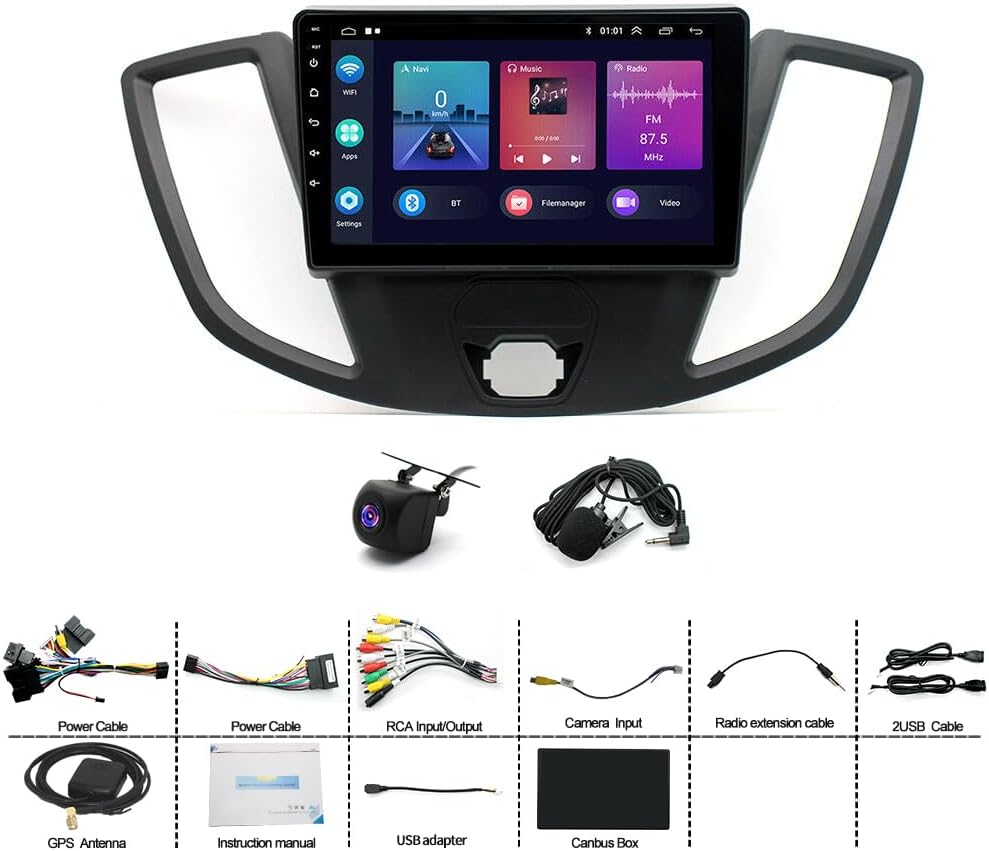
Imatge: Més deview of the Loddery 9-inch Android Car Stereo and its included accessories, such as power cables, GPS antenna, AHD camera, RCA cable, USB cables, microphone, Canbus box, camera input cable, radio extension cable, and the instruction manual.
3. Configuració i instal·lació
Professional installation is recommended for this product. Ensure the vehicle's battery is disconnected before beginning installation to prevent electrical damage.
3.1 Comprovació prèvia a la instal·lació
Compare the new head unit with your vehicle's existing dashboard layout to ensure compatibility. The unit is designed for Ford Transit Tourneo Custom models from 2013-2019.

Image: A visual comparison showing the Ford Transit dashboard before and after the installation of the 9-inch Android Car Stereo, highlighting the integrated fit.
3.2 Connexions de cablejat
Refer to the wiring diagram provided in the separate wiring guide (if applicable) or consult a professional installer. Key connections include:
- Cables d'alimentació: Connect to the vehicle's power supply (constant 12V, accessory 12V, and ground).
- Canbus Box: Integrate the Canbus box as instructed to ensure proper communication with vehicle systems, especially for steering wheel controls.
- Antena GPS: Munteu l'antena GPS en un lloc amb llum clara view del cel, normalment al tauler de control o sota el parabrisa.
- Càmera AHD: Connect the AHD backup camera to the dedicated camera input cable. Ensure proper routing of the cable to the rear of the vehicle.
- Cables USB: Route the USB extension cables to an accessible location for connecting external devices.
- Micròfon: Connect the external microphone for improved voice command and call quality.
- Cables RCA: Use for external audio/video input/output if required.
4. Instruccions de funcionament
4.1 Engegada inicial i configuració del sistema
After installation, reconnect the vehicle's battery. The unit will power on automatically or by pressing the power button. Follow the on-screen prompts for initial setup, including language selection and time zone.
4.2 Carplay sense fil i Android Auto
The system supports both wireless and wired Carplay for iOS devices and Android Auto for Android devices. This feature integrates your smartphone's functions (navigation, calls, messages, music) directly into the car stereo display.
- Connexió sense fil: Enable Bluetooth and Wi-Fi on your smartphone. Pair your phone with the car stereo via Bluetooth. Once paired, the system will prompt you to activate Carplay or Android Auto wirelessly.
- Connexió per cable: Connect your smartphone to one of the USB ports using a high-quality USB cable. The system should automatically detect and launch Carplay or Android Auto.
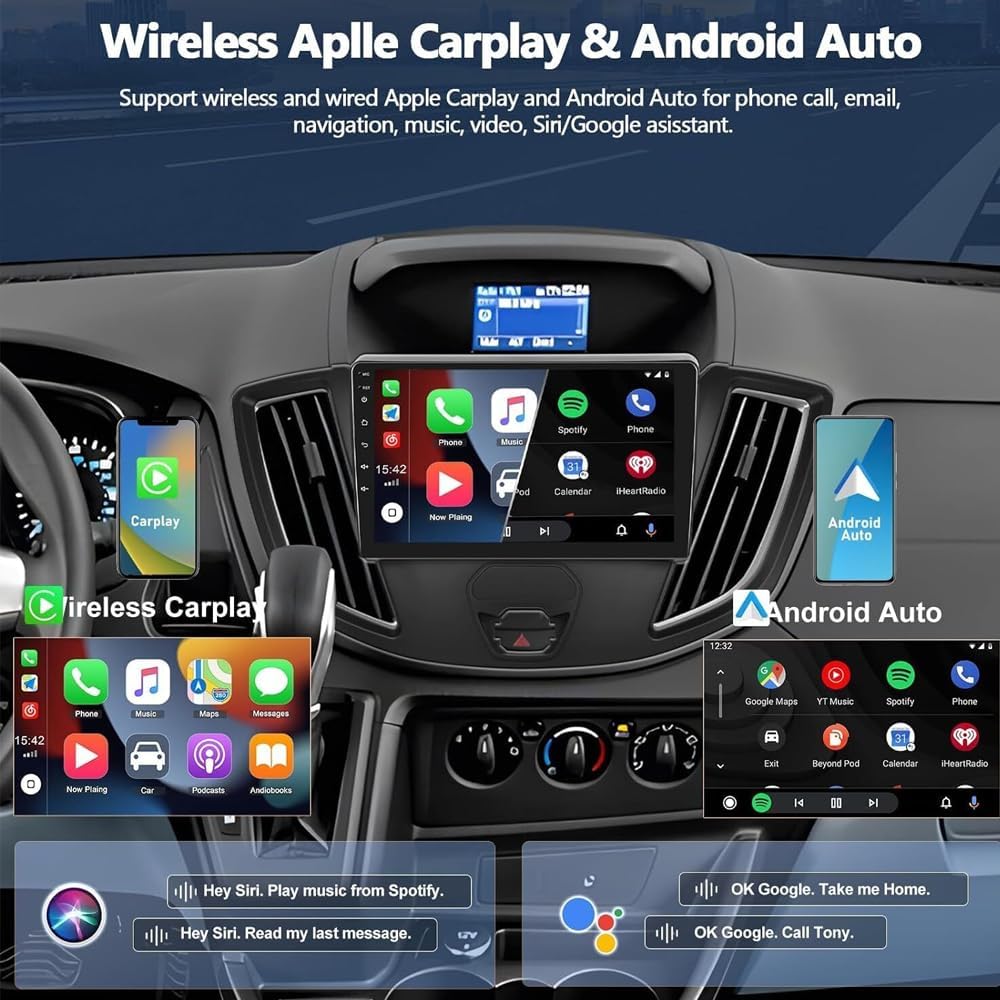
Image: Screenshots demonstrating the user interface for Wireless Apple Carplay and Android Auto, showing integrated phone calls, navigation, music, and voice assistant features on the car stereo display.
4.3 Navegació GPS
The unit has built-in GPS navigation. You can download offline maps directly from the Play Store. For online navigation, connect the unit to Wi-Fi, and use applications like Google Maps.

Image: Visual representation of the GPS navigation interface showing a route on a map, alongside icons indicating Wi-Fi connectivity and various social media/messaging applications available for download.
Connectivitat Wi-Fi 4.4
Connect the stereo to a Wi-Fi hotspot (e.g., from your smartphone) to access online features, download apps from the Play Store, stream music, and use online navigation services.
4.5 AHD Reverse Input (Backup Camera)
When the vehicle is shifted into reverse gear, the system will automatically display the image from the connected AHD backup camera. The camera provides a wide-angle view with night vision capabilities.
4.6 Control del volant
If your vehicle is equipped with steering wheel controls and the Canbus box is correctly installed, you can configure the stereo to respond to these controls. Access the "SteeringWheelKey" settings in the system menu to learn and assign functions to your steering wheel buttons.

Image: Illustration of the AHD reverse input showing a car backing up with a wide-angle camera view, and a diagram explaining how to set up steering wheel controls by assigning functions to buttons on the car stereo interface.
4.7 Media Playback and USB Connectivity
The unit supports various media formats. You can play music from your smartphone via Bluetooth or connect USB drives to the provided USB ports for media playback. The file manager allows you to browse, install, and manage applications.
5. Manteniment
Per garantir la longevitat i el rendiment òptim de l'equip de música del vostre cotxe, seguiu aquestes pautes de manteniment:
- Neteja de la pantalla: Utilitzeu un drap suau i sense pelusa lleugerament dampNetegeu-ho amb aigua o amb un netejador de pantalles dissenyat específicament per a pantalles electròniques. Eviteu productes químics agressius o materials abrasius.
- Actualitzacions de programari: Periodically check for system software updates via the Wi-Fi connection in the system settings. Keeping the software updated ensures optimal performance and access to new features.
- Condicions ambientals: Eviteu exposar la unitat a temperatures extremes, a la llum solar directa durant períodes prolongats o a una humitat excessiva.
6. Solució De Problemes
Si teniu problemes amb l'estèreo del vostre cotxe, consulteu els següents problemes i solucions habituals:
- Sense energia:
- Comproveu totes les connexions del cable d'alimentació.
- Verify the vehicle's fuse for the stereo.
- Assegureu-vos que la bateria del vehicle estigui carregada.
- Sense so:
- Comproveu les connexions dels altaveus.
- Assegureu-vos que el volum no estigui silenciat ni al mínim.
- Verifiqueu la configuració de la sortida d'àudio al menú del sistema.
- El GPS no funciona / és inexacte:
- Ensure the GPS antenna is properly connected and mounted with a clear view del cel.
- Reviseu la configuració del GPS al menú del sistema.
- If using online maps, verify Wi-Fi connectivity.
- Carplay/Android Auto no es connecta:
- Assegureu-vos que el Bluetooth i el Wi-Fi estiguin activats al telèfon.
- Try connecting with a different USB cable (for wired connection).
- Restart both the car stereo and your smartphone.
- Càmera de marxa enrere no es mostra:
- Check the AHD camera and camera input cable connections.
- Assegureu-vos que el vehicle estigui en marxa enrere.
- Verify camera settings in the system menu (CVBS/AHD selection).
Si els problemes persisteixen, poseu-vos en contacte amb l'atenció al client.
7. Especificacions

Imatge: Un front view of the Loddery 9-inch Android Car Stereo display, showing its dimensions (228mm width, 130mm height) and various on-screen icons and physical buttons (MIC, Reset, Power, Menu, Back, Vol+, Vol-).
| Característica | Detall |
|---|---|
| Nom del model | Ford Transit Tourneo Custom 2013-2019 |
| Mida de la pantalla | 9 polzades |
| Sistema operatiu | Android 13.0 |
| Connectivitat | Wi-Fi, Bluetooth, USB |
| Característiques especials | Wireless Carplay, Wireless Android Auto, GPS Navigation, AHD Backup Camera Support, Steering Wheel Control, Microphone, Touchscreen |
| Mode de sortida d'àudio | estèreo |
| Tipus de muntatge | Muntatge al quadre de comandament |
| Idiomes admesos | Chinese, English, French, Italian, Korean, Japanese, Arabic, Spanish, Portuguese, Russian, Turkish, Vietnamese, Hebrew, Polish, German (and more, up to 40 national languages) |
| Pes de l'article | 4.13 lliures |
| Dimensions del paquet | 14.96 x 12.2 x 6.69 polzades |
8. Garantia i Suport
8.1 Informació de la garantia
For specific warranty details and terms, please refer to the warranty card included with your product or contact the manufacturer directly. The warranty typically covers manufacturing defects for a specified period from the date of purchase.
8.2 Atenció al client
If you have any questions regarding the installation, operation, or troubleshooting of your Loddery car stereo, please contact our customer support team. Refer to the contact information provided on the product packaging or the official Loddery weblloc d'assistència.