
1. Producte acabatview
The LEDSONLINE COB 5V USB-powered LED Strip Kit provides efficient and versatile lighting for various indoor applications. This kit features a 6.56ft (2m) COB LED strip with 960 LEDs, offering a dotless, uniform light output at 6000K Pure White. It includes an inline USB controller for basic ON/OFF and dimming functions, and an RF wireless remote control for advanced brightness adjustment, timer settings, and special lighting modes. The high Color Rendering Index (CRI) of 95 ensures accurate color representation, making it suitable for spaces like pantries, kitchens, closets, and cabinets.

Imatge 1.1: acabatview of the LEDSONLINE COB LED Strip Kit, including the LED strip, USB cable with inline controller, and RF remote control.
2. Què hi ha a la caixa
- COB LED Strip Light (6.56ft / 2m)
- USB Cable with Inline Dimmer ON/OFF Switch
- RF Wireless Remote Controller (CR2025 button battery included)

Image 2.1: All components included in the LED Strip Kit: the coiled COB LED strip, the USB power cable with inline controller, and the RF wireless remote.
3. Especificacions del producte
| Número de model | USB Strip Light |
| Tipus de LED | COB (Chip-on-Board) |
| Recompte de LED | 960 LED |
| Temperatura de color | 6000K (blanc pur) |
| Longitud de la tira | 6.56 peus (2 metres) |
| Amplada de la franja | 0.3 polzades (8 mm) |
| Entrada Voltage | 5V DC (USB-powered) |
| Consum d'energia | 10W (5W/meter) |
| Flux lluminós | 800 lúmens |
| CRI (índex de reproducció del color) | 95 |
| Angle del feix | 180 graus |
| Resistència a l'aigua | IP20 (només per a ús interior) |
| Mètode de control | Inline Button Control, RF Remote Control |
| Característiques especials | Dimmable, Timer Function |

Imatge 3.1: Detallada view of the COB LED strip, highlighting the continuous light emission without visible individual LED dots.
4. Informació de seguretat
- Ensure the power source is 5V DC and provides at least 2A current. Using an inadequate power supply may result in dimming or malfunction.
- This product is rated IP20 for indoor use only. Do not expose to water or high humidity.
- Do not bend the LED strip sharply at angles less than 90 degrees to avoid damaging the circuit.
- Mantenir fora de l'abast dels nens.
- Do not stare directly into the illuminated LEDs for extended periods.
5. Guia d'instal·lació
5.1 Preparació de la superfície
Before installation, ensure the mounting surface is clean, dry, and smooth. Dust, oil, or moisture can reduce the adhesive's effectiveness.
5.2 Applying the LED Strip
- Traieu amb cura el suport protector de la cinta adhesiva 3M de la part posterior de la tira LED.
- Press the LED strip firmly onto the desired surface, ensuring good contact along the entire length.
- Avoid repositioning the strip multiple times, as this can weaken the adhesive.

Image 5.1: Demonstrates peeling the protective backing from the adhesive on the LED strip, preparing it for mounting.
5.3 Connexió de potència
- Connect the USB plug of the inline controller cable to a compatible 5V 2A (or higher) USB power adapter (not included) or a USB port on a device.
- Assegureu-vos que la connexió sigui segura.
5.4 Cutting the LED Strip (Optional)
The LED strip can be cut to your desired length at designated cutting marks, typically indicated by a copper pad and a scissor icon. Each cutting unit is approximately 0.39 inches (10mm).
- Only cut along the marked lines to avoid damaging the circuit.
- Once cut, the trimmed section will not be functional unless re-connected with appropriate connectors (not included).

Image 5.2: Close-up of the LED strip showing the designated cutting marks, indicated by copper pads and a scissor icon.
5.5 Vídeo d'instal·lació
Video 5.1: This video demonstrates the connection of the USB power cable to the LED strip and the basic operation of the inline controller and RF remote control.
6. Instruccions de funcionament
6.1 Using the Inline USB Controller
The inline controller on the USB cable provides basic control over the LED strip:
- Botó d'encesa: Press to turn the LED strip ON or OFF.
- Botons de brillantor (+/-): Press to adjust the brightness level. There are 6 levels of dimming.
6.2 Using the RF Wireless Remote Control
The RF remote control offers more comprehensive functions. Ensure the CR2025 battery is correctly installed.

Image 6.1: Layout of the RF Wireless Remote Control, showing buttons for power, brightness, timer, and special modes.
- Botons ON/OFF: Turn the LED strip ON or OFF.
- Ajust de brillantor: Use the sun icon buttons (bright/dim) to increase or decrease the light intensity.
- Mode de llum nocturna: Press the moon icon button for a low-brightness setting suitable for night use.
- Mode de llum de respiració: Press the heart icon button to activate a gentle pulsating light effect.
- Funcions del temporitzador: Set the light to turn off automatically after a specified duration (30 minutes, 1 hour, 2 hours, 3 hours, 4 hours). Press the 'C' button to cancel the timer.

Image 6.2: Close-up of the remote control sensor, which receives signals from the RF remote.
7. Manteniment
- Neteja: Netegeu suaument la tira LED amb un drap sec i suau. No utilitzeu netejadors líquids ni materials abrasius.
- Emmagatzematge: If storing the LED strip, ensure it is coiled loosely and kept in a dry, cool environment away from direct sunlight.
- Manipulació: Avoid excessive bending or twisting of the strip, especially near connection points.
8. Solució De Problemes
- LED Strip Not Turning On:
- Check if the USB power cable is securely connected to a 5V 2A (or higher) power source.
- Assegureu-vos que la font d'alimentació estigui activa.
- Verify that the ON button on either the inline controller or the RF remote has been pressed.
- LED Strip is Dim:
- Adjust the brightness using the '+' button on the inline controller or the bright sun icon on the RF remote.
- Ensure your USB power source provides sufficient current (at least 2A).
- RF Remote Not Responding:
- Check if the CR2025 battery in the remote is correctly inserted and has sufficient charge. Replace if necessary.
- Assegureu-vos que no hi hagi obstacles entre el comandament a distància i el receptor USB.
- Il·luminació inconsistent:
- Inspect the LED strip for any physical damage or sharp bends.
- Assegureu-vos que totes les connexions siguin fermes.
9. Garantia i Suport
This LEDSONLINE product comes with a Garantia del fabricant de 2 anys des de la data de compra. Aquesta garantia cobreix els defectes de materials i de mà d'obra en ús normal.
For technical support, warranty claims, or further assistance, please visit the official LEDSONLINE store or contact customer service through the platform where you purchased the product.
LEDSONLINE Store: https://www.amazon.com/stores/LEDSONLINE/page/1DACABEE-1836-47BE-9B58-C3E20FF3F1FE
10. Aplicació Examples
The flexible and dotless design of this COB LED strip makes it ideal for various accent and task lighting applications:
- Under-cabinet lighting in kitchens
- Pantry and closet illumination
- Desk and workstation lighting
- TV backlight for reduced eye strain
- Decorative lighting for shelves and displays
- DIY lighting projects
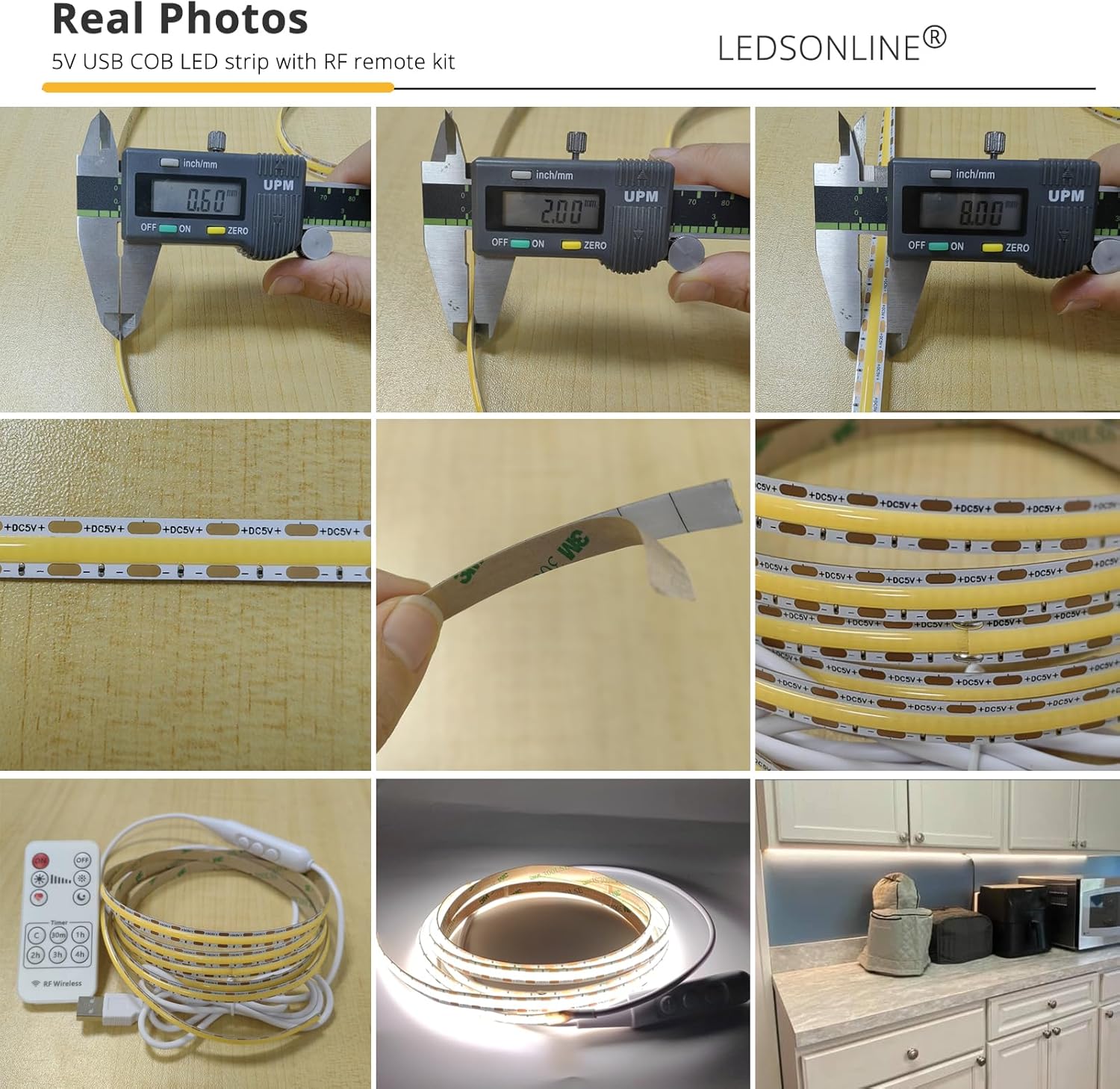
Imatge 10.1: Ex.ample of the LED strip installed under a kitchen cabinet, providing bright and uniform task lighting.

Image 10.2: Collage showing the LED strip used in various settings, including kitchen, cabinet, and DIY projects.