1. Introducció
Thank you for choosing the TD Systems 24-inch Smart TV. This television combines a compact design with advanced smart features, powered by Google TV and Android 11. It offers a high-definition viewing experience, integrated digital tuners, and a wide range of connectivity options to enhance your entertainment.
This manual provides essential information for setting up, operating, and maintaining your new television. Please read it thoroughly before use to ensure proper functionality and safety.
2. Informació de seguretat
Observeu sempre les següents precaucions de seguretat per evitar descàrregues elèctriques, incendis o danys al dispositiu:
- No exposeu el televisor a la pluja o la humitat.
- No bloquejar les obertures de ventilació.
- Assegureu-vos que el cable d'alimentació no estigui pessigat ni trepitjat.
- Desconnecteu l'endoll durant tempestes amb llamps o quan no l'utilitzeu durant períodes prolongats.
- Demaneu tot el servei a personal de servei qualificat.
- Mantingueu les piles fora de l'abast dels nens.
3. Contingut del paquet
Verifiqueu que tots els elements siguin presents a la caixa:
- TD Systems 24-inch Smart TV
- Control remot
- 2 piles AAA (per al comandament a distància)
- 2 x Legs (Left, Right)
- Manual d'usuari (aquest document)

Image: The TD Systems 24-inch Smart TV, showcasing its sleek design and included stand.
4. Configuració
4.1 Col·locació del suport
- Carefully place the TV screen-down on a soft, flat surface to prevent scratches.
- Identify the left and right legs.
- Align each leg with the corresponding screw holes on the bottom of the TV.
- Secure each leg using the provided screws. Do not overtighten.
4.2 Connexió de potència
Connecteu el cable d'alimentació a l'entrada d'alimentació del televisor i després a una presa de corrent. Assegureu-vos que la presa de corrent sigui fàcilment accessible.
4.3 Encès inicial
Press the power button on the TV or the remote control. Follow the on-screen instructions to complete the initial setup, including language selection, network connection, and channel scanning.

Image: The 24-inch TD Systems Smart TV seamlessly integrated into a modern kitchen environment, demonstrating its compact size and versatile placement options.

Image: Detailed dimensions of the TD Systems 24-inch Smart TV, including width, height, and depth, useful for planning placement.
5. Instruccions de funcionament
5.1 Control remotview
El comandament a distància inclòs us permet navegar per les funcions del televisor. Introduïu les 2 piles AAA al comandament a distància, assegurant-vos de la polaritat correcta.

Image: The remote control for the TD Systems Smart TV, highlighting the dedicated buttons for popular streaming services and the voice assistant.
5.2 Funcions bàsiques
- Potència: Premeu el botó Poder botó per encendre o apagar el televisor.
- Volum: Utilitza el Volum +/- botons per ajustar el nivell de so.
- Canal: Utilitza el Canal +/- botons per canviar de canal.
- Entrada: Premeu el botó Entrada button to select different input sources (HDMI, AV, etc.).
- Navegació: Use the directional Fletxa botons i OK botó per navegar pels menús.
6. Connectivitat
Your TD Systems Smart TV offers a variety of ports for connecting external devices:
- HDMI (x2): Per connectar dispositius d'alta definició com ara reproductors de Blu-ray, consoles de jocs o descodificadors.
- USB: Per connectar dispositius d'emmagatzematge USB per reproduir contingut multimèdia files.
- AV Composite Input: Per connectar dispositius antics mitjançant cables RCA.
- Sortida d'auriculars: Per connectar auriculars o altaveus externs.
- Sortida d'àudio digital òptic: For connecting to a soundbar or home theater system for high-quality audio.
- CI+ Port: For inserting a Conditional Access Module (CAM) to access encrypted channels.
- Ethernet (RJ45): Per a una connexió a Internet per cable.
- Wi-Fi: Per a la connexió a Internet sense fil.
- Bluetooth: For connecting wireless accessories like headphones or speakers.

Image: A visual representation of the various input and output ports available on the TD Systems Smart TV, including HDMI, USB, DVB-T2/C/S2, AV, Optical, and Headphone Jack.
7. Funcions de Smart TV
Your TD Systems Smart TV runs on Android 11 with Google TV, providing a personalized and intuitive user experience.
7.1 Interfície de Google TV
Google TV organizes your favorite content from various streaming services into one central hub. It offers personalized recommendations based on your viewd'hàbits.

Image: The vibrant Google TV interface displayed on the TD Systems Smart TV, showing various streaming app icons and content recommendations.
7.2 Supported Applications
Access a wide range of popular streaming applications directly from your TV, including:
- YouTube
- Netflix
- Disney+
- HBO Max
- Prime Video
You can download thousands of additional applications from the Google Play Store.

Image: The Google TV ecosystem on the TD Systems Smart TV, illustrating access to over 5000 apps via Google Play, including popular streaming services.
7.3 Control per veu amb l'Assistent de Google
Use your voice to control the TV, search for content, get answers, and manage smart home devices. Simply press the Google Assistant button on your remote and speak your command.

Image: The TD Systems remote control with a microphone icon and sound waves, demonstrating the voice control capability powered by Google Assistant.
7.4 Chromecast integrat
Easily cast movies, shows, photos, and more from your phone, tablet, or laptop directly to your TV screen using the built-in Chromecast feature.
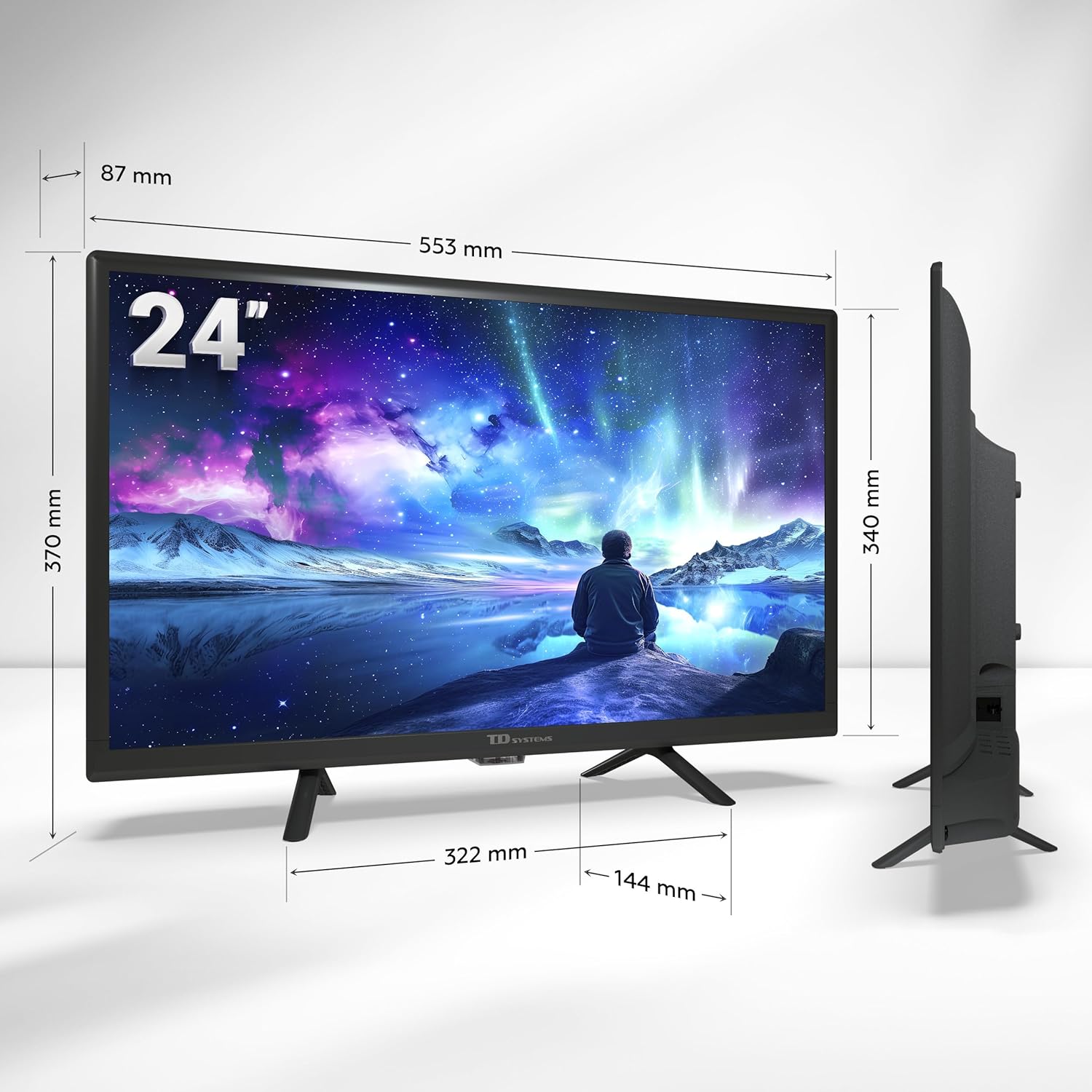
Image: A smartphone displaying content being wirelessly cast to the TD Systems Smart TV, illustrating the Chromecast built-in functionality.
8. Manteniment
Proper care ensures the longevity of your TV:
- Neteja de pantalla: Netegeu suaument la pantalla amb un drap suau i sense borrissol. Per a les marques difícils, utilitzeu una solució de neteja específica per a pantalles aplicada al drap, no directament a la pantalla.
- Neteja d'armaris: Netegeu el moble del televisor amb un drap suau i sec. No utilitzeu productes de neteja abrasius ni dissolvents.
- Ventilació: Assegureu-vos que les obertures de ventilació de la part posterior del televisor no estiguin bloquejades per evitar el sobreescalfament.
- Cable d'alimentació: Reviseu regularment el cable d'alimentació per si hi ha algun dany.
9. Solució De Problemes
Si teniu problemes amb el televisor, consulteu els problemes i solucions més comuns següents:
| Problema | Causa possible | Solució |
|---|---|---|
| Sense poder | Cable d'alimentació desconnectat; no hi ha corrent a la presa de corrent. | Comproveu la connexió del cable d'alimentació; proveu la presa de corrent amb un altre dispositiu. |
| No hi ha imatge, però hi ha so | Font d'entrada incorrecta seleccionada; problema amb el dispositiu extern. | Premeu el botó Entrada button to select the correct source; check external device connection. |
| No hi ha so, però hi ha imatge | Volum silenciat o massa baix; problema amb el sistema d'àudio extern. | Activa el volum o augmenta el nivell; comprova les connexions a dispositius d'àudio externs. |
| No es pot connectar a la Wi-Fi | Contrasenya incorrecta; problema amb el router; televisor massa lluny del router. | Re-enter password; restart router; move TV closer to router or use Ethernet. |
| El control remot no funciona | Piles esgotades o incorrectament inserides; obstrucció. | Canvieu les piles; assegureu-vos de la polaritat correcta; elimineu les obstruccions entre el comandament a distància i el televisor. |
Si el problema persisteix després de provar aquestes solucions, poseu-vos en contacte amb l'atenció al client.
10. Especificacions
| Característica | Descripció |
|---|---|
| Marca | Sistemes TD |
| Número de model | PRIME24C19GLE |
| Mida de la pantalla | 24 polzades (60 cm) |
| Tecnologia de visualització | LED |
| Resolució | 1366 x 768 píxels (HD) |
| Freqüència d'actualització | 60 Hz |
| Sistema operatiu | Android TV (Android 11) with Google TV |
| Àudio | Dolby Digital Plus |
| Sintonitzadors | DVB-T2/C/S2 (Digital Terrestrial, Cable, Satellite) |
| Connectivitat | 2x HDMI, 1x USB, AV Composite, Headphone Out, Optical Digital Audio Out, CI+, Ethernet (RJ45), Wi-Fi, Bluetooth |
| Característiques especials | Google Assistant (Voice Control), Chromecast Built-in, Access to Google Play Store |
| Power Consumption (Energy Efficiency) | Classe E |
| Components inclosos | TV, Remote Control, 2x AAA Batteries, 2x Legs |
11. Garantia i Suport
11.1 Garantia del fabricant
This TD Systems Smart TV comes with a Garantia del fabricant de 24 mesos des de la data de compra. Aquesta garantia cobreix els defectes de materials i de fabricació en condicions d'ús normal. Conserveu el comprovant de compra per a reclamacions de garantia.
11.2 Atenció al client
TD Systems is committed to providing high-quality products and exceptional customer service. If you have any questions, require technical assistance, or need to report an issue, please contact our support team. Your satisfaction is our priority.
Image: A customer service representative, symbolizing the dedicated support available for TD Systems products.