
1. Introducció
The Getac K120 is a rugged 2-in-1 laptop designed for demanding environments. It combines the versatility of a tablet with the performance of a laptop, featuring a 12.5-inch Full HD touchscreen, an Intel Core i5-8250U processor, 16GB of RAM, and a 512GB SSD. This device operates on Windows 11 Pro and is built to withstand challenging conditions, making it suitable for various professional applications.
2. Característiques clau
- Disseny robust: Built to MIL-STD 810G standards, capable of withstanding 6-foot drops, and features IP65 ingress protection against dust and water.
- Versatilitat 2 en 1: Functions as both a laptop with a detachable full-size backlit keyboard and a standalone tablet.
- Alt rendiment: Powered by an Intel Core i5-8250U processor, 16GB DDR4 RAM, and a 512GB SSD for fast boot-up and efficient multitasking.
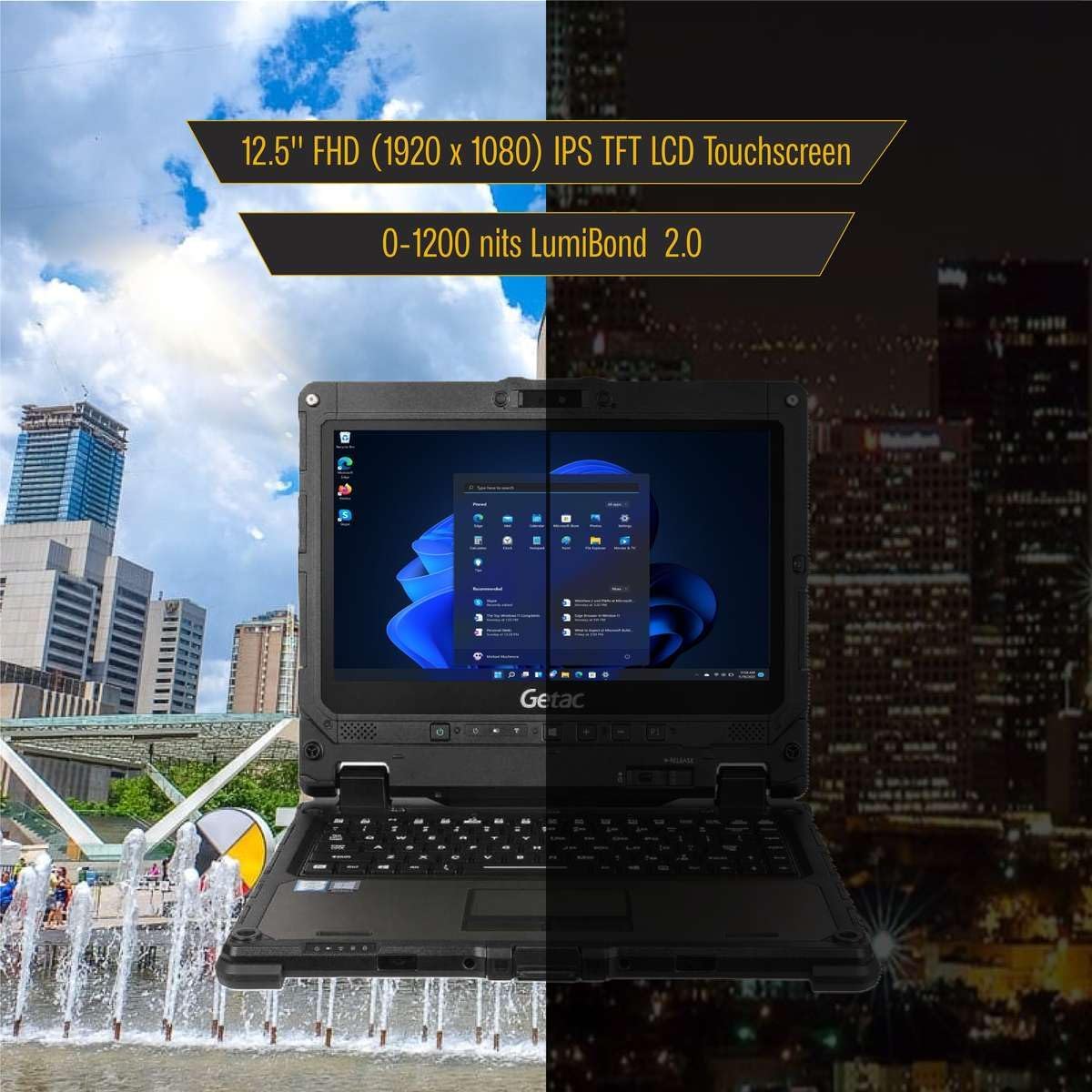
- Pantalla vibrant: 12.5-inch Full HD (1920x1080) touchscreen with LumiBond 2.0 technology, supporting wet touch and glove operation.
- Sistema operatiu: Pre-installed with Windows 11 Pro 64-bit, offering enhanced security and management features with multi-language support.
- Integrated Cameras: Equipped with a 2MP front camera and an 8MP rear camera with LED flash.
- Bateries dobles: Features two Li-Ion batteries, supporting hot-swappable functionality for extended operation.


3. Configuració
- Desembalatge: Carefully remove the Getac K120 and all accessories from the packaging.
- Càrrec inicial: Connect the power adapter to the DC-in jack on either the tablet or the keyboard base and plug it into a power outlet. Allow the device to charge fully before first use.
- Encès: Premeu el botó d'engegada per encendre el dispositiu.
- Configuració de Windows: Seguiu les instruccions que apareixen a la pantalla per completar la configuració del Windows 11 Pro, inclosa la selecció d'idioma, la connexió de xarxa i la creació d'un compte d'usuari.
- Keyboard Attachment (Optional): To use in laptop mode, align the tablet with the keyboard base and gently press until it clicks securely into place. Ensure the release button is engaged.
4. Instruccions de funcionament
4.1. Mode tauleta
- Detaching the Tablet: Press the release button located on the keyboard base to separate the tablet from the keyboard.
- Navegació per pantalla tàctil: Use your finger or a compatible stylus for navigation, tapping, swiping, and pinch-to-zoom gestures. The display supports wet touch and glove input.
- Teclat en pantalla: When in tablet mode, the on-screen keyboard will automatically appear when text input is required.
4.2. Laptop Mode
- Col·locació del teclat: Align the tablet with the keyboard base and press firmly until it locks.
- Teclat i Touchpad: Use the physical keyboard for typing and the integrated touchpad for cursor control. The keyboard is backlit for low-light conditions.
4.3. Gestió d'energia
- Durada de la bateria: The device features two Li-Ion batteries. Monitor battery levels through the Windows taskbar.
- Hot-Swappable Batteries: Batteries can be replaced without powering down the device, ensuring continuous operation.
- Sleep/Hibernate: Use Windows power settings to configure sleep or hibernate modes to conserve battery life.

5. Ports i connectivitat
5.1. Tablet Ports
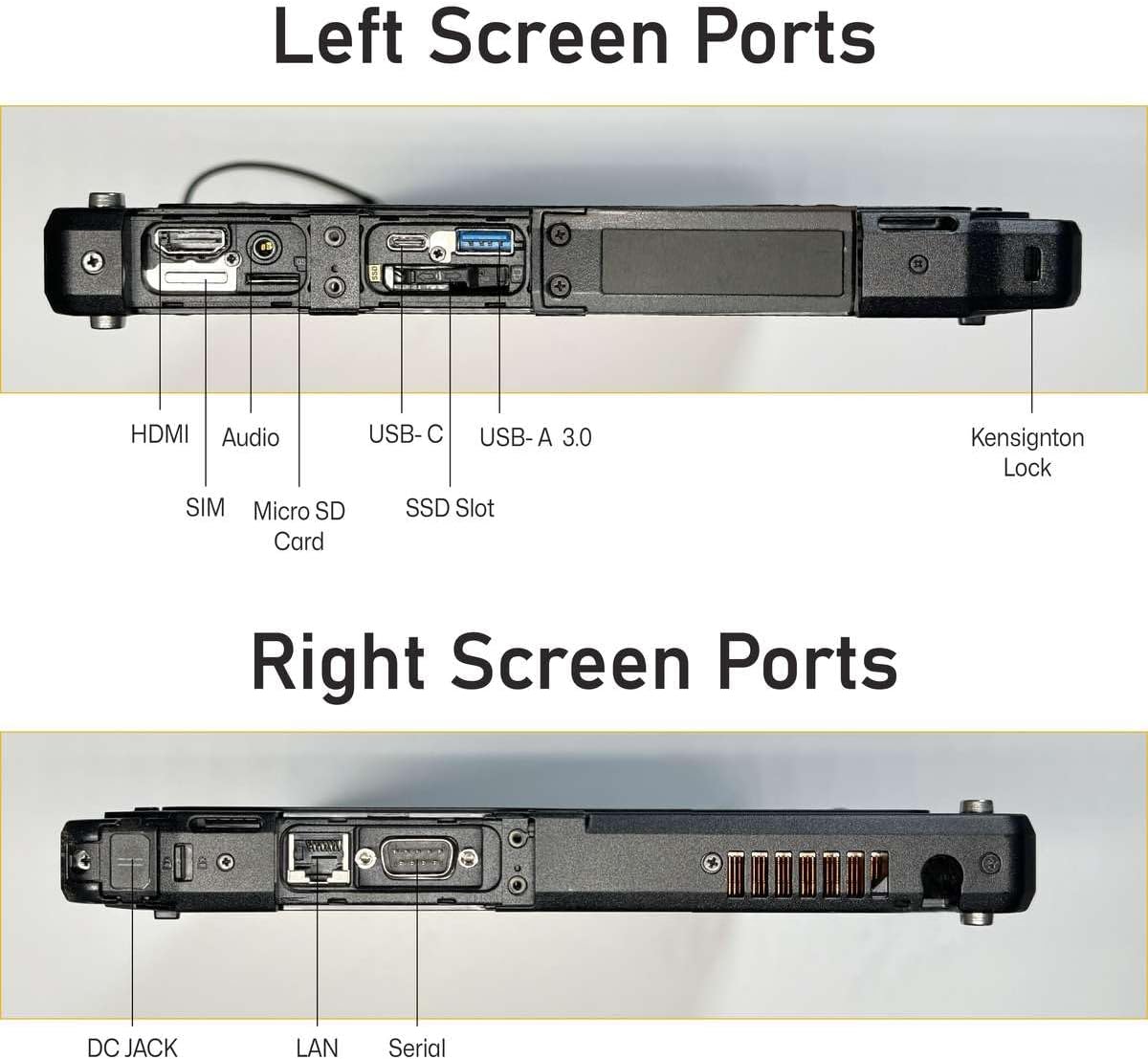
- DC in Jack x 1
- USB 3.0 x 1
- USB 3.1 Gen 1 Type-C x 1
- LAN (RJ-45) x 1
- HDMI x 1
- MicroSD slot x 1
- Connector d'acoblament x 2
- Headphone out / mic-in combo x 1
- Port sèrie
- 4G LTE (EM7511)
5.2. Keyboard Ports
- DC in Jack x 1
- USB 3.0 x 3
- LAN (RJ-45) x 1
- HDMI x 1
- Serial port (9-pin; D-sub) x 1
- SDXC slot x 1
- VGA x 1

6. Optional Features
The Getac K120 offers various configurable options to enhance functionality:
- Barcode Reader (BCR)
- Second USB 2.0 port
- True Serial port
- Lector de targetes intel·ligents (SCR)
- Contactless Smart Card Reader (Contactless SCR)
- Fingerprint Reader (FPR)
- Xarxa d'àrea àmplia sense fil (WWAN)
- Sistema de posicionament global (GPS)
These options are typically configured at the time of purchase and may vary by model or region.
7. Manteniment
- Neteja: Utilitzeu un suau, damp cloth to clean the screen and exterior. Avoid harsh chemicals or abrasive materials. Ensure all port covers are securely closed before cleaning with liquids.
- Cura de la bateria: For optimal battery longevity, avoid extreme temperatures. If storing the device for an extended period, ensure batteries are charged to approximately 50%.
- Actualitzacions de programari: Regularly check for and install Windows updates and driver updates to maintain performance and security.
- Protecció del medi ambient: While rugged, avoid intentionally exposing the device to extreme conditions beyond its specified ratings (MIL-STD 810G, IP65). Ensure all port covers are sealed when operating in dusty or wet environments.
8. Solució De Problemes
- El dispositiu no s'encén: Assegureu-vos que el dispositiu estigui carregat. Connecteu l'adaptador de corrent i espereu uns minuts abans d'intentar tornar-lo a engegar.
- Pantalla tàctil que no respon: Restart the device. If the issue persists, check for driver updates. Ensure the screen is clean and free of debris.
- Problemes de connectivitat (Wi-Fi/4G LTE): Verify that Wi-Fi or 4G LTE is enabled in Windows settings. Check network signal strength. For 4G LTE, ensure a valid SIM card is inserted and activated.
- El teclat no respon: Ensure the tablet is securely docked to the keyboard base. Restart the device.
- Rendiment lent: Close unnecessary applications. Check for available Windows updates. Ensure sufficient free space on the SSD.
9. Especificacions
| Característica | Especificació |
|---|---|
| Mida de la pantalla de peu | 12.5 polzades |
| Resolució de pantalla | 1920 x 1080 píxels (FHD) |
| Processador | Intel Core i5-8250U (1.6 GHz to 3.40 GHz) |
| RAM | 16 GB DDR4 |
| Disc dur | SSD de 512 GB |
| Coprocessador gràfic | Intel HD Graphics 520 |
| Sistema operatiu | Windows 11 Pro |
| Pes de l'article | 9.28 lliures |
| Dimensions del producte | 12 x 1 x 8 polzades |
| Color | Negre |
| Característica especial | Resistent a vessaments |
10. Garantia i Suport
This Getac K120 device is offered as an Amazon Renewed product. It comes with a 90-day return policy, allowing for refunds or replacements if issues arise within this period.
Additionally, various protection plans are available for purchase to extend coverage beyond the initial return period. Please refer to the product listing for details on available 2-Year, 4-Year, or Complete Protect plans.
For technical support or warranty claims, please contact the seller or refer to the Amazon Renewed program guidelines.