
1. Producte acabatview
This MekedeTech Android car stereo is designed as a direct upgrade for Ford Mondeo models manufactured between 2010 and 2014. It features a 10-inch IPS touch screen, an 8-core CPU, 2GB RAM, and 32GB ROM, providing a responsive and feature-rich in-car entertainment and navigation experience. Key functionalities include built-in 4G LTE, Wi-Fi, wireless CarPlay, and Android Auto.

Imatge 1.1: Comparison of the Ford Mondeo dashboard before and after installation of the MekedeTech Android Car Stereo. The image shows the original radio unit replaced by the larger 10-inch touch screen display, seamlessly integrated into the vehicle's interior.
2. Configuració i instal·lació
The MekedeTech Android car stereo is designed for a plug-and-play installation in compatible Ford Mondeo vehicles (2010-2014). All necessary accessories for installation, including the dash kit, power cable, RCA cable, reversing camera cable, and USB cables, are included.
2.1. Llista de verificació prèvia a la instal·lació
- Assegureu-vos que el vehicle estigui apagat i que la bateria estigui desconnectada abans de començar la instal·lació.
- Verify all included accessories match the packing list.
- Familiaritzeu-vos amb el procés de desmuntatge del tauler de control del vostre vehicle.
2.2. Passos d'instal·lació
- Traieu amb cura la unitat estèreo del cotxe original i el revestiment del tauler de control.
- Connect the provided power cable, RCA cables, and other necessary wiring harnesses to the new Android stereo and the vehicle's existing connectors.
- If installing a reversing camera, route the camera cable to the rear of the vehicle and connect it to the stereo.
- Secure the new MekedeTech Android stereo into the dashboard opening.
- Reconnect the vehicle's battery and test the unit before fully reassembling the dashboard trim.
2.3. Cooling Fan Setup
The unit includes a cooling fan to manage internal temperatures, especially during prolonged use or in hot environments. Proper setup ensures optimal performance and longevity.

Imatge 2.1: This image illustrates the internal components including the Octa-Core CPU, 2GB RAM, and 32GB ROM. It also provides a visual guide for connecting the cooling fan and accessing the device settings to activate it, showing temperature comparisons with and without the fan.
- Connectar: Ensure the cooling fan cable is securely connected to the designated port on the stereo unit.
- Configuració: Navega a Dispositiu > So in the system settings.
- Device - AMP ACTIVITAT: Locate and enable the 'AMP ON' option within the device settings.
- The cooling fan will start operating automatically when needed.
3. Instruccions de funcionament
3.1. Funcions bàsiques
- Encès/apagat: Premeu i manteniu premut el botó d'engegada de la unitat o feu servir el contacte del vehicle.
- Pantalla tàctil: Navigate the Android interface by tapping, swiping, and pinching on the 10-inch IPS touch screen.
- Control de volum: Adjust volume using the physical buttons on the unit or the steering wheel controls.
- Pantalla d'inici: Access various applications such as Navigation, Radio, Music, Video, and Settings from the main home screen.
3.2. Connectivitat
- Wi-Fi: Connect to a Wi-Fi hotspot (e.g., from your smartphone) to access online features, download apps, and update software. Go to Configuració > Xarxa i Internet > Wi-Fi.
- 4G LTE: Insert a 4G SIM card into the designated slot to enable direct internet access without needing a Wi-Fi hotspot. The unit supports two SIM card slots: one on the back of the main unit and one on the RCA cable.
- Bluetooth 5.0: Pair your smartphone for hands-free calling and audio streaming. Go to Configuració > Dispositius connectats > Vincula un dispositiu nou.
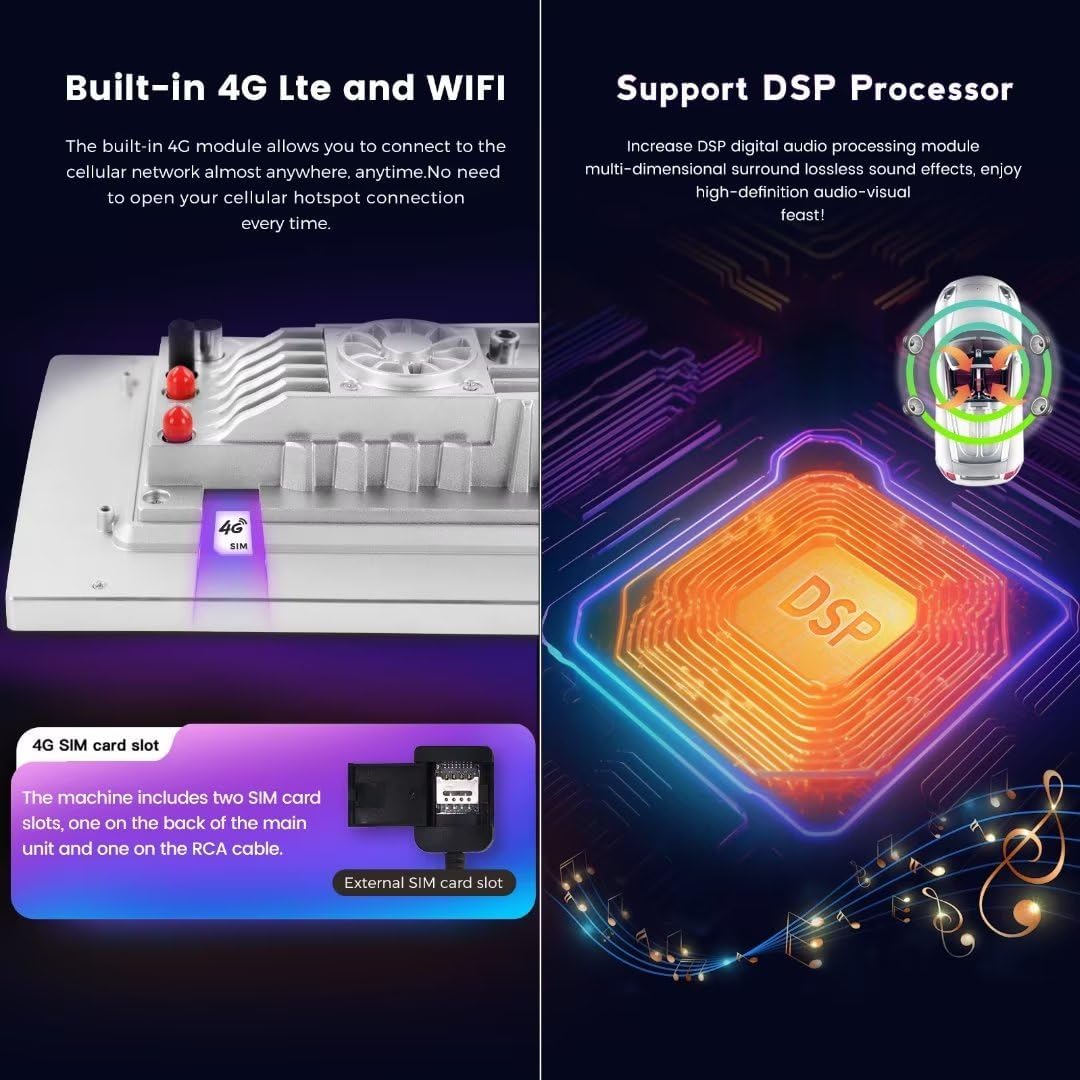
Imatge 3.1: This image highlights the built-in 4G LTE and Wi-Fi capabilities, showing the location of the SIM card slots. It also visually represents the Digital Sound Processor (DSP) for enhanced audio quality.
3.3. CarPlay sense fil i Android Auto
The unit features built-in wireless CarPlay and Android Auto, allowing seamless integration with your smartphone for navigation, music, messages, and more.

Imatge 3.2: This image displays the user interface for both wireless CarPlay (iOS system) and wireless Android Auto (Android system). It provides step-by-step instructions for connecting each system via Bluetooth and the 'Car Link' application.
For Wireless CarPlay (iOS System):
- Connect your iPhone to the stereo via Bluetooth.
- Obriu el "Car Link" application on the stereo.
- Wait for the connection to establish. (CarPlay can also be connected via USB cable).
For Wireless Android Auto (Android System):
- Connect your Android phone to the stereo via Bluetooth.
- Obriu el "Car Link" application on the stereo.
- Wait for the connection to establish. (Android Auto can also be connected via USB cable).
3.4. Control del volant
The unit retains all original steering wheel control functions, allowing you to easily switch songs, channels, and adjust volume without taking your hands off the steering wheel. This enhances convenience and driving safety.
3.5. Navegació GPS
The stereo has built-in GPS navigation and supports various map applications. Ensure you have downloaded or updated your preferred maps for offline use, or use online maps via Wi-Fi or 4G LTE connection.
4. Manteniment
- Neteja de pantalla: Utilitzeu un drap suau i sense pelusa lleugerament dampNetegeu-ho amb aigua o amb un netejador de pantalles dissenyat específicament per a pantalles electròniques. Eviteu productes químics agressius o materials abrasius.
- Actualitzacions de programari: Comproveu periòdicament si hi ha actualitzacions del programari del sistema via Wi-Fi per garantir un rendiment òptim i l'accés a les noves funcions.
- Atenció general: Eviteu exposar la unitat a temperatures extremes, a la llum solar directa durant períodes prolongats o a una humitat excessiva.
5. Solució De Problemes
- La unitat no s'encén:
- Check all power connections and ensure they are securely seated.
- Verify the vehicle's battery is connected and charged.
- Check the vehicle's fuse box for any blown fuses related to the stereo.
- Sense so:
- Assegureu-vos que el volum no estigui silenciat ni al mínim.
- Comproveu les connexions dels altaveus.
- Verify audio output settings in the system.
- GPS signal lost or inaccurate:
- Assegureu-vos que l'antena GPS estigui instal·lada correctament i que tingui una vista clara view del cel.
- Update map data if necessary.
- CarPlay/Android Auto no es connecta:
- Assegureu-vos que el Bluetooth estigui activat tant a l'estèreo com al telèfon intel·ligent.
- Verify the "Car Link" app is open on the stereo.
- Try restarting both the stereo and your smartphone.
- Assegureu-vos que el sistema operatiu del vostre telèfon estigui actualitzat.
- La pantalla tàctil no respon:
- Perform a soft reset of the unit (refer to the device settings for a reset option or power cycle the unit).
- Assegureu-vos que la pantalla estigui neta i lliure de residus.
6. Especificacions
| Característica | Descripció |
|---|---|
| Marca | MekedeTech |
| Model | 8-Core 2+32G |
| Mida de la pantalla | 10 polzades |
| Sistema operatiu | OS Android 13 |
| CPU | 8-Core A53 1.8GHz (Octa Core, up to 1.6GHz, 8*Cortex A55 (28NM)) |
| Memòria | 2 GB de RAM, 32 GB de ROM |
| Resolució de pantalla | 1280*720 IPS Touch Screen |
| Potència de sortida | 4 * 50W |
| Connectivitat | Built-in 4G LTE, Wi-Fi Module, Bluetooth 5.0 |
| Característiques especials | Wireless CarPlay, Wired Android Auto, Built-in DSP Sound System, GPS Navigation, Steering Wheel Control Support |
| Suport de format d'àudio | APE/FLAC/WAV/MP3/WMA, etc. |
| Suport de format de vídeo | MKV/RMVB/AVI/MP4/MDV, etc. |
| Suport de format d'imatge | PNG/JPEG/JPG/GIF/WBMP/BNP, etc. |
| Entrada de la interfície humana | Botons, pantalla tàctil |
7. Garantia i Suport
7.1. Informació de la garantia
This MekedeTech Android Car Stereo comes with a 1 anys de garantia des de la data de compra. Aquesta garantia cobreix defectes de fabricació i avaries en condicions d'ús normal. Conserveu el comprovant de compra per a reclamacions de garantia.
The warranty does not cover damage caused by improper installation, misuse, accidents, unauthorized repairs, or normal wear and tear.
7.2. Atenció al client
For technical assistance, troubleshooting, or warranty inquiries, please contact MekedeTech customer support. Refer to the contact information provided with your product packaging or visit the official MekedeTech weblloc per obtenir detalls de suport.
When contacting support, please have your product model (8-Core 2+32G) and purchase details ready to expedite the process.