
ODK 801001-UK
ODK Gaming Desk User Manual
Model: 801001-UK
Marca: ODK
1. Introducció
Thank you for choosing the ODK Gaming Desk. This manual provides detailed instructions for the assembly, operation, maintenance, and troubleshooting of your new gaming desk. Please read this manual thoroughly before assembly and use to ensure proper function and safety. This desk is designed to enhance your gaming experience with integrated LED lighting and convenient power outlets.

Figure 1.1: ODK Gaming Desk Overview
2. Característiques del producte
- Llums LED incorporades: Equipped with innovative light strips offering 10 colors and 20 dynamic modes, controlled by a reversible remote for an immersive gaming atmosphere.
- Presa de corrent integrada: Features 2 AC sockets and 2 USB charging ports (5V/2A) with a 200 cm power cord, allowing convenient charging of devices directly from your desk.
- Double Z Frame Design: Provides enhanced stability and a modern aesthetic.
- Split-board Structure: Designed with a technology-forward look, this structure also reserves space for monitor arm installation, with a thickened middle section to support the weight of a monitor arm and screen.
- Accessoris convenients: Includes a sturdy metal headphone hook and a cup holder for organized and clutter-free gaming.
- Mida compacta: The 100 cm model is ideal for smaller rooms, maximizing space efficiency.
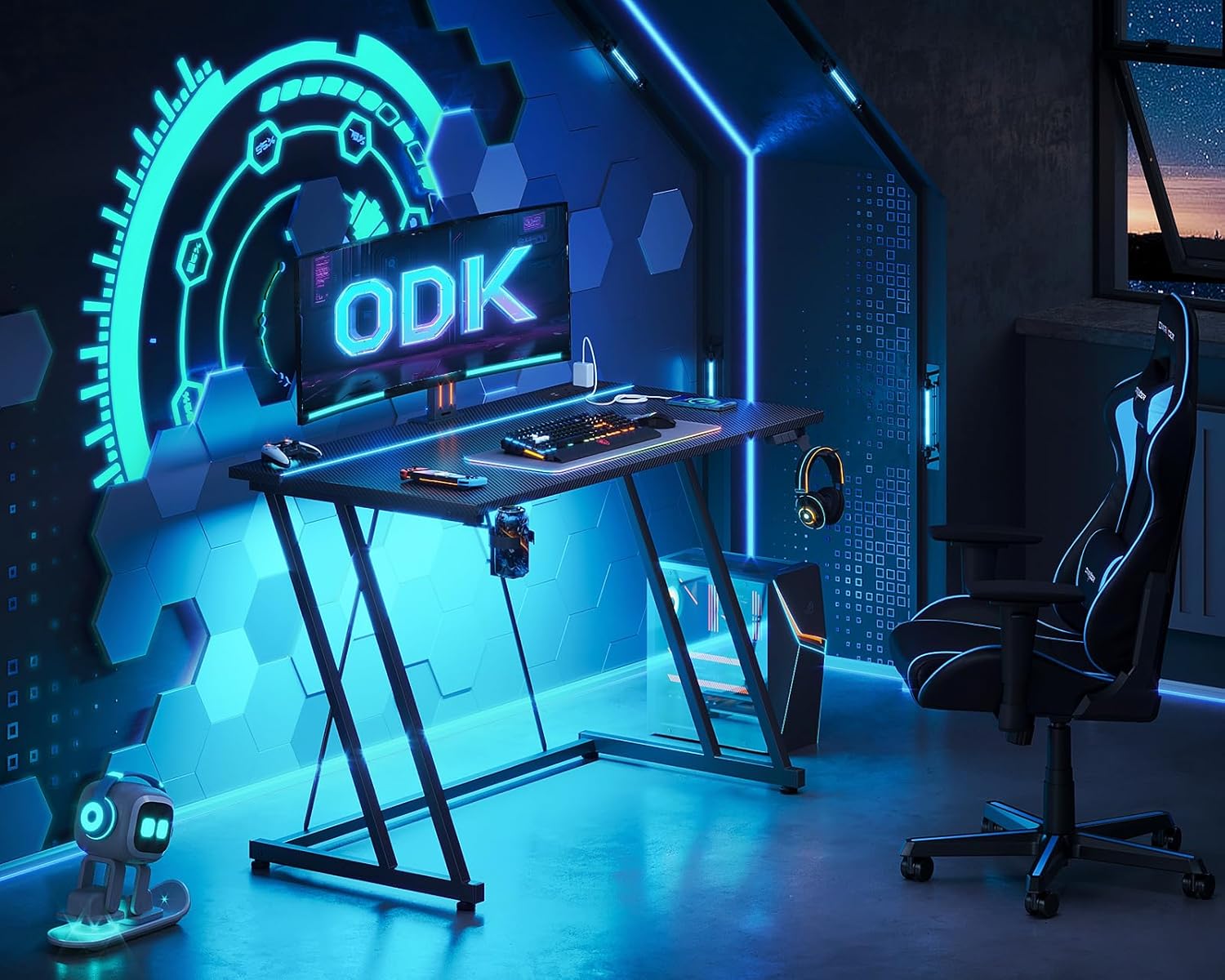
Figure 2.1: Gaming Desk in a typical setup
3. Contingut del paquet
Si us plau, verifiqueu que tots els components siguin presents abans de començar el muntatge. Si falta alguna peça o hi ha alguna peça danyada, poseu-vos en contacte amb el servei d'atenció al client.
- Desk Panels (Main tabletop, LED light panel)
- Z-shaped Frame Legs (Left and Right)
- Support Beams and Brackets
- LED Light Strip (pre-installed or separate)
- Control remot LED
- Power Outlet Unit with Cable
- Ganxo per a auriculars
- Portavasos
- Assembly Hardware (Screws, bolts, nuts, washers)
- Assembly Tools (Hex key/Allen wrench)
- Manual d'instruccions
4. Muntatge i muntatge
The ODK Gaming Desk is designed for easy assembly. Comprehensive instructions and all necessary tools are included in the package. We recommend assembling the desk with two people for optimal ease and safety.
- Desempaquetar components: Carefully remove all parts from the packaging and lay them out on a clean, soft surface (e.g., a blanket or carpet) to prevent scratches.
- Identifica les parts: Refer to the parts list in the included assembly guide to identify each component.
- Muntatge del marc: Follow the step-by-step diagrams in the assembly guide to connect the Z-shaped frame legs with the support beams using the provided hardware. Ensure all screws are finger-tightened initially.
- Enganxar panells d'escriptori: Secure the desk panels to the assembled frame. Pay attention to the orientation of the split-board structure if applicable.
- Instal·lació d'accessoris: Attach the headphone hook and cup holder to the designated locations on the desk.
- Instal·leu la presa de corrent: Mount the power outlet unit to the underside of the desk as indicated in the assembly guide.
- Ajustament final: Once all components are in place, systematically tighten all screws with the provided tools. Do not overtighten.
- Gestió de cables: Utilize any integrated cable management features to route the power cord neatly.
For detailed visual instructions, please refer to the separate assembly manual included in your package.
5. Instruccions de funcionament
5.1. Funcionament dels llums LED
The ODK Gaming Desk features integrated LED lights with a reversible controller for easy customization.

Figure 5.1: LED Lights and Controller
- Encès/apagat: Premeu el botó ON/OFF button on the controller to turn the LED lights on or off.
- Static Color Button (C): Premeu el botó C button to cycle through 10 different static colors.
- Dynamic Mode Button (M): Premeu el botó M button to cycle through 20 different dynamic lighting modes (e.g., flashing, fading, pulsing).
- Ajusta la velocitat i la brillantor: While in a dynamic mode, use the ON/OFF button (or dedicated speed/brightness buttons if present on your specific controller model) to adjust the speed of the dynamic effect or the brightness of the lights.
- Funció de memòria: The LED system includes a power-off memory function, which means it will recall your last selected setting when powered on again.
5.2. Ús de la presa de corrent
The integrated power outlet provides convenient access to power for your devices.

Figure 5.2: Integrated Power Outlet
- Endolls de CA: The desk is equipped with 2 standard AC sockets (110-240V/6A). Plug in your gaming console, monitor, or other AC-powered devices.
- Ports de càrrega USB: Two USB charging ports (5V/2A) are available for charging mobile phones, headphones, or other USB-powered accessories.
- Cable d'alimentació: Ensure the 200 cm power cord is securely plugged into a wall outlet.
6. Manteniment
Regular maintenance will help prolong the life and appearance of your ODK Gaming Desk.
- Neteja: Netegeu la superfície de l'escriptori amb un damp cloth. For stubborn marks, a mild, non-abrasive cleaner can be used. Avoid harsh chemicals or abrasive materials that could damage the carbon fiber finish.
- Pols: Regularly dust the LED light strips and power outlet area to prevent accumulation that could affect performance or aesthetics.
- Comprovació de maquinari: Reviseu periòdicament tots els cargols i connexions per assegurar-vos que romanen ajustats. Torneu a apretar-los si cal per mantenir l'estabilitat.
- Seguretat elèctrica: Ensure the power cord is not pinched or damaged. Do not overload the power outlets. If any electrical component appears damaged, discontinue use and contact support.
7. Solució De Problemes
If you encounter any issues with your ODK Gaming Desk, please refer to the following common solutions:
| Problema | Causa possible | Solució |
|---|---|---|
| Els llums LED no s'encenen. | Power cord not plugged in; controller battery dead; loose connection; LED strip damage. | Ensure power cord is fully plugged into wall and desk. Check controller battery. Verify all LED connections are secure. Contact support if strip is damaged. |
| Les preses de corrent no funcionen. | Desk power cord unplugged; circuit breaker tripped; device not properly plugged in. | Check desk power cord connection. Reset household circuit breaker if tripped. Ensure devices are fully inserted into outlets. |
| L'escriptori sembla inestable. | Cargols de muntatge fluixos; terra irregular. | Retighten all assembly screws. Adjust any leveling feet if present, or place shims under legs on uneven surfaces. |
| LED controller unresponsive. | Controller battery low/dead; obstruction between controller and receiver. | Replace controller battery. Ensure clear line of sight between controller and LED receiver. |
If the problem persists after attempting these solutions, please contact ODK customer support for further assistance.
8. Especificacions
| Atribut | Detall |
|---|---|
| Marca | ODK |
| Número de model | 801001-Regne Unit |
| Color | Negre |
| Dimensions del producte | 50 x 100 x 75 cm (profunditat x amplada x alçada) |
| Pes de l'article | 10 kg |
| Material | Metal, Carbon Fibre |
| Característiques especials | Built-In LED Lights, Power Outlet, Double Z Design, Monitor Arm Ready |
| Power Outlet Input | 110-240V/6A |
| Sortida USB | 5V/2A |
| Longitud del cable d'alimentació | 200 cm |

Figura 8.1: Dimensions del producte
9. Informació de seguretat
Always ensure the desk is stable and secure before use. Be cautious when using the built-in power outlets and LED lights to prevent any electrical hazards.
- No supereu la capacitat màxima de pes de l'escriptori.
- Keep liquids away from electrical components, especially the power outlets and LED light connections.
- Ensure the power cord is not a tripping hazard and is protected from damage.
- Do not attempt to modify or repair the electrical components of the desk. Contact qualified personnel for service.
- Mantingueu les peces petites i els materials d'embalatge lluny dels nens per evitar perills d'asfixia.
10. Garantia i Suport
ODK is committed to providing high-quality products and customer satisfaction. While specific warranty details are not provided in this manual, we offer responsive customer support.
- Atenció al client: If any questions or issues arise during assembly or use, our responsive team is available to assist you within 24 hours.
- Informació de contacte: Please refer to the contact details provided on the product packaging or the official ODK weblloc de suport.
- Devolucions/Substitucions: For information regarding returns or replacements, please consult your purchase platform's policy or contact ODK customer service directly.
Ask a question about this manual
Ask about setup, troubleshooting, compatibility, parts, safety, or missing instructions. Manuals+ will review the question and use this page’s manual context to help answer it.