
MageGee SKY81-Pink
Manual d'usuari del teclat mecànic per a jocs MageGee SKY81 75%.
Model: SKY81-Pink | Brand: MageGee
1. Introducció
Thank you for choosing the MageGee SKY81 75% Mechanical Gaming Keyboard. This manual provides detailed instructions for setting up, operating, maintaining, and troubleshooting your new keyboard. Designed for both gamers and office users, the SKY81 features a gasket-mounted structure, 5-layer sound dampening, hot-swappable switches, vibrant RGB backlighting, and a multifunctional knob for enhanced user experience.
Per obtenir més informació i suport, visiteu l'oficial MageGee Store.
2. Contingut del paquet
- MageGee SKY81 Mechanical Gaming Keyboard
- Cable USB tipus C desmuntable
- Extractor de tecles
- Tirador de commutació
- Manual d'usuari (aquest document)

3. Guia de configuració
3.1 Connexió del teclat
- Locate the detachable Type-C USB cable included in the package.
- Connect the USB-C end of the cable to the port on the left side of the MageGee SKY81 keyboard.
- Connect the standard USB-A end of the cable to an available USB port on your computer (Laptop or PC).
- The keyboard is plug-and-play and should be automatically recognized by your operating system (Windows or Mac).
3.2 Ajust de l'angle del teclat
The SKY81 keyboard features 2-stage adjustable foot pads on the underside, allowing you to set your preferred typing angle for ergonomic comfort.

4. Instruccions de funcionament
4.1 Compatibilitat del sistema
The MageGee SKY81 keyboard supports both Windows and Mac operating systems. To switch between systems, press FN + Inici.
4.2 Control de retroil·luminació RGB
The keyboard features stunning RGB backlighting with multiple modes and customization options.
- Activar/desactivar la llum de fons: Use the dedicated switch on the left side of the keyboard.
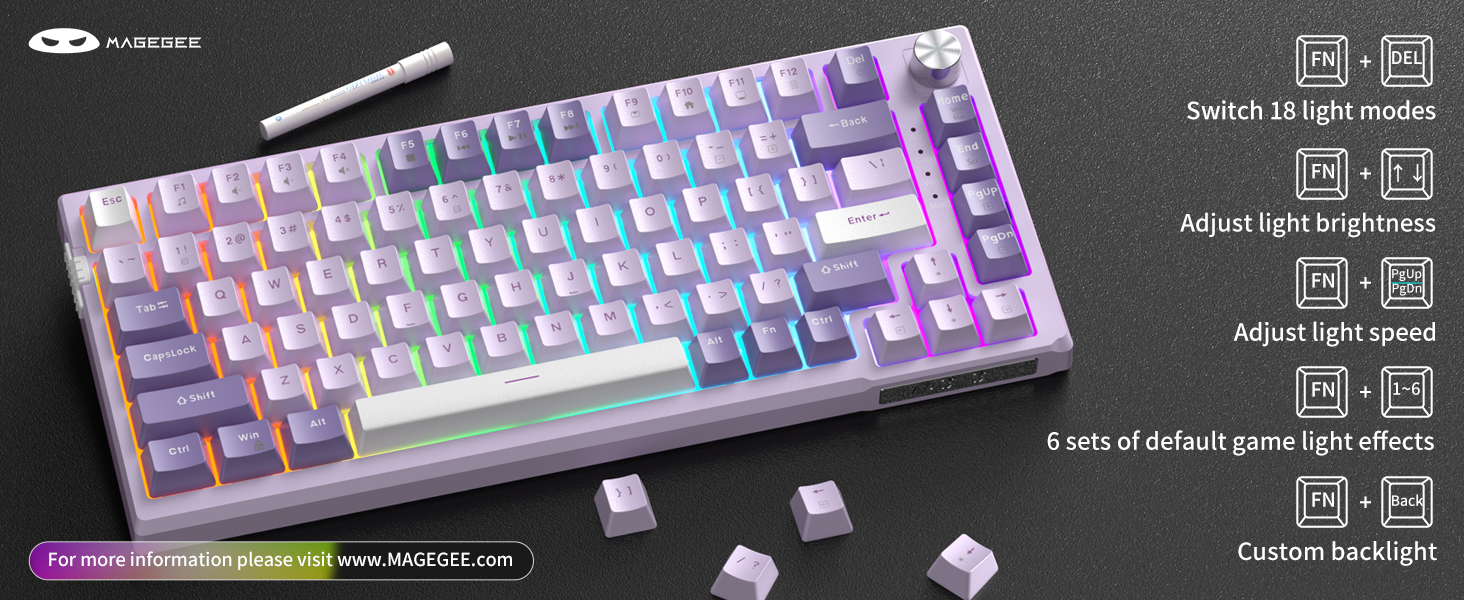
- Canvia els modes de llum: Premeu FN + DEL to cycle through 18 built-in backlight modes.
- Ajusta la brillantor de la llum: Premeu FN + ↑ (Up Arrow) to increase brightness, FN + ↓ (Down Arrow) per disminuir la brillantor.
- Ajusta la velocitat de la llum: Premeu FN + ← (Left Arrow) to decrease speed, FN + → (Right Arrow) per augmentar la velocitat.
- Default Gaming Backlight Effects: Premeu FN + 1 a través de FN + 6 for 6 sets of pre-defined gaming backlight effects.
- Custom Backlight: Premeu FN + Enrere to record customized light effects.
4.3 Multifunctional Knob and Indicator Lights
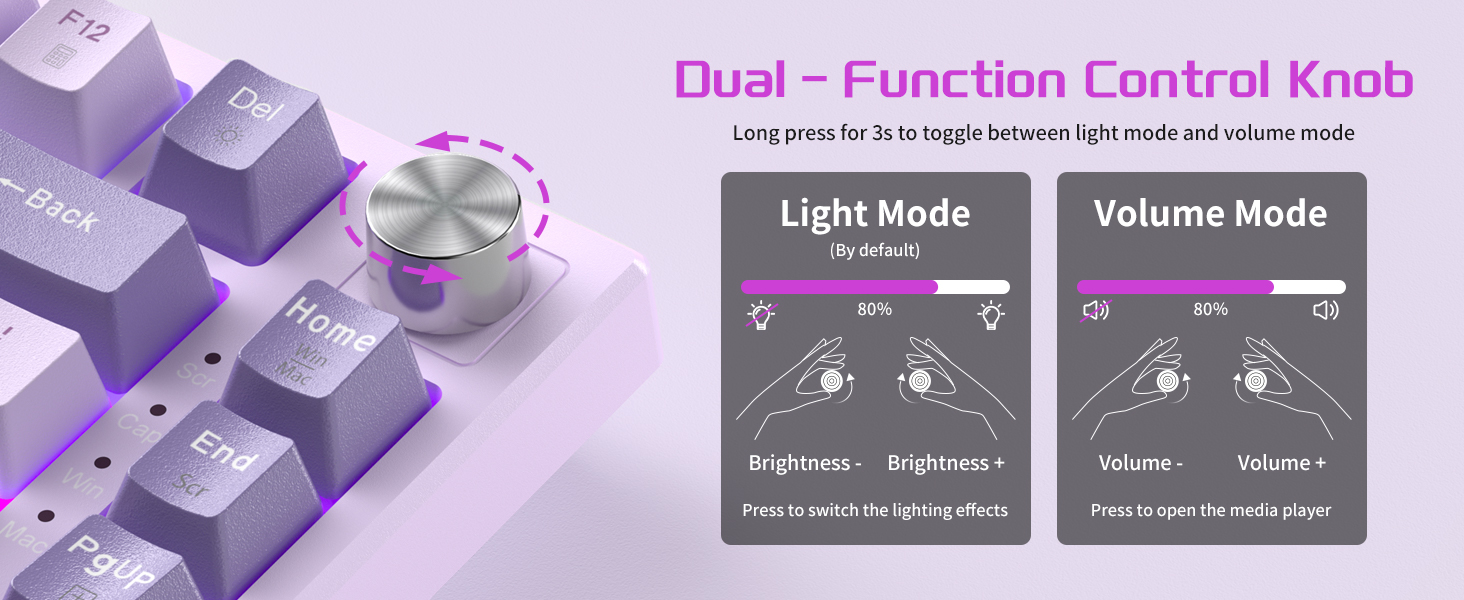
The metal knob on the keyboard provides quick control over lighting and volume settings.
- Default Mode (Light Control):
- Rotate the knob to adjust backlight brightness.
- Press the knob to switch between different lighting effects.
- Mode de volum:
- Hold the knob for 3 seconds to switch to volume mode.
- Gireu el botó per ajustar el volum del sistema.
- Press the knob to turn on/off the media player.
The 4 indicator lights on the right side of the keyboard clearly display its real-time status.

4.4 Substitució de la clau N (NKRO)
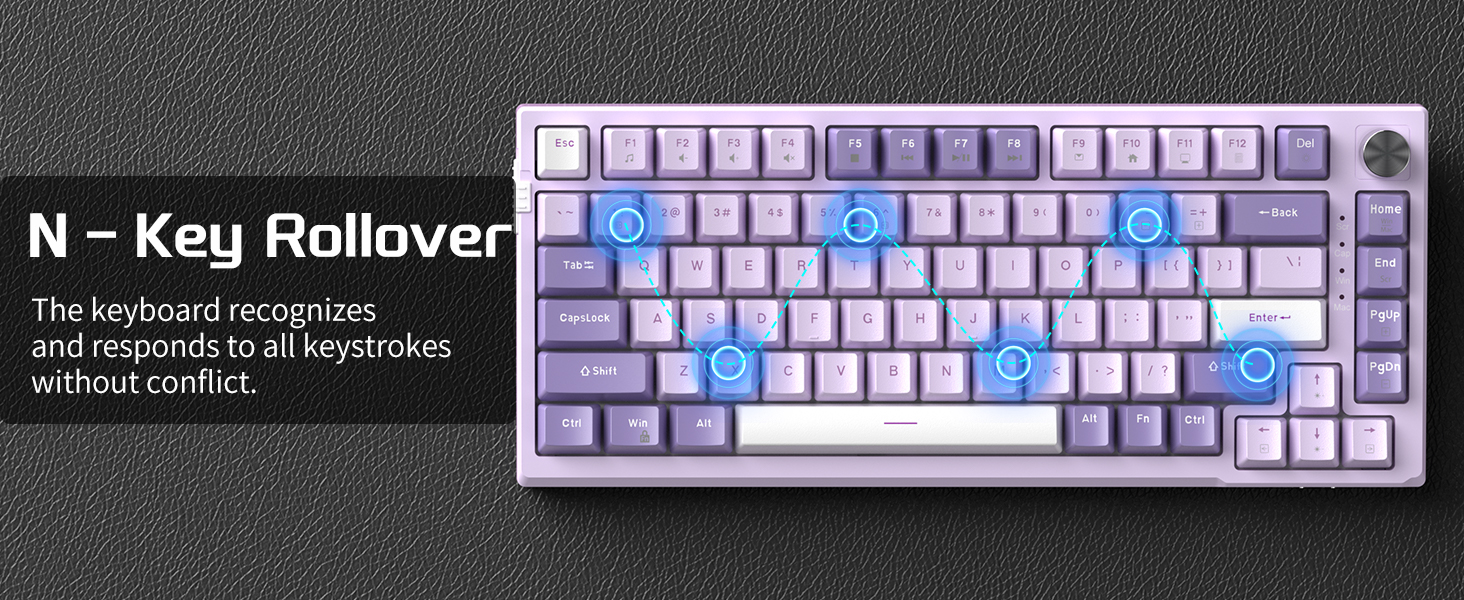
The SKY81 features 100% anti-ghosting with N-Key Rollover, ensuring that every keystroke is detected correctly, even when multiple keys are pressed simultaneously. This is crucial for fast-paced gaming and accurate typing.

5. Manteniment
5.1 Neteja general
Per mantenir el rendiment i l'aspecte del teclat:
- Feu servir un drap suau i sense borrissol per netejar les tecles i el xassís.
- For deeper cleaning, use compressed air to remove dust and debris from between the keycaps.
- Avoid using harsh chemicals or abrasive materials, as these can damage the keyboard's finish.
5.2 Commutadors intercanviables en calent
The MageGee SKY81 features hot-swappable sockets, allowing you to easily replace individual switches without soldering. This keyboard is compatible with 3-pin or 5-pin mechanical switches.
- Using the included switch puller, gently grip the switch and pull it straight up to remove it.
- Alineeu els pins del nou interruptor amb els forats de la placa de circuit imprès.
- Gently press the new switch down until it clicks into place. Ensure the pins are not bent.

6. Solució De Problemes
- El teclat no respon:
- Assegureu-vos que el cable USB estigui connectat correctament tant al teclat com a l'ordinador.
- Prova de connectar el teclat a un port USB diferent de l'ordinador.
- Prova el teclat en un altre ordinador per descartar problemes específics del sistema.
- La llum de fons no funciona:
- Check the backlight on/off switch on the left side of the keyboard.
- Assegureu-vos que la brillantor no estigui configurada al nivell més baix mitjançant FN + ↑ (Up Arrow).
- Les claus no es registren / Escriuen dues vegades:
- Això podria indicar un interruptor defectuós. Utilitzeu la funció d'intercanvi en calent per substituir l'interruptor problemàtic.
- Assegureu-vos que l'interruptor estigui completament col·locat a la seva base.
- Knob Functionality Issues:
- Ensure you are in the correct mode (Light or Volume). Hold the knob for 3 seconds to toggle modes.
7. Especificacions
| Característica | Descripció |
|---|---|
| Model | SKY81-Pink |
| Disseny | 75% (83 tecles) |
| Estructura | Gasket-Mounted |
| So Dampening | 5-Layer (IXPE foam, PORON foam, diaphragm, EVA soundproofing foam, silicone absorbing pad) |
| Interruptors | Violet Switch (Pre-lubed, Linear, 42gf operating force, 70 million keystrokes lifespan) |
| Intercanviable en calent | Yes (Compatible with 3-pin or 5-pin switches) |
| Il·luminació de fons | RGB (18 built-in modes, 6 gaming effects, customizable) |
| Connectivitat | Cablejat (cable USB tipus C desmuntable) |
| Canvi de clau N (NKRO) | 100% anti-ghosting |
| Dispositius compatibles | Portàtil, PC |
| Sistemes operatius | Windows, Mac |
| Material | Metall |
| Pes de l'article | 2.29 lliures |
| Dimensions del paquet | 13.86 x 7.36 x 2.05 polzades |


8. Vídeos oficials de productes
No official product videos from the seller are available at this time.
9. Garantia i Suport
MageGee products are designed for durability and performance. For any warranty claims, technical support, or inquiries, please contact MageGee customer service through the official MageGee Store on Amazon o consulteu la informació de contacte que trobareu a l'embalatge del producte.
Si us plau, conserveu el comprovant de compra per motius de garantia.
Documents relacionatsSKY81-Pink

Ask a question about this manual
Ask about setup, troubleshooting, compatibility, parts, safety, or missing instructions. Manuals+ will review the question and use this page’s manual context to help answer it.