
1. Introducció
Thank you for choosing the QUMOX External CD/DVD Drive with 8-in-1 USB 3.0 Hub. This versatile device provides high-speed data transfer for reading and writing CDs and DVDs, along with expanded connectivity through its integrated USB hub and card readers. This manual will guide you through the setup, operation, and maintenance of your new device.
2. Informació de seguretat
- Manteniu el dispositiu allunyat de l'aigua, la humitat i les temperatures extremes.
- Eviteu deixar caure o sotmetre el dispositiu a forts impactes.
- No intenteu desmuntar ni reparar el dispositiu vosaltres mateixos. Poseu-vos en contacte amb personal qualificat per al servei tècnic.
- Use only compatible discs and cables.
- Assegureu-vos una ventilació adequada per evitar el sobreescalfament.
3. Contingut del paquet
Si us plau, comproveu el contingut del paquet per assegurar-vos que hi hagi tots els elements:
- QUMOX External CD/DVD Drive with 8-in-1 USB 3.0 Hub
- Cable de dades USB-A a USB-C
- USB-A Data Cable
- Manual d'usuari (aquest document)
4. Producte acabatview
The QUMOX External CD/DVD Drive combines an optical drive with a multi-functional hub, offering enhanced connectivity and media capabilities.
4.1 Disseny del dispositiu
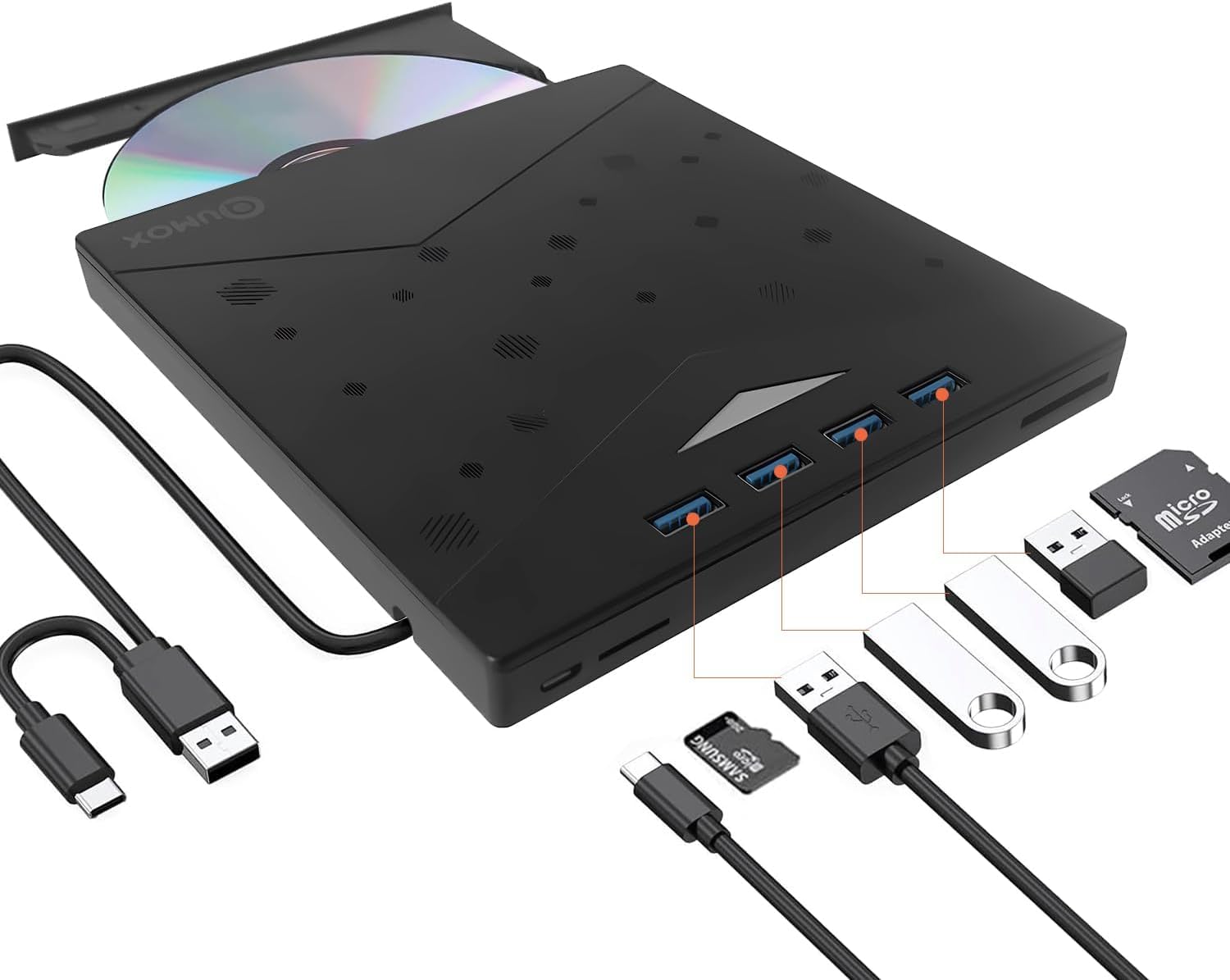
Figure 1: QUMOX External CD/DVD Drive with USB-A and USB-C cables.
The device features a sleek, ultra-slim design with an integrated cable for convenience. It includes multiple ports for various peripherals.
4.2 Ports i indicadors

Figure 2: Labeled ports and connections on the QUMOX External CD/DVD Drive.
- USB A 3.0 Ports (x4): For connecting USB devices such as flash drives, keyboards, mice, or external hard drives.
- Ranura TF: For Micro SD (TF) memory cards.
- Ranura SD: Per a targetes de memòria SD estàndard.
- Port USB C: For connecting the drive to a host device with a USB-C port.
- USB A Data Cable: Integrated cable for connecting to a host device with a USB-A port.
- Pop-up Button: To open the disc tray.
- Forced Ejection Hole: For manual disc ejection in case of power failure or malfunction.
- Llum indicadora: Shows device status (e.g., power, activity).

Figure 3: Device dimensions and additional features.
5. Configuració i instal·lació
The QUMOX External CD/DVD Drive is designed for plug-and-play functionality, requiring no additional drivers for most operating systems.
5.1 Connexió del dispositiu
- Connect the integrated USB-A data cable to an available USB 3.0 port on your computer. If your computer only has USB-C ports, use the provided USB-A to USB-C adapter cable.
- Ensure the connection is secure. The indicator light on the drive will illuminate, indicating it is powered on and ready for use.
- El vostre sistema operatiu hauria de detectar i instal·lar automàticament els controladors necessaris. Aquest procés pot trigar uns instants.

Figure 4: Plug and Play connection to a laptop.
Nota: For optimal performance, connect the drive directly to a USB 3.0 port on your computer. Avoid using unpowered USB hubs or extension cables, as this may affect performance or power delivery.
6. Instruccions de funcionament
6.1 Using the CD/DVD Drive
- Per inserir un disc: Press the pop-up button on the front of the drive. The disc tray will eject. Carefully place a CD or DVD onto the tray, ensuring it is centered on the spindle. Gently push the tray back into the drive until it clicks into place.
- Per expulsar un disc: Press the pop-up button. Alternatively, you can eject the disc through your operating system (e.g., right-click the drive icon and select "Eject").
- Reading Discs: Un cop inserit un disc, el sistema operatiu de l'ordinador l'hauria de detectar automàticament. Aleshores, podeu accedir al contingut del disc a través de File Explorer (Windows) o Finder (macOS).
- Writing/Burning Discs: To burn data to a CD-R/RW or DVD±R/RW, you will need compatible burning software (not included). Follow the instructions provided with your chosen software.
The drive supports CD-R/RW, DVD±R/RW, DVD-RAM, and SVCD formats. It offers up to 8x DVD read/write speed and 24x CD read/write speed.
6.2 Using the 8-in-1 Hub
- Ports USB 3.0: Connect up to four USB devices to the available USB 3.0 ports for high-speed data transfer (up to 5 Gbps).
- Lectors de targetes SD/TF: Insert your SD or Micro SD (TF) memory cards into the corresponding slots to access or transfer data. Nota: The SD and TF card slots cannot be used simultaneously.
6.3 Compatibilitat del sistema

Figura 5: Àmplia compatibilitat amb diversos sistemes operatius.
This device is widely compatible with operating systems including Windows XP, Windows 7, Windows 8, Windows 10, Windows 11, macOS, and Linux. It is designed for use with PCs and laptops. Important: This device is not compatible with tablets, smartphones, or Blu-ray discs.
7. Manteniment
- Neteja: Use a soft, dry cloth to clean the exterior of the drive. Do not use liquid cleaners or abrasive materials. For the disc tray, use a specialized optical drive cleaning kit if necessary.
- Emmagatzematge: When not in use, store the drive in a cool, dry place, away from direct sunlight and dust.
- Manipulació: Always handle discs by their edges to avoid fingerprints and scratches.
8. Solució De Problemes
| Problema | Causa possible | Solució |
|---|---|---|
| Unitat no reconeguda per l'ordinador. | Connexió fluixa, potència insuficient, problema amb el controlador. |
|
| Disc not reading or burning. | Dirty/scratched disc, incorrect disc type, faulty disc. |
|
| USB hub or card readers not working. | Loose connection, power issue, incompatible card. |
|
| Disc tray does not open. | Power issue, mechanical jam. |
|
9. Especificacions
| Característica | Descripció |
|---|---|
| Marca | QUMOX |
| Número de model | Z311 |
| Interfície | USB 3.0 (backward compatible with USB 2.0/1.1), USB 3.0 Type-A, USB 3.0 Type-C |
| Velocitat de lectura d'emmagatzematge òptic | Up to 8x for DVD, 24x for CD |
| Velocitat d'escriptura d'emmagatzematge òptic | Up to 8x for DVD, 24x for CD |
| Tipus de disc compatibles | CD-R/RW, DVD±R/RW, DVD-RAM, SVCD |
| Hub USB | 4 x ports USB 3.0 |
| Lectors de targetes | SD Slot, TF (Micro SD) Slot (not simultaneous) |
| Compatibilitat de sistemes operatius | Windows XP/7/8/10/11, macOS, Linux |
| Plataforma de maquinari | Portàtil, PC |
| Dimensions (L x A x A) | 19.4 x 16.1 x 2.7 cm (aprox. 7.6 x 6.3 x 1.1 polzades) |
| Pes | 390 grams (aprox. 0.86 lliures) |
| Característiques especials | Powered, DVD Burner, Portable, RGB lighting |
10. Garantia i Suport
QUMOX products are designed and manufactured to the highest quality standards. This product is covered by a standard manufacturer's warranty against defects in materials and workmanship.
For warranty claims, technical support, or any questions regarding your QUMOX External CD/DVD Drive, please contact your retailer or visit the official QUMOX weblloc web per a informació d'atenció al client.
Si us plau, conserveu el comprovant de compra per motius de garantia.