
1. Introducció
The Brilagi VELVET SMART LED Ceiling Light is a high-efficiency, dimmable LED lighting solution designed for indoor use. With 24 watts of power and 230 volts, it offers significant energy savings. Its modern black and gold design complements various interior styles. Featuring Wi-Fi Tuya technology, this ceiling light allows remote control of brightness and color temperature (2700-6500K) via an application, and also includes a remote control for convenience. The light has a 45 cm diameter and comes with mounting hardware.
2. Instruccions de seguretat importants
- Llegiu atentament totes les instruccions abans de la instal·lació i l'ús.
- Assegureu-vos que l'alimentació estigui desconnectada a l'interruptor principal abans de la instal·lació o el manteniment.
- Si no esteu segurs, la instal·lació l'ha de dur a terme un electricista qualificat.
- No modifiqueu el producte de cap manera.
- Aquest producte està dissenyat només per a ús en interiors. No l'exposeu a la humitat ni a temperatures extremes.
- Mantenir els materials d'embalatge fora de l'abast dels nens.
3. Contingut del paquet
Verifiqueu que tots els components siguin presents abans de començar la instal·lació.
- Brilagi VELVET SMART LED Ceiling Light (1 unit)
- Comandament a distància (1 unitat)
- Maquinari de muntatge (cargols, ancoratges)
- Manual d'usuari (aquest document)
4. Configuració i instal·lació
The Brilagi VELVET SMART LED Ceiling Light is designed for flush ceiling mounting and does not require assembly.
4.1. Mounting the Ceiling Light
- Apagueu l'alimentació: Before starting, ensure the power supply to the installation area is completely off at the main circuit breaker.
- Preparació de la superfície de muntatge: Mark the drilling points on the ceiling using the light fixture's mounting bracket as a template.
- Perforar forats: Drill holes at the marked points and insert appropriate wall anchors if necessary.
- Connecteu el cablejat: Connect the household electrical wires to the light fixture's wires according to local electrical codes (Live to Live, Neutral to Neutral, Ground to Ground). Ensure connections are secure.
- Secure fixture: Attach the light fixture to the ceiling using the provided mounting hardware. Ensure it is securely fastened.
- Restaurar l'energia: Un cop finalitzada la instal·lació, restableu l'alimentació a l'interruptor principal.

Image: The Brilagi VELVET SMART LED Ceiling Light seamlessly integrated into a modern living room setting, showcasing its aesthetic appeal when installed.
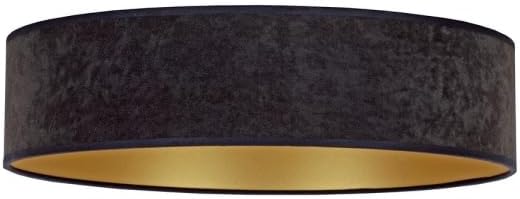
Imatge: Una imatge detallada view of the Brilagi VELVET SMART LED Ceiling Light, highlighting its black exterior finish and the contrasting gold interior, which enhances light reflection.
4.2. Emparellament del control remot
The remote control is typically pre-paired. If not, or if you need to re-pair:
- Assegureu-vos que el llum estigui encès.
- Within 5 seconds of turning on the light, press and hold the "ON/OFF" button on the remote control until the light flashes, indicating successful pairing.

Image: The included white remote control, featuring buttons for power, brightness adjustment, color temperature control, and preset scene selections for convenient operation.
4.3. Wi-Fi (Tuya App) Setup
- Descarrega l'aplicació Tuya Smart: Download and install the "Tuya Smart" app from your smartphone's app store (iOS or Android).
- Registra't/Inici de sessió: Obre l'aplicació i registra't per obtenir un compte nou o inicia la sessió si ja en tens un.
- Afegeix un dispositiu: Toqueu la icona "+" a la cantonada superior dreta de l'aplicació per afegir un dispositiu nou.
- Seleccioneu il·luminació: Choose "Lighting" or "Light Source (Wi-Fi)" from the device categories.
- Enter Wi-Fi details: Assegura't que el telèfon estigui connectat a una xarxa Wi-Fi de 2.4 GHz. Introdueix la contrasenya de la Wi-Fi a l'aplicació.
- Reset Light for Pairing Mode: Turn the light ON-OFF-ON-OFF-ON (with 2-second intervals) until the light starts blinking rapidly. This indicates it's in pairing mode.
- Confirma el parpelleig: In the app, confirm that the indicator light is blinking rapidly.
- Connectar: The app will search for and connect to the light. Once connected, you can rename the device.
5. Instruccions de funcionament
5.1. Ús del comandament a distància
The remote control provides convenient access to the light's primary functions:
- ON/OFF: Press the central button to turn the light on or off.
- Ajust de brillantor: Use the "+" and "-" buttons to increase or decrease the light intensity.
- Temperatura de color: Adjust the color temperature from warm white (2700K) to cool white (6500K) using the dedicated buttons.
- Escenes predefinides: Select from various pre-programmed lighting scenes (e.g., night mode, reading mode) using the scene buttons.
Image: The remote control layout, illustrating the functions of each button for controlling the ceiling light's features.
5.2. Ús de l'aplicació Tuya Smart
The Tuya Smart app offers advanced control and customization options:
- Comandament ON/OFF: Control the light from anywhere with an internet connection.
- Atenuació continuada: Precisely adjust brightness levels.
- Control de temperatura de color: Fine-tune the color temperature across the 2700K-6500K range.
- Scene Customization: Create and save your own custom lighting scenes.
- Programació: Set timers and schedules for the light to turn on/off or change settings automatically.
- Control de veu: Integrate with voice assistants like Amazon Alexa or Google Assistant (requires compatible device and setup within the Tuya app).
6. Manteniment
- Neteja: Ensure the power is off before cleaning. Wipe the light fixture with a soft, dry cloth. Do not use abrasive cleaners or solvents.
- LED: La font de llum LED integrada està dissenyada per a un ús a llarg termini i no és substituïble per l'usuari.
- Comandament a distància: Replace batteries (type not specified, assume standard AAA or button cell) when the remote's range decreases or it stops responding.
7. Solució De Problemes
| Problema | Causa possible | Solució |
|---|---|---|
| La llum no s’encén. | Sense subministrament elèctric; cablejat solt; interruptor defectuós. | Check circuit breaker. Verify wiring connections. Test with another switch if possible. |
| El comandament a distància no funciona. | Batteries depleted; remote not paired. | Replace remote control batteries. Re-pair the remote control (see Section 4.2). |
| Cannot connect to Wi-Fi (Tuya app). | Incorrect Wi-Fi password; 5GHz Wi-Fi network; light not in pairing mode; network interference. | Ensure correct 2.4GHz Wi-Fi network and password. Reset light to pairing mode (Section 4.3). Move closer to router. |
| La llum parpelleja o s'atenua inesperadament. | Unstable power supply; loose connection; incompatible dimmer (if external). | Check power supply stability. Verify wiring. This light is internally dimmable; do not use with external dimmers. |
8. Especificacions del producte
| Característica | Detall |
|---|---|
| Marca | Brilagi |
| Nom del model | VELUT |
| Número de model | BG0436 |
| Dimensions | 45L x 45W x 10H cm |
| Color | Negre, daurat |
| Material | Vidre (pantalla) |
| Tipus de font de llum | LED |
| Wattage | 24 watts |
| Voltage | 230 Volts |
| Temperatura de color | 2700K - 6500K (ajustable) |
| Connectivitat | Wi-Fi (Tuya Smart App), Remote Control |
| Tipus de muntatge | Flush Mount, Ceiling Mount |
| Etiqueta d'eficiència energètica | High / Excellent (EU Label) |
| Muntatge obligatori | No |
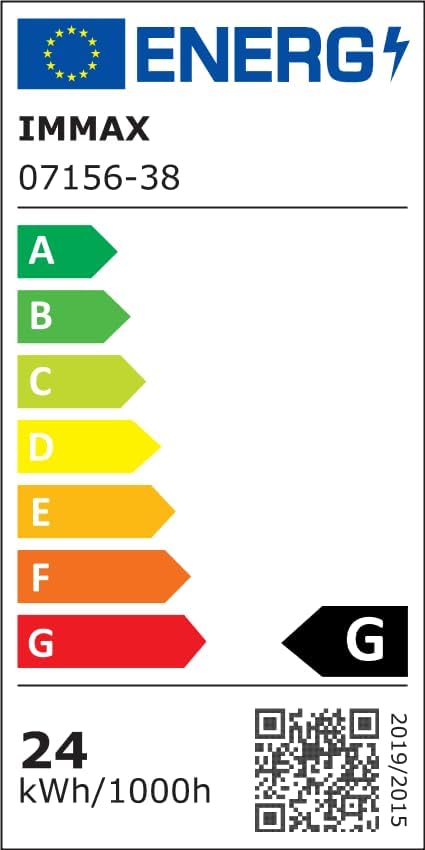
Image: The EU Energy Efficiency Label, indicating the product's energy consumption and efficiency class. For more details, refer to the official EPREL database via the QR code or link.
Official EPREL Database Link: https://eprel.ec.europa.eu/qr/1294167
9. Garantia i assistència
For warranty information and customer support, please refer to the documentation provided with your purchase or contact Brilagi customer service. Keep your proof of purchase for warranty claims.