
Temtop US-M10+
Manual d'usuari del monitor de qualitat de l'aire interior Temtop M10+
Model: US-M10+
1. Introducció
The Temtop M10+ is an advanced indoor air quality monitor designed to provide comprehensive insights into your home environment. It accurately detects key air pollutants and environmental factors, including Carbon Dioxide (CO2), Particulate Matter (PM2.5), Volatile Organic Compounds (VOCs), temperature, and humidity. This device is equipped with an energy-efficient e-ink display and smart app connectivity, making it an essential tool for maintaining a healthy living space.
2. Què hi ha a la caixa
Upon unboxing your Temtop M10+ Indoor Air Quality Monitor, please ensure all the following items are present:
- Temtop M10+ Air Quality Monitor
- Cable de càrrega USB-C
- Manual d'usuari

Descripció de la imatge: This image displays the Temtop M10+ air quality monitor, its USB-C charging cable, and the user manual, neatly arranged next to the product's packaging box. This illustrates the complete contents included with the device.
3. Característiques i components del producte
The Temtop M10+ is engineered with several key features and components to provide accurate and user-friendly air quality monitoring.
3.1. Key Indicators Monitored
- CO2 (Carbon Dioxide): Measures carbon dioxide levels in parts per million (ppm).
- PM2.5 (partícules 2.5): Detects fine inhalable particles, measured in micrograms per cubic meter (µg/m³).
- VOC (Volatile Organic Compounds): Monitors a range of organic chemicals that can be harmful, measured in milligrams per cubic meter (mg/m³).
- Temperatura: Displays ambient temperature in Fahrenheit or Celsius.
- Humitat: Shows relative humidity as a percentage.
- AQI (índex de qualitat de l'aire): Provides an overall assessment of air quality based on the monitored pollutants.
3.2. Advanced Sensor Technology
The M10+ incorporates world-leading Sensirion sensors for CO2, TVOC, temperature, and humidity, ensuring high accuracy and reliability. Additionally, Temtop's in-house particle sensor is utilized for precise PM2.5 and AQI measurements.
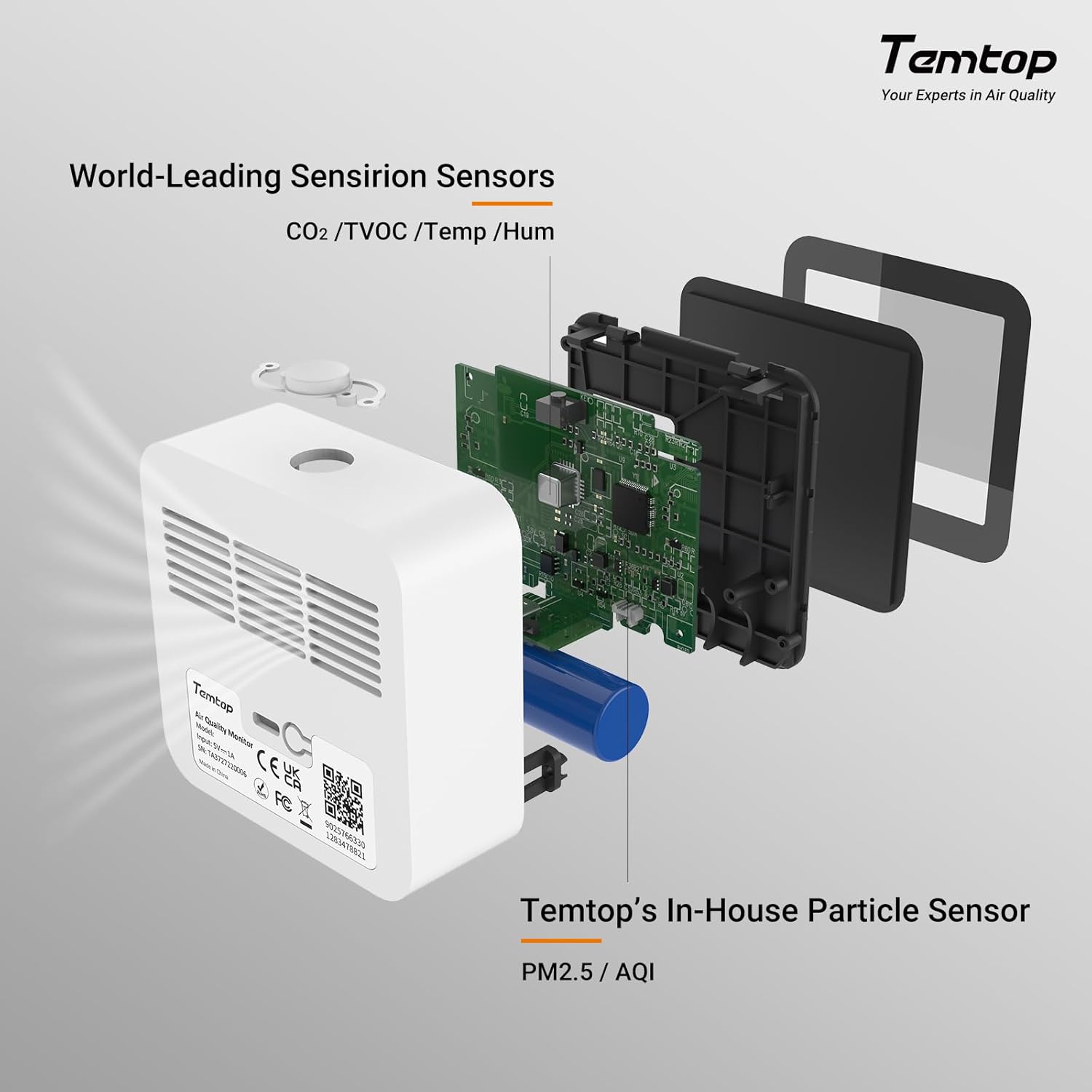
Descripció de la imatge: Aquesta imatge proporciona un desplegament view of the Temtop M10+ monitor, highlighting its internal components. It shows the placement of the world-leading Sensirion sensors for CO2, TVOC, temperature, and humidity, as well as Temtop's proprietary in-house particle sensor for PM2.5 and AQI detection.
3.3. E-ink Display
The device features an eye-care e-ink display, which offers excellent readability from ultra-wide viewing angles and consumes minimal power, contributing to extended battery life.
3.4. Bateria de llarga durada
Thanks to an energy-efficient algorithm and the e-ink display, the M10+ can achieve up to 60 days of battery life on a single charge, minimizing the need for frequent recharging.

Descripció de la imatge: This image illustrates the impressive battery life of the Temtop M10+, stating "60 days battery life on one charge." It also highlights the device's capability for "Real-time update" of air quality data, showcasing its efficiency and responsiveness.
3.5. Integrated Alarm System
The M10+ includes an audible alert and a visual indicator bar (color-coded: Green for Good, Yellow for Fair, Red for Poor) to notify users of significant changes in air quality. The buzzer alarm can be disabled for silent monitoring.

Descripció de la imatge: This image demonstrates the M10+'s alert system, showing the device display with a CO2 reading and a vertical color bar indicating air quality status (Good, Fair, Poor). An audible alarm icon is visible, emphasizing the device's ability to provide both visual and sound alerts for air quality changes.
3.6. App Connectivity (BLE)
The monitor connects to the Temtop app via Bluetooth Low Energy (BLE), allowing for real-time data viewing, historical data analysis, device calibration, and Over-the-Air (OTA) updates.

Descripció de la imatge: This image illustrates the BLE-enabled connectivity of the Temtop M10+, showing a smartphone screen displaying the Temtop app. The app interface includes historical data graphs and options for air detection items, demonstrating effortless synchronization and monitoring capabilities.
4. Configuració
Follow these steps to set up your Temtop M10+ monitor for the first time.
4.1. Càrrega inicial
Before first use, fully charge the device using the provided USB-C cable and a compatible USB power adapter (not included). The battery icon on the display will indicate charging status.
4.2. Encès / apagat
- To power on, press and hold the button on the top of the device until the display activates.
- To power off, press and hold the button on the top until the display turns off.
4.3. Calibració inicial
Upon first power-on or after moving the device to a new environment, the M10+ will begin an automatic calibration process. This may take some time (up to 1-2 hours) to ensure accurate readings, especially for CO2. During this period, ensure the device is in a well-ventilated area.
4.4. Descàrrega i connexió de l'aplicació
- Download the "Temtop" app from your smartphone's app store (iOS or Android).
- Obriu l'aplicació i creeu un compte si se us demana.
- Assegureu-vos que el Bluetooth estigui habilitat al vostre telèfon intel·ligent.
- On the M10+ device, press the Bluetooth button on the back to activate Bluetooth pairing mode.
- In the Temtop app, follow the instructions to add a new device and connect to your M10+.

Descripció de la imatge: This image shows the Temtop M10+ monitor alongside a smartphone displaying the Temtop app. The app interface highlights features like data export and the process of connecting to the device via Bluetooth Low Energy (BLE), illustrating the seamless integration between the monitor and the mobile application.
5. Funcionament
Understanding how to operate your Temtop M10+ will help you effectively monitor your indoor air quality.
5.1. Navegació de la pantalla
The M10+ features a single multi-function button on the top for easy navigation:
- Premsa única: Cycles through the different air quality parameters (PM2.5, AQI, CO2, TVOC) displayed on the main screen.
- Double Click (Rapidly): Activates a cycling mode where each reading is displayed for a few seconds before automatically switching to the next, providing a continuous overview.
5.2. Comprensió de lectures
The display shows the current readings for the selected parameter, along with temperature and humidity. A color-coded bar (Green, Yellow, Red) on the right side of the display provides an immediate visual indication of the air quality level for the currently displayed pollutant.

Descripció de la imatge: This image shows the Temtop M10+ monitor displaying a CO2 reading of 1314 ppm, along with temperature and humidity. Above it, a smartphone screen shows the corresponding CO2 data within the Temtop app, including a historical graph, demonstrating real-time data synchronization.
5.3. Data Refresh
The device features an intelligent detection system that automatically adjusts the monitoring frequency to optimize battery life. To instantly refresh the current air quality readings, simply press the button on the top of the device.
5.4. Configuració d'alarma
The M10+ provides an audible alarm for poor air quality. To disable the buzzer alarm, double-click the button on the back of the device. This allows for silent monitoring, particularly useful in bedrooms or quiet environments.
5.5. Ús de l'aplicació
The Temtop app enhances your monitoring experience:
- Actualitzacions en temps real: View current air quality data directly on your smartphone.
- Historical Data Analysis: Access graphs and logs of air quality trends over time (daily, weekly, monthly).
- Calibració del dispositiu: Perform manual calibration for certain sensors via the app if needed.
- Actualitzacions de l'OTA: Receive firmware updates for your device through the app, ensuring it always has the latest features and improvements.
- Exportació de dades: Export historical data in formats like XLS for further analysis.

Descripció de la imatge: This image illustrates the versatility of the Temtop M10+ and its Bluetooth connectivity. It shows multiple monitors placed in various rooms (living room, bedroom, nursery, kitchen) within a house, all effortlessly syncing with a smartphone app. This highlights the ability to monitor air quality across different areas of a home.
6. Manteniment
Proper maintenance ensures the longevity and accuracy of your Temtop M10+ monitor.
6.1. Neteja
Gently wipe the device with a soft, dry cloth. Do not use abrasive cleaners, solvents, or immerse the device in water. Keep the sensor vents clear of dust and debris.
6.2. Càrrega
Recharge the device using the provided USB-C cable when the battery indicator shows low power. Avoid overcharging or leaving the device uncharged for extended periods.
6.3. Recalibració
While the device performs automatic calibration, if you notice consistent discrepancies or move the device to a significantly different environment, you may initiate a manual calibration through the Temtop app for optimal accuracy.
7. Solució De Problemes
If you encounter issues with your Temtop M10+, refer to the following common problems and solutions.
| Problema | Causa possible | Solució |
|---|---|---|
| El dispositiu no s’encén. | Bateria baixa; mal funcionament del dispositiu. | Charge the device for at least 2 hours. If it still doesn't turn on, contact support. |
| Readings seem inaccurate. | Initial calibration not complete; sensor obstruction; device moved to new environment. | Ensure device has completed initial calibration in a well-ventilated area. Clear any dust from sensor vents. Perform a manual calibration via the app if necessary. |
| No es pot connectar a l'aplicació per Bluetooth. | Bluetooth not enabled on device/phone; device too far; app issue. | Ensure Bluetooth is active on both the M10+ (press the back button) and your phone. Keep the phone close to the device. Restart the app and/or the device. |
| La durada de la bateria és més curta del que s’esperava. | Frequent data refreshing; continuous alarm usage. | Reduce manual data refreshes. Consider disabling the audible alarm if not critically needed. |
| La pantalla està en blanc o congelada. | Device crash; low battery. | Attempt to restart the device by holding the power button. Charge the device. If the issue persists, contact support. |
8. Especificacions
Detailed technical specifications for the Temtop M10+ Indoor Air Quality Monitor:
- Dimensions del producte: 3.2 x 1.2 x 3.2 polzades (8.13 cm x 3.05 cm x 8.13 cm)
- Pes de l'article: 0.6 lliures (272 grams)
- Número de model de l'article: US-M10+
- Bateries: 1 bateria de metall de liti (inclosa)
- Font d'alimentació: Funciona amb bateria
- Tipus de visualització: Tinta electrònica
- Connectivitat: Bluetooth de baix consum (BLE)
- Paràmetres monitoritzats: CO2, PM2.5, VOC, Temperature, Humidity, AQI
- Humitat de funcionament: del 0% al 99%
- Valoració de temperatura superior: 140 graus Fahrenheit (60 graus Celsius)
- Alarma: Audible (can be disabled)
- Fabricant: Elitech
9. Garantia i assistència
The Temtop M10+ is manufactured by Elitech. For any product-related inquiries, technical assistance, or warranty claims, please refer to the contact information provided with your purchase documentation or visit the official Temtop weblloc de recursos de suport.
Documents relacionatsUS-M10+


Ask a question about this manual
Ask about setup, troubleshooting, compatibility, parts, safety, or missing instructions. Manuals+ will review the question and use this page’s manual context to help answer it.