
Introducció
This manual provides detailed instructions for the setup, operation, and maintenance of your MageGee V560 Wireless Gaming Keyboard and Mouse Combo. Please read this manual thoroughly before use to ensure optimal performance and longevity of your device.

Image: The MageGee V560 Wireless Gaming Keyboard and Mouse Combo, featuring a blue, white, and purple color scheme, with the USB receiver visible.
Contingut del paquet
Si us plau, verifiqueu que tots els elements siguin presents al paquet:
- MageGee V560 Wireless Keyboard
- MageGee Wireless Mouse
- 2.4GHz USB Receiver (stored in mouse battery compartment)
- Cable de càrrega USB-C
- Manual d'usuari

Image: Contents of the MageGee V560 package, including the keyboard, mouse, USB receiver, charging cable, and user manual.
Instruccions de configuració
- Localitza el receptor USB: Open the battery cover of the wireless mouse. The 2.4GHz USB receiver is stored inside the compartment next to the mouse battery slot.
- Connecteu el receptor: Connecteu el receptor USB a un port USB disponible de l'ordinador.
- Dispositius d'encesa: Ensure both the keyboard and mouse are powered on. The devices are plug-and-play and should connect automatically.
- Càrrec inicial: For optimal performance, it is recommended to fully charge both the keyboard and mouse before first use. Use the provided USB-C charging cable.

Image: Illustration showing the 2-in-1 USB receiver connecting the keyboard and mouse wirelessly to a laptop.
Instruccions de funcionament
Funcions del teclat
- RGB Backlighting Control:
- Premeu FN + INS per encendre o apagar la llum de fons.
- Premeu FN + PgUp or FN + PgDn to adjust the 3-level backlight brightness.
- Premeu FN + 1 / 2 / 3 / 4 / 5 to switch between different backlight modes. Note: Backlight settings are not saved after power off.
- Dreceres multimèdia: Utilitza el FN key in combination with F1-F12 keys for quick access to multimedia functions such as volume control, media playback, and more.
- Disseny ergonòmic: The keyboard features a stepped layout and foldable brackets at the bottom, allowing you to adjust the typing angle for comfort during extended use.
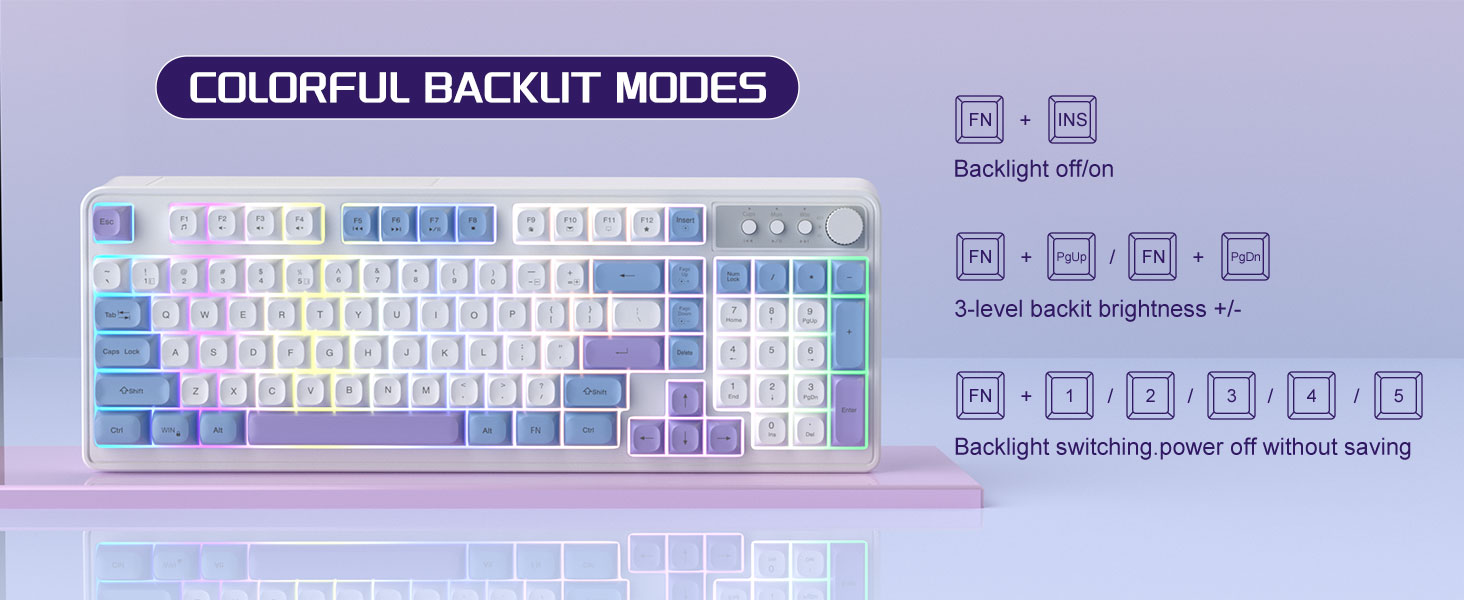
Image: The MageGee V560 keyboard displaying various colorful backlit modes, with instructions for controlling them.

Image: A visual representation of the 16 multimedia shortcuts available on the MageGee V560 keyboard, activated via the FN key.
Funcions del ratolí
- Ajust de DPI: The mouse supports 6 levels of DPI adjustment (600-3200 DPI). Press the DPI button (usually located below the scroll wheel) to cycle through the sensitivity settings. Internal indicator lights will show the current DPI level.
- Breathing Backlight: The mouse features 7 dazzling color breathing backlights. This lighting is automatic and indicates mouse activity.

Image: The MageGee V560 mouse highlighting its DPI settings (1000, 1200, 1600 DPI) and showing the USB-C charging port.
Càrrega i durada de la bateria
- Both the keyboard and mouse are rechargeable. Use the provided USB-C charging cable to charge them.
- Keyboard Standby Time: Fins a 365 dies.
- Mouse Standby Time: Fins a 270 dies.
- Funció de repòs automàtic: The devices automatically enter sleep mode after a period of inactivity to conserve battery power and extend battery life.

Image: An illustration demonstrating the intelligent auto-sleep feature of the MageGee V560 combo, which conserves battery life.
Compatibilitat
The MageGee V560 Wireless Gaming Keyboard and Mouse Combo is compatible with the following operating systems:
- Win2000
- Guanya XP
- Guanya'M
- Vista
- Win7
- Win8
- Win10
- Android
- Linux
- Mac OS
Resolució de problemes
If you encounter issues with your MageGee V560 combo, please refer to the following common solutions:
- El dispositiu no es connecta:
- Assegureu-vos que el receptor USB estigui ben connectat a un port USB que funcioni.
- Verifiqueu que tant el teclat com el ratolí estiguin encesos.
- Check the battery levels of both devices and charge if necessary.
- Proveu de connectar el receptor USB a un port USB diferent.
- Retard o desconnexió:
- Ensure the devices are within the 33 ft (10 meter) operating range of the USB receiver.
- Minimitzar les interferències d'altres dispositius sense fil de 2.4 GHz (per exemple, encaminadors Wi-Fi, telèfons sense fil).
- Charge the devices to ensure sufficient power.
- Keys Not Registering / Mouse Not Responding:
- Recarrega el teclat i el ratolí.
- Ensure the USB receiver is properly connected.
- Reinicieu l'ordinador.
- Problemes de retroiluminació:
- Assegureu-vos que el teclat estigui carregat.
- Ús FN + INS per activar/desactivar la retroiluminació.
- Ajusta la brillantor amb FN + Re Pàg/Av Pàg.
Especificacions
| Marca | MageGee |
| Model | V560 |
| Tecnologia de connectivitat | 2.4 GHz sense fils |
| Característiques especials | RGB lighting, rechargeable keyboard and mouse, ergonomic design |
| Dispositius compatibles | Personal Computer (Win2000, Win XP, Win ME, Vista, Win7, Win8, Win10, Android, Linux, Mac OS) |
| Pes de l'article | 1.87 lliures |
| Dimensions del paquet | 16.61 x 9.21 x 1.73 polzades |
| Fabricant | MAGEGEU |
Manteniment
- Neteja: Feu servir un drap suau i sec per netejar el teclat i el ratolí. Per a la brutícia persistent, feu servir un drap lleugerament sec.amp es pot fer servir un drap, assegurant-se que no entri líquid al dispositiu.
- Emmagatzematge: Guardeu els dispositius en un lloc fresc i sec, allunyat de la llum solar directa i de temperatures extremes.
- Cura de la bateria: Avoid fully discharging the batteries frequently. Charge them regularly to maintain battery health.
Garantia i Suport
Aquest producte ve amb un 1 any de garantia des de la data de compra.
For any questions or support needs, please contact MageGee customer service via Amazon email. We aim to respond within 12 hours and provide a satisfactory solution.