
1. Introducció i informació de seguretat
This manual provides essential instructions for the installation, operation, and maintenance of your GAMEMAX GX-850 80 Plus Gold Fully Modular Power Supply. Please read this manual thoroughly before installation and retain it for future reference.
1.1 Advertiments de seguretat importants
- Perill de descàrrega elèctrica: Power supplies contain high voltage components. Do not open the power supply unit. There are no user-serviceable parts inside. Opening the unit will void the warranty.
- Connexió a terra adequada: Ensure your computer system is properly grounded to prevent electrical hazards.
- Desconnecteu l'alimentació: Always disconnect the AC power cord from the wall outlet before installing, removing, or servicing the power supply or any other computer components.
- Ventilació: Ensure adequate ventilation around the power supply. Do not block any ventilation openings.
- Humitat i temperatura: Do not operate the power supply in high humidity or high-temperature environments. Keep it away from water and heat sources.
- Instal·lació professional: Si no esteu segurs sobre algun dels passos d'instal·lació, demaneu ajuda a un tècnic qualificat.
2. Contingut del paquet
Verify that all items are present in your GAMEMAX GX-850 package:
- GAMEMAX GX-850 80 Plus Gold Fully Modular Power Supply
- Modular Cable Set (including ATX 24-pin, CPU 8-pin, PCIe 6+2-pin, SATA, Peripheral 4-pin cables)
- Cable d'alimentació CA
- Cargols de muntatge
- Manual d'usuari (aquest document)
3. Producte acabatview
The GAMEMAX GX-850 is an 850-watt 80 Plus Gold certified fully modular power supply designed for desktop computers. It features an LLC and DC-DC circuit design for high efficiency and stable power delivery, along with an ultra-quiet FDB (Fluid Dynamic Bearing) fan for optimal cooling and low noise.
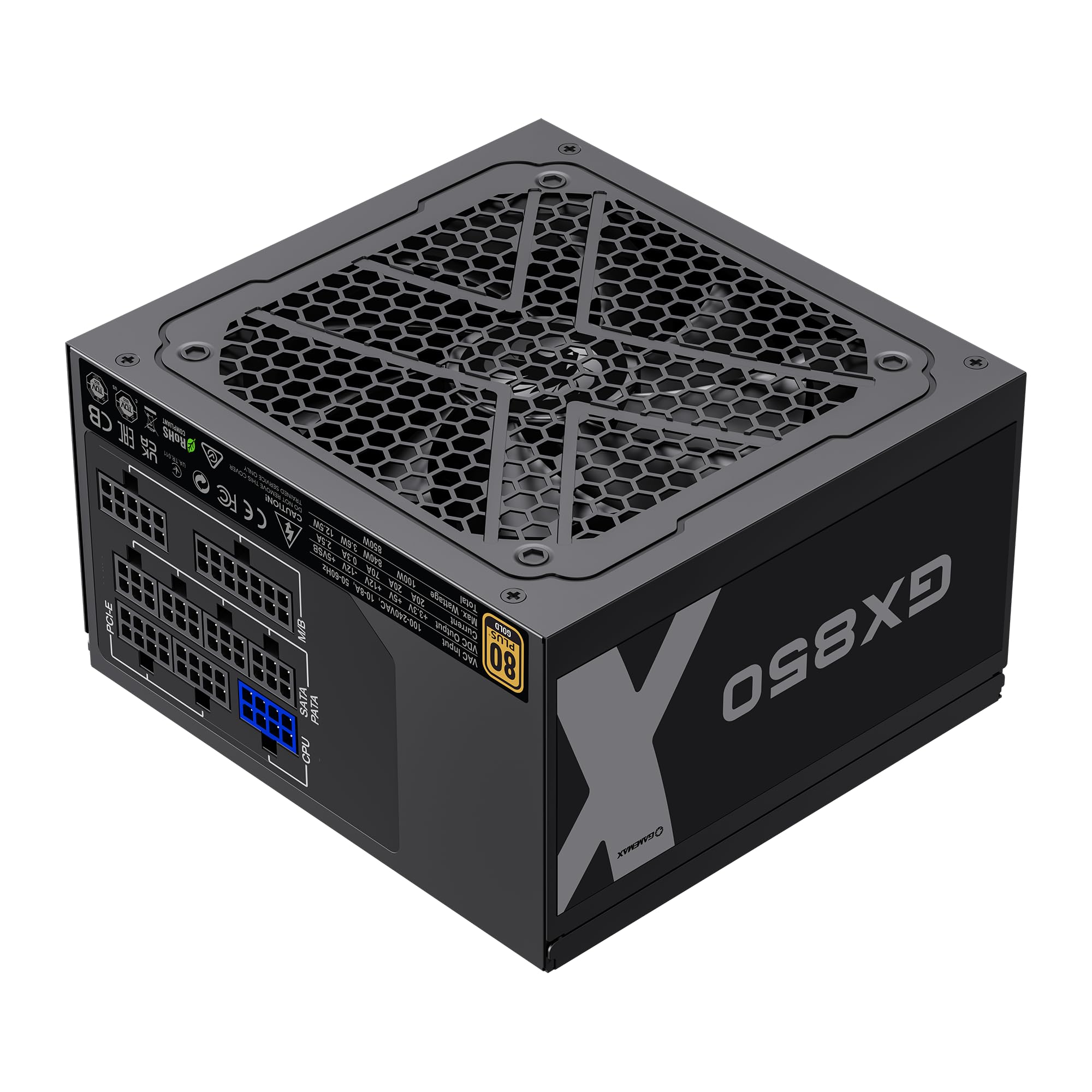
Image: The GAMEMAX GX-850 80 Plus Gold Fully Modular Power Supply, showcasing its black finish and modular design.
3.1 Característiques clau
- Certificació 80+ Gold: Ensures high power efficiency, reducing heat and operating costs.
- LLC+DC-DC Circuit: Advanced circuit design for stable voltage output and improved efficiency.
- Disseny totalment modular: Allows for custom cable management, reducing clutter and improving airflow.
- FDB Fan: Ultra-quiet temperature-controlled Fluid Dynamic Bearing fan for silent operation and extended lifespan.
- 105℃ Mainstream Capacitor: High-quality capacitors ensure long life and smooth power output.
- Protecció integral: Features SIX levels of protection: Over Temperature Protection (OTP), Over Current Protection (OCP), Short Circuit Protection (SCP), Over Voltage Protection (OVP), sota voltage Protection (UVP), and Over Power Protection (OPP).
4. Configuració i instal·lació
Follow these steps to properly install your GAMEMAX GX-850 power supply into your computer system.
4.1 Passos d'instal·lació
- Prepareu el vostre sistema: Assegureu-vos que l'ordinador estigui completament apagat i desendollat de la presa de corrent. Obriu la carcassa de l'ordinador.
- Traieu la font d'alimentació antiga (si escau): Desconnecteu tots els cables de la font d'alimentació antiga i traieu-la de la carcassa.
- Muntar la nova font d'alimentació: Carefully place the GAMEMAX GX-850 into the power supply bay of your computer case. Secure it with the provided mounting screws. Ensure the fan is facing the correct direction for optimal airflow (typically facing down if your case has a bottom vent, or up if it's a top-mounted PSU).
- Connecteu els cables modulars: Identify the necessary cables for your components. Connect the modular cables to the corresponding ports on the power supply first, then route them to your components.
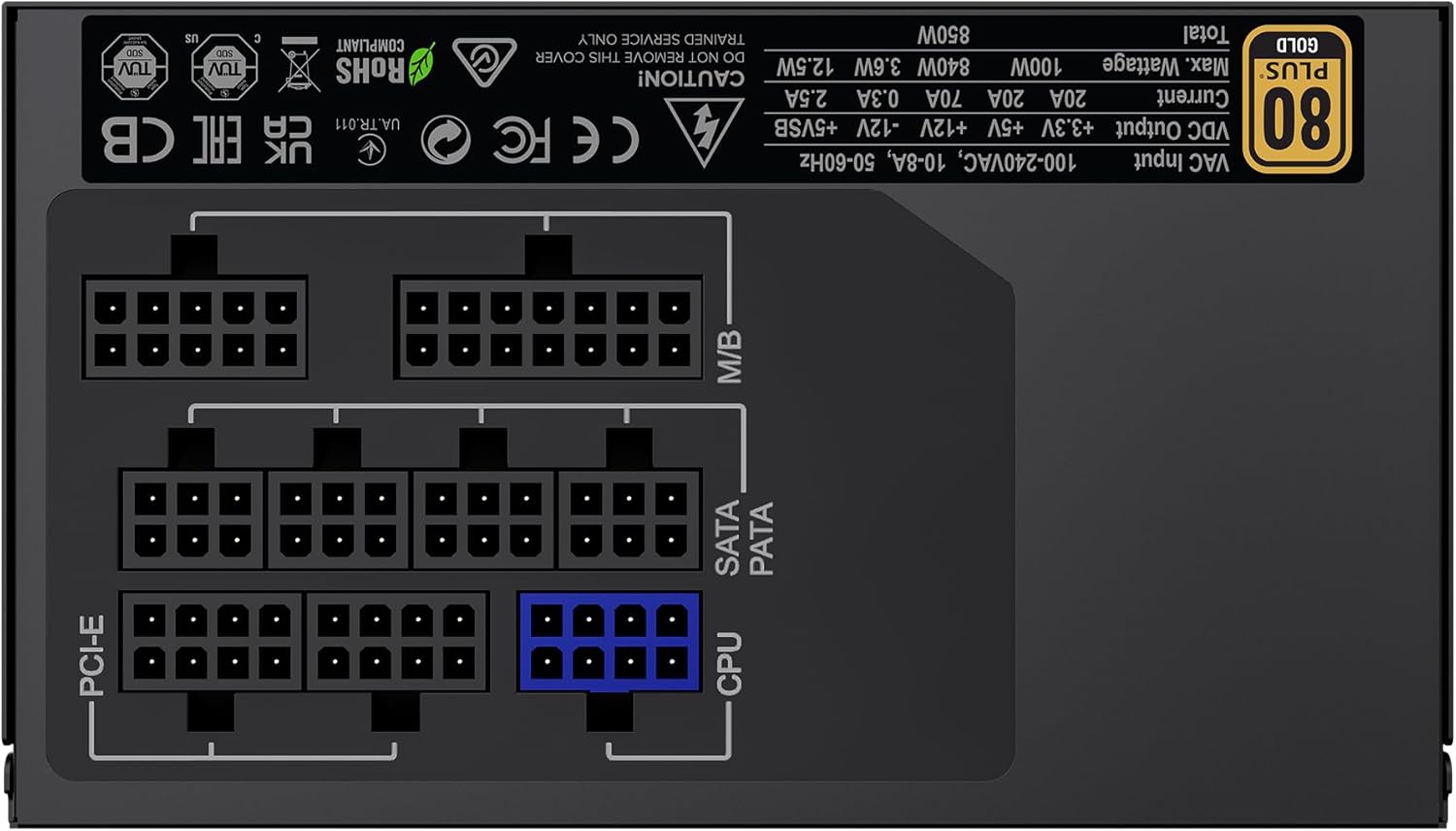
Imatge: Part posterior view of the GAMEMAX GX-850 showing the fully modular cable connection ports for PCI-e, M/B (Motherboard), SATA/PATA, and CPU cables.
- Motherboard (M/B): Connecteu el cable ATX de 24 pins a la placa base.
- CPU: Connect the 8-pin (or 4+4-pin) CPU power cable to the CPU power connector on your motherboard.
- Graphics Cards (PCI-e): Connect the 6+2-pin PCIe power cables to your graphics card(s). Use separate cables for each connector if your GPU requires multiple.
- Storage Devices (SATA): Connecteu els cables d'alimentació SATA als vostres SSD, HDD i unitats òptiques.
- Peripherals (PATA/Molex): Connect peripheral power cables to any other devices requiring them (e.g., fan controllers, older drives).
- Gestió de cables: Col·loca els cables amb cura per millorar la circulació del flux i l'estètica.
- Tanqueu la carcassa i connecteu l'alimentació de CA: Tanca la carcassa de l'ordinador. Connecta el cable d'alimentació de CA a la font d'alimentació i després a una presa de corrent amb connexió a terra.
5. Instruccions de funcionament
After successful installation, follow these steps to operate your system.
- Interruptor d'alimentació: Assegureu-vos que l'interruptor d'alimentació de la part posterior de la font d'alimentació estigui en la posició 'ON' (I).
- Engegada del sistema: Press the power button on your computer case to turn on the system.
- System Power Off: To turn off your system, use the operating system's shutdown procedure. For a hard shutdown, hold the case power button for several seconds. For complete power disconnection, switch the PSU's power switch to 'OFF' (O) and unplug the AC cord.
6. Manteniment
Un manteniment regular ajuda a garantir la longevitat i el rendiment òptim de la vostra font d'alimentació.
- Neteja de pols: Periodically clean the power supply's fan and ventilation grilles using compressed air to prevent dust buildup, which can impede cooling. Ensure the system is powered off and unplugged before cleaning.
- Comprovació del cable: Occasionally check all modular cable connections to ensure they are securely seated.
- Condicions ambientals: Maintain a clean, dry, and well-ventilated environment for your computer.
7. Solució De Problemes
Si teniu problemes amb la font d'alimentació, consulteu els passos habituals següents per a la resolució de problemes:
- Sense energia:
- Ensure the AC power cord is securely plugged into both the wall outlet and the power supply.
- Comproveu que l'interruptor d'alimentació de la part posterior de la font d'alimentació estigui en la posició 'ON' (I).
- Verify that the 24-pin ATX and 8-pin CPU power cables are correctly and firmly connected to the motherboard.
- Proveu la presa de corrent amb un altre dispositiu per confirmar que tingui corrent.
- Inestabilitat del sistema/aturades aleatòries:
- Assegureu-vos que tots els cables modulars estiguin completament connectats tant als extrems de la font d'alimentació com als dels components.
- Comproveu que la ventilació sigui adequada i assegureu-vos que el ventilador de la font d'alimentació estigui girant. El sobreescalfament pot provocar aturades.
- If you have recently added new components, ensure your 850W power supply is sufficient for the total system wattage.
- El ventilador no gira:
- The GX-850 features a temperature-controlled fan. It may not spin at low loads or temperatures. This is normal operation.
- If the fan does not spin under load and the PSU feels hot, ensure there are no obstructions and consider contacting support.
If problems persist after performing these steps, contact GAMEMAX customer support or your retailer for further assistance.
8. Especificacions
Detailed technical specifications for the GAMEMAX GX-850 80 Plus Gold Power Supply:
| Característica | Especificació |
|---|---|
| Nom del model | GX-850 Modular |
| Marca | GAMEMAX |
| Potència de sortidatage | 850 watts |
| Factor de forma | ATX |
| Certificació d'eficiència | 80 més d'or |
| Disseny de fonts d'alimentació | Completament Modular |
| Mètode de refrigeració | Air (FDB Fan) |
| Nombre de fans | 1 |
| Vol. d'entrada mínimatage | 115 Volts |
| Volum d'entrada màximtage | 240 volts (CA) |
| Classificació de temperatura superior | 105 Degrees Celsius (Capacitors) |
| Dispositius compatibles | Ordinador d'escriptori |
| Tipus de connectors | ATX, PCI-e, SATA |
9. Garantia i Suport
GAMEMAX products are manufactured to high-quality standards. For warranty information, please refer to the warranty card included with your product or visit the official GAMEMAX weblloc web. Els termes de la garantia poden variar segons la regió i el distribuïdor.
For technical support or further inquiries, please contact GAMEMAX customer service through their official weblloc web o la informació de contacte que us ha proporcionat el vostre distribuïdor.