
Introducció
The Yesido YAU41 is a versatile 2-in-1 Bluetooth 5.0 audio adapter designed to function as both a transmitter (TX) and a receiver (RX). It enables wireless audio streaming for a wide range of devices, converting traditional audio systems into Bluetooth-enabled ones. Additionally, it features a built-in TF card reader for direct music playback. This manual provides essential information for proper setup, operation, and maintenance of your YAU41 device.
Producte acabatview
Característiques principals:
- Bluetooth 5.0 for stable and efficient wireless connection.
- 2-in-1 functionality: Transmitter (TX) and Receiver (RX) modes.
- Integrated TF card reader for direct audio playback.
- 3.5mm AUX audio input/output.
- Rechargeable battery with approximately 10 hours of music playback.
- Disseny compacte i portàtil.
- Intuitive TX/RX mode switch button.
Components del dispositiu:
Familiarize yourself with the various parts of your YAU41 audio adapter:
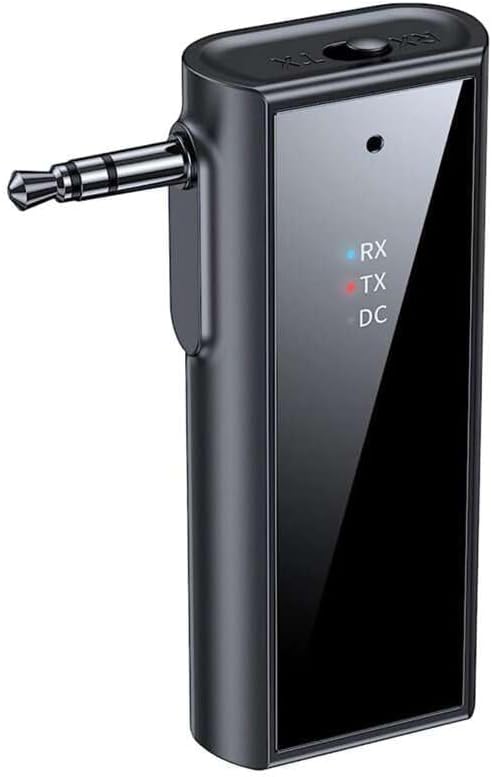
Imatge: Frontal view of the Yesido YAU41 Audio Adapter, highlighting the 3.5mm audio jack, mode indicator lights (RX, TX, DC), and the Yesido logo.
- Conector d'àudio de 3.5 mm: For connecting to audio sources (TX mode) or speakers (RX mode).
- TX/RX Switch Button: Alterna entre els modes transmissor i receptor.
- Botó d'engegada/Botó multifunció: Encén/apaga el dispositiu, reprodueix/pausa música i respon/finalitza trucades.
- Botó Pujar volum/Pista següent: Augmenta el volum o salta a la pista següent.
- Botó per baixar el volum/pista anterior: Disminueix el volum o torna a la pista anterior.
- Ranura per a targetes TF: Per inserir una targeta TF (MicroSD) per reproduir música directament.
- Port de càrrega USB-C: Per carregar el dispositiu.
- Indicator Lights (RX, TX, DC):
- RX (Blue): Indicates Receiver mode is active.
- TX (Red): Indicates Transmitter mode is active.
- DC (Green): Indica l'estat de càrrega.
Configuració
1. Càrrega inicial:
Before first use, fully charge the YAU41 adapter. Connect the provided USB-C charging cable to the device's USB-C port and the other end to a standard USB power adapter (not included) or a computer USB port. The DC indicator light will illuminate during charging and turn off when fully charged.
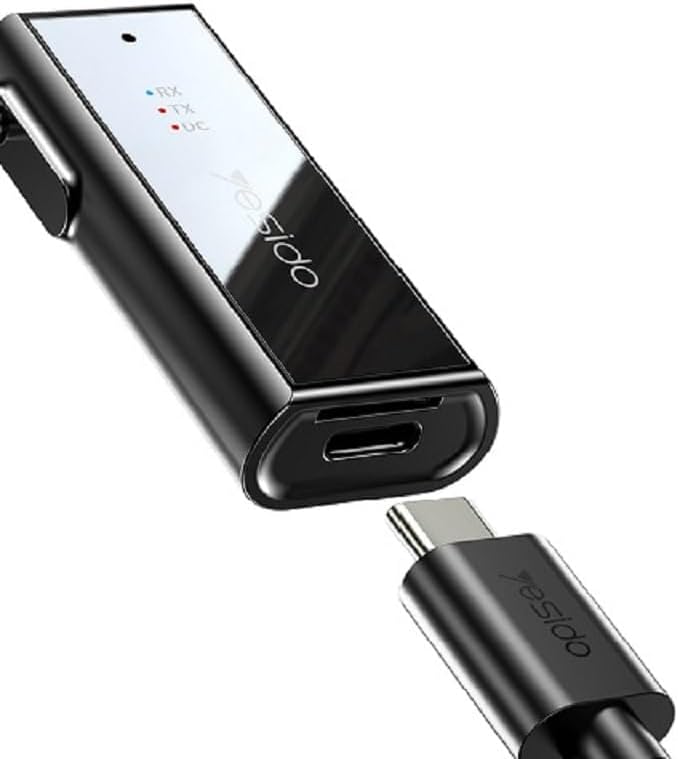
Image: The Yesido YAU41 Audio Adapter being charged via its USB-C port.
2. Encendre/apagar:
- Per encendre: Press and hold the Power button for approximately 3 seconds until the indicator lights flash.
- Per apagar: Press and hold the Power button for approximately 3 seconds until the indicator lights turn off.
Modes de funcionament
Mode transmissor (TX):
In TX mode, the YAU41 transmits audio from a non-Bluetooth device (e.g., TV, computer, MP3 player) to a Bluetooth-enabled receiving device (e.g., Bluetooth headphones, Bluetooth speaker).
- Ensure the YAU41 is powered on.
- Slide the TX/RX switch to the TX position. The red TX indicator light will illuminate.
- Connect the YAU41's 3.5mm audio jack to the audio output port of your non-Bluetooth device using the provided 3.5mm audio cable.
- Place your Bluetooth receiving device (headphones/speaker) into pairing mode.
- The YAU41 will automatically search for and connect to nearby Bluetooth receiving devices. Once connected, the TX indicator light may change its blinking pattern or remain solid.
- Play audio on your non-Bluetooth device. The sound should now be transmitted to your Bluetooth headphones/speaker.
Mode receptor (RX):
In RX mode, the YAU41 receives audio from a Bluetooth-enabled device (e.g., smartphone, tablet) and outputs it to a non-Bluetooth audio system (e.g., car stereo, home stereo, wired headphones).
- Ensure the YAU41 is powered on.
- Slide the TX/RX switch to the RX position. The blue RX indicator light will illuminate and flash, indicating it's in pairing mode.
- Connect the YAU41's 3.5mm audio jack to the audio input port (e.g., AUX-in) of your non-Bluetooth audio system using the provided 3.5mm audio cable.
- On your Bluetooth-enabled device (e.g., smartphone), enable Bluetooth and search for available devices. Select "YAU41" from the list to pair.
- Once successfully paired, the blue RX indicator light will remain solid.
- Play audio on your Bluetooth-enabled device. The sound will now be output through your connected audio system.

Image: The Yesido YAU41 Audio Adapter in a car, demonstrating its use with a TF card for direct music playback.
Reproducció de la targeta TF:
The YAU41 supports direct audio playback from a TF (MicroSD) card.
- Inseriu una targeta TF amb àudio files (e.g., MP3) into the TF card slot on the YAU41.
- The device will automatically switch to TF card playback mode.
- Use the Volume Up/Next Track and Volume Down/Previous Track buttons to control playback.
- The Power/Multi-function button can be used to play/pause.
- Ensure the YAU41 is connected to an audio output device (e.g., speaker in RX mode) to hear the audio.
Carregant
When the battery is low, the indicator light may flash or a voice prompt may be heard. To charge the device:
- Connect the YAU41 to a USB power source using the provided USB-C cable.
- The DC indicator light will turn on during charging.
- Once fully charged, the DC indicator light will turn off.
- A full charge typically takes approximately 1-2 hours and provides up to 10 hours of music playback.
Manteniment
- Mantingueu el dispositiu sec. No l'exposeu a la humitat ni a líquids.
- Netegeu el dispositiu amb un drap suau i sec. Eviteu utilitzar productes químics agressius o netejadors abrasius.
- Guardeu el dispositiu en un lloc fresc i sec, allunyat de la llum solar directa i de temperatures extremes.
- Eviteu deixar caure o sotmetre el dispositiu a forts impactes.
- No intenteu desmuntar ni modificar el dispositiu, ja que això anul·larà la garantia i pot causar danys.
Resolució de problemes
| Problema | Possible solució |
|---|---|
| El dispositiu no s'encén. | Ensure the device is fully charged. Press and hold the Power button for 3-5 seconds. |
| Cannot pair in TX/RX mode. |
|
| Sense entrada/sortida d'àudio. |
|
| Retard/endarreriment d'àudio. | Bluetooth audio transmission can sometimes introduce minor latency. This device uses Bluetooth 5.0, which minimizes this, but some applications (e.g., live music performance) may still experience noticeable delay. Ensure no obstacles are between devices. |
Especificacions
| Característica | Detall |
|---|---|
| Model | YAU41 |
| Versió Bluetooth | 5.0 |
| Modes de funcionament | Transmissor (TX), Receptor (RX) |
| Connectivitat | Bluetooth, 3.5 mm AUX |
| Suport de la targeta TF | Yes (MicroSD) |
| Distància de transmissió | Fins a 10 metres (33 peus) |
| Tipus de bateria | Rechargeable Lithium Ion/Polymer |
| Temps de reproducció de música | Aproximadament 10 hores |
| Port de càrrega | USB-C |
| Mètode de control | Botons |
| Material | PC (policarbonat) |
| Pes | 300 grams |
| Color | Negre |
| Dispositius compatibles | TV, Radio, Speaker, Smartphone, Car Audio Systems |
Informació de seguretat
- No exposeu el dispositiu a temperatures extremes, llum solar directa ni flames obertes.
- Avoid using the device in dusty or dirty environments.
- Mantingueu el dispositiu allunyat de camps magnètics forts.
- Do not use unauthorized chargers or cables, as this may damage the device or pose a safety risk.
- Desfeu-vos del dispositiu i de la bateria de manera responsable d'acord amb la normativa local.
Garantia i Suport
Per obtenir informació sobre la garantia i assistència tècnica, consulteu la documentació que s'inclou amb la compra o poseu-vos en contacte directament amb el fabricant. Conserveu el comprovant de compra per a reclamacions de garantia.