
1. Introducció
This manual provides comprehensive instructions for the Blackmagic Design Pyxis 6K Cinema Camera, L-Mount. It covers essential information regarding setup, operation, maintenance, and troubleshooting to ensure optimal performance and longevity of your camera. Please read this manual thoroughly before using the camera.
2. Informació de seguretat
- No exposeu la càmera a l'aigua ni a una humitat excessiva.
- Avoid operating the camera in extreme temperatures.
- Use only Blackmagic Design approved accessories and power supplies.
- No intenteu desmuntar ni modificar la càmera. Encarregueu tot el manteniment a personal qualificat.
- Mantingueu la càmera allunyada de camps magnètics forts.
3. Contingut del paquet
Verifiqueu que tots els elements siguin presents al paquet:
- Blackmagic Design Pyxis 6K Cinema Camera (L-Mount)
- Font d'alimentació
- Manual d'usuari (aquest document)
- Clau d'activació de DaVinci Resolve Studio
4. Càmera acabadaview
The Blackmagic Design Pyxis 6K Cinema Camera features a 36x24mm full-frame 6K sensor, offering exceptional image quality and flexibility for cinematic content creation. It supports various recording formats including Blackmagic RAW and H.264 proxies, with resolutions up to 6048 x 4032.

Figura 4.1: Part frontal view of the Blackmagic Design Pyxis 6K Cinema Camera with an L-Mount lens attached. This image highlights the camera's robust body, the lens mount, and the integrated top handle.
Key features include a built-in 4-inch HDR 1500 nit LCD screen for clear monitoring, and support for open gate 3:2, full height 6:5 anamorphic, and Super 35 recording modes. The camera records full resolution up to 36 frames per second (fps) or 120 fps in windowed mode.

Figura 4.2: posterior view of the Blackmagic Design Pyxis 6K Cinema Camera, showcasing the 4-inch HDR LCD touchscreen display, control buttons, and the attached lithium-ion battery pack. The screen displays recording settings and menu options.
The camera utilizes CFexpress for flash memory storage and offers HDMI connectivity for external monitoring. Audio is supported in AAC, MP3, and PCM formats.
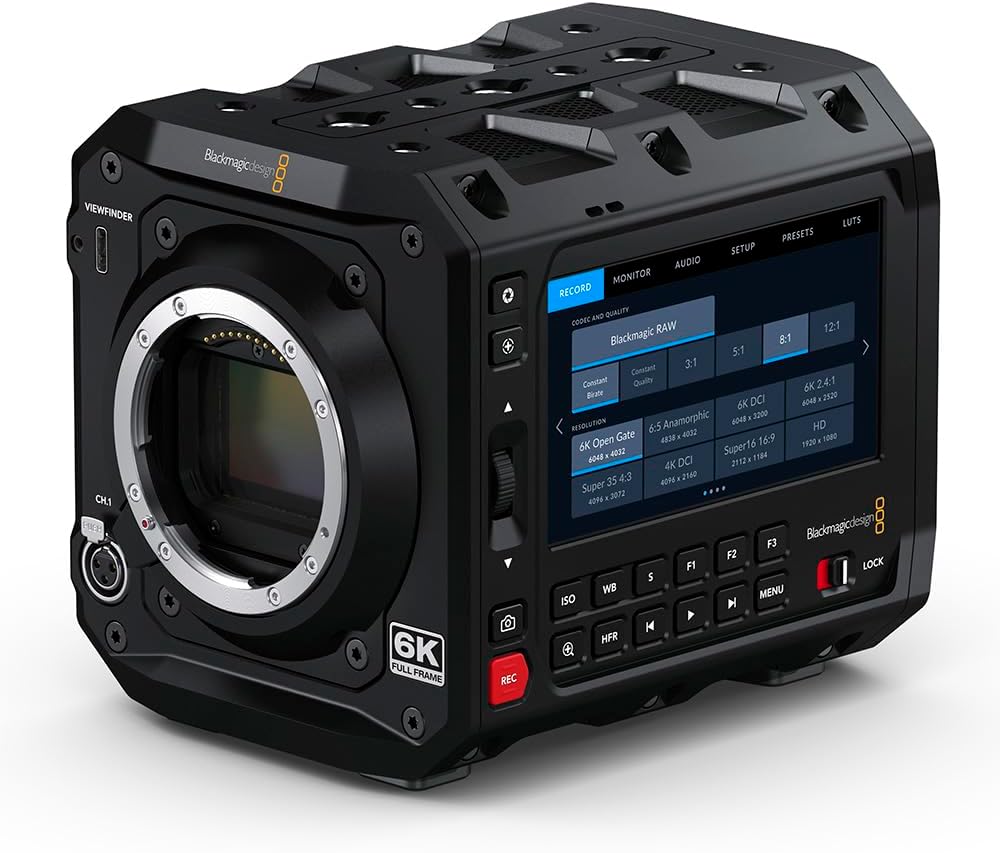
Figura 4.3: Frontal view of the Blackmagic Design Pyxis 6K Cinema Camera without a lens, clearly showing the L-Mount for lens attachment and the '6K FULL FRAME' designation. This view highlights the camera's robust construction and lens interface.
5. Configuració
5.1. Instal·lació de la bateria
- Assegureu-vos que la càmera estigui apagada.
- Locate the battery compartment on the rear of the camera.
- Insert a compatible lithium-ion battery pack, ensuring it clicks securely into place.
5.2. Lens Attachment (L-Mount)
- Remove the body cap from the camera and the rear cap from your L-Mount lens.
- Align the white index mark on the lens with the white index mark on the camera's lens mount.
- Insert the lens into the mount and rotate it clockwise until it locks into position.
5.3. Media Card Insertion
- Locate the CFexpress card slot.
- Insert a CFexpress card with the label facing the correct direction until it clicks into place.
- To remove, press the card gently to eject it.
5.4. Encès / apagat
- To power on, slide the power switch to the 'ON' position.
- Per apagar-lo, feu lliscar l'interruptor d'alimentació a la posició "OFF".
5.5. Configuració inicial
Upon first power-on, you may be prompted to set the language, date, and time. Follow the on-screen instructions using the touchscreen LCD.
6. Funcionament de la càmera
6.1. Navegació del menú
The 4-inch HDR LCD screen is a touchscreen interface. Tap icons and swipe to navigate through menus and adjust settings. Physical buttons are also available for quick access to common functions like ISO, White Balance, and Frame Rate.
6.2. Gravació
- Formats de gravació: The camera supports Blackmagic RAW for maximum quality and H.264 proxies for efficient workflow. Select your desired format in the 'Record' menu.
- Resolució i freqüència d'imatges: Adjust resolution (e.g., 6K Open Gate, 6K DCI, Super 35) and frame rate (up to 36 fps at full resolution, 120 fps windowed) via the 'Record' or 'Project' settings.
- Iniciar/Aturar la gravació: Press the dedicated 'REC' button on the camera body to start and stop recording.
6.3. Configuració d'àudio
Access audio input levels, monitoring options, and format settings (AAC, MP3, PCM) through the 'Audio' menu. Ensure external microphones are properly connected to the camera's audio inputs.
6.4. Monitoring and Connectivity
Use the built-in LCD for on-camera monitoring. For external displays, connect an HDMI cable from the camera's HDMI output to your monitor. Adjust display settings in the 'Monitor' menu.
7. Manteniment
7.1. Neteja
- Feu servir un drap suau i sec per netejar el cos de la càmera.
- For the LCD screen, use a specialized screen cleaning solution and a microfiber cloth.
- Keep the lens mount free of dust and debris. Use a blower brush for sensor cleaning if necessary, or consult a professional.
7.2. Emmagatzematge
When not in use, store the camera in a cool, dry place, preferably in a padded camera bag or case to protect it from physical damage and environmental factors.
7.3. Actualitzacions de firmware
Periodically check the Blackmagic Design website for firmware updates. Updates can improve performance, add features, and resolve issues. Follow the instructions provided with the firmware update carefully.
8. Solució De Problemes
- La càmera no s'encén: Ensure the battery is fully charged and correctly inserted, or the external power supply is connected.
- No hi ha imatge a la pantalla LCD: Check lens attachment, ensure the lens cap is removed, and verify monitor settings.
- Problemes de gravació: Confirm a compatible CFexpress card is inserted and has sufficient free space. Check recording format and resolution settings.
- Problemes d'àudio: Verify microphone connection, audio input levels, and selected audio format.
- For persistent issues, perform a factory reset (refer to the 'Settings' menu) or contact Blackmagic Design support.
9. Especificacions
| Característica | Especificació |
|---|---|
| Dimensions del producte | 5.91 x 4.72 x 4.33 polzades |
| Pes de l'article | 4.62 lliures |
| Número de model de l'article | CINECAMCPYXA60LFL |
| Tecnologia del sensor fotogràfic | CMOS |
| Resolució de captura de vídeo | 6K (6048 x 4032), 1080p, 720p |
| Apertura màxima | 2 Millimeters (Lens dependent) |
| Tipus de memòria flash | CFexpress |
| Format de captura de vídeo | Blackmagic RAW, CinemaDNG, ProRes, DNxHR |
| Format d'àudio compatible | AAC, MP3, PCM |
| Mida de la pantalla | 4 Inches (HDR 1500 nit LCD) |
| Tecnologia de connectivitat | HDMI |
| Color | Negre |
| Fabricant | Disseny Blackmagic |
10. Garantia i Suport
10.1. Informació de la garantia
Blackmagic Design products typically come with a limited manufacturer's warranty. Please refer to the warranty card included with your product or visit the official Blackmagic Design weblloc web per obtenir informació detallada sobre els termes i condicions de garantia específics de la vostra regió.
10.2. Suport tècnic
For technical assistance, product registration, or to download the latest software and drivers, please visit the official Blackmagic Design support page. You can find comprehensive FAQs, knowledge base articles, and contact information for customer support.
Official Blackmagic Design Store: Blackmagic Design on Amazon