
1. Introducció
This manual provides essential information for the proper installation, configuration, and operation of your Xiaomi AX3000 NE Network System. Please read this guide thoroughly before using the device to ensure optimal performance and safety.
2. Informació de seguretat
- Utilitzeu només l'adaptador d'alimentació subministrat amb el dispositiu.
- Do not expose the device to water or high humidity.
- Mantingueu el dispositiu lluny de fonts de calor i de la llum solar directa.
- Assegureu-vos una ventilació adequada al voltant del dispositiu per evitar el sobreescalfament.
- No intenteu desmuntar ni reparar el dispositiu vosaltres mateixos. Poseu-vos en contacte amb el personal de servei autoritzat.
3. Contingut del paquet
Verifiqueu que tots els elements siguin presents al vostre paquet:
- Xiaomi AX3000 NE Router Body
- Adaptador d'alimentació
- Cable de xarxa
- Manual d'usuari (aquest document)
- Targeta de garantia
4. Producte acabatview
The Xiaomi AX3000 NE is a high-performance network system designed to provide full home Wi-Fi coverage with high-speed Wi-Fi 7 capabilities. It supports seamless circulation for an optimized mesh network experience and features NFC Easy Share for quick device connections.
4.1 Davant View

Figura 4.1: Frontal view of the Xiaomi AX3000 NE router, featuring a minimalist white design with an illuminated indicator strip on the right side.
4.2 lateral View

Figura 4.2: lateral view of the Xiaomi AX3000 NE router, showcasing its compact, upright form factor and subtle ventilation grooves.
4.3 Panell posterior i ports

Figure 4.3: Rear panel of the Xiaomi AX3000 NE router, displaying the power input, four Ethernet ports (one WAN, three LAN), and a recessed Mesh/Reset button.
El panell posterior inclou:
- Entrada d'alimentació: Es connecta a l'adaptador de corrent proporcionat.
- Ports Ethernet (4): One port typically serves as the WAN (Wide Area Network) port for connecting to your modem, while the others are LAN (Local Area Network) ports for wired devices.
- Botó de malla/restabliment: Used for initiating mesh pairing or performing a factory reset.
5. Guia de configuració
5.1 Initial Setup (Main Router)
- Connectar l'alimentació: Plug the power adapter into the router's power input and then into a power outlet. Wait for the indicator light to turn solid white or blue, indicating it's ready.
- Connectar-se al mòdem: Connect one end of the provided network cable to the WAN port (often labeled or distinguished) on the Xiaomi AX3000 NE router and the other end to your internet modem's LAN port.
- Connexió a l'ordinador (opcional): For initial configuration, you can connect a computer directly to one of the router's LAN ports using another Ethernet cable, or connect wirelessly to the default Wi-Fi network (SSID and password usually found on a sticker on the router).
- Configuració d'accés: Obre a web browser on your connected computer or smartphone and navigate to the router's default IP address (e.g., 192.168.31.1 or miwifi.com). Follow the on-screen instructions to set up your internet connection (e.g., PPPoE, DHCP) and Wi-Fi network name (SSID) and password.
- Configuració completa: Once configured, the router will restart, and your Wi-Fi network will be active.
5.2 Setting Up a Mesh Network (Additional Units)
The Xiaomi AX3000 NE supports mesh networking for extended coverage. To add additional units:
- Encès: Place the additional AX3000 NE unit(s) in desired locations within range of the main router and plug them into power outlets.
- Wait for Startup: Allow each unit to power on and stabilize. The indicator light should typically be solid white or blue.
- Initiate Mesh Pairing: On the additional unit, press the Mesh/Reset button once. The indicator light may change to a blinking state, indicating it's searching for the main router.
- Configuració automàtica: The additional unit will automatically detect and pair with the main router, adopting its Wi-Fi settings. This process may take a few minutes.
- Verifica la connexió: Once paired, the indicator light on the additional unit should turn solid, indicating a successful mesh connection.

Figure 5.2: Illustration of a mesh network configuration, demonstrating how multiple Xiaomi AX3000 NE units work together to provide comprehensive Wi-Fi coverage across different rooms and devices.
6. Instruccions de funcionament
6.1 Connexió de dispositius
- Connexió Wi-Fi: On your wireless device (smartphone, laptop, tablet), search for available Wi-Fi networks. Select your network's SSID (the name you set during setup) and enter the password.
- Connexió per cable: Connect devices like desktop computers, gaming consoles, or smart TVs to the router's LAN ports using Ethernet cables.
6.2 NFC Easy Share
The Xiaomi AX3000 NE features NFC Easy Share for quick and convenient connection of NFC-enabled devices to your Wi-Fi network.
- Activa l'NFC: Assegureu-vos que l'NFC estigui activat al vostre telèfon intel·ligent o a un altre dispositiu compatible.
- Toca per connectar: Gently tap your NFC-enabled device against the NFC tag area on the Xiaomi AX3000 NE router.
- Confirmeu la connexió: Your device will prompt you to connect to the Wi-Fi network. Confirm the connection.
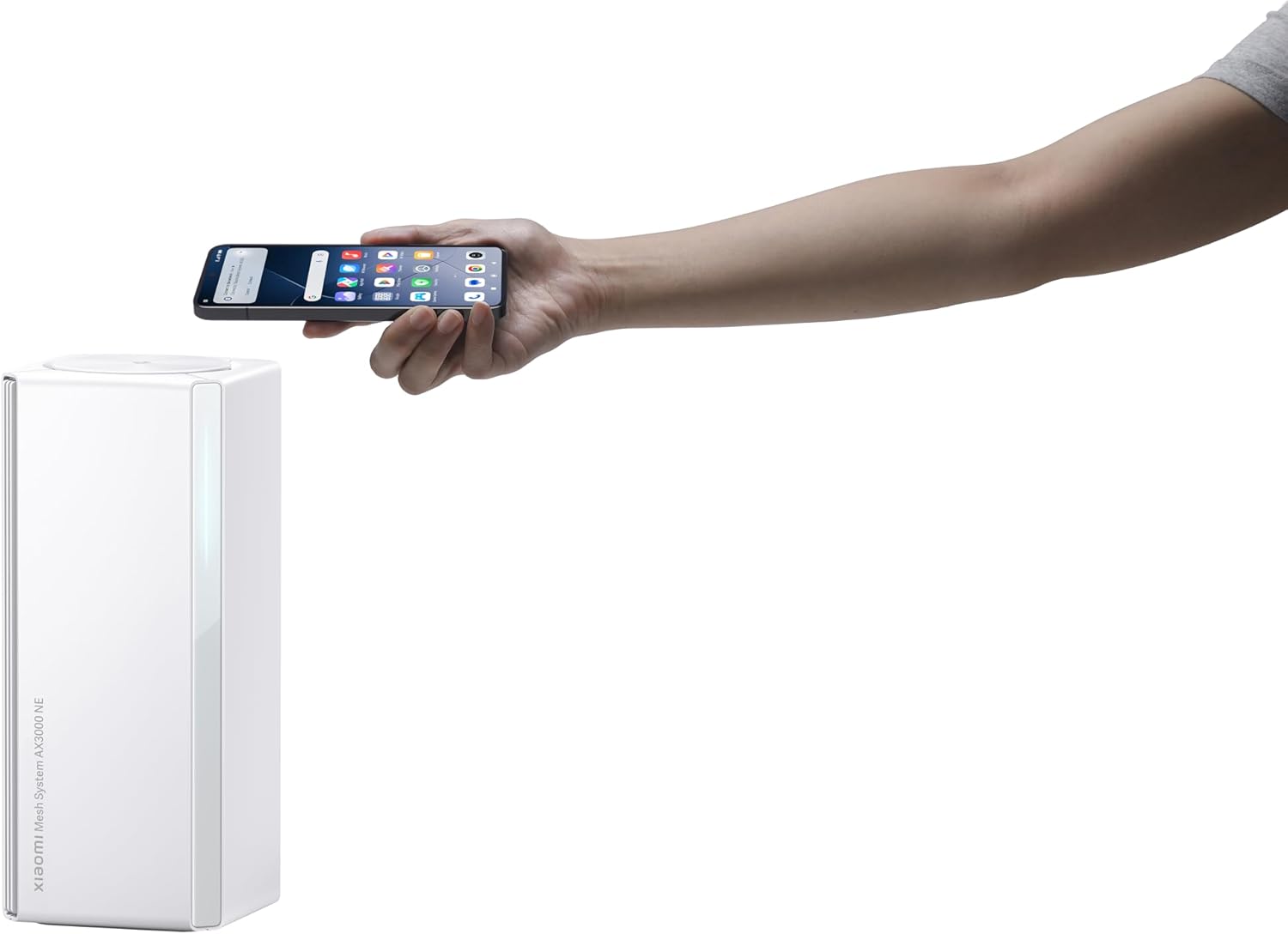
Figure 6.2: A user demonstrating NFC Easy Share by tapping a smartphone on the top surface of the Xiaomi AX3000 NE router for quick Wi-Fi connection.
6.3 Gestió de la xarxa
You can manage your network settings, connected devices, and advanced features through the Xiaomi Wi-Fi app or the web interface (miwifi.com).
7. Manteniment
- Actualitzacions de firmware: Regularly check for and install firmware updates through the Xiaomi Wi-Fi app or web interfície per garantir un rendiment òptim, seguretat i accés a noves funcions.
- Neteja: Feu servir un drap suau i sec per netejar l'exterior del router. No utilitzeu netejadors líquids ni aerosols.
- Restabliment de fàbrica: To restore the router to its factory default settings, press and hold the Mesh/Reset button on the rear panel for approximately 5-10 seconds until the indicator light changes, then release. Nota: Això esborrarà tots els paràmetres personalitzats.
8. Solució De Problemes
- Sense connexió a Internet:
- Comproveu si el vostre mòdem funciona correctament.
- Ensure the network cable is securely connected from the modem to the router's WAN port.
- Reinicieu tant el mòdem com el router.
- Verify your internet connection settings in the router's configuration interface.
- Velocitat Wi-Fi lenta:
- Ensure your devices are within optimal range of the router or mesh units.
- Comproveu si hi ha interferències d'altres dispositius electrònics.
- Consider updating your device's Wi-Fi drivers.
- Feu una prova de velocitat per confirmar la velocitat del vostre proveïdor de serveis d'Internet.
- No es pot connectar a Wi-Fi:
- Verifiqueu que esteu introduint la contrasenya Wi-Fi correcta.
- Restart your router and the device you are trying to connect.
- Check if the Wi-Fi network is broadcasting (not hidden).
- Mesh Unit Not Connecting:
- Ensure the additional unit is powered on and within range of the main router.
- Press the Mesh/Reset button on the additional unit to re-initiate pairing.
- Try moving the mesh unit closer to the main router temporarily for pairing.
9. Especificacions
| Característica | Detall |
|---|---|
| Marca | XIAOMI |
| Nom del model | Mesh System AX3000NE |
| Número de model | RD28 |
| Característica especial | High-speed Wi-Fi 7, continuous circulation, easy sharing NFC |
| Classe de banda de freqüència | Doble banda |
| Comunicació sense fils estàndard | 802.11ac, 802.11ax |
| Dispositius compatibles | Ordinador personal |
| Usos recomanats | Negocis, Llar |
| Tecnologia de connectivitat | Ethernet, Wi-Fi |
| Color | Blanc |
| Tipus d'antena | Interna |
| Sistema operatiu | RouterOS, ZyNOS, Junos OS, or Cisco IOS (Note: This likely refers to compatible OS for management, not the router's internal OS) |
| Protocol de seguretat | WPA2-PSK |
| Nombre de Ports | 4 (Ethernet) |
| Mètode de control | Tàctil, prémer el botó |
| Velocitat de transferència de dades | 48 gigabits per segon (Note: This is likely an aggregate theoretical maximum, not per port) |
| LAN Port Bandwidth | 10/100/1000 Mbps |
| Voltage | 230 volts (CA) |
| Maximum Upstream Data Transfer Rate | 3000 megabits per segon |
| Memòria RAM instal·lada | 256 MB |
| Nombre d'antenes | 3 (Internal) |
| Has Internet Connectivity | Sí |
| Router Network Type | LAN |
| Is Modem Compatible | No (Note: This indicates it is a router, not a modem/router combo) |
| Cobertura | Full Apartment |
| Pes de l'article | 674 grams |
| Dimensions de l'article (L x A x A) | 3.94 cm de llargada x 11.42 cm d'amplada x 3.94 cm d'alçada |
| Has Security Updates | Sí |
10. Garantia i Suport
Your Xiaomi AX3000 NE Network System comes with a warranty. Please refer to the included warranty card for detailed terms and conditions, including warranty period and coverage.
For technical support, frequently asked questions, or to download the latest firmware and user guides, please visit the official Xiaomi support weblloc o poseu-vos en contacte amb el seu servei d'atenció al client.
Botiga oficial de Xiaomi: Botiga Xiaomi a Amazon