
XTU X1
XTU Trail Camera X1 User Manual
Model: X1 - WiFi Solar Powered 64MP 2.7K Game Camera
Introducció
This manual provides detailed instructions for the setup, operation, and maintenance of your XTU X1 Trail Camera. Designed for versatile outdoor use, this camera features 64MP photo resolution, 2.7K video recording, advanced night vision, solar power capabilities, and convenient WiFi/Bluetooth connectivity for app control. It is suitable for wildlife monitoring, outdoor security, hunting, and farm surveillance.

Image: XTU X1 Trail Camera, solar panel, and included 32GB SD card, highlighting its features.

Image: Multiple scenarios for using the XTU Trail Camera, including hunting, home security, farm, and wildlife monitoring.
Què hi ha a la caixa?
Verifiqueu que tots els components siguin presents en desembalar-lo:
- XTU Trail Camera (X1) x 1
- Panell solar x 1
- Targeta SD de 32 GB x 1
- Manual d'usuari x 1
- Cargols
- Suport de càmera
- Suport del panell solar
- Corretja de muntatge x 1
- Cable tipus C x 1

Image: All components included in the XTU Trail Camera package.
Guia de configuració
1. Battery and Solar Panel Installation
The camera is powered by a rechargeable lithium battery and an external solar panel. Ensure the battery is charged before initial use. The solar panel provides continuous power, extending operational time.
- Connect the solar panel to the camera using the provided cable.
- Muntar el panell solar en un lloc que rebi ample direct sunlight throughout the day.
- The camera can also be charged via the Type C cable using a standard USB power adapter (not included).

Image: Trail camera with integrated solar power supply, showing connection to the solar panel.

Image: Charging options for the camera: solar power and USB cable.
2. Instal·lació de la targeta SD
The camera supports up to a 256GB micro SD card. A 32GB micro SD card is included.
- Open the camera's housing.
- Insert the micro SD card into the designated slot with the contacts facing the correct direction.
- Close the housing securely to maintain the IP66 waterproof rating.
- It is recommended to format the SD card within the camera's settings before first use.
3. Muntatge de la càmera
Use the provided mounting strap or brackets to secure the camera.
- Muntatge de la corretja: Passeu la corretja de muntatge per les ranures de la part posterior de la càmera i fixeu-la al voltant d'un arbre o pal.
- Muntatge del suport: Attach the camera bracket to a tree or wall using the screws. Then, attach the camera to the bracket. Ensure the camera is stable and pointed towards the desired monitoring area.

Image: XTU Trail Camera mounted on a tree, demonstrating its outdoor use and IP66 waterproof rating.
4. App Connection (Morecam APP)
The XTU Trail Camera connects to your smartphone via WiFi and Bluetooth for remote viewing i control.
- Instal·leu l'aplicació: Download and install the "Morecam" app from your smartphone's app store.
- Registre del compte: Open the Morecam app and register a new user account.
- Encendre la càmera: Enceneu la càmera amb l'interruptor d'encesa.
- Connectar: Follow the in-app instructions to connect to the camera. The camera uses its own hotspot WiFi for connection, not your home WiFi network.

Image: Steps for connecting the camera to the Morecam mobile application.

Imatge: Remot viewing and control of the camera via WiFi and Bluetooth connection to a smartphone.
Instruccions de funcionament
Basic Operation and Modes
The camera offers various modes for capturing wildlife activity:
- Mode de fotografia: Captures still images at 64MP resolution.
- Mode de vídeo: Records video at 2.7K resolution.
- Mode foto + vídeo: Captures a still image followed by a video recording.
Settings for these modes, such as resolution, video length, and photo burst, can be adjusted via the camera's internal menu or the Morecam app.

Imatge: Examples of 64MP photos and 2.7K UHD videos captured by the camera.

Image: High-quality 2.7K video and 64MP image capture capabilities.
Visió nocturna
The camera is equipped with 8pcs 850nm low glow infrared lights, providing clear night vision up to 65 feet (20 meters). These lights are designed to be discreet, minimizing disturbance to wildlife.

Image: Crystal night vision performance with 850nm infrared lights, showing a bobcat.

Image: Enhanced night vision capabilities, capturing clear images in low light conditions.
Motion Detection and Trigger Speed
The camera features 3 PIR sensors for a 120° wide motion detection angle and a rapid 0.2-second trigger speed. This ensures that fleeting moments of wildlife activity are captured effectively.
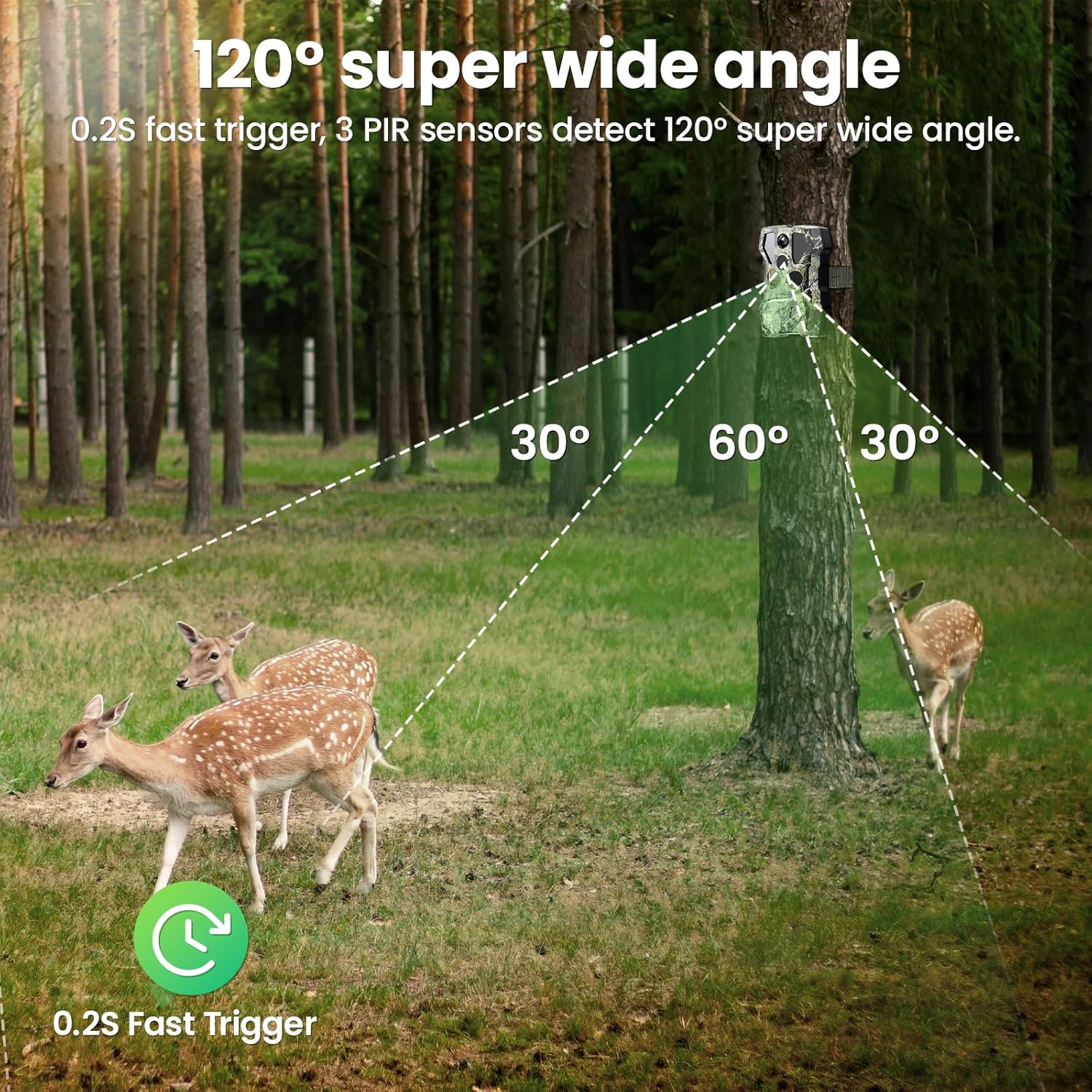
Image: 120° super wide angle detection with 3 PIR sensors.

Image: Demonstration of the 0.2-second ultra-fast trigger speed capturing a hippo.
Àudio bidireccional
After connecting to the Morecam app, the camera supports two-way audio communication, allowing you to speak to individuals near the camera remotely.
Enregistrament en bucle de vídeo
Quan la targeta SD estigui plena, la càmera sobreescriurà automàticament la més antiga files to continue recording new footage. This ensures continuous monitoring without manual intervention.

Image: Explanation of video loop recording functionality.
Manteniment
Neteja
- Regularly clean the camera lens and PIR sensors with a soft, dry cloth to ensure optimal performance.
- Keep the solar panel free of dirt, leaves, or snow to maximize charging efficiency.
Cura de la bateria
- While the solar panel provides continuous power, ensure the camera's internal battery is periodically checked, especially during prolonged periods of low sunlight.
- If storing the camera for an extended period, fully charge the battery and store it in a cool, dry place.
Impermeabilització
The camera has an IP66 weather-proof rating, making it resistant to rain, snow, and dust. Ensure all ports and the housing are securely closed to maintain this protection.

Image: The camera's IP66 waterproof rating, suitable for various weather conditions.
Resolució de problemes
La càmera no s'encén
- Ensure the internal battery is charged. Connect the camera to a power source via the Type C cable or ensure the solar panel is receiving sufficient sunlight.
- Comproveu la posició de l'interruptor d'alimentació.
Problemes de connexió de l'aplicació
- Assegureu-vos que el Bluetooth estigui habilitat al vostre telèfon.
- Verify that you are within the camera's WiFi hotspot range (up to 98ft/30m).
- Reinicieu tant la càmera com el telèfon intel·ligent.
- Re-attempt the connection process as outlined in the "App Connection" section.
- Note: The camera connects via its own hotspot, not your home Wi-Fi network.
Poor Image/Video Quality
- Netegeu la lent de la càmera.
- Ensure the camera is stable and not subject to vibrations.
- Comproveu la configuració de resolució al menú o a l'aplicació de la càmera.
Motion Detection Not Triggering / Slow Trigger
- Adjust the PIR sensitivity settings (Low, Medium, High) in the camera menu or app. Higher sensitivity may be needed for smaller or faster-moving subjects.
- Ensure there are no obstructions directly in front of the PIR sensors.
- Avoid placing the camera where moving branches or tall grass might cause false triggers.
Problemes de visió nocturna
- Ensure the infrared lights are not obstructed.
- Check for any reflective surfaces close to the camera that might cause overexposure in night mode.
Especificacions
| Model | X1 |
| Resolució fotogràfica | 64MP |
| Resolució de vídeo | 2.7K |
| Font d'alimentació | Solar Powered, Battery Powered (Lithium Ion) |
| Connectivitat | Bluetooth, Wi-Fi (Hotspot) |
| Angle de detecció de moviment | 120 Degrees (3 PIR sensors) |
| Velocitat de desencadenament | 0.2 segons |
| Gamma de visió nocturna | 65 Feet (20 meters) with 850nm IR LEDs |
| Classificació impermeable | IP66 |
| Emmagatzematge | Micro SD card (up to 256GB, 32GB included) |
| Dimensions (L x A x A) | 4.49 x 3.18 x 2.47 polzades |
| Pes | 1.96 lliures |
| Temperatura de funcionament | -20 °C a +60 °C |
Garantia i Suport
XTU is committed to providing quality products and customer service. While specific warranty details are not provided in this manual, please refer to your purchase documentation or the official XTU weblloc per obtenir informació sobre la garantia.
For technical support, questions, or assistance, please contact XTU customer service. Many users have reported positive experiences with XTU's responsive and helpful support team.
- Resposta ràpida: Expect timely responses to your inquiries.
- 24/7 Professional Technical Support: L'assistència està disponible les 24 hores del dia.

Image: XTU's commitment to customer support.
Documents relacionatsX1


Ask a question about this manual
Ask about setup, troubleshooting, compatibility, parts, safety, or missing instructions. Manuals+ will review the question and use this page’s manual context to help answer it.