
Mediacom Azimut 4
Mediacom SmartPad 4 4G Azimut 4 Tablet User Manual
Model: Azimut 4
1. Introducció
This manual provides essential information for the safe and efficient use of your Mediacom SmartPad 4 4G Azimut 4 tablet. Please read this manual thoroughly before operating the device and retain it for future reference.
2. Informació de seguretat
- Seguretat de la bateria: Do not attempt to replace the internal battery. Do not expose the device to extreme temperatures or direct sunlight.
- Resistència a l'aigua: Aquest dispositiu no és resistent a l'aigua. Eviteu l'exposició a líquids.
- Càrrega: Feu servir només el carregador i el cable originals que s'inclouen amb el dispositiu.
- Protecció auditiva: Eviteu escoltar música durant molt de temps a volums alts per evitar danys auditius.
- Eliminació: Dispose of the device and its battery according to local regulations. Do not dispose of with household waste.
3. Contingut del paquet
Assegureu-vos que tots els elements siguin presents al paquet:
- Mediacom SmartPad 4 4G Azimut 4 Tablet
- Cable de càrrega USB-C
- Adaptador d'alimentació
- Guia d'inici ràpid (si s'inclou)
- Eina d'expulsió de SIM (si s'inclou)
4. Disseny del dispositiu
Familiaritzeu-vos amb els components físics de la vostra tauleta.
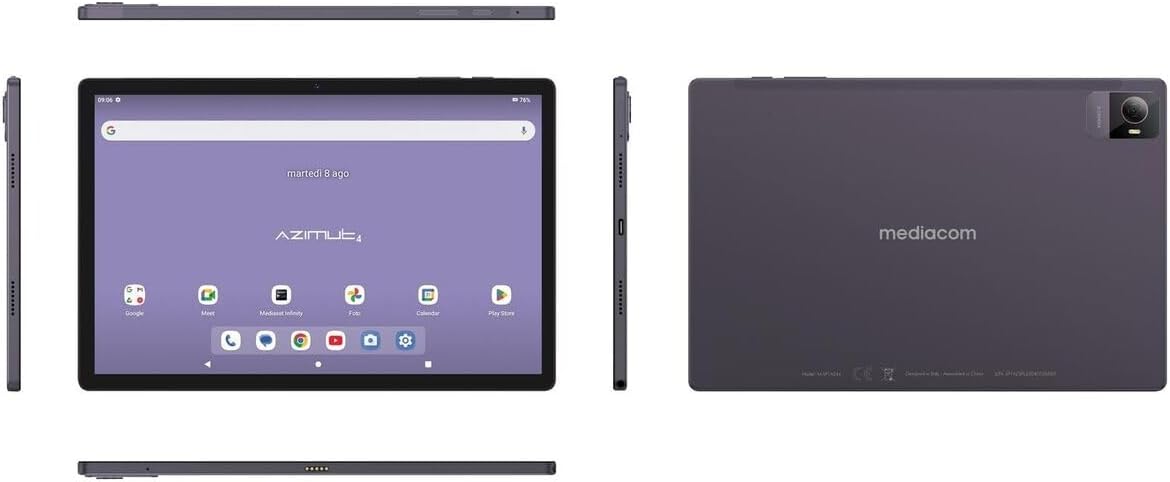
Imatge 4.1: Múltiples views of the Mediacom SmartPad 4 4G Azimut 4 tablet, illustrating the front display, rear camera, and various side ports and buttons. This includes the power button, volume rocker, USB-C port, headphone jack, and SIM/microSD card slot.
- Càmera frontal: Located at the top center of the display when held in landscape orientation.
- Visualització: 10.51-inch IPS screen.
- Botó d'encesa: Typically located on the side, used to turn the device on/off or wake/sleep the screen.
- Botons de volum: Situat a prop del botó d'engegada, s'utilitza per ajustar el volum de l'àudio.
- Port USB-C: Per a càrrega i transferència de dades.
- Auriculars Jack: Standard 3.5mm audio output.
- Ranura per a targeta SIM/microSD: Combined slot for Nano-SIM and microSD cards.
- Càmera posterior: Located on the back of the tablet, typically with a flash.
- Ponents: Four speakers for immersive audio.
5. Configuració
5.1 Càrrega del dispositiu
Before first use, fully charge your tablet. Connect the USB-C cable to the tablet's USB-C port and the power adapter. Plug the adapter into a wall outlet. The battery indicator on the screen will show charging status.
5.2 Inserció de targetes SIM i MicroSD
- Locate the SIM/microSD card slot on the side of the tablet.
- Feu servir l'eina d'expulsió de la SIM proporcionada per obrir la safata.
- Carefully place your Nano-SIM card and/or microSD card into the designated slots on the tray. Ensure correct orientation.
- Empenyeu suaument la safata cap enrere a la ranura fins que encaixi al seu lloc.
5.3 Engegada i configuració inicials
- Press and hold the Power button until the Mediacom logo appears.
- Segueix les instruccions que apareixen a la pantalla per seleccionar l'idioma, connectar-te a una xarxa Wi-Fi, configurar el teu compte de Google i configurar altres paràmetres inicials.
6. Instruccions de funcionament
6.1 Navegació bàsica
The Mediacom SmartPad 4 4G Azimut 4 uses a multi-touch capacitive touchscreen. Common gestures include:
- Toca: Per seleccionar un element o obrir una aplicació.
- Mantén premut: Per accedir a menús contextuals o moure icones.
- Llisca: Per desplaçar-se per pàgines o llistes.
- Pessigar: Per ampliar o reduir les imatges i web pàgines.
6.2 Connexió a Wi-Fi
- Vés a Configuració > Xarxa i Internet > Wi-Fi.
- Activa/desactiva el Wi-Fi On.
- Seleccioneu la xarxa desitjada de la llista i introduïu la contrasenya si se us demana.
6.3 Connecting to 4G Cellular Network
If a Nano-SIM card is inserted and activated, your tablet will automatically connect to the 4G network. Ensure mobile data is enabled in Configuració > Xarxa i Internet > Xarxa mòbil.
6.4 Ús de les càmeres
Open the Camera app from your home screen or app drawer. You can switch between the 8 MP front camera and the 13 MP rear camera. Tap the shutter button to take photos or record videos.
6.5 Gestió de l'emmagatzematge
Your tablet has 64 GB of internal storage. You can expand this by up to 128 GB using a microSD card. To view ús d'emmagatzematge, aneu a Configuració > Emmagatzematge.
6.6 Connectivitat Bluetooth
Per connectar dispositius Bluetooth:
- Vés a Configuració > Dispositius connectats > Bluetooth.
- Commuta el Bluetooth On.
- Seleccioneu el vostre dispositiu de la llista de dispositius disponibles i seguiu les instruccions d'emparellament.
7. Manteniment
7.1 Neteja del dispositiu
Feu servir un drap suau i sense borrissol per netejar la pantalla i el cos de la tauleta. Eviteu utilitzar productes químics agressius o materials abrasius.
7.2 Cura de la bateria
- Eviteu descarregar completament la bateria amb freqüència.
- No deixeu la tauleta carregant-se durant períodes prolongats després que estigui completament carregada.
- Store the tablet in a cool, dry place when not in use for long periods.
7.3 Actualitzacions de programari
Comproveu periòdicament si hi ha actualitzacions de programari per garantir un rendiment i una seguretat òptims. Aneu a Configuració > Sistema > Actualització del sistema.
8. Solució De Problemes
- El dispositiu no s'encén: Assegureu-vos que la bateria estigui carregada. Connecteu el carregador i torneu-ho a provar.
- La pantalla no respon: Try restarting the device by holding the Power button for about 10-15 seconds.
- Problemes de connexió Wi-Fi: Restart your tablet and your Wi-Fi router. Ensure you are within range and have entered the correct password.
- Les aplicacions es bloquegen: Esborra la memòria cau de l'aplicació problemàtica (Configuració > Aplicacions > [Nom de l'aplicació] > Emmagatzematge i memòria cau > Esborra la memòria cau). Si el problema persisteix, prova de reinstal·lar l'aplicació.
- Rendiment lent: Close unused apps, clear cache, or consider performing a factory reset (backup your data first).
9. Especificacions
| Característica | Especificació |
|---|---|
| Nom del model | Azimut 4 |
| Sistema operatiu | Android 13 |
| Mostra | 10.51" IPS, 1920 x 1200 pixels, Multi-touch 5 points |
| Processador | Spreadtrum Tiger T606 (8-core, 1.6 GHz) |
| RAM | 4 GB |
| Emmagatzematge intern | 64 GB |
| Emmagatzematge ampliable | microSD fins a 128 GB |
| Càmera posterior | 13 Megapixels (with flash) |
| Càmera frontal | 8 megapíxels |
| Tecnologia cel·lular | 4G (GSM, WCDMA, FDD-LTE) |
| Bandes cel·lulars | W-CDMA 900/2100, GSM 850/900/1800/1900, LTE B1/B20/B3/B7 |
| Connectivitat sense fil | Wi-Fi (802.11n), Bluetooth 5.0 |
| Ports | 1 x Nano-SIM/microSD combo, 1 x Headphone (3.5mm), 1 x USB-C |
| Bateria | Li-Po de 6000 mAh |
| Característiques especials | 4G Cellular Technology, Ergonomic and Contemporary Design |
10. Garantia i Suport
For warranty information and technical support, please refer to the warranty card included in your product packaging or visit the official Mediacom weblloc web. Conserveu el comprovant de compra per a reclamacions de garantia.
11. Compliment normatiu
This device complies with relevant regulatory standards. For detailed compliance information, please refer to the product packaging or the official Mediacom weblloc.
Ask a question about this manual
Ask about setup, troubleshooting, compatibility, parts, safety, or missing instructions. Manuals+ will review the question and use this page’s manual context to help answer it.