
Segway F2 Pro
Manual d'usuari del patinet elèctric Segway Ninebot F2 Pro i del cable de bloqueig
Model: F2 Pro
Introducció
Aquest manual proporciona informació essencial per al funcionament, manteniment i resolució de problemes segurs del vostre patinet elèctric Segway Ninebot F2 Pro i del cable de cadenat de combinació de 5 dígits que l'acompanya. Llegiu atentament aquest manual abans d'utilitzar el producte per garantir-ne un ús correcte i maximitzar la vostra experiència de conducció.
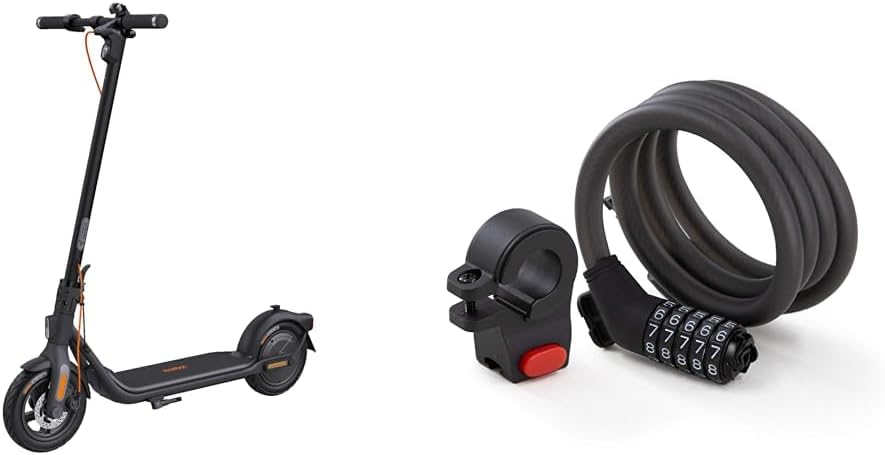
Imatge: El patinet elèctric Segway Ninebot F2 Pro es mostra juntament amb el cable amb cadenat de combinació de 5 dígits, que il·lustra el paquet complet del producte.
Informació de seguretat
Fer servir un patinet elèctric comporta riscos inherents. Per reduir el risc de lesions, és fonamental seguir totes les instruccions i advertències d'aquest manual. Porteu sempre casc i altres equips de protecció (genolleres, colzeres) quan conduïu. Assegureu-vos de conèixer les lleis i regulacions locals pel que fa a l'ús de patinets elèctrics.
- Comproveu sempre que el patinet no tingui peces soltes, la pressió dels pneumàtics i el funcionament dels frens.
- No circuleu en condicions humides, sobre superfícies relliscoses o sota pluja intensa.
- Eviteu circular per terrenys irregulars, sots o superar obstacles.
- Mantingueu una distància de seguretat amb altres vehicles i vianants.
- No feu acrobàcies ni maniobres brusques.
- Assegureu-vos que el patinet estigui completament carregat abans de fer viatges llargs.
- El cable de bloqueig és dissuasiu i no garanteix una seguretat absoluta contra el robatori.
Contingut del paquet
Verifiqueu que tots els elements siguin presents al vostre paquet:
- Patinet elèctric Segway Ninebot F2 Pro
- Cadenat de cable amb combinació de 5 dígits
- Adaptador de càrrega
- Manual d'usuari (aquest document)
- Guia d'inici ràpid
- Suport de muntatge per a cable de bloqueig
- Cargols i clau hexagonal necessaris
Configuració
1. Muntatge del patinet elèctric
- Desplega la tija: Aixequeu amb cura la tija fins que quedi encaixada al seu lloc.
- Fixeu el manillar: Connecteu el manillar a la potència. Assegureu-vos que els cables no estiguin pinçats. Fixeu-ho amb els cargols i la clau hexagonal proporcionats.
- Càrrec inicial: Carregueu completament el patinet abans del primer ús. Connecteu l'adaptador de càrrega al port de càrrega del patinet i després a una presa de corrent. L'indicador lluminós del carregador canviarà quan estigui completament carregat.

Imatge: Un costat view del patinet elèctric Segway Ninebot F2 Pro, que il·lustra la seva forma muntada i el disseny general.
2. Configuració del cable de bloqueig
- Instal·lació del suport de muntatge: Fixeu el suport de muntatge del cable de bloqueig a un lloc adequat a la potència o al quadre del vostre patinet amb els accessoris proporcionats.
- Configuració de la teva combinació:
- El codi predeterminat és 00000.
- Alineeu el codi per defecte amb les marques indicadores.
- Amb el forat del pany cap amunt, gireu el botó de configuració del número 90 graus en sentit horari.
- Establiu la combinació de 5 dígits que desitgeu.
- Gireu el botó 90 graus en sentit antihorari fins a la seva posició original. La nova combinació ja està configurada.

Imatge: El cadenat de cable amb combinació de 5 dígits del Segway, que mostra el cable en espiral i el mecanisme de selector de combinació.
Instruccions de funcionament
1. Funcionament del patinet elèctric
- Encès/apagat: Premeu i manteniu premut el botó d'engegada del tauler de control per encendre o apagar el patinet.
- Modes de conducció: Premeu breument el botó d'engegada per alternar entre els modes de conducció (per exemple, ECO, Drive, Sport). Cada mode ofereix diferents característiques de velocitat i potència.
- Acceleració: Empenyeu amb el peu per guanyar velocitat inicial i, a continuació, premeu la palanca de l'accelerador per accelerar.
- Frenatge: Feu servir la palanca del fre de mà per reduir la velocitat o aturar-vos. El patinet compta amb un sistema de frenada dual per a una aturada eficaç.
- Llums: Premeu dues vegades el botó d'engegada per encendre o apagar els llums del davant i del darrere.
- Tauler intel·ligent: El quadre de comandament mostra la velocitat, el nivell de la bateria, el mode de conducció i l'estat dels llums.

Imatge: Primer pla del quadre de comandament intel·ligent i el botó d'engegada del Segway Ninebot F2 Pro, on es destaquen els indicadors de velocitat, bateria, mode de velocitat, llums i control de creuer.

Imatge: Una il·lustració que detalla el rendiment del motor del Segway Ninebot F2 Pro, que mostra una potència màxima de 900 W, una velocitat màxima de 20 km/h i una capacitat de pujada de pendents del 22 %.
2. Ús del cable de bloqueig
- Bloqueig: Marca la teva combinació personal per obrir el cadenat. Enrotlla el cable al voltant del teu patinet i un objecte fix i segur (per exemple, un portabicicletes, un pal). Introdueix el capçal de bloqueig al mecanisme i barreja els números per bloquejar-lo.
- Desbloqueig: Marca la teva combinació personal per alinear-la amb les marques indicadores. El cadenat s'obrirà i et permetrà treure el cable.

Imatge: El cadenat de cable amb combinació de 5 dígits del Segway que es mostra enganxat al manillar del KickScooter, que demostra com es pot emmagatzemar o utilitzar per seguretat.

Imatge: Un primer pla view del mecanisme de dial del cadenat de cable de combinació de 5 dígits Segway mentre està fixat al manillar del KickScooter, mostrant els números.
Manteniment
Un manteniment regular garanteix la longevitat i el rendiment òptim del teu patinet elèctric Segway Ninebot F2 Pro i del cable antirrobo.
- Neteja: Netegeu el patinet i bloquegeu-lo amb un anunciamp drap. No utilitzeu alcohol, gasolina, querosè ni altres dissolvents químics corrosius. No renteu amb un raig d'aigua a alta pressió.
- Pressió dels pneumàtics: Comproveu la pressió dels pneumàtics regularment i infleu-los fins als PSI recomanats (normalment es troba al lateral del pneumàtic).
- Frens: Inspeccioneu periòdicament les pastilles de fre i els cables per detectar desgast. Ajusteu-los o substituïu-los segons calgui.
- Cura de la bateria: Guardeu el patinet en un lloc sec entre 0 °C i 40 °C (32 °F i 104 °F). Carregueu la bateria almenys un cop cada 30 dies si no l'utilitzeu per evitar que es descarregui massa.
- Elements de fixació: Reviseu tots els cargols i perns regularment per assegurar-vos que estiguin ben ajustats.
- Bloqueig de cable: Mantingueu el cable i el mecanisme de bloqueig nets. Lubriqueu el mecanisme de bloqueig periòdicament amb un lubricant a base de silicona.
Resolució de problemes
| Problema | Causa possible | Solució |
|---|---|---|
| El scooter no s'encén | Bateria baixa; Connexions soltes; Mal funcionament del botó d'engegada | Carregueu la bateria; comproveu totes les connexions dels cables; contacteu amb el servei d'assistència si el problema persisteix. |
| Abast/velocitat reduïts | Baixa pressió dels pneumàtics; Sobrecàrrega; Degradació de la bateria; Pujada freqüent en pendents | Infleu els pneumàtics a la pressió recomanada; Reduïu la càrrega; Assegureu-vos que la càrrega estigui completa; Ajusteu l'estil de conducció. |
| Els frens es senten febles | Pastilles de fre desgastades; Cable de fre fluix | Inspeccionar i substituir les pastilles de fre; ajustar la tensió del cable de fre. |
| El bloqueig del cable no s'obre | Combinació incorrecta; Mecanisme encallat | Assegureu-vos que la combinació correcta s'introdueixi amb precisió; apliqueu una lleugera pressió mentre gireu els dials; Lubriqueu si està rígid. |
Especificacions
| Característica | Detall |
|---|---|
| Nom del model | F2 Pro |
| Marca | Segway |
| Color | Negre |
| Potència del motor (nominal/màx.) | 450 W / 900 W |
| Velocitat màxima | Fins a 20 mph (32 km/h) |
| Interval màxim | Fins a 55 km (34 milles) (en mode ECO) |
| Inclinació màxima | Fins al 22% |
| Material de la roda | Cautxú |
| Material del marc | Acer d'aliatge |
| Estil de fre | Fre de mà (sistema de doble frenada) |
| Característiques especials | Tauler de control intel·ligent, portàtil i compatible amb aplicacions |
| Tipus de cadenat de cable | Cadenat de cable amb combinació de 5 dígits |
| Material del bloqueig de cable | Acer trenat amb recobriment de PVC |
Garantia i suport
Els productes Segway inclouen una garantia limitada. Consulteu la targeta de garantia inclosa al paquet o visiteu el lloc web oficial de Segway. weblloc web per obtenir informació detallada sobre els termes i condicions de garantia específics de la vostra regió.
Per a assistència tècnica, recanvis o consultes de servei, poseu-vos en contacte amb el servei d'atenció al client de Segway a través del seu servei oficial. weblloc web o la informació de contacte que es proporciona a la documentació del producte. Quan contacteu amb el servei d'assistència, tingueu a mà el número de model del producte (F2 Pro) i la data de compra.
Segway oficial Weblloc: www.segway.com
Ask a question about this manual
Ask about setup, troubleshooting, compatibility, parts, safety, or missing instructions. Manuals+ will review the question and use this page’s manual context to help answer it.