
Bobtot K701S
Manual d'usuari del sistema de so envoltant de 5.1/2.1 canals Bobtot K701S
Model: K701S
1. Introducció
Gràcies per la compraasing the Bobtot K701S 5.1/2.1 Channel Surround Sound System. This system is designed to provide a powerful and immersive audio experience for your home entertainment. With 800W peak power and a 6.5-inch subwoofer, it delivers clear, dynamic sound. This manual will guide you through the setup, operation, and maintenance of your new sound system.

Image 1.1: Bobtot K701S 5.1/2.1 Channel Surround Sound System with subwoofer, satellite speakers, and remote control.
2. Instruccions de seguretat importants
Please read and follow these safety instructions carefully before operating the system to prevent electric shock, fire, or damage to the unit.
- No exposeu aquest aparell a la pluja o la humitat.
- No bloquegeu cap obertura de ventilació. Instal·leu-ho d'acord amb les instruccions del fabricant.
- No instal·leu a prop de cap font de calor com ara radiadors, registres de calor, estufes o altres aparells (inclosos amplificadors) que produeixen calor.
- Eviteu que el cable d'alimentació sigui trepitjat o pessigat, especialment als endolls, els endolls i el punt on surten de l'aparell.
- Utilitzeu només accessoris/accessoris especificats pel fabricant.
- Desendolleu aquest aparell durant les tempestes amb llamps o quan no l'utilitzeu durant llargs períodes de temps.
- Demaneu tot el servei a personal de servei qualificat. Cal fer servei quan l'aparell s'hagi fet malbé d'alguna manera.
3. Contingut del paquet
Desembaleu la caixa amb cura i assegureu-vos que tots els articles hi siguin presents i en bon estat. Si falta algun article o hi ha algun malmès, poseu-vos en contacte amb el servei d'atenció al client.
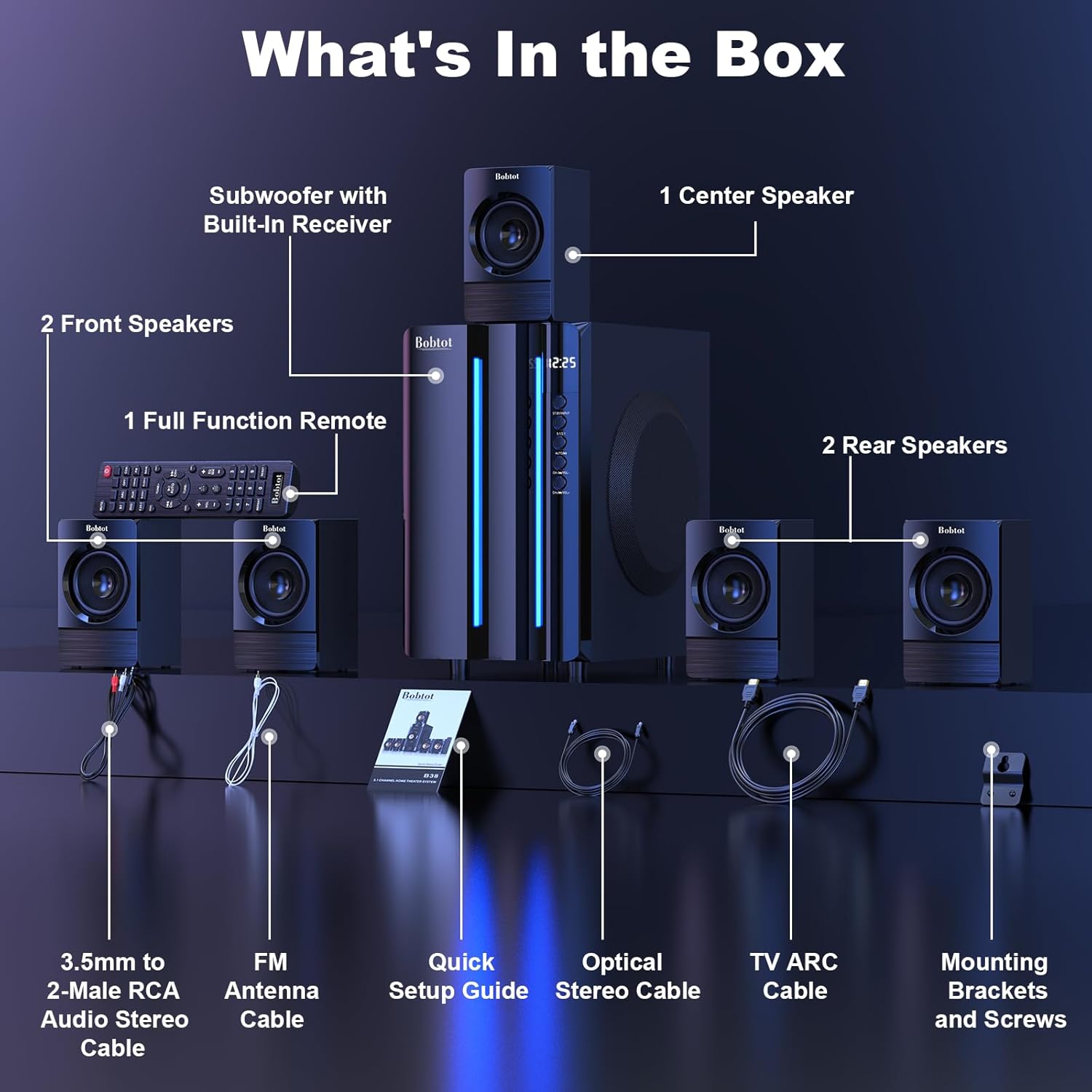
Image 3.1: Visual representation of all items included in the Bobtot K701S package.
- 1 x Subwoofer with Built-in Receiver
- 1 x Center Speaker
- 2 x Front Speakers
- 2 x Rear Speakers
- 1 x Full Function Remote Control
- 1 x 3.5mm to 2-Male RCA Audio Stereo Cable
- 1 x FM Antenna Cable
- 1 x Guia d'instal·lació ràpida
- 1 x Optical Stereo Cable
- 1 x TV ARC Cable (HDMI)
- 1 x cable coaxial
- 1 x cable AUX
- 1 x cable RCA
- Suports i cargols de muntatge
- Manual d'usuari (aquest document)
4. Components mésview
4.1 Subwoofer (Main Unit)
The subwoofer houses the main receiver and amplifier for the entire system. It features a 6.5-inch driver for deep bass and includes all input/output ports.

Imatge 4.1: Detallada view of the 6.5-inch subwoofer, highlighting its internal components.
4.2 altaveus satèl·lit
The system includes five satellite speakers: one center, two front (left/right), and two rear (left/right). These speakers are wired and connect directly to the subwoofer unit.
4.3 Control remot
The full-function remote control allows you to manage power, input modes, volume, channel selection, and other settings from a distance.
5. Configuració del sistema
Follow these steps to set up your Bobtot K701S surround sound system.
5.1 Connexió dels altaveus
The five satellite speakers come with integrated cables. Connect each speaker to the corresponding "Audio Output" slot on the rear of the subwoofer unit. The cables are color-coded or labeled for easy identification (e.g., FL for Front Left, FR for Front Right, CEN for Center, SL for Surround Left, SR for Surround Right).
- Front Center and L/R speakers: Cables are approximately 13 feet long.
- Rear L/R speakers: Cables are approximately 31 feet long.
Place all speakers in the same room for optimal surround sound performance.

Image 5.1: Recommended speaker placement for a 5.1 channel surround sound experience.
5.2 Power On and Initial Test
- Connect the subwoofer to a power outlet using the provided power cable.
- Enceneu el subwoofer amb l'interruptor d'alimentació.
- Press the power button on the remote control or the front panel.
- Test the remote control functionality.
- Switch to "BT" (Bluetooth) mode and connect your mobile device to "B701D" via Bluetooth to ensure audio playback.
5.3 Connexió de dispositius externs
Choose the appropriate input mode and connect your external device (e.g., TV, projector, DVD player, game console) to the subwoofer using the corresponding audio cables provided.
- Ensure the cable is securely plugged into the correct input slot on the subwoofer.
- Select the matching input mode on the system (e.g., HDMI ARC, OPT, COA, AUX, USB, DVD).

Imatge 5.2: acabatview of the rear panel connections and supported multimedia inputs.
6. Instruccions de funcionament
6.1 Funcions de control remot
The remote control provides full command over your sound system. Always press the power button before selecting an input mode when turning on the unit.

Image 6.1: Detailed diagram of the remote control buttons and their functions.
- Encès/apagat: Activa o desactiva el sistema.
- Input Mode Select: Buttons for BT, ARC, OPT, COA, DVD, AUX, USB/SD, FM to switch between audio sources.
- 5.1/2.1 Channel Select: Toggles between 5.1 surround sound and 2.1 stereo mode (in 2.1 mode, only the two front speakers play).
- Volume Control (VOL +/-): Ajusta el volum global del sistema.
- Mic Volume Adjustment (MIC +/-): Adjusts the volume for connected microphones (supports wireless/wired microphones).
- Echo Control (ECHO +/-): Ajusta l'efecte d'eco per als micròfons.
- TUNE +/-: For FM radio tuning.
- CH +/-: For FM radio channel selection.
- MUT: Silencia o activa la sortida d'àudio.
6.2 Input Modes
The Bobtot K701S supports various input methods:
- Bluetooth (BT): For wireless connection to smartphones, tablets, and other Bluetooth-enabled devices.
- ARC HDMI: Connects to your TV's HDMI ARC port for high-quality audio transmission and TV remote control integration.
- Òptic (OPT): Digital audio input for TVs, game consoles, and other devices with an optical output.
- Coaxial (COA): Digital audio input, similar to optical, for compatible devices.
- AUX: Analog audio input using a 3.5mm or RCA cable for a wide range of devices.
- USB/SD: Reprodueix àudio files directly from USB drives or SD cards.
- Ràdio FM: Built-in FM tuner for listening to radio stations.
- DVD: Dedicated input for DVD players.
6.3 Channel Configuration (5.1 / 2.1)
The system offers two channel modes: 5.1 and 2.1. You can switch between these modes using the remote control or the front panel. In 5.1 mode, all five satellite speakers and the subwoofer are active, providing a full surround sound experience. In 2.1 mode, only the two front speakers and the subwoofer are active, suitable for stereo audio.
7. Connectivity Guide
This section details how to connect various devices to your sound system.
7.1 Connexió Bluetooth
- Press the "BT" button on the remote control or front panel to select Bluetooth mode. The display will show "BT".
- Al dispositiu mòbil, activeu el Bluetooth i cerqueu els dispositius disponibles.
- Select "B701D" from the list to pair. Once connected, you will hear a confirmation sound.
Connexió HDMI ARC 7.2
- Connect one end of the HDMI ARC cable to the "HDMI ARC" port on the subwoofer.
- Connect the other end to the "HDMI ARC" port on your TV.
- Select "ARC" input mode on the sound system.
- Ensure your TV's audio output is set to HDMI ARC or external speakers.
7.3 Optical/Coaxial Connection
- Connect an optical or coaxial cable from your device's digital audio output to the corresponding "OPT" or "COA" input on the subwoofer.
- Select "OPT" or "COA" input mode on the sound system.
- Ensure your device's audio output is set to PCM (Pulse-code modulation) for optical/coaxial connections, as some devices may default to other formats not supported by the system.
7.4 Connexió AUX
- Use the provided 3.5mm to 2-Male RCA cable or a standard RCA cable.
- Connect the cable from your device's audio output (e.g., headphone jack, RCA L/R output) to the "AUX" input on the subwoofer.
- Select "AUX" input mode on the sound system.
Reproducció USB/SD de 7.5"
- Inseriu una unitat flash USB o una targeta SD que contingui àudio files into the respective port on the subwoofer.
- Select "USB/SD" input mode. The system will automatically begin playing compatible audio files.
7.6 Ràdio FM
- Connect the FM antenna cable to the "FM ANTENNA" port on the subwoofer. Extend the antenna for better reception.
- Select "FM" input mode.
- Use the "TUNE +/-" or "CH +/-" buttons on the remote to scan for and select radio stations.
8. Especificacions
| Característica | Especificació |
|---|---|
| Número de model | K701S |
| Tipus d'altaveu | Satèl·lit |
| Configuració del canal de so envoltant | 5.1 |
| Potència màxima de sortida | 800 watts |
| Diàmetre del subwoofer | 6.5 polzades |
| Resposta de freqüència | 20 kHz |
| Tecnologia de comunicació sense fils | Bluetooth 5.0 |
| Tecnologia de connectivitat | Bluetooth, HDMI ARC, Optical, Coaxial, AUX, USB, DVD, FM |
| Mètode de control | Control remot |
| Font d'alimentació | Elèctric amb cable |
| Entrada Voltage | 120 Volts |
| Dimensions del producte (L x A x A) | 31.8 x 19.8 x 33 cm |
| Pes de l'article | 6.56 quilos |
| Material | Wood (MDF), Acrylonitrile Butadiene Styrene (ABS) |
| Característica especial | Baix Amplificació |
9. Solució De Problemes
If you encounter issues with your Bobtot K701S system, refer to the following common problems and solutions:
9.1 Sense so
- Comproveu la potència: Ensure the system is powered on and the power cable is securely connected.
- Nivell de volum: Increase the master volume on the system and your connected device.
- Mode d'entrada: Verify that the correct input mode is selected on the system (e.g., BT, ARC, OPT).
- Connexions de cable: Ensure all audio cables are securely connected to both the system and the source device.
- Sortida del dispositiu font: Check the audio output settings on your source device (e.g., TV, DVD player) to ensure it's sending audio to the correct output port and format (e.g., PCM for optical/coaxial).
9.2 Mala qualitat de so / Distorsió
- Nivell de volum: Reduce the volume if it's too high, causing distortion.
- Integritat del cable: Inspeccioneu els cables d'àudio per detectar danys o connexions soltes.
- Col·locació dels altaveus: Ensure speakers are placed correctly and not obstructed.
- Qualitat de la font: Prova amb una font d'àudio diferent o file to rule out issues with the original content.
9.3 El comandament a distància no funciona
- Bateries: Substituïu les piles del comandament a distància.
- Línia de visió: Ensure there is a clear line of sight between the remote and the system's IR receiver.
- Distància: Feu funcionar el comandament a distància dins del seu abast efectiu.
9.4 Problemes de connexió Bluetooth
- Mode de sincronització: Ensure the system is in Bluetooth pairing mode.
- Proximitat del dispositiu: Keep your Bluetooth device within a few meters of the system.
- Interferència: Allunyeu-vos d'altres dispositius sense fil que puguin causar interferències.
- Oblida el dispositiu: On your mobile device, "forget" or "unpair" the "B701D" and attempt to reconnect.
10. Cura i Manteniment
- Neteja: Use a soft, dry cloth to clean the surfaces of the system. Do not use liquid cleaners or aerosols.
- Ventilació: Ensure the subwoofer has adequate ventilation and is not placed in an enclosed space that could restrict airflow.
- Col·locació: Eviteu col·locar el sistema a la llum solar directa, a prop de fonts de calor o en zones amb molta humitat.
- Apagar: Turn off and unplug the system when not in use for extended periods.
11. Garantia i atenció al client
Bobtot is committed to providing a positive customer experience. If you encounter any issues with your B701D Home Surround Sound System, please refer to this user manual for initial troubleshooting.
For further assistance, please contact Bobtot customer support through the Amazon buyer-seller messaging service. Our support team is available to help you with any questions or concerns you may have.
Ask a question about this manual
Ask about setup, troubleshooting, compatibility, parts, safety, or missing instructions. Manuals+ will review the question and use this page’s manual context to help answer it.