
FREEWOLF M96
Manual d'usuari del teclat de jocs sense fil FREEWOLF M96
Model: M96
Introducció
The FREEWOLF M96 Wireless Gaming Keyboard is designed for versatile use, offering both Bluetooth and 2.4G wireless connectivity. It features a mechanical feel, RGB LED backlighting, a digital display screen, and durable PBT keycaps. This manual provides detailed instructions to help you set up, operate, and maintain your keyboard for optimal performance.
Producte acabatview
The FREEWOLF M96 keyboard combines advanced features with a user-friendly design. Key components include:
- Connectivitat dual: Supports Bluetooth (BT1, BT2) and 2.4G wireless modes for seamless switching between multiple devices.
- Pantalla digital: Provides real-time information on battery capacity, connection mode, and charging status.
- Multimedia Control Knob: Allows for easy adjustment of volume and backlight settings.
- Tecles PBT: Durable, spherical keycaps designed for comfortable typing and longevity.
- RGB LED Backlight: Customizable lighting effects to enhance your gaming or typing experience.
- Bateria de llarga durada: Equipped with a 3000 mAh battery for extended use.
- Disseny ergonòmic: Features adjustable feet for optimal typing comfort.

Imatge: Més deview of the FREEWOLF M96 Wireless Keyboard, highlighting its 90% US layout, PBT keycaps, Bluetooth/2.4G connectivity, LED backlight, 3000 mAh battery, multimedia knob, LED screen, and compatibility with Win/Mac/Linux/iOS/Android systems.

Imatge: Primer pla view of the PBT color blocking keycaps, emphasizing their durability and longer lifespan.
Configuració
1. Càrrega del teclat
Before first use, it is recommended to fully charge the keyboard. Connect the provided USB-C cable to the charging port on the keyboard and the other end to a USB power source (e.g., computer USB port, wall adapter).
- The digital display screen will indicate the charging status.
- Una càrrega completa sol trigar diverses hores.

Imatge: Lateral view of the keyboard illustrating the power switch, Type-C charging port, and the 2.4G/BT1/BT2 mode switch. The Type-C port is for charging only and cannot be used for wired connection.
2. Connecting via 2.4G Wireless
- Locate the 2.4G wireless receiver (USB dongle), usually stored in a compartment on the keyboard's underside.
- Connecteu el receptor 2.4G a un port USB disponible de l'ordinador.
- Feu lliscar el selector de mode del teclat a la posició "2.4G".
- The keyboard should automatically connect to your device. The display screen will show the 2.4G connection status.
3. Connexió mitjançant Bluetooth
El teclat admet dos canals Bluetooth (BT1 i BT2) per connectar-se a diversos dispositius.
- Feu lliscar el selector de mode del teclat a la posició "BT1" o "BT2".
- Al dispositiu (ordinador, tauleta, telèfon intel·ligent), activeu el Bluetooth i cerqueu dispositius nous.
- Select "FREEWOLF M96" (or similar name) from the list of available devices.
- If prompted, enter the pairing code displayed on your device.
- Once connected, the digital display screen will show the active Bluetooth channel (BT1 or BT2).
To switch between connected Bluetooth devices, simply slide the mode switch to the desired BT1 or BT2 channel.
Video: Demonstrates the dual-mode connectivity of the FREEWOLF M96 Wireless Gaming Keyboard, showing how to switch between 2.4G wireless and Bluetooth connections (BT1, BT2) for seamless multi-device operation.
Instruccions de funcionament
1. Pantalla digital
The integrated electronic display provides essential information at a glance:
- Capacitat de la bateria: Mostra el percentatge actual de la bateriatage.
- Mode de connexió: Indicates whether the keyboard is in 2.4G, BT1, or BT2 mode.
- Estat de càrrega: Displays an icon when the keyboard is charging.
- Indicador de bateria baixa: Alerts you when the battery is low.

Imatge: Detallada view of the digital display screen on the FREEWOLF M96 keyboard, showing indicators for power display, connection status (2.4G, BT1, BT2), charging, and low battery.
2. Multimedia Control Knob
The knob located on the top right of the keyboard offers dual functionality:
- Default Function (Volume Control):
- Gireu en sentit horari per augmentar el volum.
- Gireu en sentit antihorari per disminuir el volum.
- Press the knob to mute/unmute audio.
- Control de la llum de fons:
- Press and hold the knob for five seconds to switch to backlight control mode.
- In backlight control mode:
- Rotate clockwise to increase backlight brightness.
- Rotate counter-clockwise to decrease backlight brightness.
- Press the knob to switch between different backlight effects/modes.

Image: Illustration of the advanced dial control, detailing its default functions for volume (volume up, volume down, mute) and its backlight control functions (backlight brightness up, backlight brightness down, light effect switching) when pressed and held for 5 seconds.
3. Backlight Control (Function Keys)
In addition to the knob, you can control the backlight using function key combinations:
- FN + N: Canvia el mode de retroiluminació
- FN + Up Arrow / Down Arrow: Ajusteu la brillantor de la llum de fons
- FN + Left Arrow / Right Arrow: Ajusta la velocitat de la retroiluminació
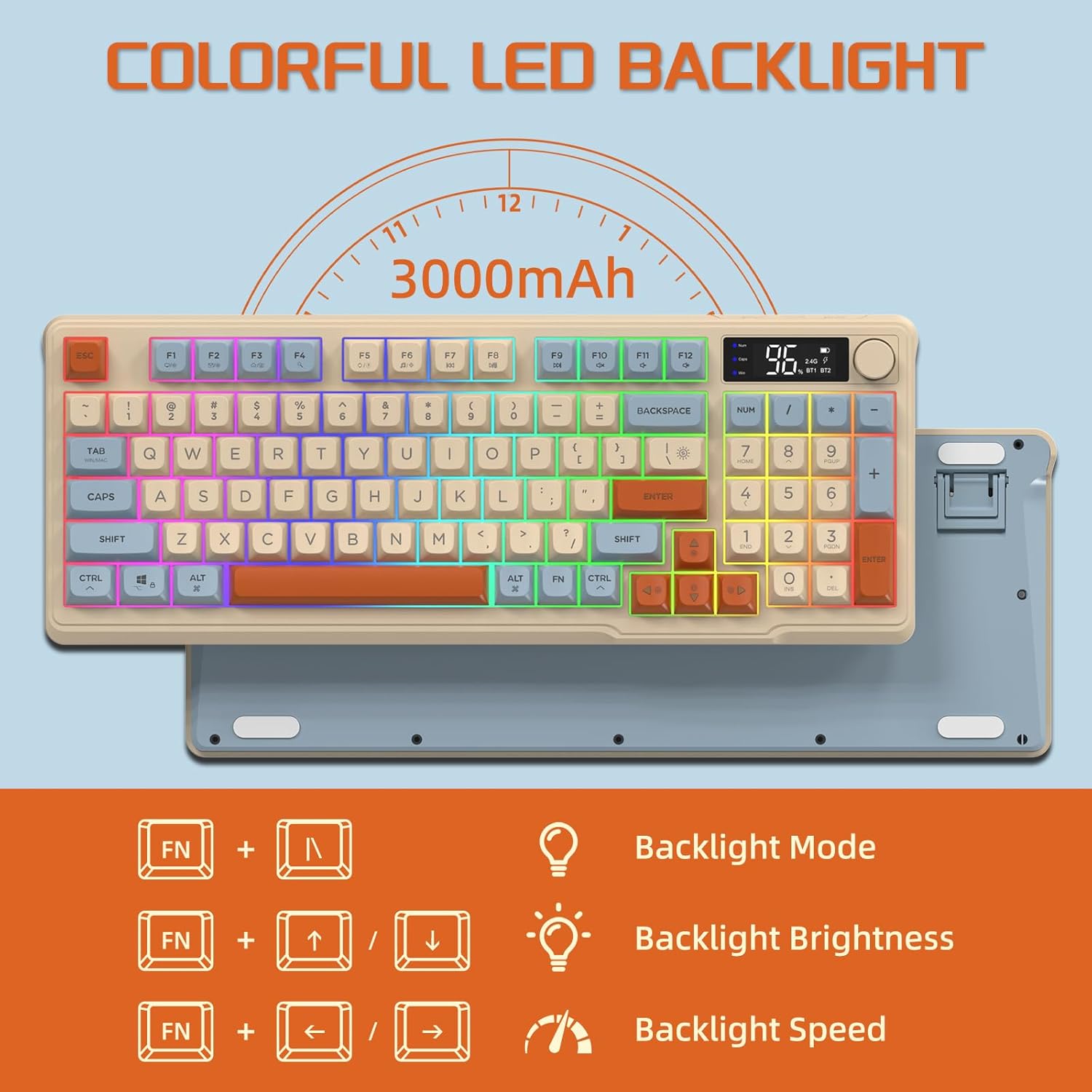
Image: The keyboard displaying the key combinations for controlling the colorful LED backlight, including changing backlight mode, brightness, and speed using the FN key with N, arrow keys.
4. Modes d'estalvi d'energia
The keyboard is designed with power-saving features to extend battery life:
- Sleep Mode (3 minutes inactivity): After 3 minutes of inactivity, the keyboard enters sleep mode, and the backlight turns off.
- Deep Sleep Mode (10 minutes inactivity): After 10 minutes in sleep mode, the keyboard enters deep sleep. The first key press will be ignored to wake the keyboard, and the second key press will activate it.
5. Compatibilitat
The FREEWOLF M96 keyboard is compatible with a wide range of operating systems, including Windows, Mac, and Linux, ensuring broad usability.
Manteniment
1. Neteja
- Apagueu el teclat abans de netejar-lo.
- Utilitzeu un drap suau i sense pelusa lleugerament dampesbandida amb aigua o una solució netejadora suau per netejar la superfície.
- Per netejar entre les tecles, feu servir aire comprimit o un raspall petit.
- Eviteu utilitzar productes químics o materials abrasius.
2. Cura de la bateria
- Eviteu descarregar completament la bateria amb freqüència.
- Guardeu el teclat en un lloc fresc i sec quan no el feu servir durant períodes prolongats.
- Feu servir només el cable de càrrega proporcionat o un cable USB-C compatible.
Resolució de problemes
| Problema | Causa possible | Solució |
|---|---|---|
| El teclat no respon. | Low battery; incorrect connection mode; receiver not plugged in (2.4G); Bluetooth not paired. | Charge the keyboard; switch to correct mode (2.4G/BT1/BT2); ensure 2.4G receiver is connected; re-pair Bluetooth. |
| La retroiluminació no funciona. | Backlight turned off; low battery; brightness set to minimum. | Check backlight settings using the knob or FN key combinations; charge the keyboard. |
| Keys not registering or ghosting. | Software conflict; low battery; interference. | Restart your device; charge the keyboard; move closer to the receiver/device; check for driver updates. |
| Connexió Bluetooth inestable. | Interferència; distància del dispositiu; bateria baixa. | Reduce interference (other wireless devices); move keyboard closer to device; charge keyboard. |
Especificacions
| Característica | Detall |
|---|---|
| Marca | LLOP LLIURE |
| Número de model | M96 |
| Tecnologia de connectivitat | Bluetooth, sense fil 2.4G |
| Descripció del teclat | Mechanical feel with PBT keycaps |
| Nombre de claus | 94 keys (US Layout) |
| Llum de fons | Retroil·luminació LED RGB |
| Capacitat de la bateria | 3000 mAh |
| Característiques especials | Electronic display, multimedia control knob, power saving modes |
| Dispositius compatibles | PC (Windows, Mac, Linux), iOS, Android |
| Color | Blueberry (Myrtille) |
| Dimensions del producte | 385mm (15.16 inch) x 145mm (5.71 inch) x 40mm (1.57 inch) |

Image: Diagram illustrating the product dimensions of the FREEWOLF M96 keyboard: 385mm (15.16 inches) length, 145mm (5.71 inches) width, and 40mm (1.57 inches) height.
Garantia i Suport
This FREEWOLF M96 Wireless Gaming Keyboard comes with a standard manufacturer's warranty. Please refer to the product packaging or the seller's information for specific warranty terms and conditions. For technical support or further assistance, please contact the retailer or manufacturer directly.
For the latest information and support, visit the official FREEWOLF weblloc o poseu-vos en contacte amb el seu servei d'atenció al client.
Ask a question about this manual
Ask about setup, troubleshooting, compatibility, parts, safety, or missing instructions. Manuals+ will review the question and use this page’s manual context to help answer it.