
PGYTECH CapLock MantisPod Power
PGYTECH CapLock MantisPod Power User Manual
Model: CapLock MantisPod Power
Introducció
The PGYTECH CapLock MantisPod Power is a versatile and powerful accessory designed to enhance your mobile photography and videography experience. It combines a robust grip handle, a stable tripod, and an integrated 5000mAh power bank, ensuring your devices remain charged during extended shooting sessions. Featuring a detachable remote control and PGYTECH's patented CapLock quick-release system, this device offers unparalleled flexibility and convenience for capturing dynamic shots in various scenarios.

The PGYTECH CapLock MantisPod Power in various configurations, demonstrating its use with action cameras and smartphones.
Què s'inclou
Carefully unpack your PGYTECH CapLock MantisPod Power and ensure all components are present:

All components included in the PGYTECH CapLock MantisPod Power package.
- CapLock MantisPod Power Charging Handle Mount x1
- Control remot x1
- Action Camera Quick Release Plate x1
- 1/4" Quick Release Plate x1
- Pom x1
- S4 Hex Wrench x1
- Safety Wrist Strap x1
Característiques del producte
Integrated 5000mAh Power Bank
The MantisPod Power features a built-in 5000mAh rechargeable battery, providing extended power for your devices. It supports 5V/2.0A (10W) output via a Type-C interface and 5V/2.4A (12W) input for charging the unit itself. This allows for prolonged shooting sessions without interruption.

Interna view of the 5000mAh battery and charging specifications.
Detachable Magnetic Remote Control
Control your camera from a distance with the detachable magnetic remote. This remote allows you to effortlessly shoot photos/videos, switch modes, and power on/off your compatible camera or smartphone from up to 10 meters away. The remote is designed for easy attachment and detachment from the handle.
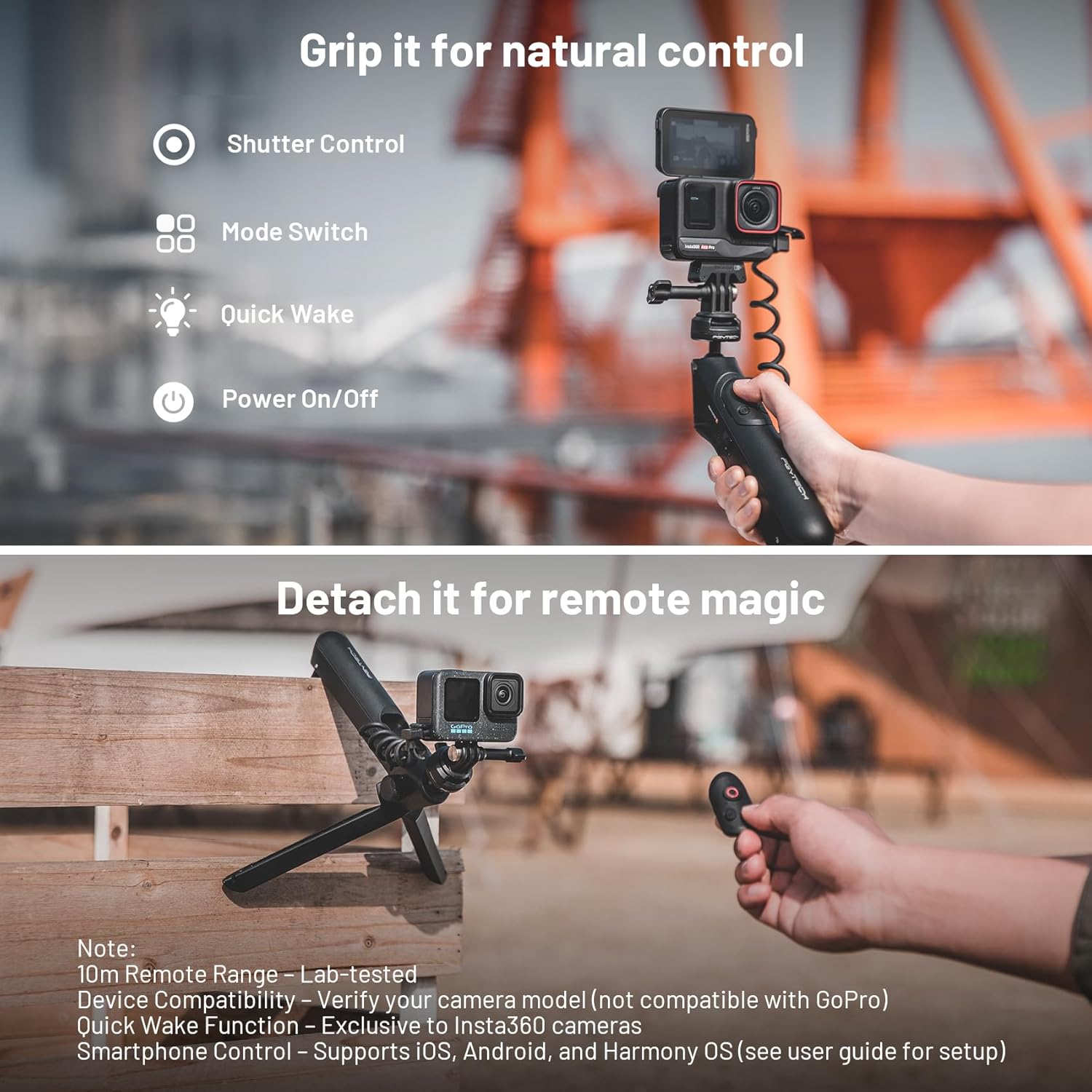
The MantisPod Power with its integrated controls and the detachable remote for wireless operation.
4 Modes de tret versàtils
The MantisPod Power adapts to various shooting scenarios with its four distinct modes:
- Mantis Mode: Allows the device to be hung from objects, providing unique overhead perspectives.
- Handle Mode: Functions as a comfortable handgrip for stable handheld shooting.
- Mode trípode: Deploys the integrated legs to form a stable tabletop tripod.
- Handgrip Mode: A compact and ergonomic grip for on-the-go shooting.

Mantis Mode (left) and Handheld Mode (right).

Briefcase Mode (left) and Tripod Mode (right).
360° Adjustable Gimbal Head
The integrated gimbal head allows for 360° panning and 35° tilting, enabling quick switching between horizontal and vertical shooting orientations. This flexibility ensures you can achieve dynamic angles and stable shots with ease.

Adjustable gimbal head for flexible shooting angles.
CapLock Quick-Release System
PGYTECH's patented CapLock system ensures fast and secure mounting of your devices. It features a dual-lock design for added safety and includes both an action camera quick release plate and a 1/4" quick release plate, allowing for rapid camera changes in approximately one second.

The CapLock Action Camera Quick Release System.
Guia de configuració
Connectar el dispositiu
- Select the appropriate quick release plate: the action camera quick release plate for action cameras or the 1/4" quick release plate for smartphones (with a phone clamp, not included) or other devices.
- Attach the quick release plate to your camera or phone clamp.
- Align the quick release plate with the CapLock mount on the MantisPod Power and press down firmly until it clicks into place. Ensure the dual-lock mechanism engages for secure attachment.
- To detach, press the quick release button and lift your device.
Vinculació del comandament a distància
- Assegureu-vos que el Bluetooth de la càmera o del telèfon intel·ligent estigui activat.
- On the MantisPod Power remote control, press and hold the Bluetooth pairing button (refer to the 'Work Status at a Glance' diagram for location) until the indicator light flashes, indicating it's in pairing mode.
- On your device, search for available Bluetooth devices and select "PGYTECH Remote" or similar.
- Once connected, the remote's indicator light will turn solid.
Instruccions de funcionament
Understanding Controls and Indicators
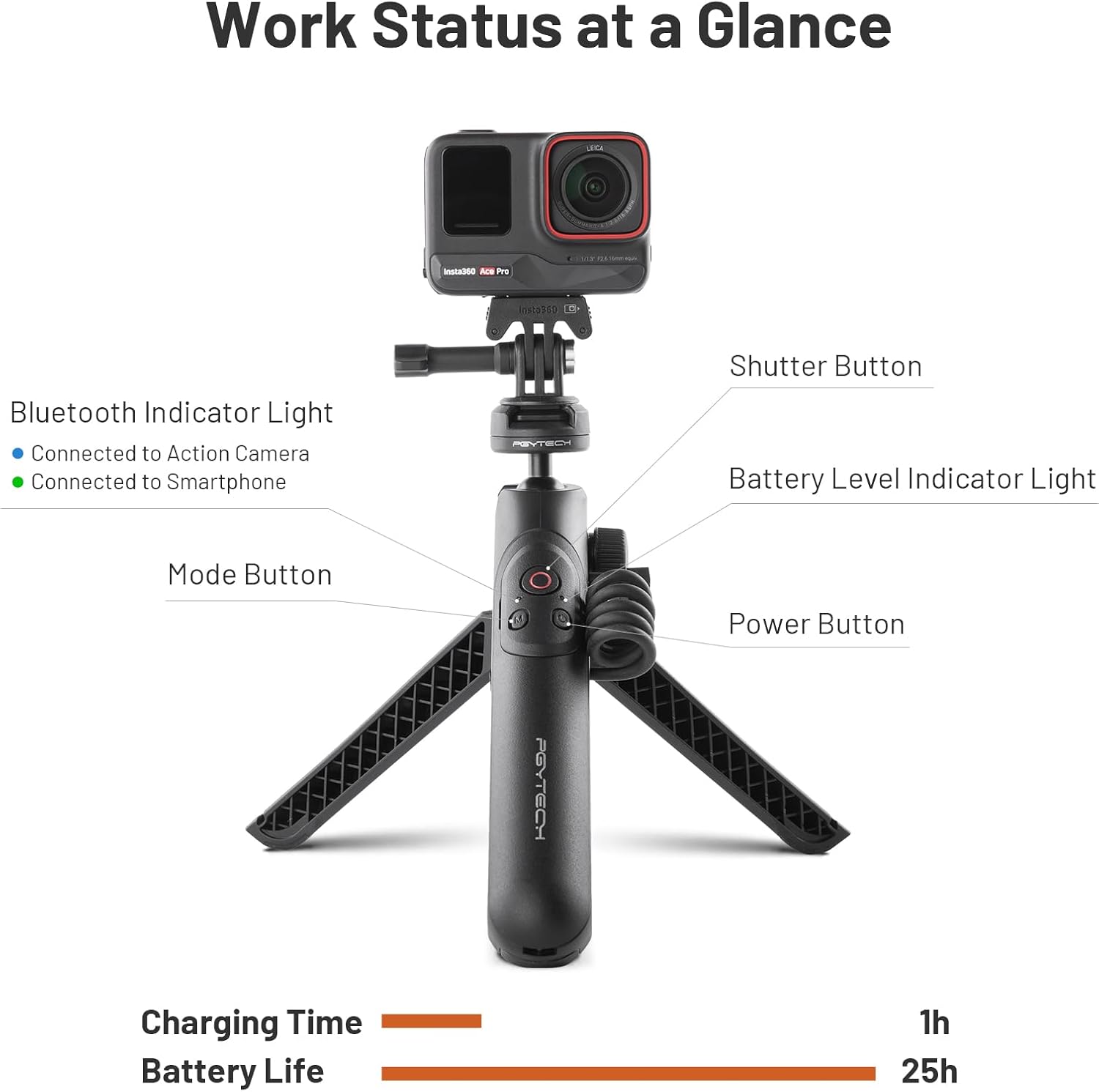
Acabatview of controls and indicator lights on the MantisPod Power.
- Botó d'encesa: Press and hold to power on/off the MantisPod Power.
- Botó de l'obturador: Press to capture photos or start/stop video recording on your connected device.
- Botó de mode: Press to switch between different shooting modes on your connected device (functionality depends on camera/app).
- Llum indicador de Bluetooth: Blue indicates connection to an action camera; Green indicates connection to a smartphone.
- Llum indicador de nivell de bateria: Shows the remaining battery charge of the MantisPod Power.
Ús de diferents modes
To switch between the MantisPod Power's versatile modes:
- Mantis Mode: Extend the legs fully and position them to hook onto a stable edge or surface. Ensure the device is securely balanced before use.
- Handle Mode: Fold the legs inward to form a compact grip. Use the safety wrist strap for added security during handheld operation.
- Mode trípode: Extend the legs and place the MantisPod Power on a flat, stable surface. Adjust the gimbal head for desired camera angle.
- Briefcase Mode: Hold the MantisPod Power with the camera facing downwards, ideal for low-angle shots or tracking subjects.
Càrrega i gestió de la bateria
The MantisPod Power is equipped with a 5000mAh battery to provide extended power to your connected devices. To charge the MantisPod Power:
- Connect a Type-C charging cable to the input port on the MantisPod Power.
- Connect the other end of the cable to a 5V/2.4A (12W) power adapter.
- The battery level indicator lights will show charging progress. A full charge typically takes approximately 1 hour.
When fully charged, the MantisPod Power can provide up to 25 hours of battery life for its own functions, while simultaneously charging compatible devices. It is compatible with Insta360 Ace Pro 2/Ace Pro/Ace/Go3/X3/One RS (Dual Lens/4K/One-Inch Panoramic)/One X2/One R, as well as Android, iOS (Type-C), and HarmonyOS phones. Note: Not compatible with GoPro for charging.

The MantisPod Power features a comprehensive BMS for battery protection.
Manteniment
- Neteja: Netegeu el dispositiu amb un drap suau i sec. No utilitzeu productes químics agressius ni materials abrasius.
- Emmagatzematge: Store the MantisPod Power in a cool, dry place away from direct sunlight and extreme temperatures.
- Cura de la bateria: For optimal battery life, avoid fully discharging the battery frequently. If storing for long periods, charge the battery to approximately 50-70%.
- Evitar l'impacte: Protegiu el dispositiu de caigudes i impactes, que poden danyar els components interns.
Resolució de problemes
| Problema | Causa possible | Solució |
|---|---|---|
| El dispositiu no s'encén. | Bateria baixa; el botó d'engegada no s'ha mantingut premut prou estona. | Charge the MantisPod Power; Press and hold the Power button for 3 seconds. |
| Remote control not connecting. | Not in pairing mode; Device Bluetooth off; Out of range. | Ensure remote is in pairing mode; Enable Bluetooth on your device; Move closer to the device (within 10m). |
| Camera/phone not charging. | Cable issue; Device incompatibility (e.g., GoPro); MantisPod Power battery low. | Check cable connection; Verify device compatibility (not for GoPro); Charge the MantisPod Power. |
| Quick release plate feels loose. | Not fully engaged; Debris in mount. | Press down firmly until it clicks and dual-lock engages; Clean the mount and plate. |
Especificacions
| Característica | Detall |
|---|---|
| Nom del model | MantisPod Power |
| Capacitat de la bateria | 5000 mAh |
| Entrada | 5V/2.4A (12W) Type-C |
| Sortida | 5V/2.0A (10W) Type-C |
| Pes de l'article | 1.08 lliures (aprox. 490 g) |
| Dimensions del paquet | 11.02 x 4.33 x 2.6 polzades |
| Material | Niló |
| Color | Negre |
| Dispositius compatibles | Action Cameras, Smartphones (Insta360 Ace Pro 2/Ace Pro/Ace/Go3/X3/One RS/One X2/One R, Android, iOS, HarmonyOS phones) |
| Interval de control remot | Fins a 10 metres |
| Tipus de capçal de trípode | Ball Heads (360° panning, 35° tilting) |
Garantia i Suport
PGYTECH products are manufactured to high quality standards. For information regarding warranty coverage, please refer to the warranty card included with your product or visit the official PGYTECH website. If you encounter any issues or require technical assistance, please contact PGYTECH customer support through their official channels.
Conserveu el vostre comprovant de compra per a reclamacions de garantia.
Ask a question about this manual
Ask about setup, troubleshooting, compatibility, parts, safety, or missing instructions. Manuals+ will review the question and use this page’s manual context to help answer it.