
MSHUKCOE MSHUKCOE-MD538
MSHUKCOE MD538 Wireless Bluetooth Headset User Manual
Model: MSHUKCOE-MD538
Brand: MSHUKCOE
1. Producte acabatview
The MSHUKCOE MD538 Wireless Bluetooth Headset is designed for comfortable, discreet audio listening, especially for side sleepers. These ultra-thin earbuds offer immersive sound in a lightweight, barely-there design, fitting comfortably without the bulk of traditional headphones.
Key features include an advanced Bluetooth chip for stable wireless connection, intuitive touch controls, and a compact charging case providing extended playtime. The design prioritizes comfort for prolonged wear, including during sleep.
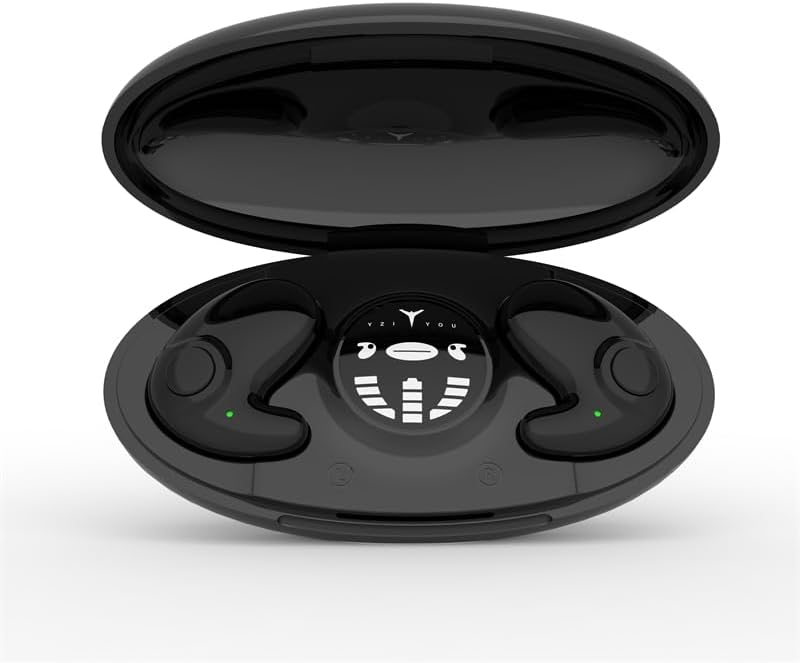
Figure 1: The MD538 earbuds resting in their open charging case, displaying the charging indicators.

Figure 2: An MD538 earbud shown worn in an ear, highlighting its small, invisible design and thin profile (10.6 mm).
2. Què hi ha a la caixa
Upon opening your MSHUKCOE MD538 package, you should find the following components:
- MSHUKCOE MD538 Wireless Earbuds (Left and Right)
- Estoig de càrrega portàtil
- Cable de càrrega USB (tipus C)
- Manual d'usuari (aquest document)
Note: While the product data listed "DVD" as an included component, this is likely an error. The standard package includes the items listed above.
3. Guia de configuració
3.1. Càrrega dels auriculars i l'estoig
Before first use, ensure both the earbuds and the charging case are fully charged. The charging case provides multiple charges for the earbuds, extending their usage time significantly.
- Place the earbuds into their respective slots in the charging case. Ensure they are correctly seated; magnetic closures will help secure them.
- Connecteu el cable de càrrega USB tipus C al port de càrrega de la carcassa i l'altre extrem a una font d'alimentació USB compatible (per exemple, un adaptador de paret, un port USB de l'ordinador).
- The charging case features a display that indicates the battery levels of both earbuds and the case itself. Allow approximately 1 hour for a full charge of the earbuds and 2 hours for the charging case.

Figure 3: The charging case display indicating individual earbud power levels and the charging compartment's power.
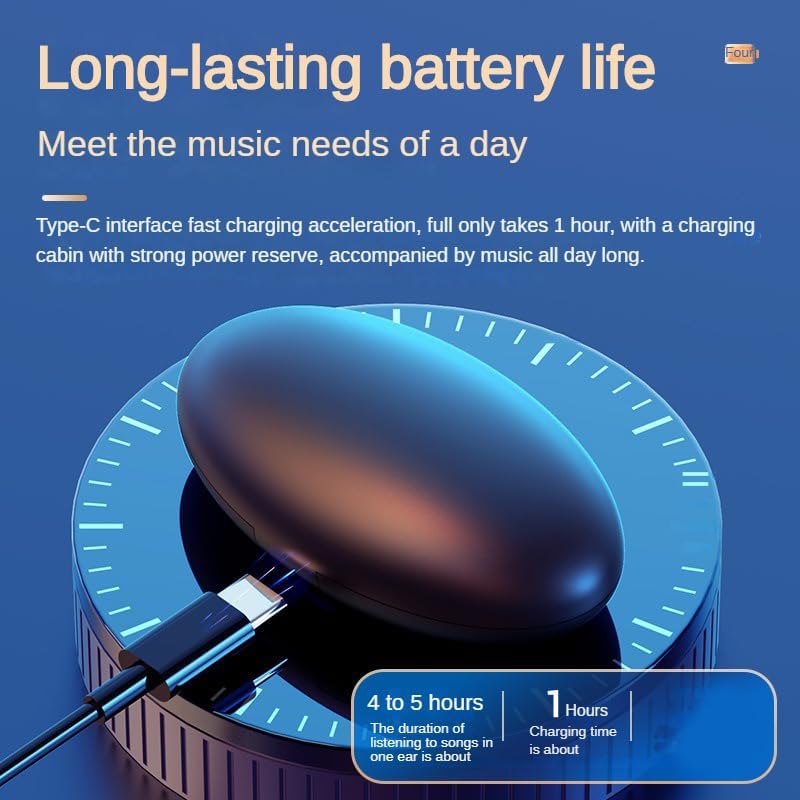
Figure 4: The earbud charging in its case, illustrating the Type-C fast charging capability and battery life.
3.2. Emparellament amb el dispositiu
The MD538 earbuds are designed for easy automatic pairing.
- Obre l'estoig de càrrega. Els auriculars entraran automàticament en mode d'emparellament.
- Al dispositiu (telèfon intel·ligent, tauleta, etc.), navegueu fins a la configuració de Bluetooth.
- Cerca available devices and select "MSHUKCOE-MD538" (or similar name) from the list.
- Un cop connectats, sentireu una confirmació audible i els auriculars estaran llestos per al seu ús.
Reconnexió automàtica: After the initial successful pairing, the earbuds will automatically connect to the last used device when taken out of the charging case, enabling immediate use.
4. Instruccions de funcionament
The MD538 earbuds feature intuitive touch controls for managing audio playback and calls.
4.1. Posar-se els auriculars
The MD538 earbuds are designed for an open-ear fit, resting gently on top of your ear without entering the ear canal. This design is particularly comfortable for side sleepers.

Figure 5: Illustration of the ergonomic design, showing how the earbud fits comfortably for side sleepers.
4.2. Toqueu Controls
Each earbud is equipped with a touch-sensitive area for control. Specific functions may vary slightly depending on your device and operating system.
- Reproduir/pausa: Un sol toc a qualsevol dels auriculars.
- Pista següent: Toqueu dues vegades l'auricular dret.
- Pista anterior: Toqueu dues vegades l'auricular esquerre.
- Respondre/Finalitzar la trucada: Toqueu un sol cop a qualsevol dels auriculars durant una trucada entrant.
- Rebutja la trucada: Prem i mantén premut qualsevol dels auriculars durant una trucada entrant.
- Activa l'Assistent de veu: Toqueu tres vegades en qualsevol dels auriculars (per exemple, Siri, Google Assistant).
5. Manteniment
Proper maintenance ensures the longevity and optimal performance of your MD538 earbuds.
- Neteja: Feu servir un drap suau, sec i sense borrissol per netejar els auriculars i l'estoig de càrrega. No utilitzeu productes químics agressius, dissolvents de neteja ni detergents forts.
- Resistència a l'aigua: The earbuds are rated as Waterproof. However, this does not mean they are suitable for swimming or prolonged submersion. Avoid exposing them to excessive moisture or liquids. Dry them thoroughly if they get wet.
- Emmagatzematge: Quan no els utilitzeu, guardeu els auriculars a la funda de càrrega per protegir-los de la pols i els danys. Guardeu-los en un lloc fresc i sec, allunyat de temperatures extremes.
- Cura de la bateria: To preserve battery life, avoid fully discharging the earbuds or charging case frequently. Charge them regularly, even if not in constant use.
6. Solució De Problemes
If you encounter issues with your MD538 earbuds, refer to the following common solutions:
| Problema | Possible solució |
|---|---|
| Els auriculars no s'emparellan/connecten. |
|
| No se sent so d'un o dels dos auriculars. |
|
| L'estoig de càrrega no es carrega. |
|
| Mala qualitat d'àudio. |
|
7. Especificacions
Detailed technical specifications for the MSHUKCOE MD538 Wireless Bluetooth Headset:
| Nom del model | MSHUKCOE-TWS-MD538-Black |
| Tecnologia de connectivitat | Sense fil (Bluetooth) |
| Versió Bluetooth | 5.3 |
| Interval Bluetooth | 10 metres (aprox. 30 peus) |
| Pes de l'auricular (cada un) | 3.2 g (0.11 oz) |
| Earbud Thickness | 10.4 mm |
| Durada de la bateria (auriculars) | Fins a 6 hores |
| Estoig de càrrega Durada de la bateria | Fins a 24 hores (costos addicionals) |
| Caixa de càrrega Capacitat de la bateria | 300 mAh |
| Temps de càrrega de la caixa de càrrega | 2 hores |
| Resposta de freqüència | 20000 Hz |
| Sensibilitat | 90 dB |
| Impedància | 32 ohms |
| Nivell de resistència a l'aigua | Impermeable |
| Tipus de control | Call Control, Button, Voice |
| Dimensions del producte | 2.95 x 1.57 x 0.98 polzades (estoig de càrrega) |
| Pes total de l'article | 2.12 unces (60.1 grams) |

Figure 6: Visual comparison highlighting the MD538's smaller, thinner, and lighter design compared to standard headphones.
8. Garantia i Suport
For any questions or concerns regarding your MSHUKCOE MD538 Wireless Bluetooth Headset, please contact us directly via Amazon. Our team is dedicated to ensuring your satisfaction with our products.
Please note that specific warranty details are not provided in this manual. For warranty information, please refer to your purchase documentation or contact MSHUKCOE customer support through the Amazon platform.
Ask a question about this manual
Ask about setup, troubleshooting, compatibility, parts, safety, or missing instructions. Manuals+ will review the question and use this page’s manual context to help answer it.