
OiLiehu A7146A3216A4MI2
OiLiehu Android 13 Car Radio User Manual
For Hyundai Tucson IX35 (2010-2015) - Model A7146A3216A4MI2
1. Introducció
This manual provides detailed instructions for the installation, operation, and maintenance of your OiLiehu Android 13 Car Radio. Designed specifically for Hyundai Tucson IX35 models from 2010 to 2015, this unit offers advanced features including Wireless Carplay, Android Auto, GPS navigation, Bluetooth connectivity, FM RDS radio, WiFi, Mirror Link, rear camera support, and steering wheel control integration. Please read this manual thoroughly before installation and use to ensure proper function and safety.
2. Informació de seguretat
- Instal·lació professional recomanada: A causa de la complexitat dels sistemes elèctrics dels cotxes, es recomana la instal·lació professional per evitar danys a la unitat o al vehicle.
- Font d'alimentació: Ensure the unit is connected to a 12V DC power supply with negative grounding. Incorrect voltage pot causar danys.
- Cablejat: Do not modify or cut the wiring harness. Incorrect wiring can lead to malfunctions or electrical hazards.
- Seguretat de conducció: No feu servir la unitat de manera que us distregui de la conducció. Prioritzeu sempre la seguretat viària.
- Temperatura: Eviteu exposar la unitat a temperatures extremes o a la llum solar directa durant períodes prolongats.
- Humitat: Keep the unit away from water and excessive moisture to prevent electrical shock or damage.
3. Contingut del paquet
Si us plau, comproveu el paquet per veure si hi ha els elements següents:
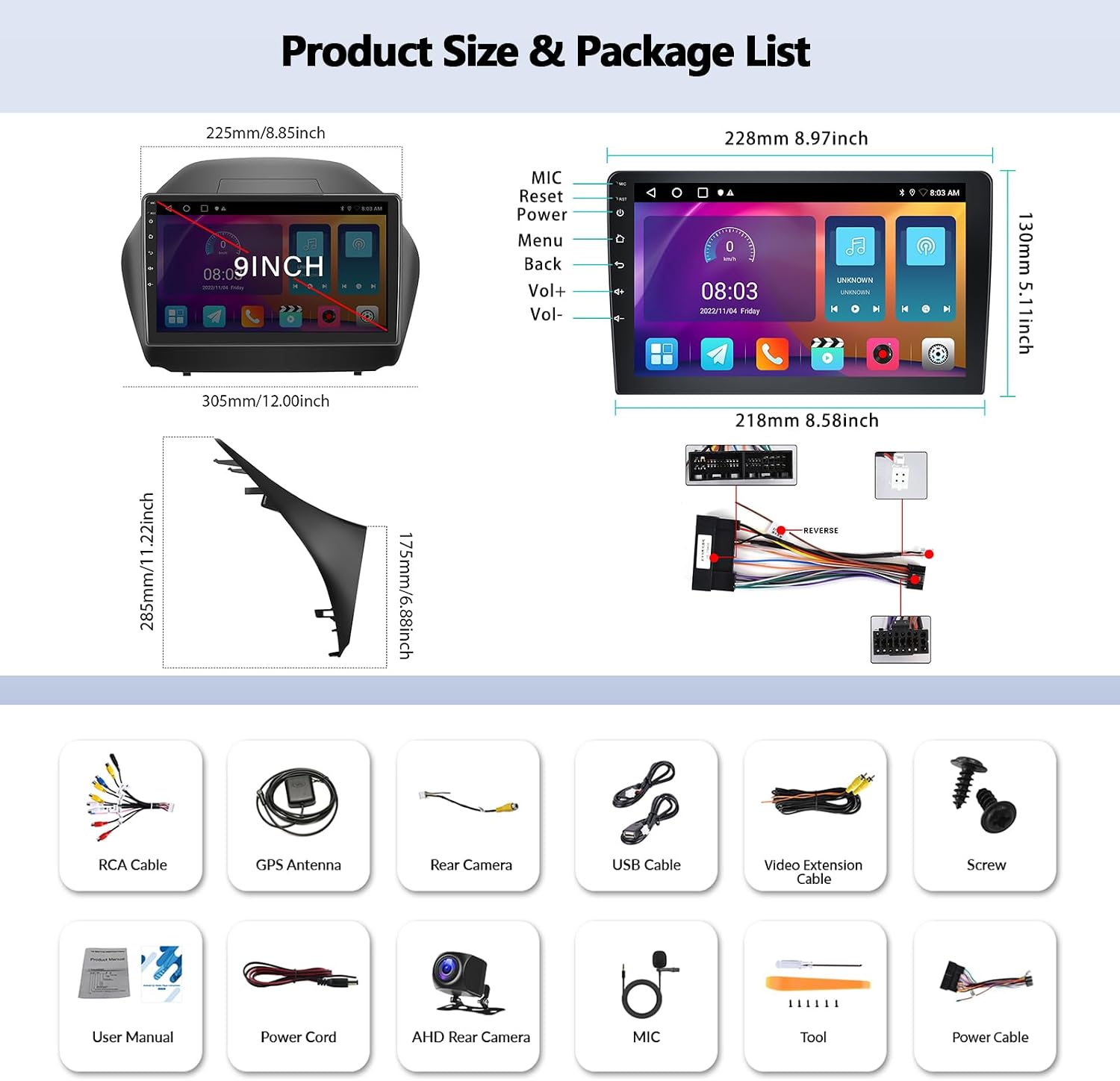
- OiLiehu Android 13 Car Radio Unit
- Càmera posterior AHD
- Cargols per a la instal·lació
- Manual d'usuari (aquest document)
- Power Cord (main wiring harness)
- Cable RCA
- Cable USB
- Video Extension Cable
- Micròfon (MIC)
- Eina d'instal·lació
- Antena GPS
4. Producte acabatview
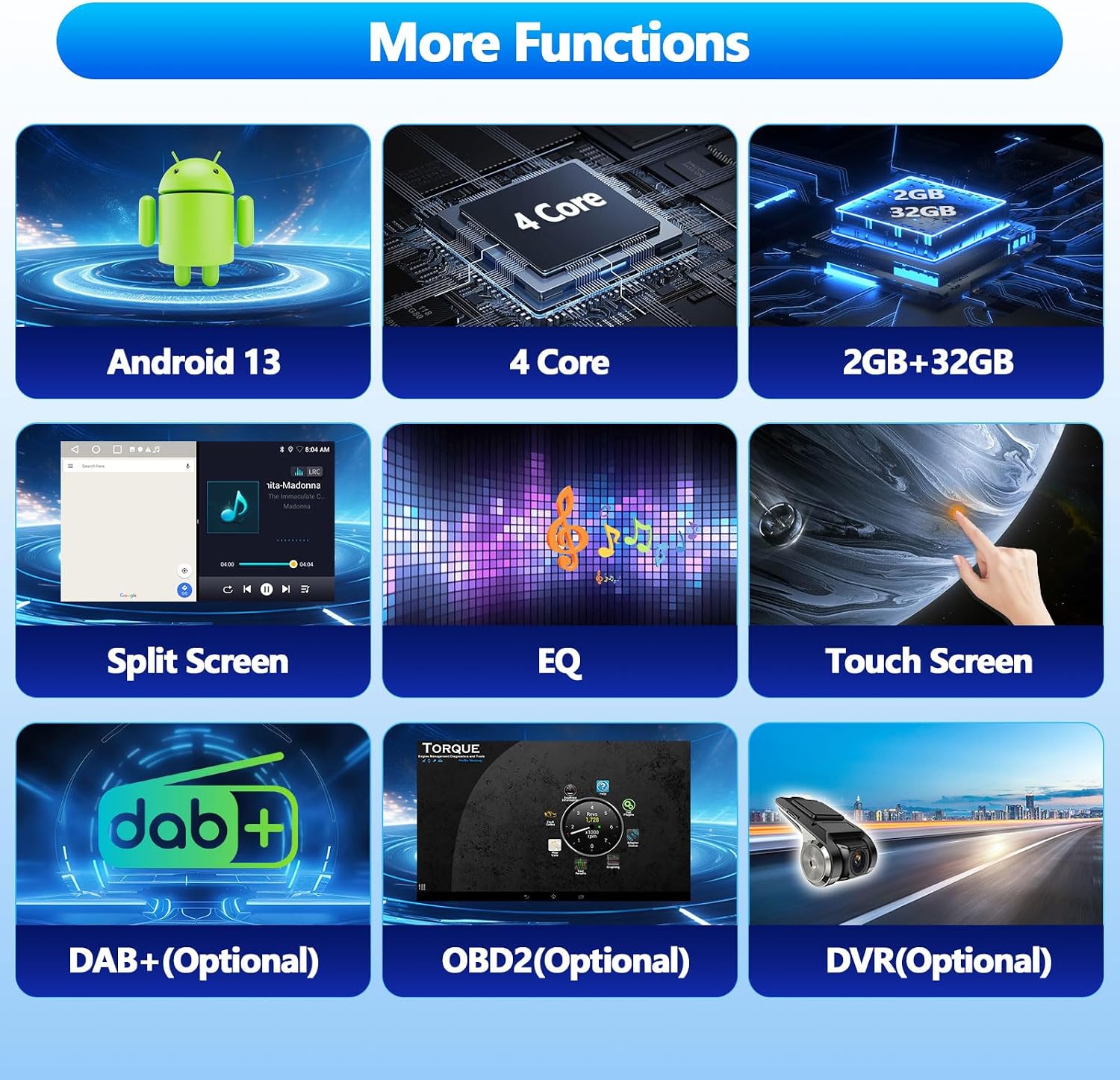
The OiLiehu Android 13 Car Radio features a 10.1-inch touchscreen display and is designed to seamlessly integrate into your Hyundai Tucson IX35 (2010-2015) dashboard. It runs on Android 13 with 2GB RAM and 32GB ROM, providing a responsive and feature-rich experience.

Les característiques clau inclouen:
- Sistema operatiu Android 13
- Pantalla tàctil capacitiva de 10.1 polzades (resolució de 1024 x 600)
- 2 GB de RAM + 32 GB de ROM
- Carplay sense fil i Android Auto
- Built-in GPS Navigation
- Bluetooth for Hands-free Calling and Music Streaming
- Ràdio FM amb RDS
- Connectivitat WiFi
- Funcionalitat d'enllaç de mirall
- Support for Original Steering Wheel Controls
- Rear Camera Input with Automatic Switching
- Audio Equalizer (EQ) Settings
- Funció de pantalla dividida
- Support for optional external devices: DAB+, OBD2, DVR (not included in package)
5. Configuració i instal·lació
5.1 Comprovacions prèvies a la instal·lació
- Verify vehicle compatibility: This unit is designed for Hyundai Tucson IX35 models from 2010 to 2015.
- Desconnecteu el terminal negatiu de la bateria del vehicle abans de començar qualsevol treball elèctric.
- Ensure all package contents are present and undamaged.
5.2 Diagrama de cablejat i connexions
Refer to the provided wiring diagram (usually on a sticker on the unit or in a separate small diagram) for specific connections. General connections include:
- Arnès d'alimentació: Connecteu-lo als cables d'alimentació, terra i accessoris del vehicle.
- Cables de l’altaveu: Connecteu-vos a les sortides d'altaveus del vehicle.
- Antena GPS: Connect to the dedicated GPS port on the unit and mount in a location with a clear view del cel.
- Cables USB: Connect to the unit's USB ports for external storage or phone connection.
- Entrada de càmera posterior: Connect the provided AHD Rear Camera to the 'CAM IN' or 'REVERSE' video input. Connect the camera's power to the vehicle's reverse light circuit and the trigger wire to the unit's 'REVERSE' trigger input.
- Micròfon extern: Connecteu el micròfon extern per millorar la qualitat de la trucada.

5.3 Instal·lació física
- Carefully remove the original car radio and trim panels.
- Connect all necessary wiring harnesses and cables to the new OiLiehu unit.
- Mount the GPS antenna in an optimal location, typically on the dashboard with a clear view del cel.
- Install the AHD Rear Camera at the rear of the vehicle, ensuring proper alignment and wiring.
- Secure the new car radio unit into the dashboard opening using the provided screws and brackets.
- Torneu a instal·lar tots els panells de guarnició.
- Torneu a connectar el terminal negatiu de la bateria del vehicle.

5.4 Configuració del control del volant
The unit supports the original steering wheel controls of your Hyundai Tucson IX35. After installation, you may need to configure these controls:
- Vés a Configuració > Steering Wheel Learn or similar option on the unit.
- Follow the on-screen prompts to assign functions (e.g., volume up/down, track skip, answer call) to your vehicle's steering wheel buttons.
6. Instruccions de funcionament
6.1 Funcionament bàsic
- Encès/apagat: The unit typically powers on with the vehicle's ignition. A power button on the unit or screen may also be available for manual control.
- Pantalla tàctil: Navigate through menus and applications by tapping, swiping, and dragging on the 10.1-inch capacitive touchscreen.
- Pantalla d'inici: Customize widgets and app shortcuts on the home screen for quick access.
6.2 Connectivitat Wi-Fi
Connect the unit to a WiFi network or your phone's hotspot to access online features and applications.
- Vés a Configuració > Xarxa i Internet > Wi-Fi.
- Seleccioneu la xarxa desitjada i introduïu la contrasenya si cal.

6.3 Navegació GPS
The unit has a built-in GPS receiver. You can use pre-installed navigation apps or download others from the Google Play Store (requires WiFi connection).
- Launch the navigation application from the home screen or app drawer.
- Enter your destination to receive turn-by-turn directions.
- Supports both online and offline maps (offline maps require prior download).
6.4 Funcionalitat Bluetooth
Connecta el teu telèfon intel·ligent mitjançant Bluetooth per a trucades de mans lliures i transmissió d'àudio.
- Enable Bluetooth on your smartphone and on the car radio (usually via the Bluetooth app or Settings).
- Cerca available devices on your phone or the car radio. The unit's Bluetooth name is typically 'CarBT'.
- Pair the devices. The default PIN is usually '0000'.
- Once paired, you can make/receive calls, access your phonebook, and stream music.

Ràdio FM 6.5 amb RDS
Access local radio stations and receive station information via RDS.
- Open the 'Radio' application.
- Feu servir la funció d'escaneig per trobar emissores disponibles o sintonitzar manualment una freqüència.
- Save your favorite stations to presets.
- RDS (Radio Data System) provides information like station name, program type, and traffic announcements.
6.6 Carplay sense fil i Android Auto
Connect your iPhone or Android phone wirelessly for a seamless in-car experience.
- Ensure Bluetooth and Wi-Fi are enabled on both your phone and the car radio.
- Open the 'Carplay' or 'Android Auto' application on the unit.
- Follow the on-screen instructions to pair your phone. For some phones, a wired connection might be required for the initial setup.
- Once connected, you can access navigation, music, messages, and voice assistants (Siri/Google Assistant) directly from the car radio display.
Compatibility Note: For Apple phones, iOS version 16.5 or higher may not be compatible. For Android phones, Android version 12 or higher may not be compatible. Samsung and Huawei phones are generally not supported for this feature.

6.7 Enllaç de mirall
Duplica la pantalla del teu telèfon intel·ligent a la pantalla de la ràdio del cotxe.
- Open the 'Mirror Link' application on the unit.
- Follow the instructions to connect your iOS or Android smartphone. This may involve scanning a QR code or connecting via USB.
Compatibility Note: For iOS smartphones, version 15 or lower is recommended. For Android smartphones, version 11 or lower is recommended.

6.8 Pantalla de la càmera posterior
When the vehicle is shifted into reverse gear, the unit will automatically display the feed from the connected AHD Rear Camera, assisting with parking and maneuvering.
6.9 Funció de pantalla dividida
The unit supports split-screen mode, allowing you to run two applications simultaneously (e.g., navigation and music player).
- To activate, open one app, then long-press the recent apps button or swipe from the bottom (depending on Android version) to select another app for split-screen view.
6.10 Configuració de so (EQ)
Personalitza la teva experiència d'àudio amb l'equalitzador integrat.
- Access the 'EQ' or 'Sound Settings' application.
- Adjust various audio parameters such as bass, treble, balance, and fader, or select from preset equalizer modes.
6.11 Optional Features (Not Included)
The unit supports additional functionalities with separately purchased accessories:
- DAB+ (Digital Audio Broadcasting): Requires an external DAB+ receiver.
- OBD2 (diagnòstic a bord): Requires an OBD2 dongle for vehicle diagnostics.
- DVR (Enregistrador de vídeo digital): Requires an external USB DVR camera for recording driving footage.
7. Manteniment
- Neteja de la pantalla: Feu servir un drap suau i sense borrissol per netejar suaument la pantalla tàctil. Per a taques difícils, fregueu lleugeramentampNetegeu el drap amb aigua o un netejador de pantalles dissenyat per a electrònica. Eviteu productes químics agressius.
- Actualitzacions de programari: Periodically check for software updates via the unit's settings (requires WiFi connection) to ensure optimal performance and access to new features.
- Atenció general: Avoid placing heavy objects on the unit or exposing it to direct sunlight for extended periods when parked.
8. Solució De Problemes
| Problema | Causa possible | Solució |
|---|---|---|
| La unitat no s'encén. | Connexió d'alimentació fluixa, fusible fundit, cablejat incorrecte. | Check all power connections. Inspect vehicle's fuse box and the unit's inline fuse. Verify wiring against the diagram. |
| Sense so. | Volume too low, mute activated, incorrect speaker wiring, audio settings. | Increase volume. Check if mute is active. Verify speaker connections. Adjust EQ/sound settings. |
| El Bluetooth no es connecta. | Bluetooth off, device not discoverable, incorrect pairing process. | Ensure Bluetooth is enabled on both devices. Make the phone discoverable. Re-attempt pairing with PIN '0000'. Clear previous pairings. |
| Senyal GPS feble o perdut. | Obstrucció de l'antena GPS, mala col·locació de l'antena, problema de programari. | Assegureu-vos que l'antena GPS tingui una visió clara view del cel. Comproveu la connexió de l'antena. Reinicieu la unitat. |
| Carplay/Android Auto not working. | Phone compatibility, incorrect connection, app issues. | Verify phone OS version compatibility (iOS <16.5, Android <12). Ensure Wi-Fi and Bluetooth are on. Try a wired connection first. Restart phone and unit. Note: Samsung/Huawei phones may not be compatible. |
| La càmera posterior no es mostra. | Cablejat incorrecte, mal funcionament de la càmera, disparador invers no connectat. | Check camera power and video input connections. Ensure the reverse trigger wire is correctly connected to the vehicle's reverse light circuit. |
9. Especificacions
| Característica | Detall |
|---|---|
| Número de model | A7146A3216A4MI2 |
| Sistema operatiu | Android 13 |
| RAM | 2 GB |
| Emmagatzematge intern | 32 GB |
| Mida de la pantalla | 10.1 polzades |
| Resolució de pantalla | 1024 x 600 |
| Tipus de pantalla tàctil | Capacitiva |
| Tecnologia de connectivitat | Bluetooth, USB, Wi-Fi |
| Característiques especials | Wireless Carplay, Android Auto, GPS, FM RDS, Mirror Link, Steering Wheel Control, Rear Camera Input, EQ |
| Tipus de vehicle compatible | Hyundai Tucson IX35 (2010-2015) |
| Dimensions del producte (L x A x A) | 25.7 x 25.7 x 25.7 cm (aprox. 10.1 x 10.1 x 10.1 polzades) |
| Pes | 2.2 kg |
10. Garantia i Suport
For warranty information and technical support, please refer to the documentation provided with your purchase or contact OiLiehu customer service through the retailer where the product was purchased. Keep your proof of purchase for warranty claims.
For further assistance, you may visit the OiLiehu brand store online: OiLiehu Brand Store
Documents relacionatsA7146A3216A4MI2

Ask a question about this manual
Ask about setup, troubleshooting, compatibility, parts, safety, or missing instructions. Manuals+ will review the question and use this page’s manual context to help answer it.