
Introducció
Benvingut
This manual provides essential information for the safe and effective operation, maintenance, and troubleshooting of your Chasing GLADIUS MINI S underwater drone. Please read this manual thoroughly before using the device to ensure optimal performance and longevity.
Producte acabatview
El Chasing GLADIUS MINI S is a compact, portable underwater remotely operated vehicle (ROV) designed for underwater exploration, photography, and inspection. It features a 4K camera with Electronic Image Stabilization (EIS), powerful thrusters, and a direct-connect remote controller for stable operation.

Image: The Chasing GLADIUS MINI S underwater drone operating in its natural environment.
Informació de seguretat
Adhering to these safety guidelines is crucial for preventing damage to the drone and ensuring user safety.
- Comprovació prèvia a la immersió: Always inspect the drone for any visible damage, ensure all seals are secure, and verify battery levels before deployment.
- Consciència ambiental: Operate the drone in clear, calm waters free from strong currents, dense aquatic vegetation, or obstacles that could entangle the tether or thrusters.
- Límits de profunditat: Do not exceed the maximum operating depth of 330 feet (100 meters).
- Interval de temperatura: Operate within the specified temperature range (e.g., 32 Degrees Fahrenheit / 0 Degrees Celsius and above).
- Post-Dive Cleaning: After each use, thoroughly rinse the drone with fresh water, especially after saltwater exposure, to prevent corrosion. As noted by users, soaking in a clean water tub is recommended.
- Manipulació de la bateria: Follow all instructions for charging, storing, and handling the lithium-ion batteries. Do not expose batteries to extreme temperatures or physical damage.
- Supervisió: Always maintain visual contact with the drone's tether and be aware of its surroundings.
Components i característiques del producte
Components
The GLADIUS MINI S system includes the underwater drone, a direct-connect remote controller, and necessary cables.

Image: The Chasing GLADIUS MINI S drone, compact and ready for deployment, alongside its remote controller.
Característiques clau
- Sistema de càmera avançat: Equipped with a 4K HD video camera and 12 MP photo capability, featuring a 1/2.3 SONY CMOS sensor and Electronic Image Stabilization (EIS) for clear, stable underwater footage. The F2.8 lens and two 1200 lumens LED lights enhance visibility in low-light conditions.

Image: Visual demonstration of the 4K UHD EIS camera's high resolution and accurate imaging capabilities.
- Interval d'operació ampliat: Features 5 thrusters for a maximum speed of 4 knots. It can dive to a maximum depth of 330 feet (100 meters) and offers a horizontal movement radius of up to 330 feet (100 meters).
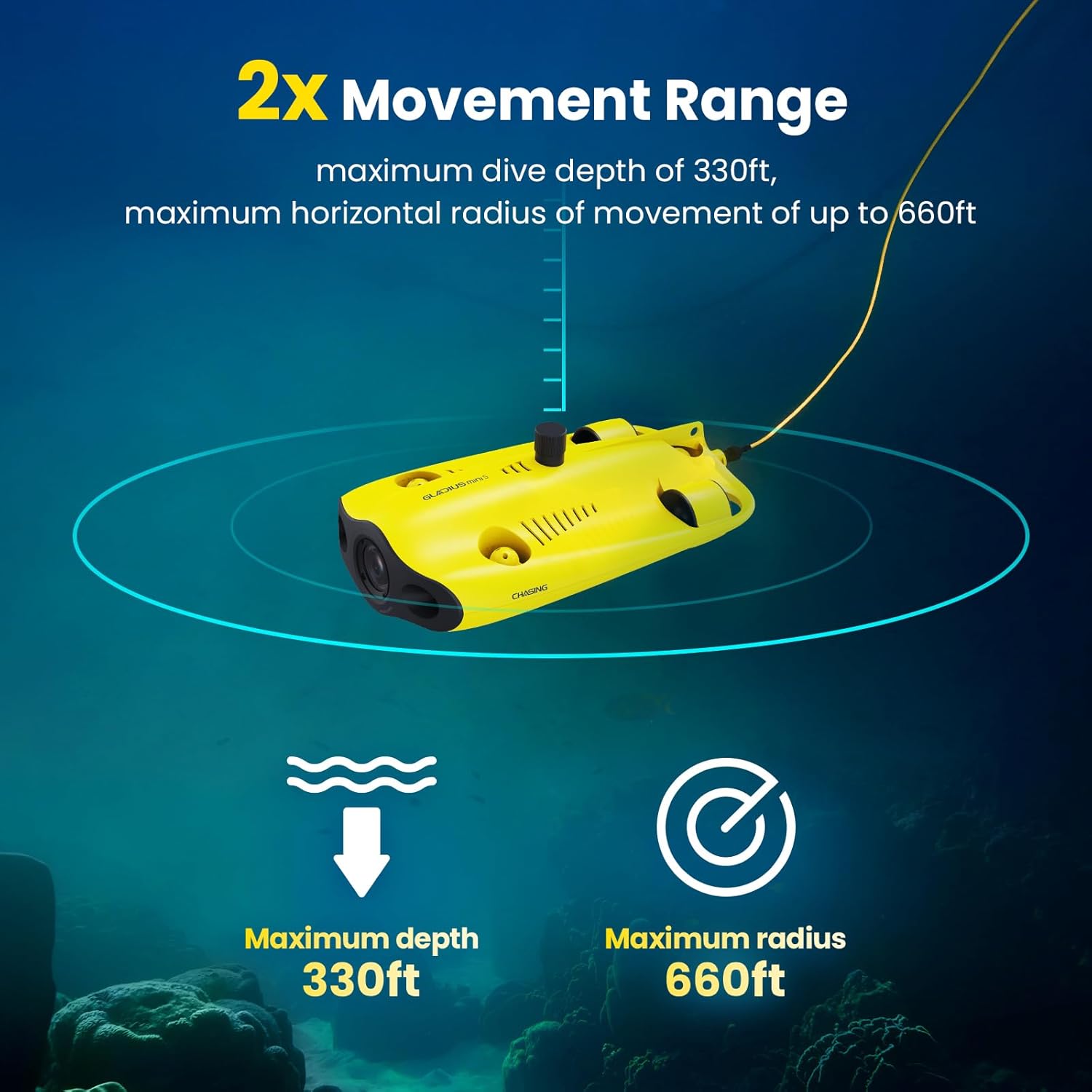
Image: The operational range of the GLADIUS MINI S, showing its depth and horizontal reach.
- Llarga vida útil de la bateria: Two 4800 mAh batteries provide up to 4 hours of operation in low-flow water conditions, with a full charge achieved in approximately 3.5 hours.

Image: The extended battery runtime of the GLADIUS MINI S, allowing for longer underwater missions.
- Anti-Stuck Motor Technology: Patented motor design prevents thrusters from getting stuck by pebbles or sand, ensuring reliable operation in various underwater environments.

Image: Detail of the anti-stuck motor, highlighting its design for reliable operation.
- Compatibilitat d'accessoris: Supports various mounts for attachments such as grabber claws or GoPro cameras, expanding its utility for different applications.

Image: The GLADIUS MINI S equipped with optional accessories like a robotic arm and a GoPro camera.
- Comandament a distància per cable: Ensures stable and continuous signal connection, preventing disconnections during operation. The app supports real-time data display (depth, temperature), live broadcasting, time-lapse photography, and quick editing features.
Configuració
Desembalatge i inspecció inicial
Carefully unpack all components and inspect for any signs of damage. Ensure all items listed in the packaging contents are present.
Charging the Drone and Controller
- Connect the drone to its charger using the provided cable. A full charge takes approximately 3.5 hours.
- Connect the remote controller to its charger. Ensure the controller is fully charged before use.
Instal·lació de la targeta de memòria
The drone comes with a 64GB SD card. It supports up to a 512GB SD card for expanded storage.
- Locate the memory card slot on the drone.
- Gently insert the SD card until it clicks into place. Ensure it is properly seated to maintain waterproofing.
- To remove, press the card gently to eject it.

Image: Illustrates the process of installing the pluggable memory card into the drone.
Connexió del controlador
The GLADIUS MINI S remote controller supports both wired and Wi-Fi connections to your mobile device (smartphone or tablet).
- Connexió per cable: Connect your mobile device directly to the remote controller using a USB cable. This provides the most stable signal.
- Connexió Wi-Fi: Alternatively, connect your mobile device to the controller's Wi-Fi network. Refer to the app instructions for specific Wi-Fi setup steps.
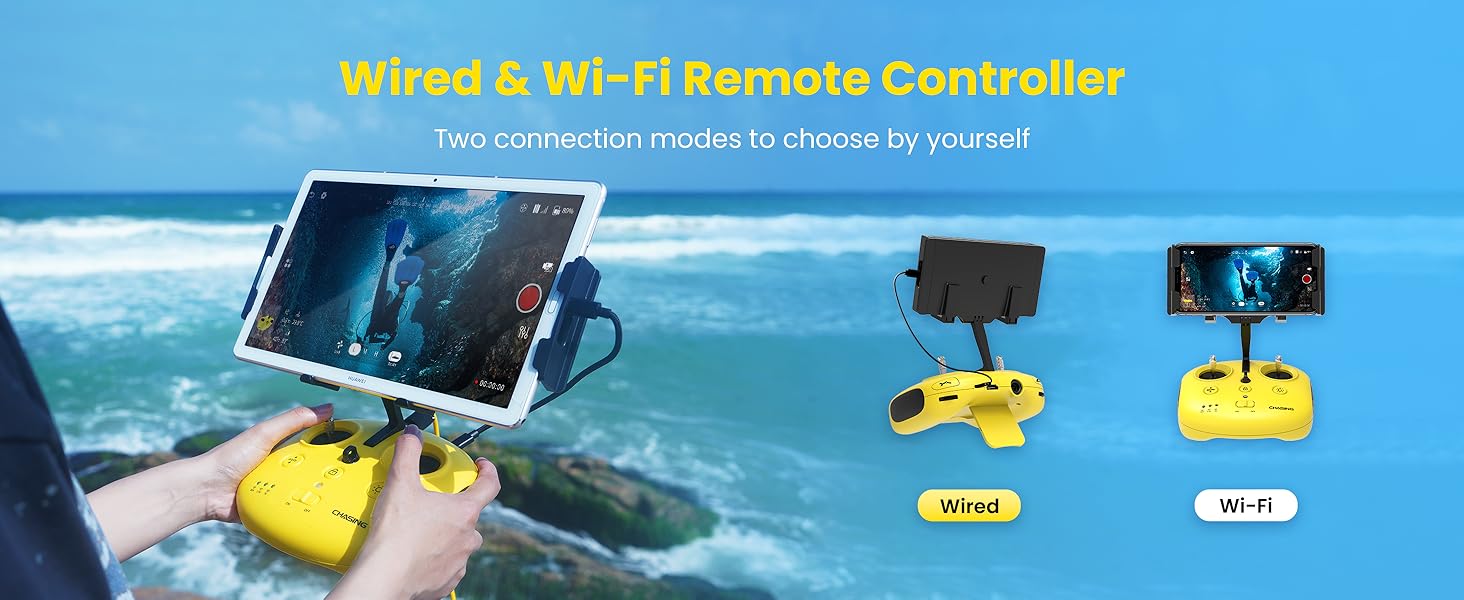
Image: The remote controller setup, demonstrating both wired and wireless connectivity options.
Instal·lació d'aplicacions
Download and install the official Chasing app on your smartphone or tablet. The app is required for controlling the drone and accessing its features.
Instruccions de funcionament
Pre-Dive Procedures
- Ensure the drone and controller are fully charged.
- Verify the memory card is correctly installed.
- Connect your mobile device to the controller (wired connection recommended for stability).
- Launch the Chasing app.
- Perform a visual inspection of the drone for any damage or debris.
Desplegament
Gently place the drone into the water. Ensure the tether is free from tangles and obstructions.

Image: The GLADIUS MINI S is suitable for operation in diverse aquatic environments, including oceans, lakes, and swimming pools.
Controls bàsics
Familiarize yourself with the remote controller layout and the on-screen controls within the Chasing app. Key controls typically include:
- Moviment direccional: Forward, backward, left, right.
- Control de profunditat: Ascend and descend.
- Control de la càmera: Tilt, record video, capture photos.
- Llums LED: Turn on/off or adjust brightness.

Image: The intuitive Human-Computer Interface (HCI) of the GLADIUS MINI S, displaying various operational data and controls.
Funcionament de la càmera
The 4K camera allows for high-quality video recording and still photography. Use the app interface to:
- Iniciar/aturar la gravació de vídeo.
- Capture still images (12 MP).
- Adjust camera settings (e.g., white balance, exposure).
- Utilize time-lapse photography features.

Image: The GLADIUS MINI S drone equipped with an external GoPro camera for enhanced recording capabilities.
Real-Time Data and Sharing
El Chasing app displays real-time depth and temperature data. You can also:
- View transmissió de vídeo en directe.
- Share live broadcasts to social media platforms.
- Save photos and videos to the drone's SD card or directly to your mobile device.
- Utilize HDMI output for external monitors.
Manteniment
Proper maintenance ensures the longevity and optimal performance of your GLADIUS MINI S drone.
Post-Operation Cleaning
After each use, especially in saltwater, immediately rinse the entire drone with fresh, clean water. It is recommended to soak the drone in a tub of clean water for a period to thoroughly remove salt and debris from all crevices and thrusters. This prevents corrosion and ensures smooth operation of moving parts.
Cura de la bateria
- Guardeu les piles en un lloc fresc i sec.
- Do not fully discharge batteries for extended periods.
- Charge batteries regularly, even if not in use, to maintain their health.
Emmagatzematge
Store the drone and its components in a dry, protected environment, away from direct sunlight and extreme temperatures. Ensure the tether is neatly coiled to prevent tangles or damage.
Resolució de problemes
This section addresses common issues you might encounter with your Chasing GLADIUS MINI S drone.
| Problema | Causa possible | Solució |
|---|---|---|
| El dron no s'encén. | Low battery or power connection issue. | Ensure the drone battery is fully charged. Check all power connections. |
| No video feed or signal loss. | Loose cable connection, Wi-Fi interference, or drone out of range. | Verify the wired connection between the controller and mobile device. If using Wi-Fi, ensure strong signal. Bring the drone closer to the surface if operating at maximum range. |
| Thrusters are not responding or are stuck. | Debris (sand, pebbles, aquatic plants) in thrusters. | Retrieve the drone and carefully inspect thrusters for obstructions. Clean thoroughly. The patented anti-stuck motor design minimizes this, but severe entanglement can still occur. |
| Mala qualitat d'imatge/vídeo. | Dirty camera lens, low light, or water turbidity. | Clean the camera lens. Utilize the LED lights in low light. Operate in clearer water if possible. |
| Drone drifts or is difficult to control. | Strong currents, unbalanced trim, or thruster issue. | Avoid strong currents. Check app settings for trim adjustments. Inspect thrusters for proper function. |
For further assistance, please contact Chasing customer support.
Especificacions
Detailed technical specifications for the Chasing GLADIUS MINI S underwater drone.
| Marca | Chasing |
| Nom del model | GLADIUS MINI S |
| Color | groc |
| Resolució de captura de vídeo | 4K |
| Resolució de fixes efectius | 12 MP |
| Tecnologia de connectivitat | HDMI, Wired, Wi-Fi |
| Pes de l'article | 1 lliures (aprox. 0.45 kg) |
| Capacitat de la bateria | Drone: 2 x 4800 mAh, Controller: 300 Milliamp Hores |
| Format de captura de vídeo | MP4 |
| Tipus de control | Control remot |
| Interval màxim | 330 Feet (Depth), 330 Feet (Horizontal Radius) |
| Composició de les cèl·lules de la bateria | Ió de liti |
| Temperatura de funcionament | 32 Degrees Fahrenheit (0 Degrees Celsius) and above |
| Format d'imatge compatible | JPEG |
| Resolució de sortida de vídeo | 3840 píxels |
| Tecnologia de sensors òptics | CMOS |
| Dimensions del producte | 1"L x 1"W x 1"H (Note: Dimensions provided are generic; refer to product packaging for exact measurements) |
| Número de peça del fabricant | Chasing MINIS |
| Data de primera disponibilitat | 26 d'abril de 2024 |
Garantia i Suport
For information regarding product warranty, please refer to the documentation included with your purchase or visit the official Chasing website. For technical support, troubleshooting beyond this manual, or spare parts, please contact Chasing customer service directly.
Fabricant: CHASING
ASIN: B0D2Q8X1LF
Pare ASIN: B0FL239QDM


