
DOOGEE N55 Pro
DOOGEE N55 Pro Cell Phone User Manual
La teva guia completa de configuració, funcionament i manteniment.
1. Introducció
Welcome to the DOOGEE N55 Pro user manual. This guide provides detailed instructions to help you get the most out of your new smartphone. The DOOGEE N55 Pro is designed for optimal performance and user experience, featuring the latest Android 14 OS, a powerful octa-core processor, and a large 5150mAh battery.
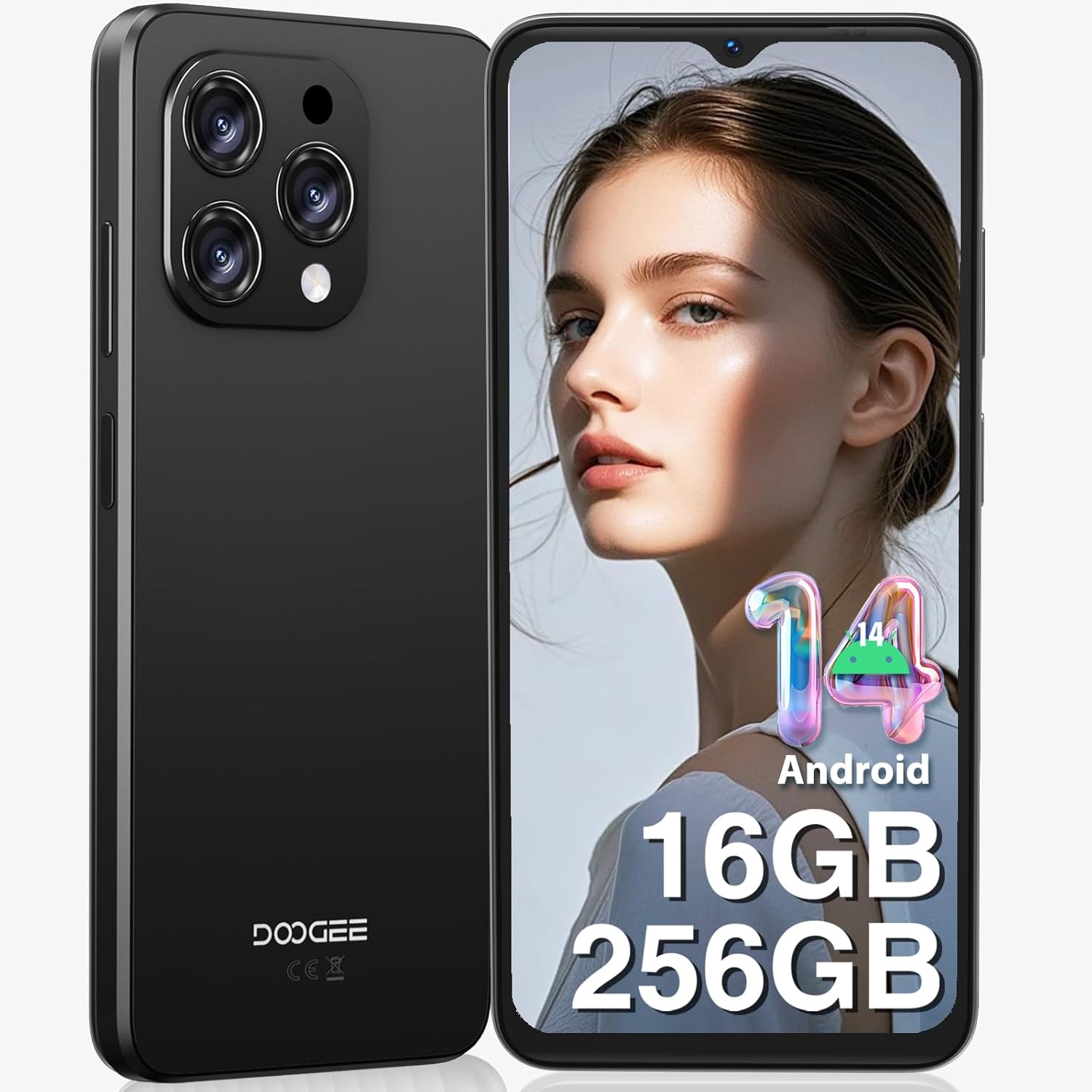
Figura 1: Davant i darrere view of the DOOGEE N55 Pro Cell Phone, showcasinel seu disseny elegant i el mòdul de càmera.
2. Què hi ha a la caixa
Upon unboxing your DOOGEE N55 Pro, please verify that all the following items are included:
- 1 x DOOGEE N55 Pro Android 14 Cellphone
- 1 x Type-C Port Cable
- 1 x Carregador
- 1 x SIM Card Pin
- 1 x TP Protective film (pre-applied)
- 1 x TPU Protective case
- 1 x Manual d'usuari
- 1 x Targeta de garantia

Figure 2: Illustration of the DOOGEE N55 Pro and its included accessories, such as the charger, USB-C cable, and protective case.
3. Producte acabatview
3.1 Característiques clau
- Sistema operatiu: Android 14
- Processador: Octa-core processor for smooth performance
- Memòria i emmagatzematge: Up to 16GB RAM (6GB physical + 10GB virtual) and 256GB ROM, expandable up to 1TB via TF card
- Visualització: 6.56-inch HD+ 90Hz IPS Waterdrop Screen (720 x 1612 resolution)
- Bateria: Bateria de gran capacitat de 5150 mAh
- Càmeres: 13MP AI Main Camera and 8MP Front Camera
- Seguretat: Support for Face Unlock
- Connectivitat: Dual SIM 4G, Bluetooth, Wi-Fi, GPS, 3.5mm Audio Jack
3.2 Disseny i visualització
The DOOGEE N55 Pro features a refined and elegant design, with an ultra-lightweight body weighing only 186g and a slim thickness of 8.6mm. The 6.56-inch HD+ IPS Waterdrop Screen offers a 90Hz refresh rate for a smooth and immersive visual experience.

Figure 3: The 6.56-inch HD+ 90Hz IPS Waterdrop Screen, highlighting its resolution, PPI, and aspect ratio for a dynamic display.

Figure 4: The lightweight and elegant design of the DOOGEE N55 Pro, emphasizing its slim profile (8.6mm thickness, 186g weight) and comfortable grip.
Video 1: A visual demonstration of the DOOGEE N55 Pro's 6.56-inch HD+ 90Hz IPS Waterdrop Screen, showcasing its vibrant display and smooth refresh rate.
Video 2: This video highlights the refined and elegant design of the DOOGEE N55 Pro, showcasing its sleek aesthetics and comfortable form factor.
3.3 Performance and Operating System
Equipped with a powerful octa-core processor, the DOOGEE N55 Pro ensures smooth multitasking and efficient handling of demanding applications. It runs on the latest Android 14 operating system, offering enhanced security, improved privacy features, and a more intuitive user interface.

Figure 5: Visual representation of the DOOGEE N55 Pro's memory configuration, including 16GB RAM (6GB physical + 10GB virtual) and 256GB ROM, with expansion capability up to 1TB.

Figure 6: Screenshots demonstrating the upgraded Android 14 interface on the DOOGEE N55 Pro, highlighting its safety and fluency improvements.
Video 3: This video showcases the latest Android 14 system on the DOOGEE N55 Pro, demonstrating its features and smooth operation.
4. Configuració
4.1 Inserting SIM Card and TF Card
The DOOGEE N55 Pro supports dual Nano SIM cards or a combination of one Nano SIM and one TF card for expanded storage. Use the provided SIM ejector tool to open the SIM tray located on the side of the device. Carefully place your SIM card(s) and/or TF card into the tray according to the diagram on the tray, then reinsert it into the phone.
Note: This device does not support Verizon, AT&T, and Xfinity networks. Please check compatibility with your local frequency band before purchasing.
4.2 Engegada inicial i assistent de configuració
Press and hold the power button on the side of the phone until the DOOGEE logo appears. Follow the on-screen instructions to complete the initial setup, including language selection, Wi-Fi connection, Google account sign-in, and security settings (Face ID, PIN, pattern, or password).
5. Instruccions de funcionament
5.1 Navegació
Navigate through the Android 14 interface using gestures or the traditional navigation bar. Swipe up from the bottom to go home, swipe up and hold for recent apps, and swipe from the left or right edge to go back.
5.2 Personalització
Personalize your phone by changing wallpapers, widgets, and notification settings. Access these options through the Settings app or by long-pressing on the home screen.
6. Ús de la càmera
The DOOGEE N55 Pro is equipped with a 13MP AI Main Camera and an 8MP Front Camera. The camera system supports various modes including HDR, Water Mark, Video, Picture, Beauty, Pro Mode, Portrait, Gif, Panorama, Filter, QR Code, and Night mode.

Figura 7: Mésview of the DOOGEE N55 Pro's camera system, detailing the 13MP main camera and 8MP front camera, along with supported features like HDR and Night mode.
6.1 Fer fotos i vídeos
Open the Camera app. Select your desired mode (Photo, Video, Portrait, etc.). Tap the shutter button to capture a photo or start/stop video recording. Adjust settings like flash, timer, and aspect ratio from the camera interface.
7. Gestió de la bateria
The DOOGEE N55 Pro features a 5150mAh large battery, providing extended usage times. To optimize battery life:
- Redueix la brillantor de la pantalla.
- Activa el mode d'estalvi de bateria quan sigui necessari.
- Tanca les aplicacions en segon pla que no fas servir.
- Desactiva el Wi-Fi, el Bluetooth i el GPS quan no els utilitzis.

Figure 8: Visual representation of the 5150mAh large battery, indicating estimated standby time (419 hours), video playback (9.5 hours), calling (36 hours), and music playback (35 hours).
8. Connectivitat
8.1 Wi-Fi i Bluetooth
Connect to Wi-Fi networks via Settings > Network & internet > Wi-Fi. Pair Bluetooth devices via Settings > Connected devices > Bluetooth.
8.2 GPS and OTG
The phone supports GPS, Glonass, Galileo, and Beidou for accurate navigation. OTG (On-The-Go) functionality allows you to connect USB devices like flash drives or keyboards using an OTG adapter (not included).
9. Manteniment
To ensure the longevity and optimal performance of your DOOGEE N55 Pro:
- Mantingueu el dispositiu net amb un drap suau i sec.
- Eviteu exposar el telèfon a temperatures extremes o a la llum solar directa.
- No intenteu desmuntar el dispositiu.
- Regularly update the operating system to receive the latest security patches and features.
- Utilitzeu només accessoris originals o certificats.
10. Solució De Problemes
| Problema | Possible solució |
|---|---|
| El telèfon no s'encén | Ensure the battery is charged. Press and hold the power button for at least 10 seconds to force restart. |
| Les aplicacions es bloquegen o es bloquegen | Esborra la memòria cau de l'aplicació (Configuració > Aplicacions > [Nom de l'aplicació] > Emmagatzematge i memòria cau > Esborra la memòria cau). Reinicia el telèfon. |
| Senyal de xarxa pobre | Check SIM card insertion. Move to an area with better coverage. Verify network compatibility with your carrier. |
| La bateria s'esgota ràpidament | Reduce screen brightness, disable unused features (Wi-Fi, Bluetooth, GPS), close background apps. |
| Face Unlock not working | Ensure proper lighting and clear camera lens. Re-register your face data in security settings. |
11. Especificacions
- Nom del model: N55 Pro
- Sistema operatiu: Android 14
- Model de CPU: 1.2GHz Cortex A8 Processor (Octa Core)
- RAM: 16 GB (6 GB físic + 10 GB virtual)
- Capacitat d'emmagatzematge de memòria: 256 GB (ampliable a 1 TB)
- Mida de la pantalla: 6.56 polzades
- Resolució: 720 x 1612
- Freqüència d'actualització: 90 Hz
- Capacitat de la bateria: 5150 milionsamp Hores
- Càmera principal: Càmera AI de 13 MP
- Càmera frontal: 8MP
- Connectivitat: Bluetooth, Wi-Fi, GPS
- Característiques especials: Support Face Unlock, Widevine L1
- Dimensions: 7.68 x 4.09 x 2.05 polzades
- Pes de l'article: 13.7 unces
12. Garantia i Suport
DOOGEE offers comprehensive support for your N55 Pro device:
- Garantia de devolució de 30 dies i devolució gratuïta: Si no esteu satisfets amb la vostra compra.
- Garantia limitada de 2 anys: Cobreix defectes de fabricació.
- Assistència en línia 24/7: Dedicated one-on-one assistance for any queries or issues.
For further assistance, please visit the official DOOGEE store or contact their customer service through the provided warranty card information.
Ask a question about this manual
Ask about setup, troubleshooting, compatibility, parts, safety, or missing instructions. Manuals+ will review the question and use this page’s manual context to help answer it.