Introducció
This manual provides detailed instructions for the LAMA Magnetic Keyboard Case, designed to enhance the functionality of your compatible iPad. It covers setup, operation, maintenance, and troubleshooting to ensure optimal performance and user experience.

Image: The LAMA Magnetic Keyboard Case with an iPad attached, showcasing the keyboard and trackpad in use.
Compatibilitat
The LAMA Magnetic Keyboard Case is compatible with the following iPad models:
- iPad 10th Generation 10.9-inch (2022): Model Numbers A2696, A2757, A2777
- iPad (A16) 11th Generation 11-inch (2025): Model Numbers A3354, A3355, A3356
To verify your iPad model, check the "Axxxx" logo on the rear of your iPad or navigate to Configuració > General > Quant a and tap the "Mxxxx" part number to reveal the "Axxxx" model number.

Image: Visual representation of compatible iPad models and their corresponding model numbers.
Contingut del paquet
- LAMA Magnetic Keyboard Case
- Cable de càrrega USB-C
- Manual d'usuari (aquest document)
Guia de configuració
1. Connectar el vostre iPad
- Alinea el teu iPad amb el panell posterior magnètic de la funda.
- The iPad will magnetically snap into place, ensuring a secure connection.
- Ensure the camera cutout and ports align correctly with the case openings.
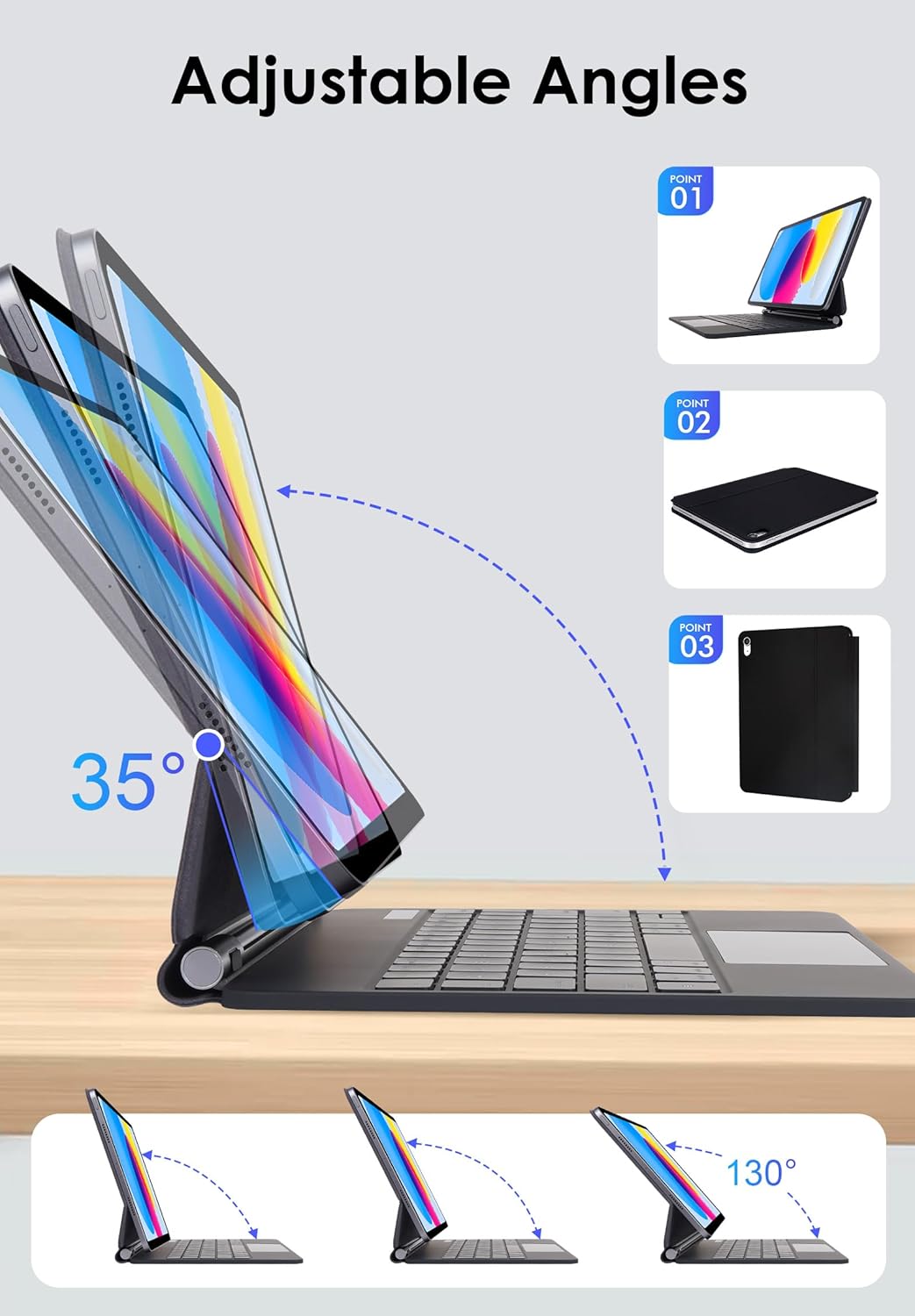
Image: The keyboard case demonstrating its adjustable angles and how the iPad attaches magnetically.
2. Càrrega del teclat
- Locate the USB-C charging port on the side of the keyboard.
- Connect the provided USB-C cable to the keyboard and a power source (e.g., USB wall adapter, computer USB port).
- L'indicador lluminós de càrrega s'il·luminarà. Una càrrega completa sol trigar entre 2 i 3 hores.
- The keyboard has a long standby time of up to 150 days and a working time of 80 hours on a single charge.
3. Emparellament Bluetooth
- Turn on the keyboard by sliding the power switch. The Bluetooth indicator light will flash.
- Al teu iPad, vés a Configuració > Bluetooth.
- Assegureu-vos que el Bluetooth estigui activat.
- Select "LAMA Keyboard" (or similar name) from the list of available devices.
- Follow any on-screen prompts to complete the pairing process. The Bluetooth indicator light on the keyboard will stop flashing once successfully paired.
Video: This video demonstrates the magnetic attachment of the iPad to the keyboard case, followed by typing and trackpad usage, illustrating the setup and basic operation.
Instruccions de funcionament
Funcions del teclat
- Control de la llum de fons: Premeu Fn + icona de llum to cycle through 7 backlight colors. Press Fn + sun icon to adjust the 3 levels of brightness.
- Tecles de drecera: The keyboard includes dedicated iOS multimedia and standard layout shortcut keys. Refer to the keyboard layout for specific functions (e.g., volume control, media playback, home screen).

Image: The keyboard displaying its 7-color backlight feature with brightness adjustment options.
Multi-Touch Trackpad Gestures
The integrated multi-touch trackpad supports various gestures for enhanced navigation:
- Single Finger Tap: Click/Select.
- Desplaçament de dos dits: Scroll up/down or left/right.
- Two Finger Pinch: Zoom in/out.
- Llisca cap amunt amb tres dits: Open the App Switcher.
- Llisca cap avall amb tres dits: Return to Home Screen.
- Ajust de sensibilitat: Anar a iPad Settings > General > Trackpad & Mouse > Tracking Speed.

Image: A user's hands demonstrating multi-touch gestures on the trackpad of the LAMA keyboard case.
Suport ajustable
The floating cantilever stand allows for flexible viewing angles from 0-180°. Adjust the iPad to your preferred angle for typing, drawing, viewing, or reading.
Auto Sleep/Wake Function
The keyboard case features an auto sleep/wake function. Opening the case will wake your iPad, and closing it will put your iPad to sleep, conserving battery life. The iPad will automatically disconnect from the keyboard after 10 minutes of inactivity; press any key to re-establish the connection.
Manteniment
- Neteja: Utilitzeu un suau, damp cloth to clean the exterior of the case and keyboard. Avoid harsh chemicals or abrasive materials.
- Emmagatzematge: When not in use, keep the keyboard case closed to protect your iPad and conserve keyboard battery. Store in a cool, dry place.
- Carregant: Charge the keyboard regularly, even if not used frequently, to maintain battery health.
Resolució de problemes
El teclat no es connecta per Bluetooth
- Assegureu-vos que el teclat estigui encès i completament carregat.
- Turn off and then turn on Bluetooth on your iPad.
- Forget the device ("LAMA Keyboard") in your iPad's Bluetooth settings and attempt to re-pair.
- Reinicieu tant l'iPad com el teclat.
Trackpad Not Responding
- Assegureu-vos que el teclat estigui connectat mitjançant Bluetooth.
- Check iPad settings for trackpad functionality: Settings > General > Trackpad & Mouse.
- Clean the trackpad surface to remove any debris.
Les claus no funcionen
- Verify the keyboard is charged and connected.
- Ensure no foreign objects are lodged under the keys.
- If specific keys are unresponsive, contact customer support.
Especificacions
| Marca | LAMA |
| Números de model | A2696/A2757/A2777 (iPad 10th Gen), A3354/A3355/A3356 (iPad 11th Gen) |
| Connectivitat | Sense fil (Bluetooth) |
| Il·luminació del teclat | 7 Colors, 3 Brightness Levels (RGB) |
| Característiques especials | Multi-Touch Trackpad, Floating Cantilever Stand, Auto Sleep/Wake, Foldable |
| Tipus de bateria | Polímer de liti (inclòs) |
| Temps de treball | Fins a 80 hores |
| Temps d'espera | Fins a 150 dies |
| Temps de càrrega | 2-3 hores |
| Dimensions del producte | 9.84 x 7.56 x 4.33 polzades |
| Pes de l'article | 1.5 lliures |
Garantia i Suport
LAMA products are designed for quality and reliability. For warranty information or technical support, please refer to the contact details provided with your purchase or visit the official LAMA weblloc. Conserveu el rebut de compra per a reclamacions de garantia.
Per a més ajuda, podeu visitar el LAMA Store on Amazon.