
1. Introducció
Thank you for choosing the Andoer 1080P Body Camera. This portable mini camera is designed for versatile audio and video recording, featuring a 180° rotatable lens, integrated LED fill lights, and a magnetic back clip for convenient attachment. It is suitable for various applications, including law enforcement, delivery services, travel, and personal security. Please read this manual carefully to ensure proper operation and maintenance of your device.

Figure 1: Andoer Body Camera in various usage scenarios, demonstrating its versatility for different recording environments.
2. Producte acabatview
The Andoer Body Camera is equipped with several key features to enhance your recording experience:
- Gravació de vídeo HD 1080P: Captura un vídeo clar i detallattage.
- Enregistrament d'àudio: Functions as a standalone audio recorder.
- Lent giratòria de 180°: Allows for flexible recording angles to suit different situations.
- Integrated LED Fill Lights: Provides illumination for clear recording in low-light conditions.
- Magnetic Back Clip: Enables secure attachment to clothing or metallic surfaces.
- Expansió de memòria: Supports TF cards up to 256GB for extended recording time.
- Bateria integrada de 800 mAh: Offers long-term audio and video recording.
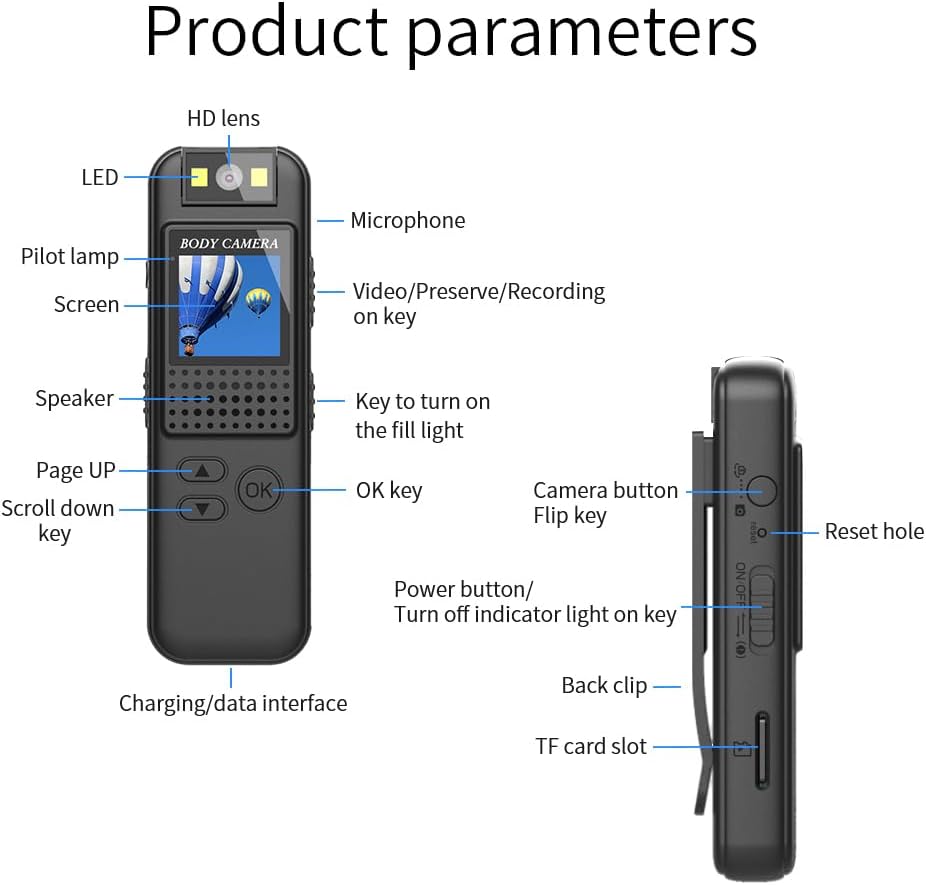
Figure 2: Detailed diagram of the Andoer Body Camera, highlighting its various components and control buttons.
Identificació de components:
- Lent HD: Main camera lens.
- LED: Llum indicadora.
- Micròfon: Per a l'enregistrament d'àudio.
- Pilot lamp: Indicador d'estat.
- Pantalla: Mostra per viewing i configuració.
- Video/Preserve/Recording on key: Multi-function button for video operations.
- Ponent: Per a la reproducció d'àudio.
- Key to turn on the fill light: Button to activate LED fill lights.
- Page UP / Scroll down key: Botons de navegació.
- Tecla D'acord: Botó de confirmació.
- Charging/data interface: Port tipus C per a càrrega i transferència de dades.
- Botó de la càmera: Per fer fotos fixes.
- Tecla giratòria: Likely for screen orientation or specific mode.
- Restableix el forat: Per restabliment de fàbrica.
- Power button/Turn off indicator light on key: Power control and indicator light toggle.
- Clip posterior: For attaching the camera.
- Ranura per a targeta TF: Per inserir una targeta microSD.
3. Configuració
3.1. Càrrega del dispositiu
Before first use, fully charge the body camera. Connect the included Type-C charging cable to the camera's charging/data interface and plug the other end into a USB power adapter (not included) or a computer's USB port. The pilot lamp indicarà l'estat de càrrega.
3.2. Inserció d'una targeta TF
The camera requires a TF (microSD) card for storing recordings. It supports cards up to 256GB (not included). Ensure the camera is powered off before inserting or removing the TF card.
- Locate the TF card slot on the side of the camera.
- Introduïu suaument la targeta TF a la ranura amb els contactes daurats cap avall fins que encaixi al seu lloc.
- Per treure-la, empenyeu lleugerament la targeta fins que surti.

Figure 3: Illustration demonstrating the insertion of a TF (microSD) card into the camera's dedicated slot for memory expansion.
3.3. Encès / apagat
- Per encendre: Press and hold the "Power button" until the screen lights up.
- Per apagar: Press and hold the "Power button" until the screen turns off.
4. Instruccions de funcionament
4.1. Gravació de vídeo
The camera records video in 1080P resolution with audio.
- Ensure a TF card is inserted and the camera is powered on.
- Press the "Video/Preserve/Recording on key" to start video recording. The pilot lamp will change to indicate recording is in progress.
- Press the "Video/Preserve/Recording on key" again to stop recording. The video file will be saved to the TF card.

Figure 4: Visual representation of the camera's 1080P video recording and sound recording capabilities, along with the TF card slot.
4.2. Using the LED Fill Light
The integrated LED fill lights assist in recording clear video in low-light environments.
- Press the "Key to turn on the fill light" to activate the LED lights.
- Press it again to turn them off.

Figure 5: Comparison of video clarity with and without the LED fill light, illustrating its effectiveness in both day and night conditions.
4.3. Rotating the Lens
The camera features a 180° rotatable lens, allowing you to adjust the recording angle without repositioning the entire device.
- Gently rotate the lens module on top of the camera to your desired angle.
- Ensure the lens is securely positioned before recording.

Figure 6: Depiction of the camera's 180° rotatable lens, showing how it can be adjusted for different recording perspectives.
4.4. Using the Magnetic Back Clip
The magnetic back clip provides flexible mounting options.
- Attach the camera to clothing pockets, belts, or other suitable surfaces using the clip.
- For magnetic surfaces, the integrated magnets in the back clip allow for direct attachment to metallic objects.
- The 1/4" screw hole can be used with compatible bicycle mounts (not included) for cycling recording.
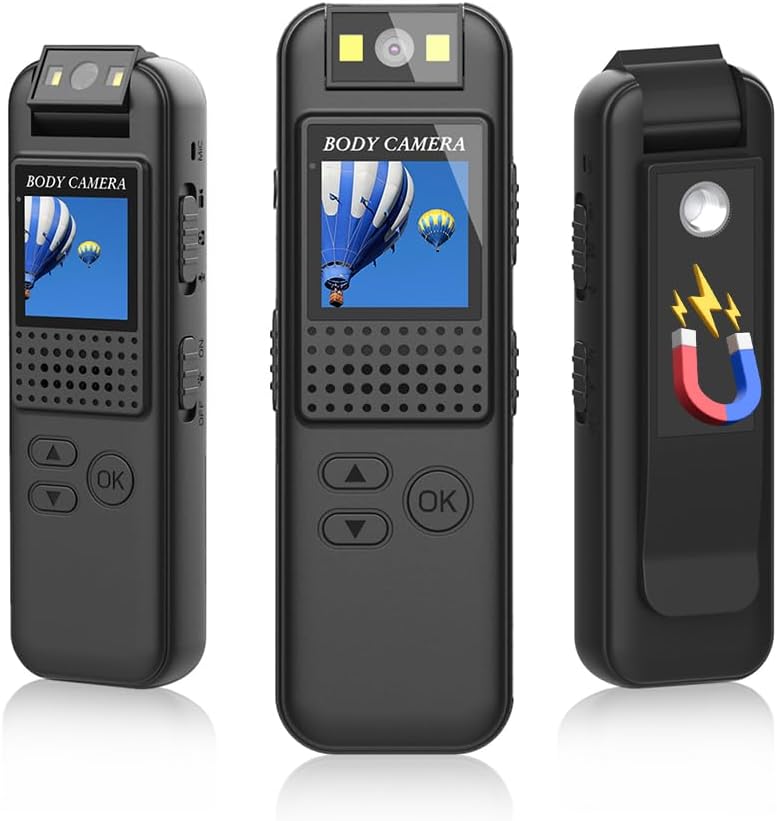
Figure 7: The Andoer Body Camera showcasing its magnetic back clip, illustrating how it can be attached to various surfaces.
4.5. Enregistrament en bucle
The camera supports circular recording, which means when the memory card is full, the oldest files will be overwritten by new recordings. This ensures continuous recording without manual deletion of old files.
5. Manteniment
- Neteja: Feu servir un drap suau i sec per netejar el cos de la càmera. Per a l'objectiu, feu servir un drap i una solució especials per a la neteja d'objectius. Eviteu productes químics agressius.
- Emmagatzematge: Guardeu la càmera en un lloc fresc i sec, allunyat de la llum solar directa i de temperatures extremes.
- Cura de la bateria: Per allargar la durada de la bateria, eviteu descarregar-la completament amb freqüència. Carregueu la càmera regularment, fins i tot si no l'esteu fent servir, per mantenir la bateria en bon estat.
- Resistència a l'aigua: Aquest dispositiu no és impermeable. Eviteu l'exposició a l'aigua o a una humitat elevada.
6. Solució De Problemes
| Problema | Causa possible | Solució |
|---|---|---|
| La càmera no s'encén. | Bateria baixa; dispositiu bloquejat. | Charge the camera fully. If unresponsive, use a thin object to press the "Reset hole" to restart the device. |
| No es pot gravar vídeo. | No TF card inserted; TF card full or corrupted; incorrect mode. | Insert a TF card. Format or replace the TF card. Ensure the camera is in video recording mode. |
| Poca qualitat de vídeo. | Dirty lens; insufficient lighting. | Clean the lens. Activate the LED fill lights in low-light conditions. |
| Computer does not recognize the camera. | Faulty USB cable; driver issue; camera not in data transfer mode. | Try a different Type-C cable. Connect to another USB port or computer. Ensure the camera is powered on and connected correctly. |
7. Especificacions
| Característica | Detall |
|---|---|
| Resolució de vídeo | 1920 x 1080 (1080 P) |
| Format de vídeo | AVI |
| Codificació de vídeo | M-JPEG |
| Video Scale | 16:9 |
| Format d'imatge | JPG |
| Capacitat de la bateria | 800 mAh |
| Suport per a targetes de memòria | Max 256GB TF card (not included) |
| Interfície de càrrega | Tipus-C |
| Sistemes suportats | Windows, Mac OS, Linux |
| Rotació de la lent | 180 graus |
| Característiques especials | 180° Rotatable lens, Integrated LED fill lights, Magnetic back clip, Memory expansion |
| Dimensions (paquet) | 12.6 x 8.6 x 3.5 cm |
| Pes (paquet) | 110 grams |
| Número de model | SUL1854288931811WC |
8. Garantia i Suport
Andoer products are designed for reliability and performance. For any questions, technical support, or warranty inquiries, please refer to the contact information provided with your purchase or visit the official Andoer weblloc web. Si us plau, conserveu el comprovant de compra per a reclamacions de garantia.
This manual is provided for informational purposes only. Specifications are subject to change without notice. Andoer is not responsible for any damage or injury caused by improper use or modification of the product.