
1. Introducció i finalview
The Radiomaster Pocket is a compact and lightweight radio transmitter designed for remote control applications, particularly for drones and other RC models. It features Hall Gimbal technology for precise control and comes pre-installed with EdgeTX firmware, offering extensive customization and functionality. Its portable design, including removable stick ends and a foldable antenna, makes it convenient for transport and storage.
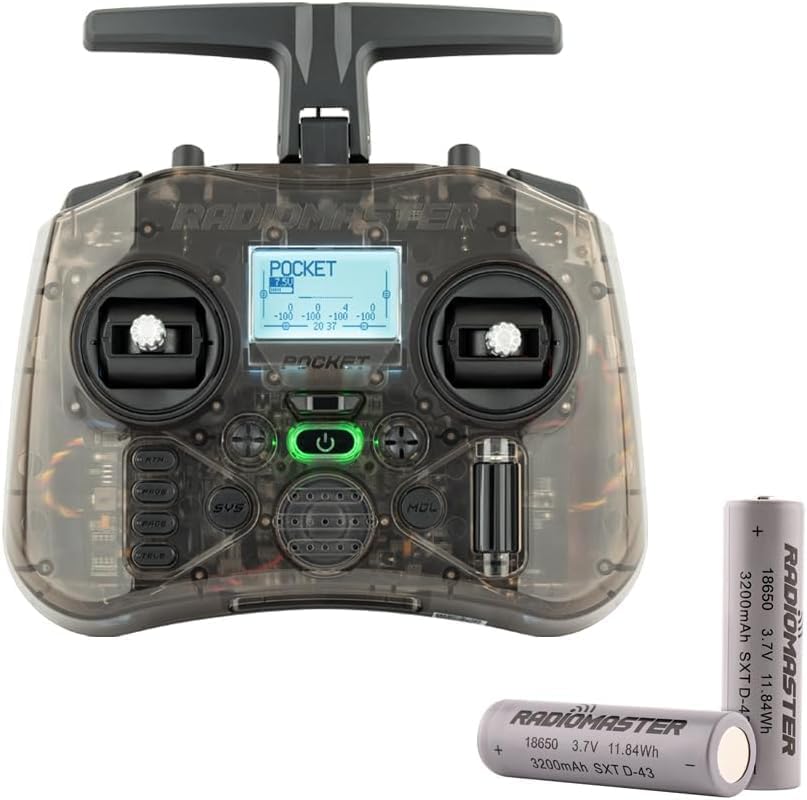
Image: Radiomaster Pocket ELRS Charcoal M2 Transmitter in Charcoal color.
2. Configuració
2.1 Instal·lació de la bateria
The Radiomaster Pocket uses two 18650 batteries (not included with all variants). Ensure batteries are inserted with correct polarity as indicated inside the battery compartment.

Image: Radiomaster Pocket Transmitter with two 18650 batteries.
2.2 Attaching/Removing Stick Ends
The stick ends are removable for compact storage. To attach, align the stick end with the gimbal shaft and gently push and twist until secure. To remove, pull the stick end straight off.
2.3 Folding/Unfolding Antenna
The antenna is foldable for portability. Gently fold it down for storage or extend it upright for optimal signal transmission during operation.
3. Instruccions de funcionament
3.1 Encès/Apagat
To power on, press and hold the power button until the screen illuminates. To power off, press and hold the power button until the device shuts down.
3.2 Navigation with EdgeTX Firmware
The transmitter runs on EdgeTX firmware. Use the navigation buttons (PAGE>, PAGE<, RTN, SYS, TELE) and the scroll wheel to navigate through menus and adjust settings on the backlit LCD screen.
3.3 Joystick Calibration
Regular joystick calibration ensures accurate control. Follow the on-screen prompts in the Hardware Settings menu to perform calibration. Move both joysticks through their full range of motion during this process.
Video: This video demonstrates the joystick calibration process for the Radiomaster Pocket Remote Control, guiding users through the steps to ensure precise control.
3.4 Pairing with a Drone
After calibration, proceed to pair the transmitter with your drone according to the drone's specific instructions and the selected RF protocol (e.g., ExpressLRS or CC2500). The video above also shows the pairing process.
4. Característiques
- Opcions de RF internes: Available in ExpressLRS and MPM CC2500 versions, supporting various protocols depending on the module.
- Firmware d'EdgeTX: Preinstalled for advanced functionality and customization.
- Hall Effect Gimbals: Provides smooth centering and precise response for enhanced control.
- Disseny portàtil: Features removable stick ends and a foldable antenna for easy transport and storage.
- Llums LED incorporades: Helps visualize switch inputs and operational status.
- Pantalla LCD retroil·luminada: Offers a clear display for settings and telemetry data.
- Botons de retallar: For easy and precise channel trimming.
- External Module Bay: Compatible with RadioMaster Nano-size modules and TBS Nano Crossfire/Nano Tracer.
- Font d'alimentació: Compatible with 18650 batteries for extended operation.
- Càrrega: Built-in USB-C QC3 charging.
- Personalització: Optional case colors (Blue, Pink, Green, Orange) are available to personalize the transmitter.
Video: This video highlights the key features and design aspects of the Radiomaster Pocket Hall Gimbal EdgeTX Transmitter.
5. Especificacions
| Especificació | Detall |
|---|---|
| Physical Dimensions (Folded) | 156.6 x 65.1 x 125.3 mm |
| Physical Dimensions (Unfolded) | 156.6 x 73.1 x 154.8 mm |
| Pes | 288 grams (aproximadament 11.2 unces) |
| Freqüència de funcionament | 2.400 GHz-2.480 GHz |
| Opcions de RF internes | CC2500 multiprotocol / ELRS 2.4 GHz |
| Protocols compatibles | Dependent del mòdul |
| RF Power (CC2500) | 100mW Max (20dBm) |
| RF Power (ELRS FCC) | 250mW Max (24dBm) |
| RF Power (ELRS EU-LBT) | 100mW Max (20dBm) |
| Vol operatiutage | 6.6-8.4 V DC |
| Sistema operatiu | EdgeTX |
| Canals de control | Maximum 16 (Receiver dependent) |
| Mostra | 128*64 LCD monocrom |
| Bateria | 2pcs 18650 batteries (Not included) |
| Carregant | Built-in USB-C QC3 Charging |
| Firmware actualitzable | Via USB or included SD card |
| Tipus de cardan | Efecte Hall |
| Badia de mòduls | Nano size (Compatible with RadioMaster Nano-size modules, TBS Nano Crossfire / Nano Tracer) |

Image: Diagram illustrating the folded and unfolded dimensions of the Radiomaster Pocket Transmitter.
6. Què hi ha a la caixa
- 1 x Radiomaster Pocket Radio Transmitter
- 1 x Custom Carry Pouch
- 1 x cable USB-C
- 1 x protector de pantalla
- 1 x Adhesiu
- 4 x Low Tension Springs
- 1 x manual
7. Manteniment
To ensure the longevity and optimal performance of your Radiomaster Pocket Transmitter, follow these maintenance guidelines:
- Neteja: Use a soft, dry cloth to clean the exterior of the transmitter. Avoid using harsh chemicals or abrasive materials.
- Emmagatzematge: Store the transmitter in its custom carry pouch in a cool, dry place away from direct sunlight and extreme temperatures. Remove batteries if storing for extended periods.
- Cura de la bateria: Always use recommended 18650 batteries. Do not overcharge or over-discharge batteries. Dispose of old batteries responsibly.
- Protecció del cardan: When transporting, ensure stick ends are removed or protected to prevent damage to the gimbals.
8. Solució De Problemes
If you encounter issues with your Radiomaster Pocket Transmitter, consider the following common solutions:
- El transmissor no s'encén: Ensure batteries are correctly installed and fully charged. Check the USB-C cable if charging.
- No Drone Connection: Verify that the transmitter and drone are using the same RF protocol and are correctly bound. Re-perform the pairing process if necessary.
- Control erràtic: Perform a joystick calibration as described in Section 3.3. Check for any physical obstructions or damage to the gimbals.
- Problemes de firmware: If experiencing software glitches, consider updating or re-flashing the EdgeTX firmware via USB or the SD card, following official Radiomaster guides.
- La pantalla no es mostra: Check power connection. If the issue persists, contact support.
9. Garantia i Suport
For warranty information, technical support, or service inquiries, please refer to the official Radiomaster website or contact your authorized dealer. Keep your proof of purchase for warranty claims. The manufacturer, Xiangtat, provides support for this product.