
Protectli V1210-2
Protectli Vault V1210-2 Port Micro Appliance/Mini PC User Manual
Model: V1210-2 | Brand: Protectli
1. Introducció
This manual provides essential information for the proper installation, operation, and maintenance of your Protectli Vault V1210-2 Port Micro Appliance/Mini PC. Please read this manual thoroughly before using the device to ensure optimal performance and safety. The Protectli Vault V1210-2 is a compact, fanless mini PC designed for network security applications such as firewalls, routers, and other open-source software solutions.
2. Informació de seguretat
- Ensure the device is placed on a stable, flat surface with adequate ventilation.
- No exposeu el dispositiu a l'aigua, la humitat ni a temperatures extremes.
- Utilitzeu només l'adaptador d'alimentació subministrat amb el dispositiu.
- No intenteu obrir ni reparar el dispositiu vosaltres mateixos. Encarregueu totes les tasques de manteniment a personal qualificat.
- Disconnect the power supply before cleaning or moving the device.
3. Contingut del paquet
Verifiqueu que tots els elements siguin presents al vostre paquet:
- Protectli Vault V1210-2 Micro Appliance
- Power Adapter with regional plugs
- USB Type-C Console Cable

Image: Contents of the Protectli Vault V1210-2 package, including the device, power adapter with various regional plugs, and a USB Type-C console cable.
4. Maquinari acabatview
4.1 Tauler frontal
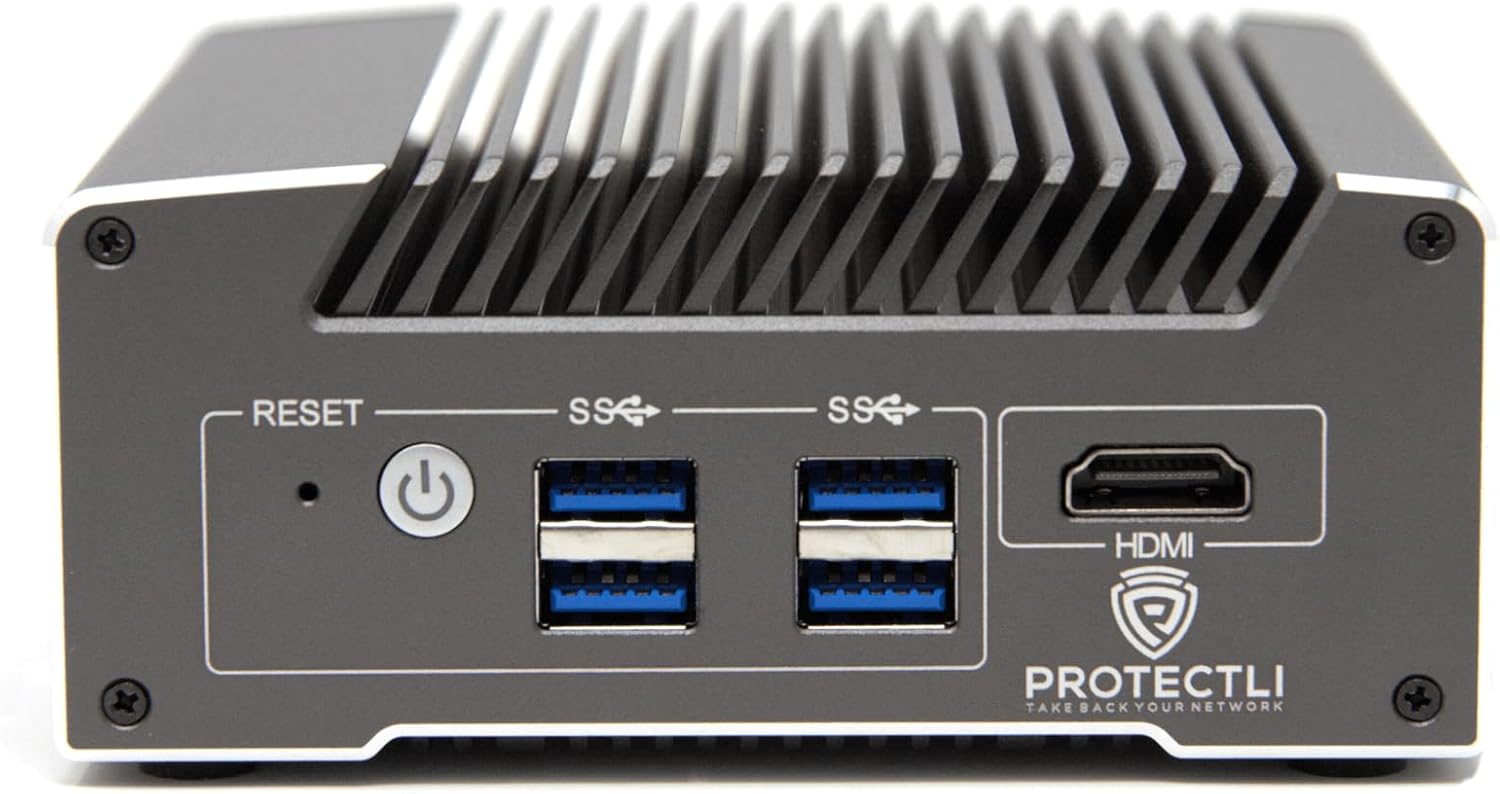
Imatge: Frontal view of the Protectli Vault V1210-2, showing the Reset button, Power button, two USB 3.0 ports, and an HDMI port.
- Botó de restabliment: S'utilitza per reiniciar el dispositiu.
- Botó d'encesa: Premeu per encendre/apagar el dispositiu.
- Ports USB 3.0 (x2): Per connectar dispositius USB com ara teclats, ratolins o emmagatzematge extern.
- Port HDMI: For connecting a display monitor.
4.2 Panell posterior

Imatge: Part posterior view of the Protectli Vault V1210-2, showing the 12V DC power input, two 2.5G Ethernet ports, a USB Type-C console port, and LED indicators.
- Entrada d'alimentació de 12 V CC: Connecteu aquí l'adaptador de corrent proporcionat.
- 2.5G Ethernet Ports (x2): For network connections. These are Intel I226-V NICs.
- USB Type-C Console Port: For serial console access, typically used for initial setup or debugging.
- Indicadors LED:
- Power LED (Green): Indicates power status.
- Storage Activity LED (Red): Indicates eMMC or NVMe storage activity.
4.3 Components interns
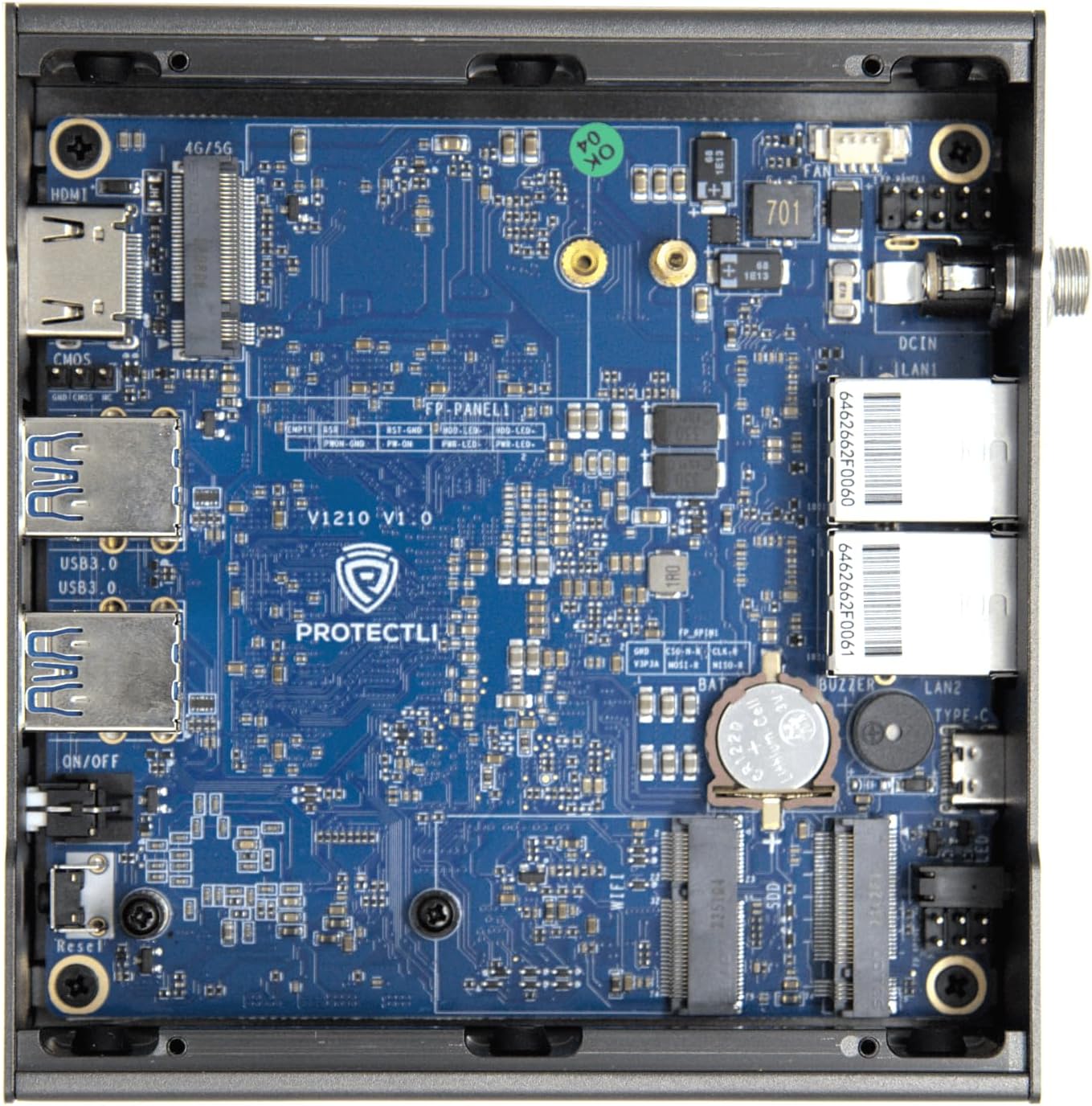
Imatge: Interna view of the Protectli Vault V1210-2, showing the motherboard with integrated RAM, eMMC storage, and M.2 slot for optional NVMe SSD.
- Intel N5105 Quad Core CPU: Processor for the device.
- 4 GB de memòria RAM LPDDR4: On-board system memory.
- 32GB eMMC Storage: On-board flash storage for the operating system.
- Ranura M.2: For optional NVMe SSD expansion (not included in this configuration).
5. Instruccions de configuració
Follow these steps for initial setup of your Protectli Vault V1210-2:
- Connecteu els perifèrics: Connect a monitor to the HDMI port, a keyboard and mouse to the USB 3.0 ports.
- Connexió de xarxa: Connect your internet source (e.g., modem) to one of the 2.5G Ethernet ports. Connect your local network (e.g., switch or computer) to the other 2.5G Ethernet port.
- Connexió d'alimentació: Connect the provided 12V DC power adapter to the power input port on the rear panel, then plug the adapter into a power outlet.
- Encès: Press the power button on the front panel. The device will power on, and the power LED will illuminate.
- Instal·lació del sistema operatiu: The Protectli Vault V1210-2 does not come with a pre-installed operating system. You will need to install your preferred open-source firewall or routing software (e.g., OPNsense, pfSense, VyOS) via a USB installation medium. Refer to the specific software's installation guide for detailed steps.
- Configuració inicial: After OS installation, follow the software's instructions for initial network configuration. You may need to use the USB Type-C console port for advanced setup or debugging if direct display output is not sufficient.
6. Instruccions de funcionament
Once your operating system is installed and configured, the Protectli Vault V1210-2 operates as a dedicated network appliance. Its fanless design ensures silent operation, making it suitable for various environments.
- Funcionament normal: The device is designed for continuous operation. Ensure it has adequate airflow around its heatsink chassis.
- Cicle de potència: To safely power off the device, use the shutdown procedure within your installed operating system. If the system is unresponsive, press and hold the power button for 5-10 seconds to force a shutdown.
- Accés a la BIOS: To access the AMI BIOS settings, press the DEL key repeatedly during startup.

Image: Diagram illustrating various applications for the Protectli Vault, including VPN Router, Firewall, Hypervisor, Backup WAN, Industrial IoT, Home Automation, Remote Office, and Managed IT Providers.
7. Manteniment
- Neteja: Use a soft, dry cloth to clean the exterior of the device. Do not use liquid cleaners or aerosols. Ensure the heatsink fins are free from dust buildup to maintain optimal cooling.
- Actualitzacions de programari: Regularly update your installed operating system and software to ensure security and performance. Refer to your software's documentation for update procedures.
- Actualitzacions de firmware: Periodically check the Protectli website for BIOS/firmware updates for your V1210-2 model. Follow the provided instructions carefully when performing firmware updates.
8. Solució De Problemes
Problemes comuns i solucions:
- El dispositiu no s'encén:
- Assegureu-vos que l'adaptador de corrent estigui connectat correctament tant al dispositiu com a una presa de corrent que funcioni.
- Comproveu que la presa de corrent funcioni.
- Try a different power adapter if available (ensure it matches voltage i amperage specifications).
- Sense sortida de pantalla:
- Check the HDMI cable connection to both the device and the monitor.
- Assegureu-vos que el monitor estigui encès i configurat a la font d'entrada correcta.
- Try connecting to the device via the USB Type-C console port for serial console access to diagnose display issues.
- Problemes de connectivitat de xarxa:
- Verify Ethernet cables are securely connected to the 2.5G NIC ports.
- Check the link/activity LEDs on the Ethernet ports.
- Ensure your operating system's network configuration is correct.
- Restart your modem/router and the Protectli Vault.
- Operating system not booting:
- Ensure the boot order in the BIOS is correctly configured for your installed OS or installation medium.
- If installing from USB, ensure the USB drive is bootable and properly formatted.
- Re-attempt OS installation if necessary.
Per obtenir més ajuda, consulteu la Protectli Store o poseu-vos en contacte amb el servei d'atenció al client.
9. Especificacions
| Característica | Especificació |
|---|---|
| Model | Protectli Vault V1210-2 |
| Processador | Intel N5105 Quad Core CPU (2.0 GHz, Turbo 2.9 GHz) |
| RAM | 4GB LPDDR4 (on-board) |
| Emmagatzematge | 32GB eMMC (on-board) |
| Interfícies de xarxa | 2x Intel I226-V 2.5G NICs |
| Ports USB | 4x USB 3.0 tipus A |
| Port de la consola | 1x USB Type-C Console |
| Sortida de vídeo | 1x HDMI (Max Resolution: 3840 x 2160) |
| BIOS | AMI BIOS |
| Dimensions (LxWxH) | 4.5 x 4.5 x 2 polzades (115 x 115 x 50 mm) |
| Pes | 1.81 lliures (0.82 kg) |
| Sistema operatiu | No OS pre-installed (Compatible with Linux-based firewall/router OS) |
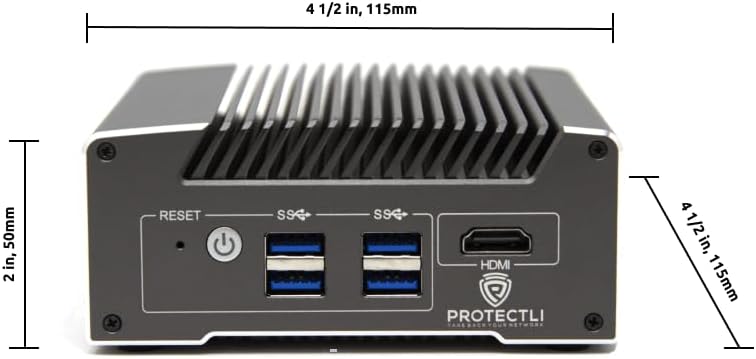
Imatge: Frontal view of the Protectli Vault V1210-2 with dimensions indicated: 4 1/2 inches (115mm) width and 2 inches (50mm) height.
10. Informació de la garantia
Protectli offers a 30-day money-back guarantee for the Vault V1210-2. For detailed warranty terms and conditions, please refer to the official Protectli weblloc o poseu-vos en contacte amb el seu servei d'atenció al client.
Extended protection plans may be available for purchase separately:
- Pla de protecció de 2 anys
- Pla de protecció de 3 anys
11. Suport
For technical assistance, troubleshooting, or general inquiries, please contact Protectli's US-based support team. They are available to help resolve any issues you may encounter.
- Visita l'oficial Protectli Store on Amazon per obtenir informació sobre productes i recursos.
- Explore the Protectli Knowledge Base for extensive documentation and articles.

Image: Features of Protectli products, highlighting open-source readiness, coreboot support, 4G LTE failover, and US-based support.
Ask a question about this manual
Ask about setup, troubleshooting, compatibility, parts, safety, or missing instructions. Manuals+ will review the question and use this page’s manual context to help answer it.