
1. Producte acabatview
The NEWSKILL Chiron Pro is an ambidextrous wireless gaming mouse designed for precision and comfort. It features a high-performance optical sensor, programmable buttons, and customizable RGB lighting.

Imatge: Anglesa view of the NEWSKILL Chiron Pro Wireless Gaming Mouse, showcasing its ergonomic shape and design.
2. Contingut del paquet
- NEWSKILL Chiron Pro Wireless Gaming Mouse
- Receptor sense fil USB de 2.4 GHz
- Cable de càrrega/dades USB-C a USB-A
- Manual d'usuari (aquest document)
3. Instruccions de configuració
3.1 Càrrega inicial
Before first use, it is recommended to fully charge the mouse. Connect the provided USB-C cable to the mouse's front port and the USB-A end to a powered USB port on your computer or a USB wall adapter. A full charge takes approximately 2 hours and provides up to 80 hours of usage.

Imatge: Frontal view of the mouse, highlighting the USB-C charging port.
Connexió sense fil 3.2 (2.4 GHz)
- Locate the USB 2.4GHz wireless receiver. It is typically stored in a compartment on the underside of the mouse.
- Connecteu el receptor USB a un port USB disponible de l'ordinador.
- Engegueu el ratolí amb l'interruptor ON/OFF que es troba a la part inferior del ratolí.
- Your computer should automatically detect and install the necessary drivers. The mouse is ready for use once the RGB lighting activates.
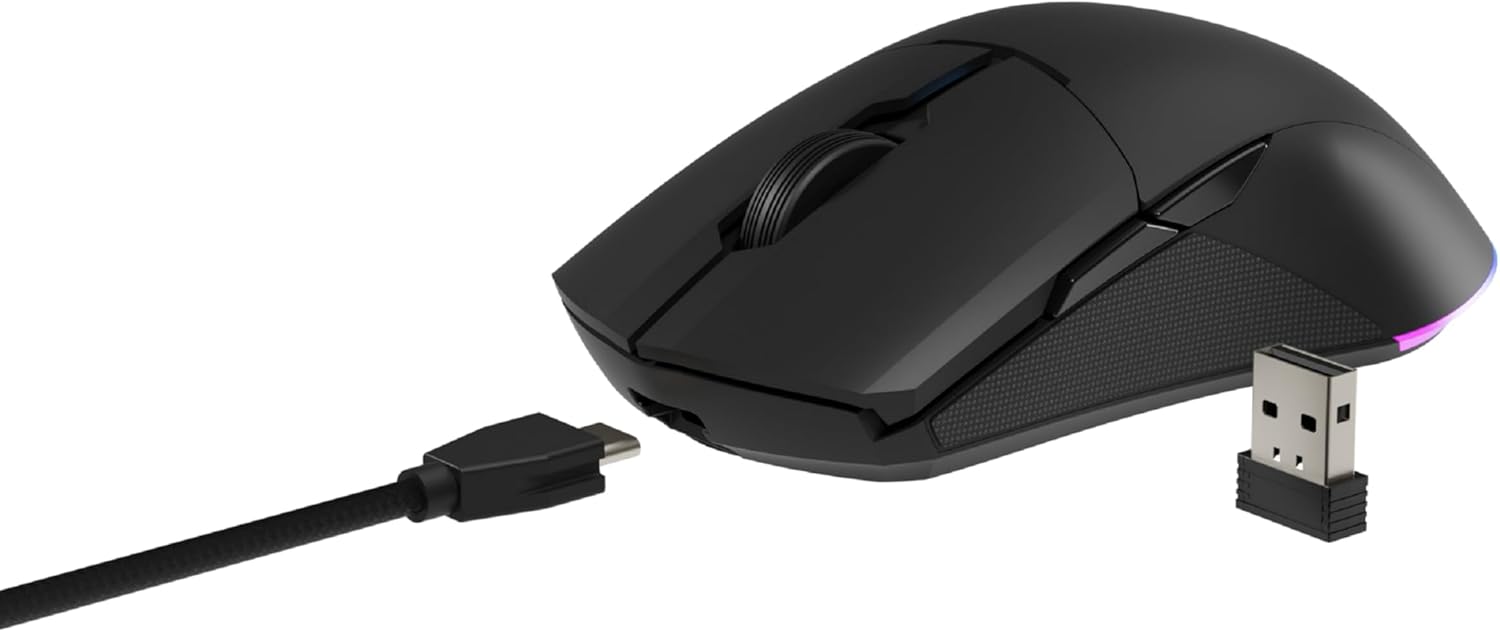
Image: The NEWSKILL Chiron Pro mouse shown with its USB-C cable and the 2.4GHz wireless receiver.
3.3 Connexió per cable
The mouse can also be used in wired mode. Simply connect the USB-C cable to the mouse and the USB-A end to your computer. The mouse will function as a wired device and charge simultaneously.
4. Instruccions de funcionament
4.1 Funcions bàsiques
- Botó esquerre de clic: Acció primària.
- Botó dret: Menú contextual/d'acció secundària.
- Roda de desplaçament: Desplaça't amunt/avall, fes clic amb el botó central.
- Side Buttons (8 programmable): Default functions may vary, but are customizable via software.

Imatge: Lateral view of the mouse, showing the textured grip and two side buttons.
4.2 Ajust de DPI
The mouse features a Pixart PMW3335 optical sensor with up to 16000 configurable DPI. The DPI button on the underside of the mouse allows you to cycle through preset DPI levels. For fine-tuning and custom DPI settings, use the advanced software.

Image: Underside of the mouse, showing the DPI button, optical sensor, and ON/OFF switch.
4.3 Personalització de la il·luminació RGB
The Chiron Pro features customizable RGB lighting. To personalize lighting effects, colors, and brightness, download and install the dedicated NEWSKILL software from the official website. The software also allows for button remapping and macro creation.

Image: The NEWSKILL Chiron Pro mouse displaying its customizable RGB lighting.
5. Manteniment
5.1 Neteja
Per mantenir un rendiment òptim, netegeu el ratolí regularment. Feu servir un drap suau i sec per netejar la superfície. Per a la brutícia persistent, netegeu lleugerament.amp Es pot fer servir un drap amb sabó suau, assegurant-se que no entri líquid al ratolí. Eviteu netejadors o dissolvents abrasius.
5.2 Cura de la bateria
Per allargar la durada de la bateria, eviteu descarregar completament el ratolí amb freqüència. Carregueu el ratolí quan l'indicador de bateria suggereixi que té poca bateria. Guardeu el ratolí en un lloc fresc i sec quan no l'utilitzeu durant períodes prolongats.
6. Solució De Problemes
- El ratolí no respon:
Ensure the mouse is turned ON. Check if the USB receiver is securely plugged into a working USB port. If using wired mode, ensure the USB-C cable is properly connected. Try a different USB port. - Problemes de connexió sense fil:
Ensure the mouse is within range of the USB receiver (typically up to 10 meters). Avoid placing the receiver near other wireless devices that might cause interference. Re-pair the mouse if necessary (refer to software instructions). - DPI or button issues:
Ensure the NEWSKILL software is installed and up-to-date. Check your settings within the software. Reset to default settings if custom configurations are causing issues. - Problemes de càrrega:
Verify the USB-C cable is not damaged and is properly connected. Try a different USB port or charging adapter. Ensure the mouse is not in an extremely hot or cold environment during charging. - Missing USB Receiver:
The USB receiver is typically stored in a compartment on the underside of the mouse for safekeeping. Please check this compartment thoroughly. If it is genuinely missing, contact customer support.
7. Especificacions
| Característica | Especificació |
|---|---|
| Marca | NOVETAT |
| Nom del model | CHIRON PRO |
| Número de model | 10831240 |
| Color | Negre |
| Tecnologia de connectivitat | Wireless (2.4GHz), USB (Wired) |
| Tipus de sensor | Optical (Pixart PMW3335) |
| DPI | Fins a 16000 DPI |
| Nombre de botons | 8 (programable) |
| Vida útil del canvi | Huano switches (up to 20 million clicks) |
| Orientació de la mà | Ambidextre |
| Durada de la bateria | Fins a 80 hores |
| Temps de càrrega | Aprox. 2 hores |
| Dimensions del producte | 12.4 x 6.75 x 0.1 cm |
| Pes del producte | 500 g |
| Sistemes operatius compatibles | Windows 10, Windows 7, Windows Vista, Windows XP, Linux |
8. Garantia i Suport
8.1 Informació de la garantia
NEWSKILL products are covered by a manufacturer's warranty. For specific warranty terms and conditions, please refer to the warranty card included with your product or visit the official NEWSKILL weblloc web. Conserveu el comprovant de compra per a reclamacions de garantia.
8.2 Atenció al client
If you encounter any issues or have questions regarding your NEWSKILL Chiron Pro Wireless Gaming Mouse, please visit the official NEWSKILL support website or contact their customer service team. You can find contact information on the NEWSKILL weblloc: www.newskillgaming.com