
1. Informació important de seguretat
Read all safety warnings and instructions carefully before using this product. Failure to follow these instructions may result in electric shock, fire, or serious injury. Keep this manual for future reference.
- Assegureu-vos sempre que el dispositiu estigui en bon estat de funcionament abans d'utilitzar-lo.
- No intenteu mesurar el voltages o corrents que superen els límits màxims especificats.
- Use caution when working with live circuits.
- Canvieu les piles immediatament quan aparegui l'indicador de bateria baixa.
- No feu funcionar el dispositiu en ambients humits o en atmosferes explosives.
- Assegureu-vos que els cables de prova estiguin connectats correctament i no estiguin danyats.
2. Producte acabatview
The MGL MASTECH MS8236 is a versatile 2-in-1 instrument combining a digital multimeter and a network cable track tester. It is designed for electrical measurements, network cable diagnostics, and telephone line checks.
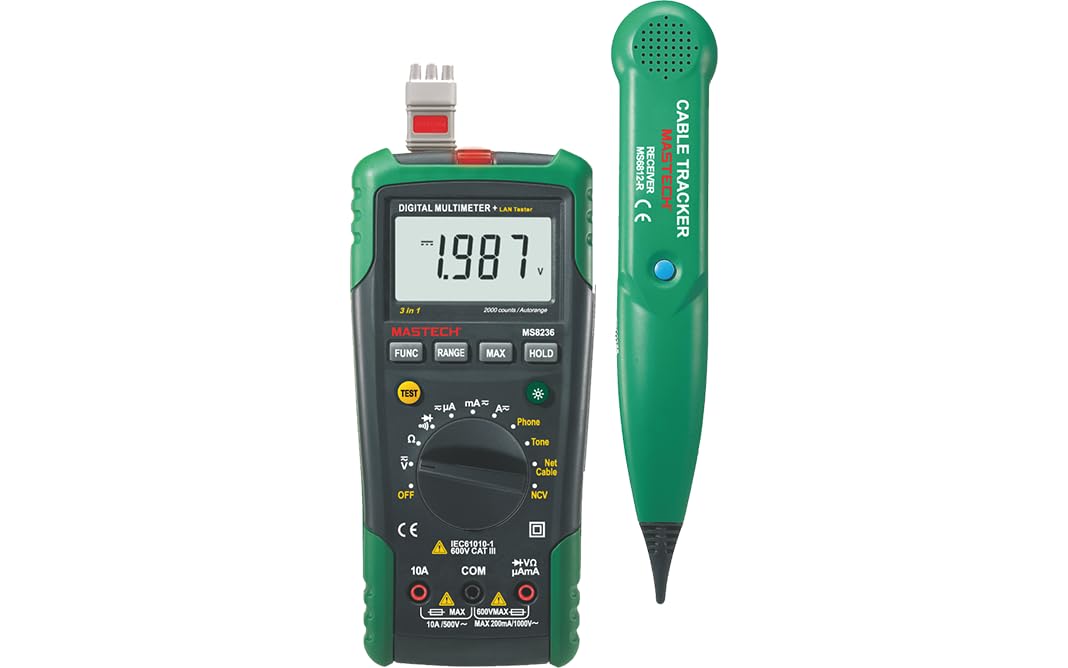
Image: The Mastech MS8236 main unit (left) and the cable tracker receiver (right).
Característiques principals:
- Pantalla de 2000 recomptes
- Distància automàtica i manual
- Apagat automàtic
- Vol. Sense contactetagDetector e (NCV).
- Diode Test (Open Voltagi 1.7V)
- Continuity Buzzer (<70Ω)
- Funció de retenció de dades
- Pantalla de bateria baixa
- Retroil·luminació de la pantalla
- Network Cable Check (Open circuits, shorts, miss-wires, reversals, split pairs, shield detection)
- Phone Check (Identify Busy, Ringing, or Clear state)
- Tone Generator for cable tracking
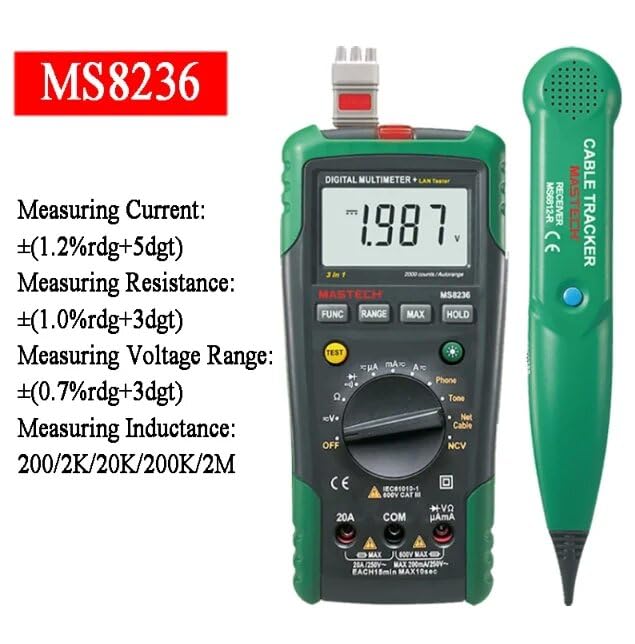
Image: The Mastech MS8236 main unit displaying its measurement capabilities for current, resistance, and voltage.
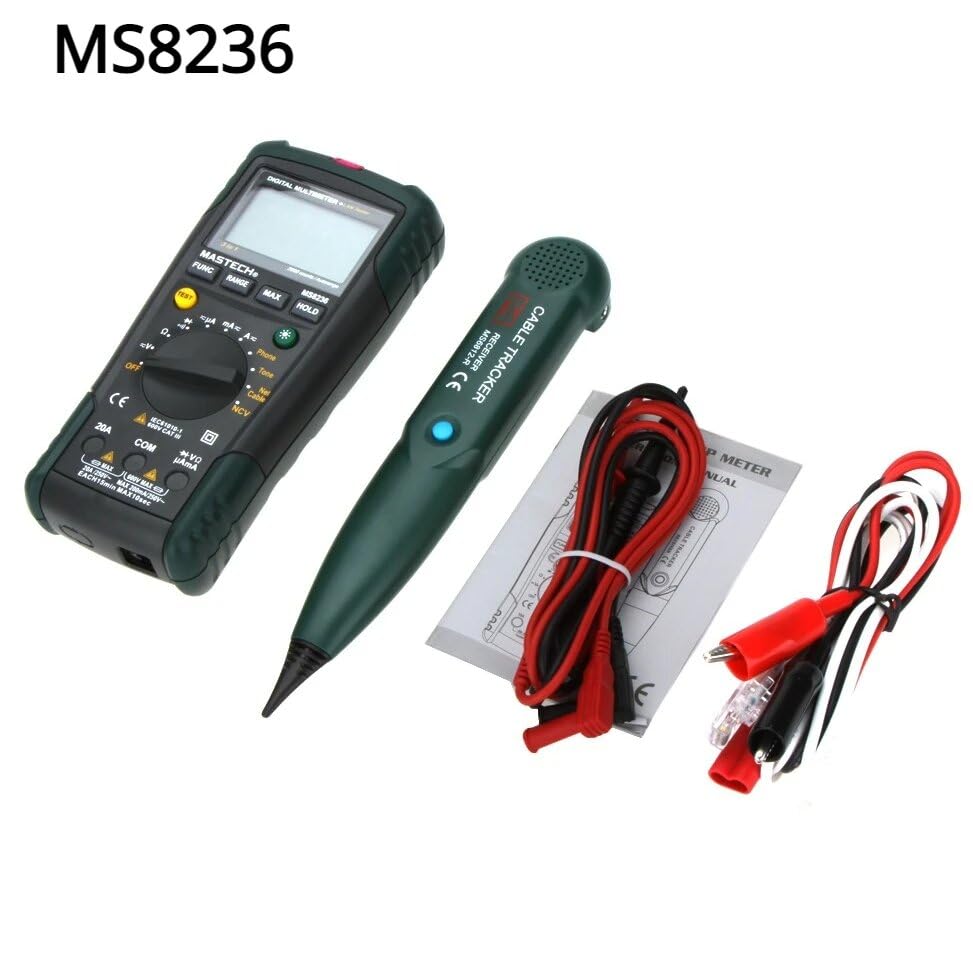
Image: The Mastech MS8236 device, cable tracker, test leads, and network cable adapter, showing all included components.
3. Configuració
3.1 Instal·lació de la bateria
The MS8236 requires 2 LR44 batteries (included) for operation. To install or replace batteries:
- Assegureu-vos que el dispositiu estigui apagat.
- Localitzeu la tapa del compartiment de la bateria a la part posterior del dispositiu.
- Utilitzeu un tornavís per obrir el compartiment.
- Insert the LR44 batteries, observing correct polarity (+/-).
- Tanqueu el compartiment de la bateria de manera segura.
3.2 Connexió dels cables de prova
For multimeter functions, connect the test leads as follows:
- Introduïu el cable de prova negre al COM Jack (comú).
- Introduïu el cable de prova vermell al VΩmA jack for voltage, resistance, and current measurements up to 200mA.
- For current measurements up to 10A, insert the red test lead into the 10A jack.
4. Instruccions de funcionament
Turn the rotary switch to the desired function to begin measurements.
4.1 Multimeter Functions
- DC/AC VoltagMesura (V~ / V-):
- Connect test leads as described in Section 3.2.
- Turn the rotary switch to the V~ (AC Voltage) o V- (Volum de corrent continutage) posició.
- Touch the test probes to the circuit points to be measured. The reading will appear on the display.
- DC/AC Current Measurement (A~ / A-):
- Connect test leads to the appropriate current jacks (VΩmA for mA, 10A for A).
- Turn the rotary switch to the A~ (AC Current) or A- (DC Current) position.
- Open the circuit and connect the meter in series with the load. The reading will appear on the display.
- Mesura de resistència (Ω):
- Connect test leads to COM and VΩmA jacks.
- Turn the rotary switch to the Ω position.
- Touch the test probes across the component to be measured. Ensure the circuit is de-energized.
- Prova de continuïtat:
- Connect test leads to COM and VΩmA jacks.
- Turn the rotary switch to the continuity symbol (speaker icon).
- Touch the test probes to the points to be tested. A buzzer will sound if continuity exists (resistance less than 70Ω).
- Prova de díode:
- Connect test leads to COM and VΩmA jacks.
- Turn the rotary switch to the diode symbol.
- Connect the red probe to the anode and the black probe to the cathode of the diode. The forward voltage drop will be displayed. Reverse the probes to check for open circuit.
- Vol. Sense contactetage (NCV) Detecció:
- Gireu l'interruptor giratori a la posició NCV.
- Move the top part of the multimeter near a live AC voltage source. The NCV indicator will light up and an audible alarm will sound if AC voltages detecta e.
4.2 Network Cable Track Tester Functions
The MS8236 includes a cable tracker receiver and a network cable test function.
- Network Cable Check:
- Connect one end of the network cable to the RJ45 port on the main unit.
- Connect the other end of the network cable to the remote unit (if applicable, or directly to the main unit for short cables).
- Turn the rotary switch to the "Net Cable" position.
- Press the "TEST" button. The display will show the wiring status (open, short, miss-wire, reversal, split pair, shield detection). Refer to the display codes for detailed fault identification.
- Phone Check:
- Connect the telephone line to the RJ11 port on the main unit.
- Turn the rotary switch to the "Phone" position.
- The display will indicate the state of the telephone line: "Busy", "Ringing", or "Clear".
- Tone Generation for Cable Tracking:
- Connect the test leads or RJ11/RJ45 connector to the cable you wish to trace.
- Turn the rotary switch to the "Tone" position. The main unit will emit an audible tone.
- Use the separate cable tracker receiver to follow the tone along the cable path to locate it or diagnose breaks.
5. Manteniment
5.1 Neteja
Wipe the device with a dry, soft cloth. Do not use abrasives or solvents.
5.2 Substitució de la bateria
When the low battery indicator appears on the display, replace the batteries as described in Section 3.1. Dispose of old batteries responsibly.
5.3 Canvi de fusibles
Si la funció de mesura de corrent falla, pot ser necessari substituir el fusible. Consulteu les especificacions per conèixer el tipus i la classificació correctes del fusible. La substitució del fusible només l'ha de realitzar personal qualificat.
6. Solució De Problemes
- No Display / Device Not Turning On:
- Comproveu si les piles estan correctament instal·lades i tenen prou càrrega. Substituïu-les si cal.
- Ensure the rotary switch is turned to an ON position.
- Lectures incorrectes:
- Verify test leads are properly connected to the correct jacks for the selected function.
- Ensure the correct measurement range is selected (if not in auto-ranging mode).
- Comproveu si hi ha cables de prova danyats.
- Ensure the circuit is de-energized for resistance and continuity tests.
- Network Cable Test Fails:
- Assegureu-vos que els dos extrems del cable estiguin ben connectats.
- Check the cable for visible damage.
- Verify the remote unit (if used) has power.
- No Tone from Cable Tracker:
- Ensure the main unit is set to "Tone" function.
- Check the cable connection to the main unit.
- Verify the cable tracker receiver has power and is functioning.
7. Especificacions
The following table details the technical specifications of the MGL MASTECH MS8236.

Image: Detailed specifications table for the Mastech MS8236, including ranges, resolutions, and accuracies for various measurements.
| Característica | Detall |
|---|---|
| Mostra | 2000 recomptes |
| Variant | Automàtic i manual |
| Font d'alimentació | 2 piles LR44 (incloses) |
| Apagat automàtic | Sí |
| Vol. Sense contactetage Detector | Sí |
| Buzzer de continuïtat | <70Ω |
| Retenció de dades | Sí |
| Retroil·luminació de la pantalla | Sí |
| Dimensions del producte | 20 x 15 x 25 cm |
| Pes de l'article | 1 quilograms |
| Temperatura de funcionament | Fins a 50 graus centígrads |
| Certificacions | CE, RoHS, UL |
| País d'origen | Taiwan |
| Mesurament | Interval | Resolució | Precisió |
|---|---|---|---|
| DC Voltage | 200mV/2V/20V/200V/600V | 0.1mV/1mV/10mV/100mV/1V | ±(0.5%+5) |
| Vol. ACtage | 200mV/2V/20V/200V/600V | 0.1mV/1mV/10mV/100mV/1V | ±(0.8%+5) |
| Corrent DC | 200µA/2000µA/20mA/200mA/2A/10A | 0.1µA/1µA/10µA/0.1mA/1mA/10mA | ±(1.2%+5) / ±(2.0%+10) |
| Corrent alterna | 200µA/2000µA/20mA/200mA/2A/10A | 0.1µA/1µA/10µA/0.1mA/1mA/10mA | ±(1.5%+5) / ±(3.0%+10) |
| Resistència | 200Ω/2kΩ/20kΩ/200kΩ/2MΩ/20MΩ | 0.1Ω/1Ω/10Ω/100Ω/1kΩ/10kΩ | ±(1.0%+5) / ±(1.5%+5) |
8. Garantia i assistència
8.1 Informació de la garantia
This Mastech MS8236 product comes with a 1 any de garantia from the date of purchase. The warranty covers manufacturing defects and material faults under normal use. It does not cover damage caused by misuse, accident, unauthorized modification, or neglect.
8.2 Atenció al client
For technical assistance, warranty claims, or product inquiries, please contact your retailer or the manufacturer's customer service department. Please have your model number (MS8236) and proof of purchase available when contacting support.