
Introducció
This manual provides comprehensive instructions for the ProtoArc EK01 Plus Ergonomic Wireless Backlit Keyboard. Please read this guide carefully to ensure proper setup, operation, and maintenance of your device. Keep this manual for future reference.
Contingut del paquet
Verifiqueu que tots els elements siguin presents al paquet:
- ProtoArc EK01 Plus Ergonomic Wireless Backlit Keyboard
- Repòs de canell
- Cable de càrrega USB-C
- Receptor USB 2.4G
- Manual d'usuari
Producte acabatview
The ProtoArc EK01 Plus is a full-size ergonomic keyboard designed to enhance typing comfort and reduce muscle strain. Its split and curved keyframe design promotes a natural hand and wrist posture.
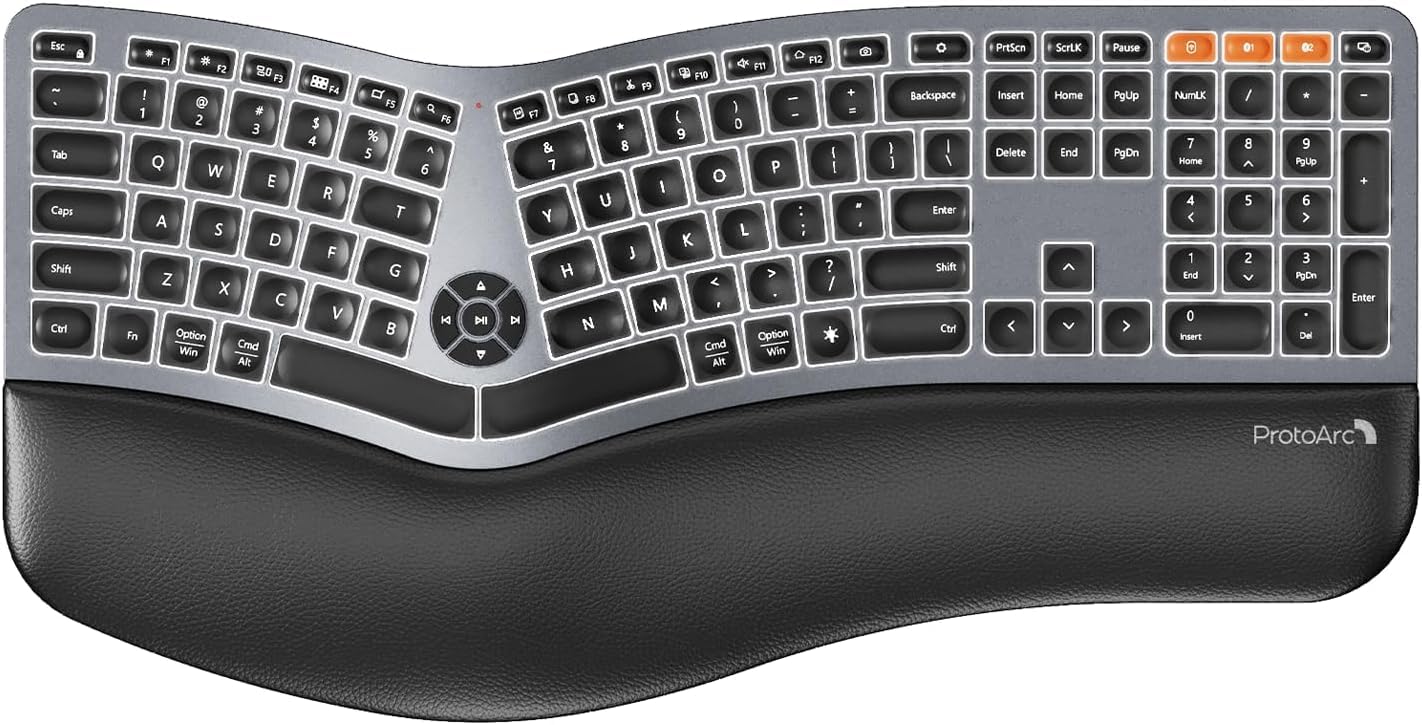
Image 1: ProtoArc EK01 Plus Ergonomic Wireless Backlit Keyboard. This image displays the full keyboard with its split design, integrated wrist rest, and key layout.
Característiques principals:
- Ergonomic Full-Size Design: Features a split, curved keyframe and integrated wrist rest to minimize muscle fatigue and promote proper posture.
- Peus inclinables ajustables: Four adjustable tilt feet allow customization of the keyboard angle for optimal comfort.
- Adjustable Backlighting: Soft white LED backlighting with three adjustable brightness levels (low-medium-high) for comfortable typing in various lighting conditions.
- Connectivitat multidispositiu: Connects to up to three devices simultaneously via Bluetooth and 2.4G USB. Easily switch between devices with a dedicated key.
- USB-C recarregable: Equipped with a 2000 mAh rechargeable lithium battery for extended use.
- Mode de repòs automàtic: Enters sleep mode after 60 minutes of inactivity to conserve power, waking up within 3 seconds upon key press.
- Compatibilitat: Widely compatible with Windows 7/8/10, Mac OS X 10.12 or higher, and Android 4.3 or higher.
Configuració
1. Càrrega del teclat
- Localitza el port de càrrega USB-C al teclat.
- Connect the provided USB-C cable to the keyboard and the other end to a USB power source (e.g., computer USB port, wall adapter).
- El llum indicador de càrrega s'il·luminarà. Un cop completament carregat, el llum pot canviar de color o apagar-se.
2. Connexió a dispositius
The keyboard supports both 2.4G USB and Bluetooth connectivity.
2.1. Connexió USB 2.4G
- Locate the 2.4G USB receiver (dongle). It is usually stored in a compartment on the keyboard or in the packaging.
- Connecteu el receptor USB a un port USB disponible de l'ordinador.
- Enceneu el teclat amb l'interruptor d'alimentació.
- El teclat s'hauria de connectar automàticament al dispositiu.
2.2. Bluetooth Connection (Up to 3 Devices)
- Enceneu el teclat.
- Press and hold one of the Bluetooth channel keys (e.g., BT1, BT2, o BT3) durant 3-5 segons fins que l'indicador lluminós parpellegi, cosa que indica el mode d'emparellament.
- Al dispositiu (ordinador, tauleta, telèfon intel·ligent), activeu el Bluetooth i cerqueu dispositius nous.
- Select "ProtoArc EK01 Plus" (or similar name) from the list of available devices.
- Segueix les instruccions que apareixen a la pantalla per completar el procés d'emparellament. L'indicador lluminós deixarà de parpellejar un cop connectat.
- Repeat these steps for up to two additional Bluetooth devices using the other Bluetooth channel keys.
Funcionament
1. Canviar entre dispositius
Per canviar entre dispositius connectats, només cal que premeu la tecla de connexió corresponent:
- Premeu 2.4G to switch to the device connected via the USB receiver.
- Premeu BT1 to switch to the first Bluetooth device.
- Premeu BT2 to switch to the second Bluetooth device.
- Premeu BT3 to switch to the third Bluetooth device.
2. Ajust de la retroiluminació
The keyboard features a soft white LED backlight with three brightness levels.
- To cycle through brightness levels (low, medium, high, off), press the dedicated backlight key (refer to keyboard layout for specific key).
3. Sleep Mode and Power Saving
To conserve battery life, the keyboard will automatically enter sleep mode after 60 minutes of inactivity. To wake the keyboard, press any key. The keyboard will be ready for use within 3 seconds.
4. Adjustable Tilt
The keyboard includes four adjustable tilt feet. Extend or retract these feet to customize the typing angle to your preference, ensuring comfortable wrist positioning whether sitting or standing.
Manteniment
1. Neteja del teclat
- Desconnecteu el teclat de tots els dispositius i fonts d'alimentació abans de netejar-lo.
- Utilitzeu un drap suau i sense pelusa lleugerament dampEsbandiu amb aigua o una solució netejadora suau per netejar la superfície del teclat.
- Eviteu utilitzar productes químics agressius, netejadors abrasius o dissolvents, ja que poden danyar l'acabat del teclat.
- Per netejar entre les tecles, feu servir aire comprimit per eliminar la pols i les restes.
2. Cura de la bateria
- Carregueu el teclat regularment per mantenir la bateria en bon estat.
- Eviteu descarregar completament la bateria amb freqüència.
- Si guardeu el teclat durant un període prolongat, carregueu-lo aproximadament al 50% abans de guardar-lo.
Resolució de problemes
| Problema | Causa possible | Solució |
|---|---|---|
| El teclat no respon | Low battery; Keyboard off; Incorrect connection mode; USB receiver not plugged in (2.4G); Bluetooth not paired. | Charge the keyboard; Turn on the keyboard; Switch to the correct connection mode (2.4G, BT1/2/3); Ensure USB receiver is securely plugged in; Re-pair Bluetooth. |
| Entrada amb retard o retard | Interferències; Distància del receptor/dispositiu; Bateria baixa. | Move closer to the receiver/device; Ensure no strong interference sources nearby; Charge the keyboard. |
| La llum de fons no funciona | Backlight turned off; Low battery. | Press the backlight key to adjust brightness; Charge the keyboard. |
| No es pot connectar mitjançant Bluetooth | Keyboard not in pairing mode; Device Bluetooth off; Already connected to 3 devices. | Ensure keyboard is in pairing mode (flashing indicator); Enable Bluetooth on your device; Disconnect from an existing Bluetooth device if maximum reached. |
Especificacions
| Marca | ProtoArc |
| Número de model | EK01 Plus |
| Tecnologia de connectivitat | Bluetooth, 2.4G USB |
| Descripció del teclat | Ergonomic, Full Size, Split Design |
| Característiques especials | Ergonomic, Full Size, Wrist Rest, Backlit, Rechargeable |
| Color | Gris espacial |
| Backlight Color Support | Monochromatic (White LED) |
| Material | Plàstic |
| Font d'alimentació | Alimentat per bateria (bateria de liti de 2000 mAh) |
| Tipus de canvi | Membrana |
| Disposició del teclat | QWERTY (UK layout for this variant) |
| Nombre de claus | 117 |
| Dispositius compatibles | Laptop, PC, Tablet, Windows/Mac/Android |
| Pes de l'article | 1.6 quilos |
| Dimensions (aprox.) | 48 cm (Llargada) x 25 cm (Amplada) |
Garantia i Suport
For warranty information and technical support, please refer to the ProtoArc official website or contact their customer service. Details are typically provided on the product packaging or the official brand store.
ProtoArc Official Store: Visit ProtoArc Store on Amazon


