
1. Introducció
This manual provides detailed instructions for the safe and effective operation, setup, and maintenance of the Jesverty SPS-6005 DC Power Supply and the Jesverty HK33D Digital Multimeter. Please read this manual thoroughly before using the devices to ensure proper functionality and to prevent damage or injury.
2. Informació de seguretat
Always observe the following safety precautions to prevent electric shock, injury, or damage to the devices.
- Assegureu-vos que la font d'alimentació estigui connectada a una presa de corrent amb connexió a terra correcta.
- Do not operate the devices in wet or damp condicions.
- Avoid touching live circuits or terminals with bare hands.
- Comproveu el vol correctetage and current settings before connecting a load to the DC power supply.
- Always use the correct input terminals and range for measurements with the multimeter.
- Replace fuses only with the specified type and rating.
- Disconnect power before performing any maintenance or fuse replacement.
- The DC power supply includes multiple protection functions such as short-circuit protection, over-load protection, and a temperature-regulated fan. However, always operate within specified limits.
3. Producte acabatview
3.1 Jesverty SPS-6005 DC Power Supply
The Jesverty SPS-6005 is an adjustable switching DC regulated bench power supply designed for various applications requiring stable and precise voltage and current. It features a 4-digit LED display and a 5V/2A USB port.

Figure 1: Jesverty SPS-6005 DC Power Supply and HK33D Digital Multimeter.
Components del panell frontal:
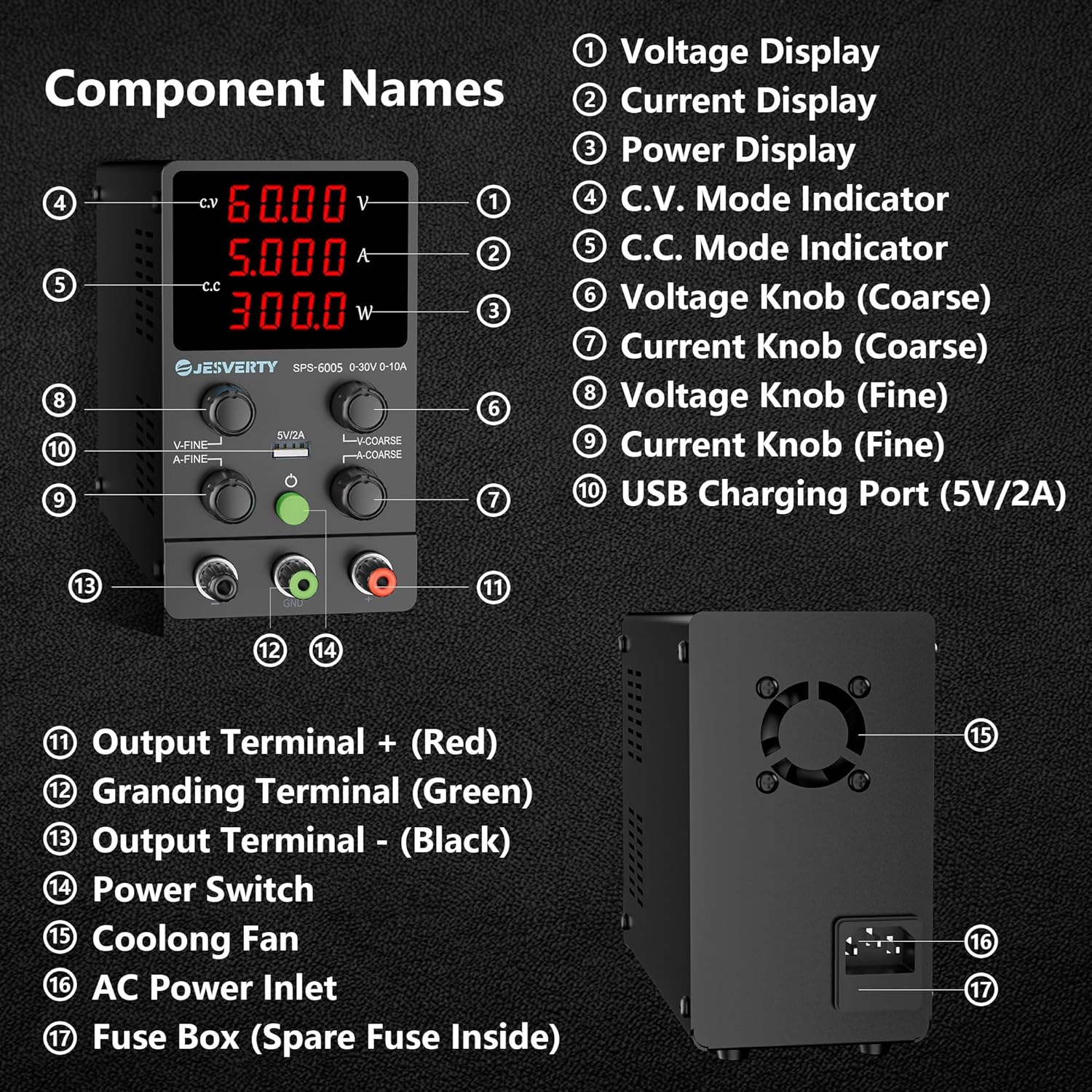
Figure 2: Front and Rear Panel Components of the SPS-6005 DC Power Supply.
- Voltage Visualització: Mostra el volum de sortidatage en Volts (V).
- Visualització actual: Mostra el corrent de sortida a Amperes (A).
- Pantalla de potència: Mostra la potència de sortida en watts (W).
- Indicador del mode CV: Illuminates when the power supply is operating in Constant Voltagmode e.
- Indicador del mode CC: Illuminates when the power supply is operating in Constant Current mode.
- VoltagManeta e (gruixuda): Ajusta el volum de sortidatage en increments més grans.
- Botó de corrent (gruixut): Adjusts the output current limit in larger increments.
- VoltagManeta e (Fi): Ajusta el volum de sortidatage en increments més petits i precisos.
- Botó actual (Fi): Adjusts the output current limit in smaller, precise increments.
- Port de càrrega USB (5V/2A): Provides a stable 5V, 2A output for charging compatible devices.
- Terminal de sortida + (vermell): Terminal de sortida positiu.
- Terminal de connexió a terra (verd): Connexió a terra.
- Terminal de sortida - (Negre): Terminal de sortida negativa.
- Interruptor d'alimentació: Encén o apaga el dispositiu.
Components del panell posterior:
- Ventilador de refrigeració: Activates automatically to dissipate heat during operation.
- Entrada d'alimentació CA: Connects the power supply to the main AC power source.
- Caixa de fusibles: Contains a replaceable fuse for overcurrent protection. A spare fuse is typically located inside.
Funció de càrrega USB:
The SPS-6005 includes a 5V/2A USB charging port with a built-in fast charging protocol recognition chip, allowing it to charge various devices such as smartphones and other USB-powered electronics.

Figure 3: Illustration of the USB Charging Function on the SPS-6005.
3.2 Jesverty HK33D Digital Multimeter
The Jesverty HK33D is a 6000-count digital multimeter capable of measuring AC/DC Voltage, AC/DC Current, Resistance, Capacitance, Live Wire, Frequency, Temperature, Duty Cycle, Continuity, and Diode. It features NCV (Non-Contact Voltage) testing, a flashlight, and data retention.

Figure 4: Jesverty HK33D Digital Multimeter with included test leads and accessories.

Figure 5: Jesverty HK33D Digital Multimeter packaging and user manual.
Característiques principals:
- Pantalla de 6000 recomptes
- Mesuració RMS veritable
- Vol. Sense contactetage (NCV) detecció
- Live Wire detection with sound and light alarm
- Funció de retenció de dades
- °C / °F Temperature Measurement
- Flashlight for illumination
- MAX/MIN data recording
- Auto Power Off for battery saving
4. Configuració
4.1 Jesverty SPS-6005 DC Power Supply
- Col·locació: Place the power supply on a stable, level surface with adequate ventilation. Ensure the cooling fan at the rear is not obstructed.
- Connexió d'alimentació: Connect the supplied AC power cord to the AC Power Inlet (16) on the rear panel and plug the other end into a grounded AC outlet.
- Connexió de càrrega: Connect the positive (+) terminal of your load to the red Output Terminal (11) and the negative (-) terminal of your load to the black Output Terminal (13). For safety, connect the grounding terminal (12) to the ground of your circuit if applicable.
4.2 Jesverty HK33D Digital Multimeter
- Instal·lació de la bateria: Open the battery compartment cover on the back of the multimeter. Insert the required batteries (typically AAA or 9V, refer to the multimeter's specific manual for exact type) observing correct polarity. Close the cover securely.
- Connexió del cable de prova: Insert the red test lead into the 'VΩmA' or '10A' jack (depending on the measurement) and the black test lead into the 'COM' jack.
5. Instruccions de funcionament
5.1 Jesverty SPS-6005 DC Power Supply
- Encès: Press the Power Switch (14) to turn on the device. The LED displays will illuminate.
- Pre-setting Voltage and Current (Recommended before connecting load):
- Gira el voltage Coarse (6) and Fine (8) knobs to set the desired output voltage.
- Turn the Current Coarse (7) and Fine (9) knobs to set the desired current limit. This acts as a protection mechanism.
- Càrrega de connexió: Després d'ajustar el volum desitjattage and current limit, connect your load to the output terminals.
- Vol. ConstanttagMode e (CV): When the load resistance is high, the power supply will operate in C.V. mode. The C.V. indicator (4) will be lit, and the output voltage will remain constant at the set value. The output current will be determined by the load.
- Mode de corrent constant (CC): When the load resistance is low, or the current drawn by the load exceeds the preset current limit, the power supply will automatically switch to C.C. mode. The C.C. indicator (5) will be lit, and the output current will remain constant at the set limit. The output voltage will drop to protect the load.
- Ús del port de càrrega USB: Connect your USB-compatible device to the 5V/2A USB Charging Port (10). The port will automatically detect and provide appropriate charging.
- Apagar: Disconnect the load, then press the Power Switch (14) to turn off the device.
5.2 Jesverty HK33D Digital Multimeter
- Encès/apagat: Rotate the function dial from 'OFF' to any desired measurement function to turn on the multimeter. Rotate back to 'OFF' to power off. The multimeter also features Auto Power Off after a period of inactivity.
- Selecció de la funció: Gireu el dial central per seleccionar la funció de mesura desitjada (per exemple, V~ per a Vol ACtage, V- per a volúmenes de corrent continutage, Ω for Resistance, etc.).
- Mesura:
- Voltage/Actual: Connect test leads in parallel for voltage, in series for current. Ensure correct input jacks are used (VΩmA or 10A).
- Resistance/Continuity/Diode: Connect test leads across the component.
- Capacitat: Connect test leads across the capacitor.
- Freqüència/Cicle de treball: Connect test leads to the appropriate points in the circuit.
- Temperatura: Use the included thermocouple probe, connecting it to the multimeter's input jacks.
- NCV (vol sense contacte).tage): Select the NCV function. Hold the top of the multimeter near an AC voltage source. The device will indicate voltage presence with an audible alarm and visual indicator.
- Detecció de cables en fase: Select the Live function. Insert the red test lead into the 'VΩmA' jack and touch the probe to the wire. The multimeter will indicate if the wire is live.
- Botó SEL: Used to switch between different sub-functions within a dial position (e.g., AC/DC voltage, Díode/Continuitat).
- Botó H / Retroil·luminació: Press briefly to hold the current reading (Data Hold). Press and hold to activate/deactivate the backlight.
- MIN/MAX/REL Button: Press to cycle through Minimum, Maximum, and Relative measurements.
6. Manteniment
6.1 Manteniment general
- Neteja: Use a soft, dry cloth to clean the exterior of both devices. Do not use abrasive cleaners or solvents.
- Emmagatzematge: Guardeu els dispositius en un lloc fresc i sec, allunyat de la llum solar directa i de temperatures extremes.
- Inspecció: Regularly inspect power cords, test leads, and device casings for any signs of damage.
6.2 Jesverty SPS-6005 DC Power Supply
- Substitució de fusibles: If the power supply fails to turn on, the fuse may need replacement. Disconnect the power cord, open the Fuse Box (17) on the rear panel, and replace the fuse with one of the same type and rating. A spare fuse is typically provided inside the fuse box.
6.3 Jesverty HK33D Digital Multimeter
- Substitució de la bateria: When the low battery indicator appears on the display, replace the batteries as described in the Setup section.
7. Solució De Problemes
7.1 Jesverty SPS-6005 DC Power Supply
- Sense energia: Check the AC power cord connection. Verify the power outlet is functional. Check and replace the fuse if necessary.
- Sense Vol de sortidatage/Actual: Ensure the power supply is turned on. Check if the current limit is set too low for the load. Ensure the load is properly connected.
- Protecció contra sobrecàrrega activada: If the C.C. indicator is lit and voltage drops unexpectedly, the current limit has been reached. Increase the current limit or reduce the load.
7.2 Jesverty HK33D Digital Multimeter
- Sense pantalla/Pantalla tènue: Substituïu les piles.
- Lectures incorrectes: Ensure test leads are properly connected. Verify the correct function and range are selected. Check if the batteries are low.
- Continuity/Diode Test Not Working: Ensure the test leads are making good contact.
8. Especificacions
8.1 Jesverty SPS-6005 DC Power Supply
| Paràmetre | Valor |
|---|---|
| Model | SPS-6005 |
| Entrada Voltage | CA 110V/220V (commutable) |
| Vol. De sortidatage | 0-60V DC Adjustable |
| Corrent de sortida | 0-5A DC Adjustable |
| Mostra | LED de 4 dígits (Volum)tage, Corrent, Potència) |
| Port USB | 5V/2A |
| Modes de funcionament | Vol. Constanttage (C.V.), Constant Current (C.C.) |
| Característiques de protecció | Short-circuit, Over-load, Grounding, Temperature-regulated fan |
| Material | Metall, plàstic |
| Factor de forma | Sobre de banc |
8.2 Jesverty HK33D Digital Multimeter
| Paràmetre | Valor |
|---|---|
| Model | HK33D |
| Mostra | LCD de 6000 recomptes |
| Funcions de mesura | Volum AC / DCtage, AC/DC Current, Resistance, Capacitance, Live Wire, Frequency, Temperature, Duty Cycle, Continuity, Diode |
| Característiques especials | NCV, True RMS, Data Hold, °C/°F Temperature, Flashlight, MAX/MIN, Auto Power Off |
| Classificació de seguretat | CAT III 600V (Refer to device for specific ratings) |
9. Garantia i Suport
Jesverty products are designed for reliability and performance. For warranty information, technical support, or service inquiries, please refer to the official Jesverty weblloc web o poseu-vos en contacte amb el vostre distribuïdor autoritzat. Conserveu el rebut de compra com a comprovant de compra per a reclamacions de garantia.