
1. Producte acabatview
The Dasbecan Type-C Wireless Apple Carplay Retrofit Kit enhances your Mazda's infotainment system by adding wireless Apple Carplay functionality. This kit eliminates the need for a data cable connection to your iPhone for Carplay use. It integrates seamlessly with your original car system, supporting voice control, hands-free calling, original Mazda SD card navigation, original car knob control, steering wheel operation, camera, and parking sensors.
The unit features a Type-C port that supports PD fast charging, delivering up to 27W to prevent your connected device from losing charge during use. Note: This specific version of the kit supports wireless Apple Carplay only and does not support Android Auto.

Image 1.1: Dasbecan Type-C Wireless Apple Carplay Retrofit Kit.
2. Compatibilitat
This retrofit kit is compatible with the following Mazda models and years, provided your vehicle has an MZD connection device:
- Mazda CX3: 2016 - 2019
- Mazda CX5: 2015 - 2020
- Mazda CX9: 2016 - 2020
- Mazda 2: 2016 - 2019
- Mazda 3: 2014 - 2018
- Mazda 6: 2016 - 2020
- Mazda MX-5 Miata Club / Grand Touring: 2016 - 2020
- Mazda MX-5 Miata RF Sport: 2018 - 2019
- Mazda MX-5 Miata Sport: 2018 - 2020
The kit replaces part number TK78-66-9U0C (also known as K1414 00008FZ34).
Important Firmware Requirement: The Carplay kit requires your Mazda's system firmware version to be 70.00.021 o superior. For optimal stability and to prevent frequent disconnections, especially if experiencing turbulence, it is recommended to update your OS version to 74.00.021 N AN/ F AN or later.
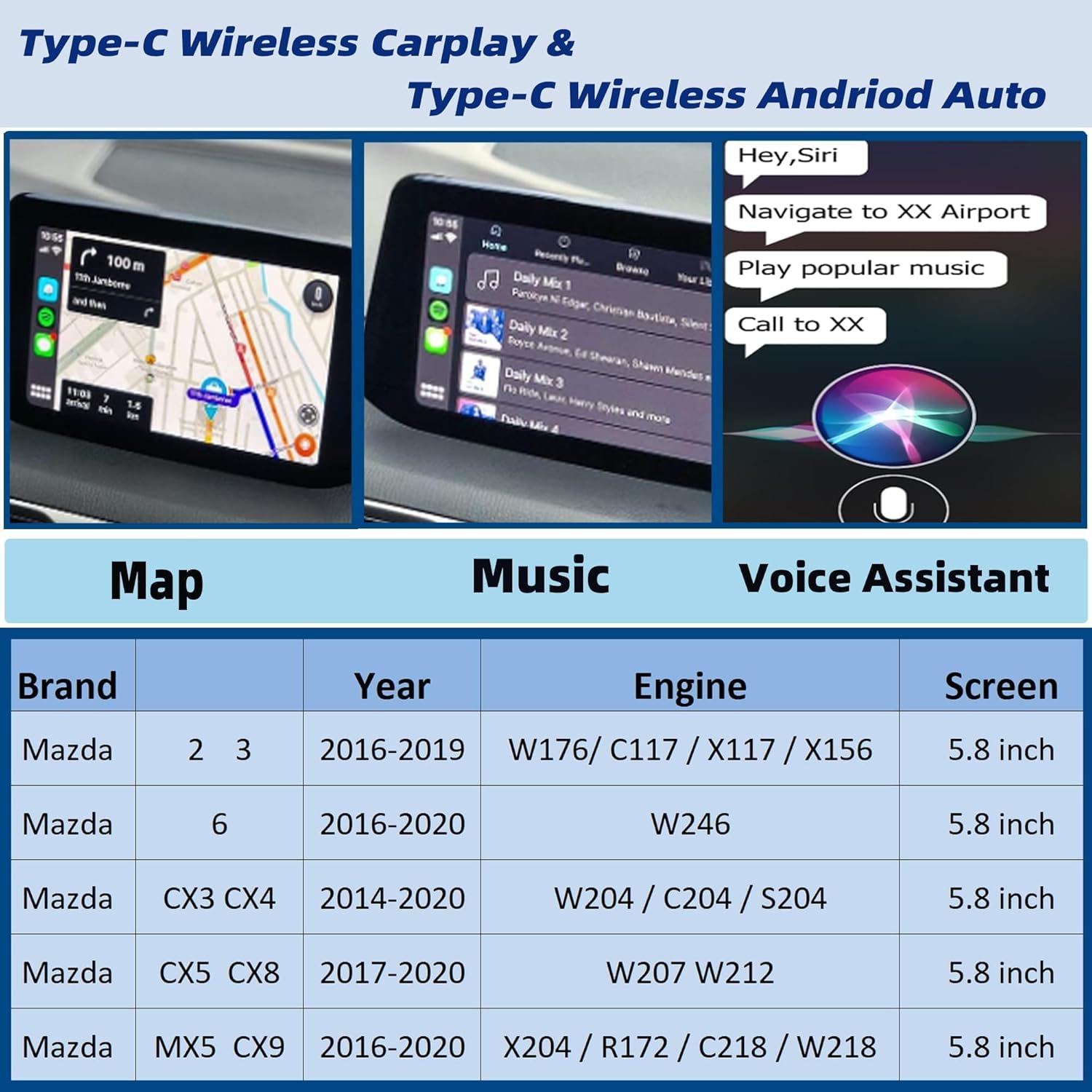
Image 2.1: Compatibility details and supported features.
3. Contingut del paquet
Si us plau, verifiqueu que tots els elements siguin presents al vostre paquet:
- 1 x Carplay USB Unit (Main Hub)
- 1 x USB Cable (Gray/Blue-Black)
- 1 x USB Cable (Gray/Blue-Brown)
- 2 x Sponge Tape (100*30mm, 10 sheets each)
- 1 x manual de producte
- 9 x Tie Wraps (L=200mm)

Image 3.1: Package contents illustration.
4. Configuració i instal·lació
Installation of this kit involves replacing the existing USB hub unit and routing new cables. It is recommended to consult detailed installation guides and videos available online for your specific Mazda model. Ensure your vehicle's firmware is updated before proceeding with the hardware installation.
4.1 Procediment d'actualització del firmware
- Check your current firmware version: Navigate to "Setting" > "System" > "About" > "Version Information" > "OS Version" on your car's infotainment system.
- If your version is below 70.00.021, or if you experience frequent disconnections, update to version 74.00.021 N AN/ F AN or higher.
- Before upgrading the firmware, remove any SD card from the navigation slot. Reinsert it after the upgrade is complete to ensure navigation functions correctly.
- Contact Dasbecan support if you require assistance with firmware updates or need the upgrade plug-in.

Image 4.1: Infotainment screen displaying software version information.
4.2 Hardware Installation Steps (General)
- Remove Old USB Hub Unit: Carefully remove the existing USB hub unit from your vehicle. This may require disassembling parts of the center console.
- Disconnect Old USB Cable: Disconnect the old Gray/Green USB cable from the CMU (Connectivity Master Unit).
- Install New Hub Unit: Connect the new Dasbecan Carplay USB unit.
- Connect New Cables: Connect the provided Gray/Blue and Black/Brown USB cables to the CMU and the new hub unit as per the wiring diagram.
- Connexions segures: To prevent noise, wrap any disconnected vehicle wiring harness connectors with the provided sponge tape.
- Cables de ruta: Route the cables neatly and securely behind the dash.
- Torneu a muntar: Reassemble the vehicle's interior components.

Image 4.2: Simplified installation diagram.
During installation, ensure the Carplay connection is made to USB1. Siri must be enabled on your iPhone to connect to Carplay.
5. Instruccions de funcionament
The Dasbecan Carplay unit features internal switches to control connectivity and charging modes. These switches are located inside the SD card cover on the unit.
5.1 Switching Between Wireless and Wired Carplay
Open the SD card cover to access the switches:
- Switch '1': For Wireless Apple Carplay connection.
- Switch '2': For Wired Apple Carplay connection.

Image 5.1: Location and function of internal switches.
5.2 Charging Speed Control
For units with a Type-C port, additional switches control charging speed:
- Switch '3': Standard charging speed.
- Switch '4': Fast charging speed (up to 27W PD).
5.3 Core Carplay Functions
Once connected, the kit enables the following functions through your Mazda's infotainment system:
- Control de veu: Utilize Siri for navigation, calls, messages, and music playback.
- Navegació: Access Apple Maps or other compatible navigation apps.
- Música i mitjans de comunicació: Stream music, podcasts, and audiobooks.
- Trucada: Fer i rebre trucades amb mans lliures.
- Controls originals del cotxe: Maintain use of the original Mazda knob control, steering wheel buttons, camera, and parking sensors.

Imatge 5.2: acabatview of supported Carplay applications and functions.
6. Manteniment
The Dasbecan Type-C Wireless Apple Carplay Retrofit Kit is designed for long-term, maintenance-free operation. No specific user maintenance is required for the unit itself. Ensure that all connections remain secure after installation.
7. Solució De Problemes
If you encounter issues with your Carplay kit, please refer to the following common solutions:
7.1 Problemes generals de connexió
- Versió del firmware: Ensure your Mazda's system firmware is version 70.00.021 or higher. Update to 74.00.021 N AN/ F AN or later for improved stability.
- Siri and Bluetooth: Verify that Siri is enabled on your iPhone and that Bluetooth is turned on.
- Connexió USB: Ensure the Carplay unit is connected to USB1 during installation.
- Targeta SD: If you updated firmware, ensure the SD card was removed before the update and reinserted afterward to prevent navigation issues.
- Qualitat del cable: If the screen displays "no Apple Carplay device found" or goes black, replace the data cable with a high-quality one that supports data transmission, not just charging.
7.2 Wireless Carplay Disconnection
- Interferència Bluetooth: Ensure your iPhone is only connected to the Bluetooth of the Carplay unit. Delete the original car's Bluetooth from your phone's list to avoid interference from multiple Bluetooth devices.
- Reinicieu els dispositius: Restart your original car system, delete the Carplay unit's Bluetooth from your phone, restart your iPhone, and then reconnect to the Carplay unit's Bluetooth.
- Firmware Stability: Frequent disconnections may indicate internal instability in the Mazda system. Update your OS version to 74.00.021 N AN/ F AN or higher.
7.3 Navigation Map Card Issues
The SD map function typically works on most cars. However, after certain firmware updates, the map card might not be supported in some regions. Note that this retrofit kit does not include an SD map card.
7.4 Display Screen Not Responding to Touch
This issue is related to the firmware version of the car. While touch screen functionality is supported with Apple Carplay, it may not be supported in some regions or with older firmware versions.
7.5 Carplay Not Working After Mazda Carplay Kit Update
- Check if the connection line is loose.
- Verify that Siri and Bluetooth are enabled.
- Test the USB port by trying to read a USB flash drive.
- Ensure the SD card was removed before the firmware upgrade and reinserted afterward.
If problems persist, you can try restoring the Carplay unit to factory settings or contact Dasbecan support for further assistance.

Image 7.1: Important tips for system updates and troubleshooting.
8. Especificacions
| Característica | Detall |
|---|---|
| Número de model | K78-66-66-9U0C |
| Dimensions del producte (L x A x A) | 7 x 2.9 x 6.1 polzades |
| Pes de l'article | 14.4 unces |
| Dispositius compatibles | iPhone |
| Usos específics per al producte | Mazda vehicles |
| Tipus de connector | USB tipus C |
| Color | Negre |
9. Garantia i Suport
For any questions regarding the installation process, product functionality, or troubleshooting not covered in this manual, please feel free to contact Dasbecan customer support. Refer to your purchase documentation for specific warranty terms and contact information.