
1. Introducció
The Hugolog S7 4K 3-Channel Dash Cam is designed to provide comprehensive video surveillance for your vehicle. Featuring 4K front recording, 1080P interior, and 1080P rear cameras, it captures critical moments from multiple perspectives. Equipped with 5G Wi-Fi, built-in GPS, IR night vision, and various recording modes, the S7 ensures enhanced security and peace of mind during your journeys.
2. Contingut del paquet
Marqueu la casella per als elements següents:
- 1*S7 4K Dash Cam
- Càmera posterior 1080P
- 1*Car Charger with Cable
- 1*Car Wire Trim Tool
- 2*Electrostatic Sticker
- 5 * Clips de cable
- 2*Adhesive
- 1 * Manual d'usuari

3. Producte acabatview
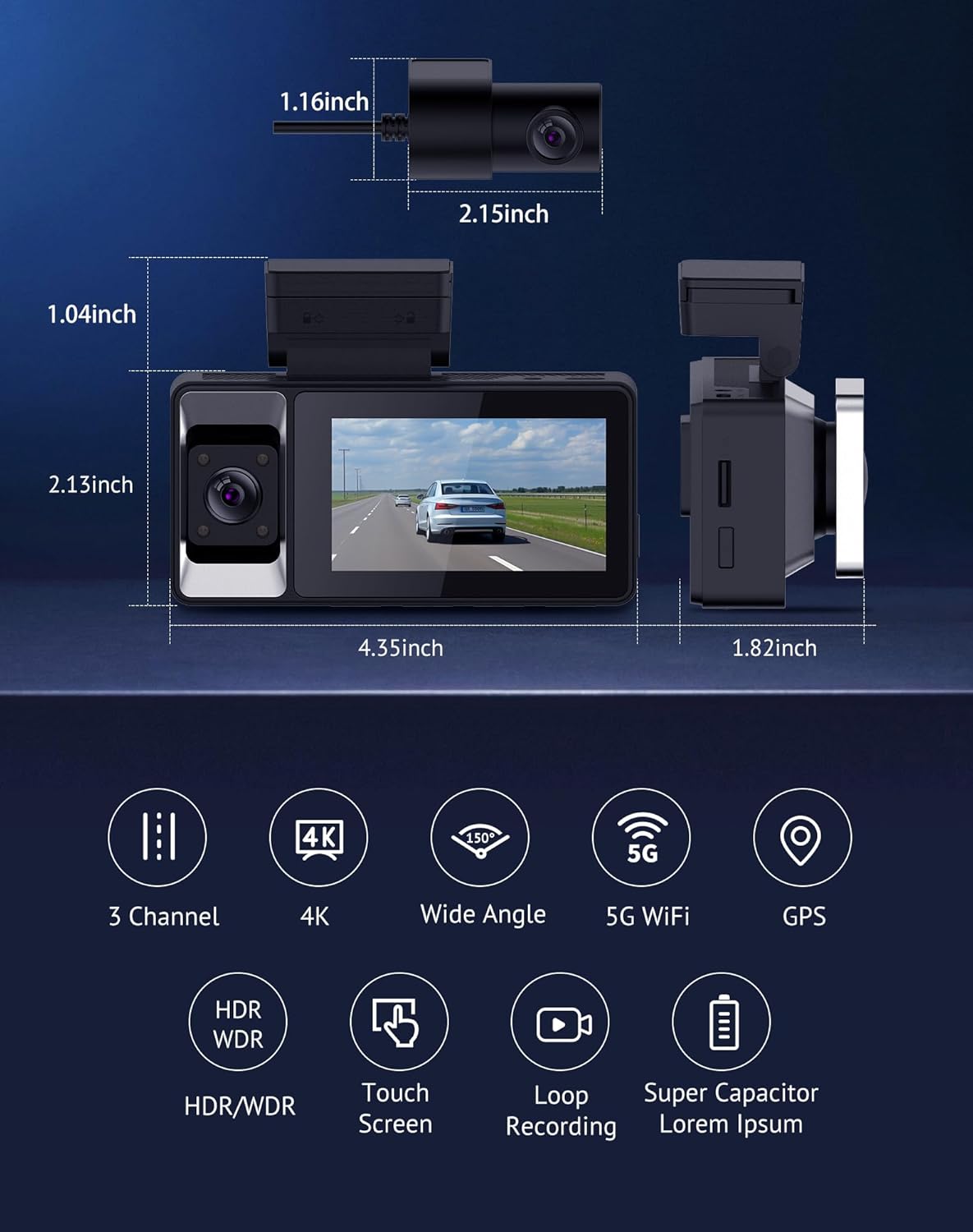
The Hugolog S7 Dash Cam features a compact design with a 3-inch IPS touch screen for easy operation. It includes a front-facing camera, an interior cabin camera, and a separate rear camera for comprehensive coverage.
3.1. Característiques de la unitat principal
- Pantalla tàctil IPS de 3 polzades: Per a una navegació i un control intuïtius.
- Càmera frontal: Records in 4K UHD with a 150° field of view.
- In-Car Camera: Records in 1080P with a 160° field of view, featuring 4 IR lights for night vision.
- GPS integrat: Provides precise location and speed data.
- Wi-Fi 5G: For fast data transfer and app connectivity.
- Ranura per a targeta MicroSD: Supports memory cards for video storage.
- Botó d'encesa: Per encendre/apagar el dispositiu.
- Botons de control: Menu, Left, Right, OK, and Reset buttons for alternative control.
3.2. Rear Camera Features
- Càmera posterior: Records in 1080P with a 155° field of view.
- Muntatge ajustable: Allows for 360° rotation and vertical/mirror flip for optimal positioning.

4. Configuració i instal·lació
Proper installation ensures optimal performance and clear recording. Follow these steps for a secure setup.
4.1. Preparació per a la instal·lació
- Clean the windshield area where the main unit will be mounted.
- Insert a compatible MicroSD card (not included with this variant) into the main unit's slot.
4.2. Muntatge de la unitat principal
- Attach an electrostatic sticker to your windshield at the desired location, ensuring it does not obstruct your view.
- Peel off the adhesive backing from the main unit's mount.
- Firmly press the main unit onto the electrostatic sticker on the windshield.
- Adjust the front camera lens to capture the desired view de la carretera.
4.3. Instal·lació de la càmera posterior
- Identify a suitable location on your rear windshield for the rear camera, ensuring a clear view.
- Clean the area and attach an electrostatic sticker.
- Peel off the adhesive backing from the rear camera mount and firmly press it onto the electrostatic sticker. Ensure the camera is mounted right-side up.
- Connect the rear camera cable to the main unit's AV-IN port.
4.4. Cablejat i connexió elèctrica
- Connect the car charger cable to the main unit's Type-C power port.
- Plug the car charger into your vehicle's 12V power outlet.
- Use the provided car wire trim tool and cable clips to neatly route and conceal the power cable and rear camera cable along the vehicle's interior trim. Start from the main unit, route along the top edge of the windshield, down the A-pillar, and under the dashboard to the power outlet. Route the rear camera cable along the headliner and side pillars to the rear windshield.

4.5. Guia de vídeo d'instal·lació
For a visual guide on the installation process, please refer to the official seller video below:
5. Instruccions de funcionament
Learn how to use your Hugolog S7 Dash Cam's various functions.
5.1. Encès / apagat
- La càmera del salpicader s'encendrà automàticament i començarà a gravar quan s'activi el contacte del vehicle.
- S'apagarà automàticament quan s'apagui el contacte.
- To manually power on/off, press and hold the Power Button.
5.2. Funcionament de la pantalla tàctil
The 3-inch IPS touch screen allows for easy navigation through menus and settings.
- Tap icons to select options.
- Swipe left/right to browse through video files or settings pages.
- Tap the screen to switch between different camera views (front, interior, rear, or combined).

5.3. Modes d'enregistrament
- Enregistrament en bucle: The camera continuously records, overwriting the oldest footage when the memory card is full. You can set loop recording intervals (e.g., 1/3/5 minutes).
- Sensor G: Detects sudden impacts or collisions. When triggered, it automatically locks and saves the current video segment to prevent it from being overwritten, preserving crucial evidence.
- Monitor d'aparcament: Protects your vehicle when parked. It offers two modes: time-lapse recording (continuously records at a low frame rate) and impact detection (records only when an impact is detected). An additional hardwire kit is required for this feature to function when the vehicle is off.

5.4. Wi-Fi & App Connectivity
Connect your S7 Dash Cam to the "Hugolog Dash" app via 5GHz Wi-Fi for fast data transfer and remote control.
- Download the "Hugolog Dash" app from your smartphone's app store.
- Enable Wi-Fi on your dash cam and connect your smartphone to the dash cam's Wi-Fi network.
- A través de l'aplicació, pots view viu footage, access recorded videos, download files al telèfon i ajusteu la configuració.


5.5. Seguiment GPS
The built-in GPS module records your vehicle's location and speed data, which can be viewed on the mobile app or a dedicated GPS player on a computer.

6. Característiques
The Hugolog S7 Dash Cam offers a range of advanced features:
- 3-Channel Full Protection: Captures 4K front, 1080P inside, and 1080P rear views with wide coverage (150° front, 160° cabin, 155° rear).
- Enhanced 5GHz Wi-Fi & GPS Integration: Fast data transfer and easy access to footage and GPS data via the "Hugolog Dash" app.
- Clear Night Vision: Equipped with a smart sensor, 4 IR lights, WDR, and AI technology for superior clarity in low-light conditions.
- Gravació en bucle i sensor G: Ensures continuous recording and automatic locking of impact-triggered footage.
- Monitor d'aparcament: Offers time-lapse and impact detection modes for 24-hour vehicle protection (requires additional hardwire kit).

7. Manteniment
To ensure the longevity and optimal performance of your dash cam, follow these maintenance guidelines:
- Neteja: Regularly wipe the camera lenses with a soft, lint-free cloth to ensure clear video quality. Avoid using abrasive cleaners.
- Targeta MicroSD: Format the MicroSD card periodically (e.g., once a month) to prevent data corruption and ensure smooth loop recording. Back up any important footage abans de formatar.
- Temperatura: Eviteu exposar la càmera del salpicader a temperatures extremes durant períodes prolongats.
- Actualitzacions de firmware: Check the Hugolog weblloc web o aplicació per a qualsevol actualització de firmware disponible per millorar el rendiment i afegir noves funcions.
8. Solució De Problemes
If you encounter any issues with your Hugolog S7 Dash Cam, please refer to the following common troubleshooting steps:
- La càmera no s'encén: Ensure the car charger is properly connected to both the dash cam and the vehicle's power outlet. Check if the vehicle's 12V outlet is functioning.
- Problemes de gravació: Ensure a MicroSD card is inserted and properly formatted. Check if the card is full; if so, back up and format it.
- Poca qualitat de vídeo: Clean the camera lenses. Ensure the resolution settings are appropriate (e.g., 4K for front).
- Problemes de connexió Wi-Fi: Assegura't que el Wi-Fi estigui activat a la càmera del salpicader i al telèfon intel·ligent. Prova de reiniciar tots dos dispositius.
- El GPS no funciona: Assegureu-vos que la càmera del salpicader tingui una visió clara view of the sky. Check GPS settings in the menu.
- G-Sensor too sensitive/not sensitive enough: Adjust the G-Sensor sensitivity setting in the dash cam's menu.
- Parking Monitor not working: Verify that an additional hardwire kit is correctly installed and connected for continuous power.
9. Especificacions
Detailed technical specifications for the Hugolog S7 Dash Cam:
| Característica | Especificació |
|---|---|
| Nom del model | HU-S7-B |
| Dimensions del producte | 4 x 1.5 x 5 polzades |
| Pes de l'article | 1.43 lliures |
| Resolució de vídeo frontal | 4K (2160p) |
| Interior Video Resolution | 1080P |
| Resolució de vídeo posterior | 1080P |
| Camp davanter de View | 150 graus |
| Interior Field of View | 160 graus |
| Camp posterior de View | 155 graus |
| Tecnologia de connectivitat | Wi-Fi de 5 G |
| Característica especial | Built-In GPS, IR Night Vision, WDR, Parking Mode, G-Sensor, Loop Recording, 3" IPS Touch Screen |
| Tipus de muntatge | Muntatge del parabrisa |
| Color | Negre |
| Bateries | Necessites 1 piles de metall de liti |
10. Garantia i assistència
All Hugolog products come with a 1 any de garantia. For any product questions or technical support, please contact customer service.
- Suport tècnic: +1 (213) 992-4747
- Correu electrònic: support@hugolog.com