
1. Informació de seguretat
Llegiu atentament totes les instruccions de seguretat abans del muntatge i l'ús per evitar lesions o danys al producte.
- Assegureu-vos que l'escriptori estigui muntat sobre una superfície plana i estable.
- Do not exceed the maximum load capacity of 80 kg (dynamic).
- Mantingueu els nens i les mascotes allunyats de l'escriptori durant l'ajust d'alçada.
- Ensure there are no obstructions above or below the desk when adjusting its height.
- No seure ni parar sobre el marc de l'escriptori.
- Only use the power adapter provided with the desk.
- Regularly check all screws and bolts to ensure they are tightened.
2. Producte acabatview
The FLEXISPOT Electric Standing Desk frame is designed for ergonomic versatility, allowing seamless transitions between sitting and standing positions. It features a robust steel construction and a digital control panel for easy height adjustments and memory presets.
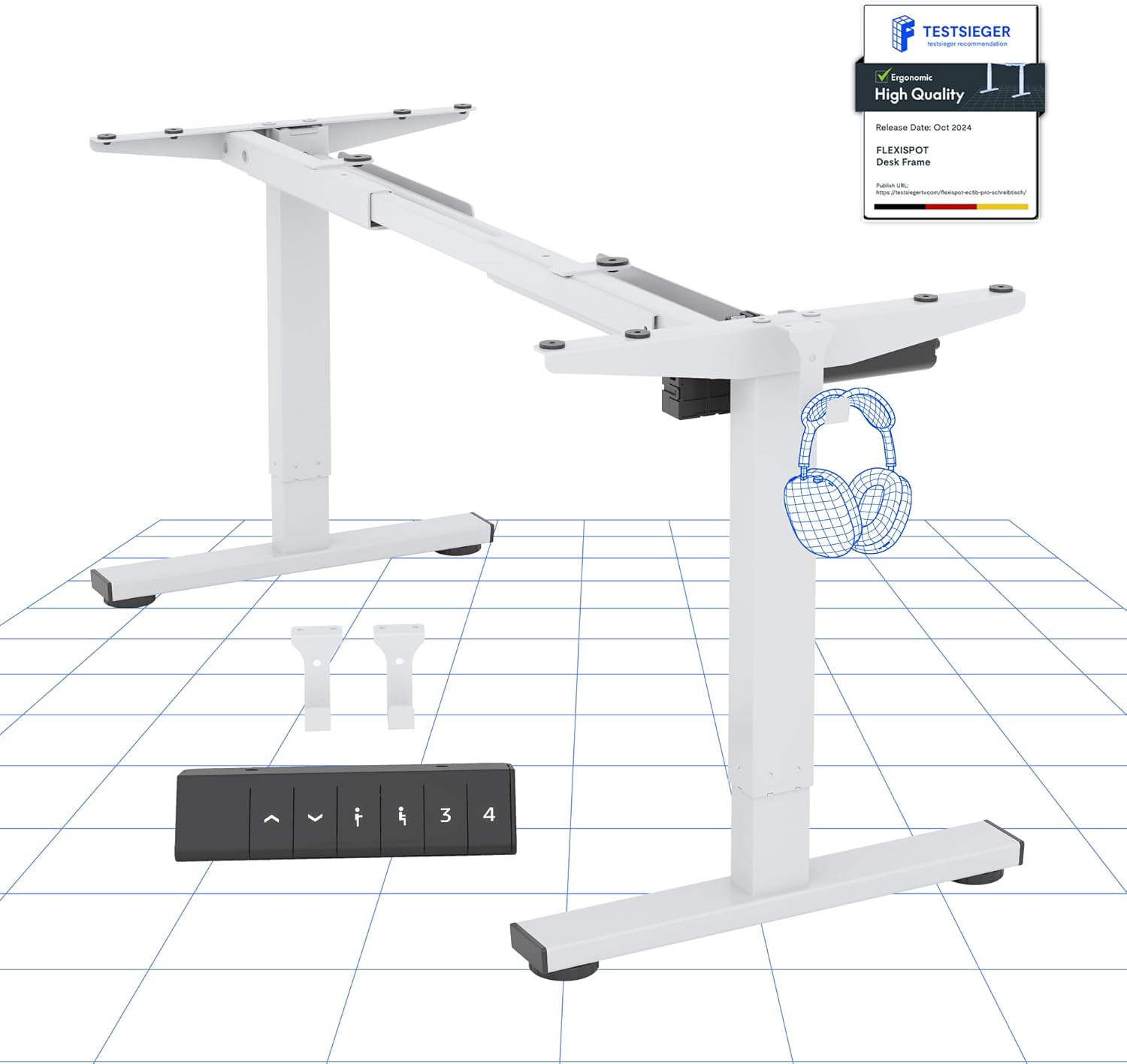
Imatge 2.1: acabatview of the FLEXISPOT Electric Standing Desk Frame and its digital control panel.
Components clau:
- Cames ajustables: Dos-stage lifting columns for smooth height transitions.
- Barra transversal: Connects the legs and supports the desktop.
- Peus: Provide stability and include anti-slip pads.
- Panell de control digital: For height adjustment and memory functions.
- Motor: Powers the height adjustment mechanism.
- Caixa de control: Houses the electronic components.
3. Instruccions de configuració
Follow these steps to assemble your FLEXISPOT Electric Standing Desk frame. A desktop (not included) is required for full functionality.
3.1 Compatibilitat amb l'escriptori
The desk frame is designed to accommodate desktops with the following dimensions:
- Longitud: 100 cm a 160 cm (de 39.4 polzades a 63 polzades)
- Amplada: 50 cm a 80 cm (de 19.7 polzades a 31.5 polzades)

Image 3.1: Illustration of the adaptable desktop size range for the desk frame.
3.2 Passos de muntatge
- Desempaquetar components: Carefully remove all parts from the packaging and verify against the parts list (refer to your included physical manual for a detailed list).
- Assemble Feet: Attach the feet to the bottom of each lifting column using the provided screws.
- Connecta la barra transversal: Extend the crossbar to the desired width for your desktop. Securely attach the crossbar to the lifting columns.
- Install Control Box and Motor: Mount the control box and motor according to the instructions in your physical manual, ensuring all cables are connected correctly.
- Adjunta el tauler de control: Secure the digital control panel to the underside of your chosen desktop in an accessible location.
- Munta l'escriptori: Carefully place your desktop onto the assembled frame. Align the pre-drilled holes (if any) or mark and drill new pilot holes. Secure the desktop to the frame using appropriate screws.
- Gestió de cables: Organize and secure all cables to prevent tangling and ensure safe operation.
- Engegada inicial: Connecteu l'adaptador de corrent a la caixa de control i després a una presa de corrent.
4. Instruccions de funcionament
Your FLEXISPOT Electric Standing Desk is equipped with a user-friendly digital control panel for effortless height adjustment.
4.1 Funcions del panell de control digital

Imatge 4.1: Detallada view of the digital control panel.
- Botons amunt/avall (▲ / ▼): Press and hold to manually adjust the desk height up or down. The current height is displayed on the LED screen.
- Preajustos de memòria (1, 2, 3, 4): These buttons allow you to save and recall up to four preferred height settings.
- 'M' Button (or 'Set' button, if present): Used to save a height into a memory preset.
4.2 Configuració de preajustos de memòria
- Ajusteu l'escriptori a l'alçada desitjada amb els botons Amunt/Avall.
- Press the 'M' button (or 'Set' button). The LED display will show 'S-'.
- Within 3 seconds, press one of the number buttons (1, 2, 3, or 4) to save the current height to that preset. The display will show the number you pressed, confirming the setting.
4.3 Anti-Collision System
The desk is equipped with an advanced anti-collision system. If the desk encounters an obstacle during height adjustment, it will automatically stop and reverse slightly to prevent damage or injury. This feature enhances safety during operation.

Image 4.2: Visual representation of the anti-collision system and other features.
5. Manteniment
Un manteniment adequat garanteix la longevitat i el rendiment òptim del vostre escriptori de peu.
- Neteja: Netegeu el marc de l'escriptori i el panell de control amb un drap suau.amp drap. Eviteu productes de neteja o dissolvents abrasius.
- Gestió de cables: Periodically check that all cables are securely fastened and not pinched or damaged.
- Elements de fixació: Ensure all screws and bolts remain tight. Retighten if necessary.
- Coixinets antilliscants: Verify that the anti-slip pads on the feet are intact and providing stable contact with the floor.
6. Solució De Problemes
Si teniu problemes amb el vostre escriptori, consulteu els següents problemes i solucions habituals:
| Problema | Causa possible | Solució |
|---|---|---|
| L'escriptori no es mou. | Cable d'alimentació desconnectat, cable del motor fluix, sobrecàrrega. | Check all cable connections. Reduce weight on the desk. Perform a reset (see below). |
| L'escriptori es mou de manera desigual. | Càrrega desigual, connexions fluixes. | Distribute weight evenly. Check all connections. Perform a reset. |
| Codi d'error mostrat. | Error específic del sistema. | Refer to your physical manual for specific error code meanings. Often, a reset can resolve temporary errors. |
| El sistema anticol·lisió s'activa amb freqüència. | Sensitivity too high, minor obstructions. | Ensure clear path for desk movement. Some models allow sensitivity adjustment (refer to physical manual). |
6.1 Procediment de reinici
A reset can often resolve minor operational issues. The exact procedure may vary slightly; refer to your physical manual for precise steps. A common reset method involves:
- Press and hold the Down (▼) button until the desk reaches its lowest position and then slightly rises or makes a sound.
- Release the button, then press and hold it again until the desk moves down slightly, then up, and stops. This indicates a successful reset.
If problems persist after troubleshooting, please contact customer support.
7. Especificacions
Detailed technical specifications for the FLEXISPOT Electric Standing Desk frame:

Image 7.1: Detailed desk dimensions and performance metrics.
| Característica | Detall |
|---|---|
| Marca | FLEXISPOT |
| Model | B0D3Q89YP2 |
| Interval d'ajust d'altura | 71.5 cm - 116 cm (28.1 polzades - 45.7 polzades) |
| Capacitat de càrrega màxima | 80 kg (176 lliures) |
| Adaptable Desktop Length | 100 cm - 160 cm (39.4 polzades - 63 polzades) |
| Adaptable Desktop Width | 50 cm - 80 cm (19.7 polzades - 31.5 polzades) |
| Material | Acer d'aliatge |
| Tauler de control | Digital with 6 buttons and 4 memory presets |
| Consum d'energia en espera | < 0.5 W |
| Anti-Collision System | Sí |
| Certificacions | CE/BIFMA/ROHS |
8. Garantia i Suport
FLEXISPOT is committed to providing high-quality products and customer satisfaction.
8.1 Informació de la garantia
- Garantia del marc: 5 anys
- Garantia del motor: 3 anys
These warranties cover manufacturing defects and malfunctions under normal use. Please retain your proof of purchase for warranty claims.
8.2 Suport tècnic
FLEXISPOT offers free lifetime technical support for your product. If you have any questions, require assistance with assembly, operation, or troubleshooting, please contact our support team.
For further assistance, please visit the official FLEXISPOT store or contact customer service through your purchase platform.
FLEXISPOT Store: Visit FLEXISPOT on Amazon