
1. Introducció
Welcome to the nubia V60 smartphone user manual. This guide provides essential information to help you set up, operate, and maintain your new device. Please read this manual carefully to ensure proper usage and to maximize the features of your nubia V60.
2. Què hi ha a la caixa
Upon unboxing your nubia V60, please verify that all the following items are included:
- nubia V60 Smartphone
- Cable USB (tipus C)
- Adaptador d'alimentació
- Eina d'expulsió de SIM (pot variar segons la regió)
- Guia d'inici ràpid (aquest document)
3. Dispositiu acabatview
Familiarize yourself with the physical components of your nubia V60 smartphone.

Figura 3.1: Davant View. Features a large display with a punch-hole front camera at the top center.
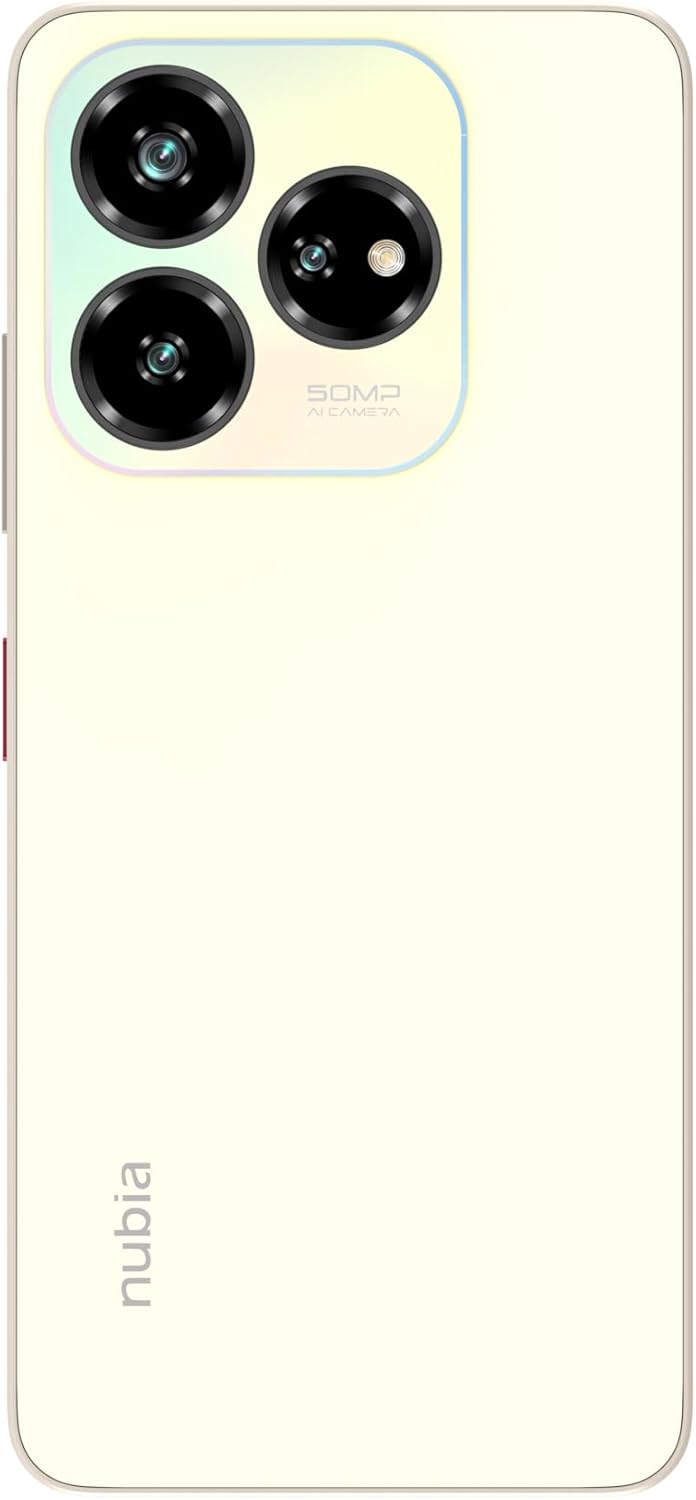
Figura 3.2: Enrere View. Shows the triple camera setup in a rectangular module and the 'nubia' logo.

Figura 3.3: El costat dret View. Includes the power button (which may integrate a fingerprint sensor) and volume control buttons.

Figura 3.4: A baix View. Features the USB Type-C port for charging and data transfer, along with the speaker grille and primary microphone.

Figura 3.5: All-Angle View. Provides a complete visual reference of the device's design and component placement.
4. Configuració
4.1 Inserció de la targeta SIM
- Localitza la safata de la targeta SIM al lateral del dispositiu.
- Introduïu l'eina d'expulsió de la SIM al forat petit que hi ha al costat de la safata i premeu fermament fins que la safata surti.
- Place your Nano-SIM card(s) into the designated slots on the tray. Ensure the gold contacts face downwards. The nubia V60 supports dual SIM cards.
- Empenyeu amb cura la safata cap a dins del telèfon fins que quedi alineada amb la carcassa del dispositiu.
4.2 Engegada i configuració inicials
- Press and hold the Power button until the nubia logo appears.
- Segueix les instruccions que apareixen a la pantalla per seleccionar l'idioma, connectar-te a una xarxa Wi-Fi i configurar el teu compte de Google.
- Configure security features such as fingerprint unlock and facial recognition during the setup process.
5. Instruccions de funcionament
5.1 Pantalla i navegació
The nubia V60 features a 6.6-inch HD+ display with a 90Hz refresh rate for smoother visuals. Navigate the interface using touch gestures:
- Toca: Seleccioneu elements o obriu aplicacions.
- Llisca: Desplaçar-se per pantalles o llistes.
- Pessigar: Apropar o allunyar les imatges i web pàgines.
5.2 Dynamic Bar
The nubia V60 includes a dynamic bar feature that provides interactive notifications and status updates around the front camera area. This feature adapts to various activities such as timers, calls, and charging status, offering quick access to information without interrupting your current task.
Vídeo 5.1: This video demonstrates the design elements of the nubia V60, including its slim profile, large display, and the interactive dynamic bar feature. It also highlights the camera system, storage capacity, and battery specifications.
6. Característiques de la càmera
Capture high-quality photos and videos with the nubia V60's advanced camera system.
- Càmera posterior: The device is equipped with a 50MP AI triple camera system. This setup allows for detailed photography and includes various modes enhanced by Artificial Intelligence for optimal image quality in different scenarios.
- Càmera frontal: An 8MP front camera is available for selfies and video calls.
To access the camera, tap the Camera icon on your home screen or lock screen. Explore different modes like Portrait, Night, Pro, and Panorama for diverse photographic experiences.
7. Bateria i càrrega
The nubia V60 is powered by a large 5000mAh battery, providing extended usage time. It supports 22.5W fast charging to quickly replenish power.
- Càrrega: Connect the USB Type-C cable to the phone's port and the power adapter to a wall outlet. Use only the provided charger and cable for optimal performance and safety.
- Optimització de la bateria: To extend battery life, manage background app usage, reduce screen brightness, and enable power-saving modes when needed.
8. Característiques de seguretat
Your nubia V60 offers multiple security options to protect your data and privacy.
- Reconeixement d'empremtes digitals: The device features a fingerprint sensor for quick and secure unlocking. To set up, go to Configuració > Seguretat > empremta digital i seguiu les instruccions.
- Reconeixement facial: Unlock your phone using your face. Set this up via Configuració > Seguretat > Desbloqueig facial.
- PIN/Patró/Contrasenya: Standard lock screen options are available for basic security.
9. Connectivitat
The nubia V60 supports various connectivity options:
- 4G LTE: Per a dades mòbils d'alta velocitat.
- Wi-Fi: Connecteu-vos a xarxes sense fil per accedir a Internet.
- Bluetooth: Pair with wireless headphones, speakers, and other compatible devices.
- NFC: Near Field Communication allows for contactless payments and quick data sharing with other NFC-enabled devices.
- USB tipus C: Per a càrrega i transferència de dades.
10. Manteniment
To ensure the longevity and optimal performance of your nubia V60, follow these maintenance guidelines:
- Mantingueu-lo net: Regularly wipe the screen and body with a soft, lint-free cloth. Avoid harsh chemicals.
- Actualitzacions de programari: Keep your device's software updated to the latest version. Updates often include performance improvements, security patches, and new features. Check for updates in Configuració > Sistema > Actualització del sistema.
- Eviteu condicions extremes: Do not expose the phone to extreme temperatures, direct sunlight for prolonged periods, or excessive moisture.
- Dades de còpia de seguretat: Regularly back up your important data to cloud storage or a computer to prevent loss.
11. Solució De Problemes
If you encounter issues with your nubia V60, try these common troubleshooting steps:
- El dispositiu no respon: Premeu i manteniu premut el botó d'engegada durant uns 10-15 segons per forçar un reinici.
- Esgotament ràpid de la bateria: Comproveu l'ús de les aplicacions en segon pla, reduïu la brillantor de la pantalla i desactiveu les funcions innecessàries com el GPS o el Bluetooth quan no les feu servir.
- Problemes de xarxa: Try restarting the device, toggling Airplane Mode on and off, or reinserting the SIM card.
- Bloqueig de l'aplicació: Esborra la memòria cau de l'aplicació (Configuració > Aplicacions > [Nom de l'aplicació] > Emmagatzematge > Esborra la memòria cau) o reinstal·leu l'aplicació.
- Sobreescalfament: Close demanding applications, reduce screen brightness, and avoid charging in direct sunlight.
If problems persist, contact customer support or refer to the official nubia support weblloc.
12. Especificacions
Key technical specifications for the nubia V60 smartphone:
| Característica | Especificació |
|---|---|
| Marca | nubia |
| Nom del model | V60 |
| Sistema operatiu | Android 13.0 |
| RAM | 6 GB (with additional 10GB dynamic RAM) |
| Capacitat d'emmagatzematge | 256 GB |
| Mida de la pantalla | 6.6 polzades |
| Resolució de visualització | 1280 x 720 (HD+) |
| Tipus de visualització | LCD |
| Resolució de la càmera posterior | 50 Megapixels (AI Triple Camera) |
| Resolució de la càmera frontal | 8 megapíxels |
| Capacitat de la bateria | 5000 mAh |
| Càrrega ràpida | 22.5W |
| Ranures per a targetes SIM | Doble SIM |
| Connectivitat | 4G, Wi-Fi, Bluetooth, NFC |
| Seguretat biomètrica | Reconeixement d'empremtes digitals |
| Tipus de connector | USB tipus C |
| Color | Or |
13. Garantia i Suport
The nubia V60 smartphone comes with a two-year warranty. For warranty claims, technical support, or service inquiries, please refer to your purchase documentation or visit the official nubia support weblloc web. Conserveu el comprovant de compra per validar la garantia.
Per obtenir més ajuda, visiteu el nubia Store on Amazon.