
1. Introducció
This manual provides detailed instructions for the installation, operation, and maintenance of your Alarm.com ADC-VC728PF Pro Series 4MP Bullet PoE Camera. This camera is designed for both indoor and outdoor surveillance, offering advanced features such as a motorized varifocal lens, 4MP video resolution, and intelligent analytics for enhanced security monitoring.
Si us plau, llegiu atentament aquest manual abans d'intentar instal·lar o fer funcionar el dispositiu per garantir-ne el funcionament i la seguretat adequats.
2. Contingut del paquet
Verifiqueu que tots els elements siguin presents al vostre paquet:
- Alarm.com ADC-VC728PF Camera
- Maquinari de muntatge
- Weather Resistant RJ45 Cap
- Guia d'instal·lació
- Clau Torx
3. Producte acabatview
The Alarm.com ADC-VC728PF is a robust Power over Ethernet (PoE) bullet camera featuring a 4MP sensor and a motorized varifocal lens. This design allows for flexible installation and remote adjustment of the camera's field of view without compromising image quality. It supports 24/7 recording to an optional onboard microSD card or a Commercial-Grade Stream Video Recorder (CSVR126), and integrates advanced analytics for object detection and business activity tracking.
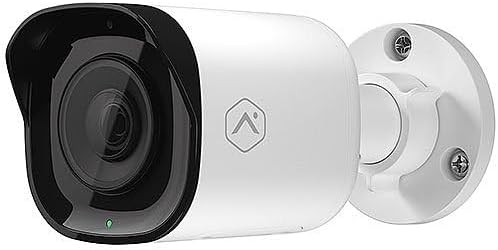
Davant view of the Alarm.com ADC-VC728PF Pro Series 4MP Bullet PoE Camera, showing the lens, LED indicator, and the adjustable mounting base.
Característiques principals:
- 4MP WDR and HDR Video: Delivers high-resolution video with Wide Dynamic Range and High Dynamic Range capabilities (4MP recording supported on Commercial SVR).
- Motorized Varifocal Lens: Allows remote adjustment of the camera's field of view (3.2-9.8 mm).
- Alimentació per Ethernet (PoE): Simplifica la instal·lació proporcionant energia i dades a través d'un únic cable Ethernet.
- SD Card Local Storage: Supports optional onboard microSD card for 24/7 continuous recording.
- Visió nocturna IR: Provides clear video surveillance in low-light or no-light conditions.
- Perimeter Guard: Supports LED and Audio Alert features (requires firmware version 0.6.3.601+).
- Business Activity Analytics: Enables intelligent object detection and tracking for commercial applications.
- Ús interior/exterior: Designed for versatile deployment in various environments.
4. Configuració i instal·lació
Follow these steps for proper installation of your camera.
4.1 Muntatge de la càmera
- Seleccioneu una ubicació: Choose a suitable indoor or outdoor location for wall mounting. Ensure the area provides a clear field of view and is within reach of your network infrastructure.
- Prepara la superfície: Use the included mounting hardware to secure the camera base to the chosen surface. Drill pilot holes if necessary.
- Adjuntar la càmera: Securely attach the camera to the mounting base. The adjustable ball joint allows for flexible positioning.
4.2 Wiring and Connectivity
- Connecteu el cable Ethernet: Connect a standard Ethernet cable from your PoE-enabled network switch or injector to the camera's RJ45 port.
- Apply Weather Resistant Cap: For outdoor installations, use the included weather-resistant RJ45 cap to protect the Ethernet connection from environmental elements.
- Encès: Once connected to a PoE source, the camera will power on automatically. The status LED on the camera will indicate its operational status.
- Configuració de la xarxa: Access the Alarm.com platform or your network management interface to discover and configure the camera. Refer to the Alarm.com documentation for specific network setup procedures.
5. Funcionament
After successful installation and network configuration, you can begin operating your ADC-VC728PF camera.
5.1 Varifocal Lens Adjustment
- The motorized varifocal lens can be adjusted remotely through the Alarm.com app or web interfície.
- Navigate to the camera settings to widen or narrow the field of view to optimize surveillance coverage.
5.2 SD Card Recording
- If an optional microSD card is installed, the camera supports 24/7 continuous recording.
- Accés gravat footage via the Alarm.com platform. Ensure the microSD card is properly formatted as per Alarm.com guidelines.
5.3 Analítica intel·ligent
- Configure object detection and business activity tracking settings within the Alarm.com platform.
- Utilize the Perimeter Guard feature for LED and audio alerts, if supported by your camera's firmware version.
6. Manteniment
Un manteniment regular garanteix un rendiment òptim i una llarga vida útil de la càmera.
- Neteja: Netegeu periòdicament la lent i la carcassa de la càmera amb un drap suau iamp tela. Eviteu els netejadors abrasius.
- Actualitzacions de firmware: Ensure your camera's firmware is up to date. Firmware updates are typically managed through the Alarm.com platform and provide performance enhancements and new features.
- Inspecció del cable: Regularly inspect all cables and connections for wear or damage, especially in outdoor environments.
7. Solució De Problemes
Consulteu la taula següent per veure els problemes habituals i les seves solucions.
| Problema | Causa possible | Solució |
|---|---|---|
| No Power / Camera Not Turning On | No PoE connection; Faulty Ethernet cable; PoE switch issue. | Verify Ethernet cable connection; Ensure PoE source is active; Try a different cable or PoE port. |
| Sense canal de vídeo | Network connectivity issue; Incorrect camera configuration; Firewall blocking. | Check network connection; Verify camera settings in Alarm.com; Ensure network allows camera traffic. |
| Poor Image Quality | Dirty lens; Incorrect focus (varifocal); Low light conditions; Network bandwidth. | Clean the lens; Adjust varifocal lens remotely; Ensure adequate lighting or check IR functionality; Verify network bandwidth. |
| SD Card Recording Not Working | SD card not installed; SD card full or corrupted; Incorrect recording settings. | Install a compatible microSD card; Format or replace SD card; Check recording settings in Alarm.com. |
8. Especificacions
Detailed technical specifications for the Alarm.com ADC-VC728PF camera.
| Característica | Especificació |
|---|---|
| Nom del model | Alarm.com VC728PF |
| Resolució de fixes efectius | 4 MP |
| Resolució de captura de vídeo | 1080p, 1920p |
| Tipus de lent | Motorized Varifocal (3.2-9.8mm) |
| Tecnologia de connectivitat | Amb cable (Ethernet) |
| Font d'alimentació | PoE (alimentació per Ethernet) |
| Ús interior/exterior | Interior, Exterior |
| Tipus de muntatge | Muntatge de paret |
| Factor de forma | Bala |
| Dimensions (L x A x A) | 6.8 x 3 x 3 polzades |
| Pes de l'article | 1.86 lliures |
| UPC | 850010773322 |
| Característiques especials | PoE, 4MP, WDR, HDR, IR Night Vision, Business Activity Analytics, Perimeter Guard |
9. Garantia i Suport
For warranty information, technical support, or service inquiries, please contact Alarm.com directly or refer to their official weblloc web. Conserveu el rebut de compra per validar la garantia.
- Assistència en línia: Visit the official Alarm.com support portal for FAQs, troubleshooting guides, and software downloads.
- Contacta amb el servei d'atenció al client: Refer to your Alarm.com service provider for direct customer support.


